


United Kingdom · GBP
Best Mini PCs for DaVinci Resolve UK
For a compact DaVinci Resolve system, choose an AtomMan G7 Pro for supported NVIDIA work that fits 8GB VRAM. Choose the ROG NUC RTX 5080 when a 16GB graphics-memory tier is needed. Choose an EVO-X2 with 64GB for a specifically supported integrated workflow. For demanding effects or larger GPU requirements, compare a tower workstation.
Which model to choose
MINISFORUM AtomMan G7 Pro, 32GB or more
Best compact NVIDIA starting direction for projects that fit its RTX 5070 Laptop GPU. Check the exact Resolve edition, codec and effects.
See model and buying options ↗ASUS ROG NUC 2025, RTX 5080
Best higher-VRAM compact direction here. Select the RTX 5080 Laptop configuration rather than assuming every ROG NUC has 16GB graphics memory.

32 GB RAM · 1000 GB SSD
£2,888.00Price checked 02.11.2026 12:43 UTCBuy on Amazon ↗Specifications and model details ↗GMKtec EVO-X2, 128 GB
For an integrated AMD workflow whose current Resolve support you have confirmed. Its large shared memory is different from dedicated NVIDIA VRAM.

128 GB RAM · 2000 GB SSD
£3,483.32Price checked 02.11.2026 20:11 UTCBuy on Amazon ↗Specifications and model details ↗Amazon prices and configurations
Core Ultra
ROG NUC 2025 Gaming Mini PC Intel Core Ultra 9 275H RTX 5080 | 32GB DDR5, 1TB SSD, Thunderbolt 4, Triple-Fan Cooling, ARGB Lighting, Windows 11 Pro
32 GB RAM · 1000 GB SSD
£2,888.00Price checked 02.11.2026 12:43 UTCBuy on Amazon ↗Ryzen AI Max+ 395
GMKtec EVO-X2 AI Mini PC AMD Ryzen Al Max+ 395 (up to 5.1GHz) Mini Gaming Computers, 128GB LPDDR5X 8000MHz (8GB*8) 2TB PCIe 4.0 SSD, Quad Screen 8K D…
128 GB RAM · 2000 GB SSD
£3,483.32Price checked 02.11.2026 20:11 UTCBuy on Amazon ↗
AMD Ryzen
MINISFORUM G1 PRO Mini PC 32GB RAM 1TB SSD | Ryzen 9 8945HX, 16C/32T up to 5.4GH,GeForce RTX 5060 8GB GDDR7,5GbE, Wi-Fi 7, Quad 4K, 245W Performance …
32 GB RAM · 1000 GB SSD
£1,599.00Price checked 02.11.2026 14:46 UTCBuy on Amazon ↗
Intel Core
Thunderobot Gaming Mini PC RTX 5070 i9-14900HX 32GB DDR5 1TB SSD Win11 Pro | 32GB DDR5 5600 (up to 256GB), free M.2 Gen4 slot, HDMI 2.1, DP1.4 USB-C,…
32 GB RAM · 1000 GB SSD
£1,829.00Price checked 02.11.2026 14:46 UTCBuy on Amazon ↗
Core Ultra
ROG NUC 2025 Mini Gaming PC, Intel Core Ultra 7, GeForce RTX 5060, 96GB DDR5 Support, Thunderbolt 4, Triple Fan Cooling & ARGB Lighting (32GB DDR5+2T…
96 GB RAM · 2000 GB SSD
£1,879.20Price checked 02.11.2026 12:43 UTCBuy on Amazon ↗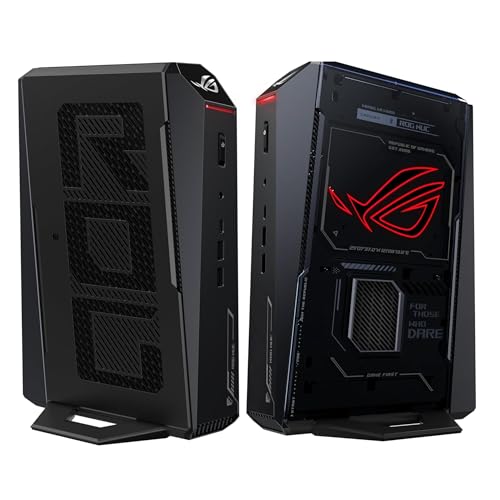
Core Ultra H
ROG NUC 2025 Gaming Mini PC Intel Core Ultra 7 255H RTX 5060 | 32GB DDR5, 1TB SSD, Thunderbolt 4, Triple-Fan Cooling, ARGB Lighting, Windows 11 Pro
32 GB RAM · 1000 GB SSD
£1,942.28Price checked 02.11.2026 12:43 UTCBuy on Amazon ↗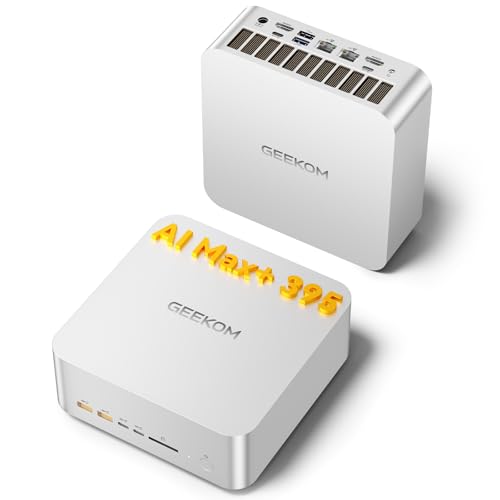
Ryzen AI Max+ 395
GEEKOM A9 Mega Mini PC, AMD Ryzen AI MAX 395,128GB LPDDR5X RAM+2TB SSD | Local AI Super PC, Radeon 8060S Graphics, 4K@120Hz Quad Display,Dual USB4, 8…
128 GB RAM · 2000 GB SSD
£3,399.00Price checked 02.11.2026 19:22 UTCBuy on Amazon ↗
Core Ultra
ASUS ROG NUC 15 Mini PC (90AS00I1-M000B0) — Intel Core Ultra 9 275HX, NVIDIA GeForce RTX 5080 16GB, 32GB DDR5 RAM, 2TB SSD, Windows 11 Home, Wi-Fi 7,…
32 GB RAM · 2000 GB SSD
£2,899.99Price checked 02.11.2026 12:43 UTCBuy on Amazon ↗Buying guide
Choose the Resolve workload before the computer
The G7 Pro is our compact NVIDIA starting comparison when the project fits its graphics-memory budget. The ROG NUC RTX 5080 is the step up when a larger dedicated memory tier is justified. The EVO-X2 is an integrated alternative for a verified compatible workflow. Those choices should be driven by your grading and effects work rather than the fact that each computer can install an editing application.
Simple cuts and modest color corrections are different from temporal noise reduction, complex Fusion work or heavy effects. Identify which of those tasks matters to you. A powerful CPU does not remove a GPU memory limit, and a large shared-memory number does not guarantee the same behavior as a dedicated graphics card.
Check edition, operating system and media support
Resolve and Resolve Studio can differ in supported acceleration and features. The operating system also affects available codecs and hardware paths. Use the current Blackmagic support information for the exact release you intend to run, then check the source files you actually edit. Do not infer complete camera-format support from a generic GPU brand name.
If you intend to use Linux, verify that platform separately instead of assuming the Windows experience carries over unchanged. Test audio, display and media handling alongside GPU acceleration. A computer that works as an ordinary Linux desktop is not automatically a validated Resolve workstation.
Size the GPU for the demanding part of the project
The G7 Pro’s RTX 5070 Laptop GPU occupies an 8GB VRAM tier. The RTX 5080 Laptop option discussed here provides 16GB. These are different capacity decisions, not merely different prices. When an effects graph exceeds the usable graphics memory, increasing system RAM is not a direct replacement for the missing dedicated capacity.
Use a representative timeline with the intended resolution and effects during setup. Watch whether memory pressure or rendering is the bottleneck before deciding which component deserves more budget. A shorter test without the expensive effects can hide the very limitation that matters to the finished project.
Plan media, cache and a realistic alternative
Keep enough SSD capacity for active media, cache and exports without filling the system drive. Use another independent location for camera originals and project backups. A fast network can support shared media when the NAS, switch and drives are capable, but it does not accelerate a local GPU effect simply because the workstation has a fast Ethernet port.
If a 16GB NVIDIA configuration is unavailable, compare another complete system with the same useful VRAM capacity or a suitable tower. An 8GB option is a deliberate smaller-project choice, not an equal substitute for a job that needs more. Favor a stable complete workflow over a premium small case with the wrong bottleneck.
Choose capacity around a real project
Use a typical project as the starting point: its resolution, source format, number of layers or tracks, effects and delivery format. Opening the application is a much smaller task than finishing that project comfortably. For a new creative Mini PC, 32GB is a practical starting tier. Compare 64GB when you work with large projects, several creative applications or memory-heavy effects. More RAM helps avoid memory pressure, but it does not turn a weak graphics processor into a strong one.
Check the application version and its supported CPU, GPU and operating system. An integrated GPU shares system memory; a dedicated GPU has its own VRAM and different software support. Some effects and plugins require a specific backend. If a required renderer or plugin needs CUDA, choose an NVIDIA system instead of assuming that an AMD or Intel AI label provides the same feature. Match the computer to the work you already need to complete.
Separate the working copy from the backup
A fast internal SSD helps with applications, cache and active projects. A second drive can separate media or sample libraries, provided the exact computer has a suitable free slot. Check physical size, PCIe connection and cooling clearance before planning that expansion. More storage makes a working environment convenient, but it is not a backup when every copy is inside one machine. Keep original material and completed work on an independent device or trusted remote backup.
Choose ports for the actual peripherals: card reader, audio interface, external storage, calibrated display and network. USB-C describes a connector, so verify the supported data and video functions of each port. Fast networking becomes useful when the rest of the storage path can sustain it. A 10GbE port does not make a slow NAS or a single hard drive behave like a high-end local SSD. Include any dock or adapter in the total price.
Judge sustained work and support
A short export or small demo may hide thermal and memory limits. During setup, open a representative project, play or edit it, apply the effects you normally use and export or render a useful section. Keep the same application version and settings when comparing alternatives. Note responsiveness, fan behavior and memory use as well as completion time. A stable, comfortable working session matters more than one unusually favorable benchmark result.
For paid work, consider the cost of downtime and recovery. Keep licence details, project dependencies and a way to restore the machine. A system with replaceable RAM and storage offers a different ownership path from one with soldered memory. Buy a larger fixed-memory configuration only when its capacity solves a real need. Choose a conventional workstation when you need a replaceable discrete GPU, several expansion cards or cooling headroom that a compact chassis cannot provide.
Buying and support in the UK
Compare the complete UK purchase cost in pounds, including delivery and the parts needed to finish a barebone. Check whether a marketplace seller supplies the machine from UK stock or ships it internationally. That affects delivery, possible additional charges and the practical return route. Look for the correct UK mains lead and a clear description of the included operating-system licence. A compact case does not make an overseas support arrangement more convenient.
Keep the invoice, serial number and exact RAM and SSD configuration. For a business desk, ask who handles a hardware fault and how a replacement is arranged before buying several units. When the first model is unavailable, keep the required memory, graphics and ports in the alternative. Include a monitor, keyboard and independent backup in the budget where needed. Compare the finished, usable computer rather than a low barebone headline price.
Questions buyers ask
Which compact Resolve PC is the first NVIDIA comparison?
The G7 Pro for supported work fitting its 8GB graphics-memory tier. Compare the RTX 5080 ROG NUC when 16GB is required.
Does more system RAM replace dedicated VRAM?
Not directly. The GPU, backend and memory architecture determine how the workload uses each memory pool.
Should I test Resolve Studio and the free edition separately?
Check the edition and operating system you will actually use because features and supported acceleration can differ.
Specifications and software guidance
Blackmagic Design support ↗MINISFORUM AtomMan G7 Pro ↗ASUS ROG NUC (2025) ↗GMKtec EVO-X2 ↗Related Mini PC guides
Best Mini PCs for Video Editing UKBest Mini PCs for Premiere Pro UKBest Mini PCs for Photo Editing UKBest Mini PCs for Music Production UKCompare Mini PC pricesAs an Amazon Associate, Cloudzat earns from qualifying purchases. Prices and availability can change.