


Head-to-head scanner comparison
Buying shortlist
Choose by the job you need to do
Revopoint POP 4
You want one Revopoint scanner for varied maker and scan-to-print projects.
See Amazon optionsRevopoint MINI 2
You primarily scan miniatures, jewelry and small parts where close-range detail matters most.
See Amazon optionsBefore you buy
What matters before you choose
Object size
Revopoint POP 4: small through medium and some larger objects. Revopoint MINI 2: small objects.
Main strength
Revopoint POP 4: general maker, portable scanning and scan-to-print work. Revopoint MINI 2: miniatures, jewelry and other small high-detail objects.
Workflow
Revopoint POP 4: Revopoint’s portable software ecosystem. Revopoint MINI 2: a close-range turntable or handheld small-object workflow.
Decision rule
Choose for the hardest recurring object in your workflow, not the easiest demonstration scan.
Buyer fit checker
Which scanner fits your workflow?
Choose the closest description of your normal objects and workflow. The result ranks only the scanners discussed on this page, so you can see which one better matches the work you actually do.
Shopping options
Current Amazon options for these scanners
Compare the exact scanner model and included items before checkout. Prices and availability can change on Amazon.
Revopoint POP 4
General maker and scan-to-print use

Revopoint POP 4 3D Scanner, AI Segmentation, for 3D Printing, Standard | Up to 105 FPS, 0.03mm Blue Laser, Small-Medium, 5 Modes, Anti-Shaking, Outdoor Scan, 3DGS, for iOS/Android/Win/MacOS
General maker and scan-to-print use
Seller: Revopoint Official Store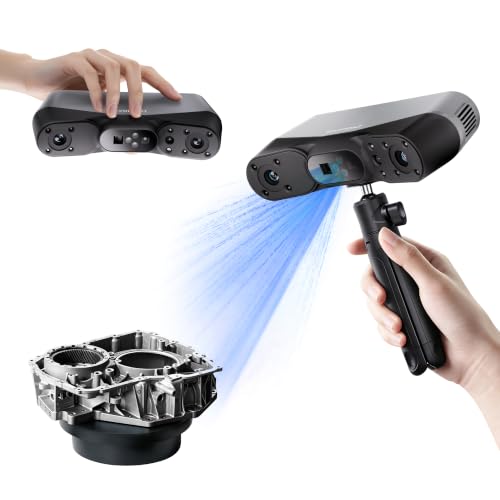
Revopoint POP 4 3D Scanner, AI Segmentation, for 3D Printing, Premium | Up to 105 FPS, 0.03mm Blue Laser, 5 Modes, Small-Medium, 5,500mAH Outdoor Scan, 3DGS Modeling, for Win/MacOS/iOS/Android
General maker and scan-to-print use
Seller: Revopoint Official StoreRevopoint MINI 2
Miniatures, jewelry and small parts
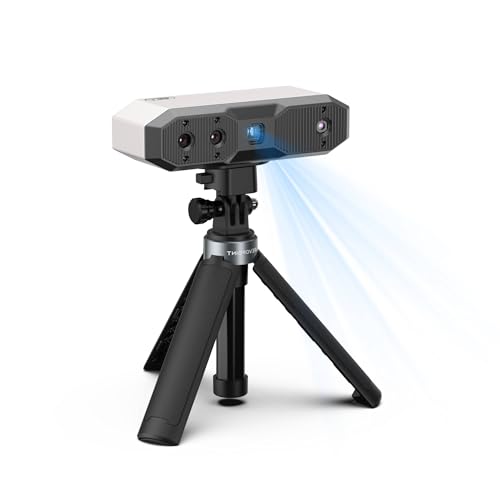
Revopoint MINI 2 3D Scanner, Full Color Scan, for 3D Printing, Standard | 0.02mm, Industrial Blue Light, Model Scanning for Small Objects, Wi-Fi 6, Portable Lightweight, for Win/Android/iOS/macOS
Miniatures, jewelry and small parts
Seller: Revopoint Official Store
Revopoint MINI 2 3D Scanner, Full Color Scan, for 3D Printing, Advanced | 0.02mm, Industrial Blue Light, Model Scanning for Small Objects, Wi-Fi 6, Portable Lightweight, for Win/Android/iOS/macOS
Miniatures, jewelry and small parts
Seller: Revopoint Official StoreBuying decision
Which scanner should you buy?
POP 4 is the safer one-scanner purchase for a mixed workshop because it covers more kinds of everyday scan-to-print work. MINI 2 is the specialist and should win when small-object detail is the reason you are buying a scanner in the first place. If you routinely scan both very small objects and medium household parts, decide which workload produces the most value instead of choosing by headline specifications alone.
At a glance
Compare Revopoint POP 4 vs Revopoint MINI 2
Detailed guide
Detailed comparison
The real difference between Revopoint POP 4 and Revopoint MINI 2
The useful difference is not the number of features on the box; it is the type of work each scanner makes easier. Revopoint POP 4 is positioned around general maker, portable scanning and scan-to-print work, while Revopoint MINI 2 is better understood as a scanner for miniatures, jewelry and other small high-detail objects. That distinction should come before price because buying the wrong scanning style creates more friction than saving a small amount at checkout.
For a buyer choosing between these two, list the five objects you are most likely to scan in the next six months. If those objects match Revopoint POP 4 more closely, its strengths will be used repeatedly. If they match Revopoint MINI 2, the second scanner will probably deliver the better real-world result even when a headline specification looks less dramatic.
Accuracy and useful detail
Revopoint POP 4 is described around fine consumer/prosumer capture, whereas Revopoint MINI 2 is described around fine-detail small-object capture. Those labels are useful for setting expectations, but they are not a promise that every scan will reproduce that level of detail. Distance, exposure, tracking, surface preparation and the geometry of the subject all affect the mesh you actually obtain.
For reverse engineering, dimensional consistency and clean edges are usually more important than simply producing a dense point cloud. For visual models and 3D printing, a clean mesh that needs less repair can be more valuable than chasing the smallest possible point spacing. Compare the scanners using the output you need, not only the best-case accuracy number.
Object size and working distance
Object scale can decide this comparison immediately. Revopoint POP 4 is intended for small through medium and some larger objects, while Revopoint MINI 2 is intended for small objects. A scanner that feels excellent on a gearbox housing may be inefficient on a tabletop object, and a small-object specialist can become frustrating when asked to maintain tracking across a much larger surface.
Think about the smallest feature you must preserve and the largest object you must capture in one session. If those two requirements are far apart, choose the scanner with the broader useful range or accept that a second specialist scanner may eventually make sense. This is especially important for buyers who alternate between maker projects and automotive or workshop parts.
Dark, shiny and difficult surfaces
Surface behavior is one of the biggest reasons scanner comparisons change once you leave a spec sheet. Revopoint POP 4 uses a workflow where multi-mode capture gives it broad general-use flexibility. Revopoint MINI 2 instead sits in a workflow where blue-light scanning is optimized around smaller detailed subjects. Very dark, glossy, translucent or reflective surfaces may still need preparation regardless of the scanner you choose.
Do not assume that a scanner eliminates every surface problem. Matte spray, removable scanning spray, markers or a change in scanning mode may still be necessary. The better choice is the scanner that reduces preparation on the surfaces you encounter most often, because preparation time becomes a recurring cost in any serious scanning workflow.
Tracking and repeatability
Good tracking is what turns hardware capability into a usable scan. Revopoint POP 4 is normally used through Revopoint’s portable software ecosystem, while Revopoint MINI 2 uses a close-range turntable or handheld small-object workflow. The more a workflow matches how you physically move around an object, the easier it is to maintain overlap and avoid losing alignment during long capture sessions.
Repeatability matters even more when you are measuring batches of similar parts. A scanner that lets you establish a consistent distance, lighting setup and movement pattern can save more time than one that merely produces a slightly denser scan under ideal conditions. If possible, build your process around repeatable passes rather than trying to capture every surface in one uninterrupted scan.
Software and cleanup workflow
Hardware is only half of the purchase. Revopoint POP 4 fits Revopoint’s portable software ecosystem; Revopoint MINI 2 fits a close-range turntable or handheld small-object workflow. You will still need to align, fuse, clean and export scans before they become printable models or useful CAD references. A workflow you understand is a genuine advantage because scanning often involves several iterations rather than a single perfect capture.
Check the computer, phone or standalone requirements before buying. If your normal workspace cannot comfortably run the software or you dislike being tethered during capture, that friction will appear in every project. The best scanner is the one whose capture and cleanup process you will actually use consistently.
3D printing and scan-to-print use
For scan-to-print work, both Revopoint POP 4 and Revopoint MINI 2 can be useful when the object fits their intended range, but the scan is only the beginning. Holes, thin walls, open surfaces and hidden geometry may need repair before slicing. The cleaner the initial mesh, the less time you spend fixing artifacts and rebuilding surfaces later.
If your goal is a replacement cover, cosplay prop or fitting part, decide whether visual similarity or dimensional fit matters more. Visual models can tolerate some smoothing; mating surfaces and replacement parts cannot. That distinction should influence which scanner you choose and how much post-processing you plan for.
Reverse engineering and CAD
Reverse engineering places a different demand on a scanner than simply creating an STL. Revopoint POP 4 is strongest when its general maker, portable scanning and scan-to-print work aligns with the part, while Revopoint MINI 2 is strongest when its miniatures, jewelry and other small high-detail objects aligns better. The scan should be treated as measurement evidence that will guide CAD reconstruction, not automatically as the finished engineering model.
Edges, holes, planar faces and reference features deserve extra attention during capture. A clean scan can make CAD reconstruction substantially faster, but even excellent mesh data may need surfaces rebuilt parametrically. Buyers who expect one-click scan-to-CAD conversion are likely to be disappointed regardless of which of these two scanners they choose.
Value: where the extra money actually goes
Value should be measured against time saved and projects completed. If Revopoint POP 4 reduces preparation or rescanning for the objects you handle most, paying more can be rational. If Revopoint MINI 2 already covers your real workload, the extra capability of the other scanner may sit unused. Amazon bundle differences can also change the apparent price, so compare what is actually included.
Avoid paying for capability you cannot exploit. A hobbyist making occasional replicas has a different value equation from a workshop scanning vehicle components every week. Consider software compatibility, included accessories, warranty and return policy alongside the scanner price, especially when two models are close enough that workflow will decide the winner.
Final buying choice
If you remain undecided, choose based on the hardest object in your normal workload rather than the easiest one. Revopoint POP 4 and Revopoint MINI 2 can both produce useful results in overlapping jobs, but the harder surfaces, smallest details, largest objects and mobility requirements reveal which scanner gives you more practical headroom.
Buyer questions
Frequently asked questions
Which is better, Revopoint POP 4 or Revopoint MINI 2?
Which is better for 3D printing, Revopoint POP 4 or Revopoint MINI 2?
For scan-to-print projects, choose the model whose object-size range and workflow match the parts you scan most. Revopoint POP 4 is aimed at general maker, portable scanning and scan-to-print work; Revopoint MINI 2 is aimed at miniatures, jewelry and other small high-detail objects. Mesh cleanup is still required with either scanner.
Which is better for reverse engineering?
Reverse engineering favors the scanner that preserves the geometry you need with the least preparation. Compare the object size, surface and feature detail against each model rather than relying only on a single accuracy number.
Which handles dark objects better?
Dark-surface performance depends on scanning mode, material and lighting. Revopoint POP 4: multi-mode capture gives it broad general-use flexibility. Revopoint MINI 2: blue-light scanning is optimized around smaller detailed subjects. Some objects can still need scanning spray or markers.
Do I still need scanning spray or markers?
Possibly. Dark, glossy, transparent, reflective or low-feature surfaces can still benefit from temporary matte spray, markers or added reference geometry. Preparation is normal for difficult optical-scanning jobs.
Can either scanner create a finished CAD model automatically?
Not usually. The scan produces mesh or point-cloud evidence. Mechanical reverse engineering commonly requires rebuilding clean CAD features from that data before manufacturing or precise modification.
Should I buy based on stated accuracy alone?
No. Accuracy matters, but object size, tracking, scanning mode, software workflow and surface preparation can have a larger effect on how useful the final scan is for your project.
What should I check on Amazon before buying?
Confirm the listing contains the scanner itself, the exact model, the expected bundle and the correct condition. Avoid accessory-only listings such as cases, turntables, spray, cables, marker kits or screen protectors.
Manufacturer references
Specifications can vary by scanning mode, software version and bundle. Confirm the exact model and included items before buying.