


Surveillance Hard Drive Prices: Compare Cost per TB
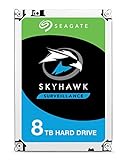
Compare current Amazon US prices for hard drives marketed for DVR, NVR and continuous video workloads. The collection recognizes WD Purple, Seagate SkyHawk and Toshiba S300 families, then shows workload, camera, recording, RPM and warranty data when stated.




No offers match these filters
Remove a filter or choose a different capacity or condition.
How to compare surveillance hard drives
Match the recorder and workload
Check the DVR or NVR compatibility list, supported capacity, bay count and expected recording workload. A surveillance label does not override the recorder manufacturer requirements.
Separate standard and AI tiers
High-capacity AI-oriented families can carry higher workload ratings and support additional analytics streams. Paying for that tier is useful only when the recorder and camera deployment can use it.
Plan redundancy and backup separately
A surveillance drive is not a backup by itself. Consider recorder redundancy, retention targets, off-site copies and the consequences of losing recorded footage.
How this comparison works
Cloudzat collects current product and offer data through the Amazon Creators API used by the main Storage Prices plugin. This add-on adds targeted searches, collection-specific validation and technical enrichment, then ranks available offers by cost per terabyte. Dedicated hourly requests prevent these pages from waiting behind the site's larger shared catalog refresh. New, used and refurbished offers remain visibly separated by condition.
Automated classification can be incomplete when a listing omits a specification or groups several variants. Confirm the capacity, interface, form factor, compatibility, warranty and condition on Amazon before buying.
Technical references
WD Purple surveillance HDD information · Seagate SkyHawk video HDD information
Frequently asked questions
How is a surveillance HDD different from a desktop HDD?
Surveillance families are designed and marketed for continuous DVR and NVR video workloads, multiple camera streams and compatible recorder environments. Exact ratings vary by family and model.
Can I use a surveillance drive in a NAS?
A drive may function outside its intended category, but firmware, workload and compatibility priorities differ. Follow the NAS or recorder manufacturer guidance for the actual system.
What do workload ratings mean?
They describe an annualized amount of data transferred under the manufacturer definition. They are not a promise that an individual drive will last for a specific number of years.
Why are camera counts sometimes missing?
The exact limit can depend on family, capacity and model. Cloudzat only displays a camera figure when it is found in the available product information.
Are complete DVR systems included?
No. The collection excludes recorders, camera kits, enclosures and drive bundles so the table compares individual internal hard drives.