


Einstar 2 buying guide
Buying shortlist
Where this scanner fits
EINSTAR 2
A strong workshop scanner for reverse engineering, darker surfaces and mixed-size parts.
See Amazon optionsCreality CR-Scan Raptor
A direct competitor for mechanical geometry and detailed reverse-engineering work.
See Amazon optionsEINSTAR VEGA
The better EINSTAR choice when you want an all-in-one scanner with its own display.
See Amazon optionsBefore you buy
What matters before you choose
Best for
reverse engineering, dark surfaces and workshop scanning.
Object range
small features through large-object IR capture.
Workflow
PC-connected handheld scanning with battery-supported mobile use.
Consider an alternative if
mechanical parts, tighter geometry and reverse-engineering work describes most of your work more accurately.
Buyer fit checker
Which scanner fits your workflow?
Choose the closest description of your normal objects and workflow. The result ranks only the scanners discussed on this page, so you can see which one better matches the work you actually do.
Shopping options
Current Amazon options for these scanners
Compare the exact scanner model and included items before checkout. Prices and availability can change on Amazon.
EINSTAR 2
Reverse engineering, dark surfaces and larger parts

EINSTAR 2 Wireless 3D Scanner, 17 Parallel Lines Blue Laser and VCSEL Infared Light Support 3D Scanning Small to Large Objects, Up to 90 FPS High Speed Scanning, Support 3mm, 6mm, 12mm Markers.
Reverse engineering, dark surfaces and larger parts
Seller: SHINING 3D TECHNOLOGY INC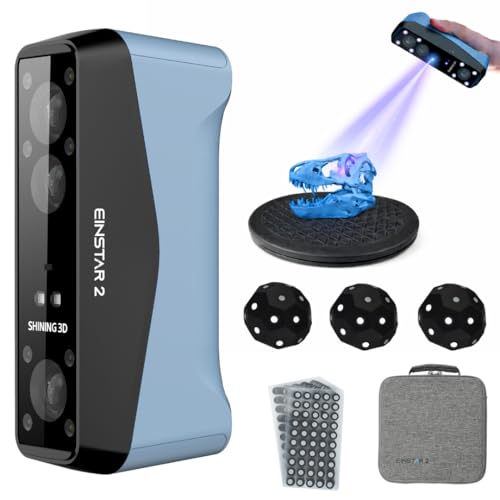
EINSTAR 2 Wireless Handheld 3D Scanner Hybrid | Full-Color Capture, Swappable Battery, EXStar Software
Reverse engineering, dark surfaces and larger parts
Seller: 3D UMAX - Authorized Shining3D Einscan DistributorCreality CR-Scan Raptor
Mechanical parts and reverse engineering

Creality CR-Scan Raptor 3D Scanner, 60fps Blue Laser & NIR, 0.02mm Accuracy, 24-Bit Color, Scans 5-2000mm Objects, Anti-Shake Tracking for Windows macOS
Mechanical parts and reverse engineering
Seller: CREALITY FALCON Official
Creality Raptor 3D Scanner, 7 Parallel Lines & NIR Scanner for 3D Printing | 0.02mm Accuracy, Up to 60fps Scan Speed, Scan Bridge Support, Full-Color Scanning, Ideal for Reverse Engineering, Automotive
Mechanical parts and reverse engineering
Seller: Creality 3D HYZEINSTAR VEGA
Standalone small-to-large object capture

EINSTAR Vega 3D Scanner with Tripod, Portable Wireless 3D Scanner with All-in-one Design, Comprehensive Object Scanning, Support Outdoor Scanning, 32G RAM + 512G SSD, 2K AMOLED Touch Screen
Standalone small-to-large object capture
Seller: SHINING 3D TECHNOLOGY INC
Shining 3D Einstar Vega Wireless 3D Scanner All-in-one Handheld 3D Scanner Two Scanning Technology Support Small to Large Objects, Stable Outdoor Scanning, 8-core 2.4GHz CPU, 512G SSD and 32G RAM
Standalone small-to-large object capture
Seller: SHINING 3D TECHNOLOGY INCBuying decision
Who should buy this scanner?
Buy EINSTAR 2 when the scanner will live in a serious maker, automotive or reverse-engineering workflow and PC-connected operation is acceptable. Its combination of laser and IR modes makes more sense for mixed workshop subjects than a small-object specialist. Choose Raptor when mechanical detail is the dominant priority, or VEGA when eliminating the computer tether is more valuable than having the most workshop-oriented setup.
At a glance
How it compares with the closest alternatives
Detailed guide
Detailed buyer guide
What EINSTAR 2 is designed to do
EINSTAR 2 is built around reverse engineering, dark surfaces and workshop scanning. That makes it a more useful purchase when your projects match that profile than when you are simply chasing the newest scanner. Its workflow is PC-connected handheld scanning with battery-supported mobile use, and the practical appeal is the ability to fit scanning into a repeatable maker or workshop process rather than treating every object as a special case.
The right way to evaluate EINSTAR 2 is to compare its intended jobs with the objects you actually own. If your work regularly falls outside small features through large-object IR capture, a different scanner may be easier to use even if EINSTAR 2 looks stronger on paper. The model should be judged by the jobs it completes with the least preparation and cleanup.
Detail and accuracy in real use
The specification for EINSTAR 2 is described as high-detail laser capture. Treat that as a best-case capability rather than a guarantee for every object. Scan distance, tracking quality, exposure, surface texture and the geometry of the part determine how much detail survives into the final mesh.
For 3D printing, the useful question is whether the scanner preserves the features your print needs. For reverse engineering, dimensional consistency and clean reference geometry matter more. Run repeat scans of the same object when accuracy matters, and compare critical measurements against calipers rather than assuming that a dense mesh is automatically dimensionally perfect.
Object size and the sweet spot
EINSTAR 2 is aimed at small features through large-object IR capture. That range tells you more about day-to-day usability than a generic claim that a scanner can capture almost anything. Small subjects demand close-range stability and enough detail; large subjects demand reliable tracking and efficient coverage so the scan does not become a long sequence of alignment problems.
If your normal projects sit outside that sweet spot, consider Creality CR-Scan Raptor for mechanical parts, tighter geometry and reverse-engineering work or EINSTAR VEGA for standalone scanning when you want to work without staying tethered to a computer. Owning the wrong scanner for object scale often leads to more rescanning, more mesh cleanup and less confidence in the final result.
Dark and reflective surfaces
Surface handling is a major part of the EINSTAR 2 buying decision because blue-laser and IR modes make it strong for darker surfaces and larger workshop parts. That can reduce preparation on some jobs, but no handheld scanner should be expected to make every glossy, transparent or mirror-like object easy. Surface behavior changes with color, curvature, lighting and scanning mode.
Plan for removable scanning spray or markers when the object defeats optical tracking. The less often you need those aids, the faster the workflow becomes, but preparation is still a normal professional technique rather than evidence that the scanner has failed. Always check whether coatings are safe for the material being scanned.
Tracking and capture technique
EINSTAR 2 works best when you keep a stable distance, maintain overlap between frames and avoid abrupt changes in angle. The PC-connected handheld scanning with battery-supported mobile use should influence how you move around the subject and how you position the computer or phone. Long uninterrupted sweeps are not automatically better than shorter controlled passes.
Start with a simple object and learn what good tracking looks like before attempting a complex part. Features such as holes, repeated patterns and large smooth panels can confuse alignment. Markers, temporary reference geometry or splitting the object into controlled passes can improve repeatability and reduce the amount of mesh repair later.
Software and export workflow
A scanner becomes useful only when the software fits the rest of your process. EINSTAR 2 uses PC-connected handheld scanning with battery-supported mobile use. Before buying, confirm that your hardware, operating system and preferred export formats fit that workflow. The capture application should be treated as part of the product, not as an afterthought.
Expect to inspect alignment, remove unwanted geometry, fuse frames and simplify or repair the mesh before sending it to a slicer or CAD tool. If you already have a preferred mesh editor, test whether the scanner exports a format that moves cleanly into it. A smooth software handoff can save more time than a minor difference in headline accuracy.
Using it for 3D printing
EINSTAR 2 can make scan-to-print projects faster when the object is well matched to its strengths. The scan gives you a geometric starting point, but a printable model still needs watertight surfaces, sensible wall thickness and clean areas where the scan could not see. Hidden faces and deep cavities frequently need reconstruction.
For replicas and cosplay pieces, visual fidelity may be enough. For replacement parts, interfaces and mounting points should be recreated carefully in CAD and checked against physical measurements. The scanner shortens the modeling process; it does not remove the need for design judgment.
Using it for reverse engineering
Reverse engineering is a stronger fit when reverse engineering, dark surfaces and workshop scanning matches the part. Capture several views of functional geometry and preserve reference features that can be measured later. Mesh data is most useful as a guide for rebuilding planes, cylinders, holes and other CAD features rather than as a final parametric model.
If reverse engineering will be your dominant workload, compare this model directly with more specialized options before buying. The cost of the scanner is often smaller than the labor cost of cleaning poor data repeatedly. A scanner that saves an hour on every part can justify a higher purchase price very quickly in a commercial workflow.
Limitations to understand before buying
The biggest mistake is expecting EINSTAR 2 to be equally strong on every object. Very small features, large featureless surfaces, transparent materials and deep hidden geometry can all require extra technique. The scanner also depends on the quality of the processing workflow, so older computers or an awkward capture setup can become the practical bottleneck.
Consider Creality CR-Scan Raptor if mechanical parts, tighter geometry and reverse-engineering work describes your workload better, and EINSTAR VEGA if standalone scanning when you want to work without staying tethered to a computer is closer. Alternatives are not included because EINSTAR 2 is weak; they exist because handheld scanners are specialized tools and the best choice changes with the object.
Buying verdict and alternatives
Before checkout, compare the exact Amazon bundle rather than only the title. A scanner listing may be mixed with accessories, cases or kits, and the included items can change the value significantly. If EINSTAR 2 matches your recurring projects and workflow, it is a rational shortlist candidate; if not, choose the alternative whose strengths line up with your actual objects.
Buyer questions
Frequently asked questions
Is EINSTAR 2 worth buying in 2026?
What is EINSTAR 2 best for?
EINSTAR 2 is best suited to reverse engineering, dark surfaces and workshop scanning. It is most compelling when your recurring projects match that profile rather than when you need a specialist for a very different object size.
How accurate is EINSTAR 2?
The model is described around high-detail laser capture. Real-world results depend on scan distance, tracking, object surface, exposure and post-processing, so verify critical dimensions independently when precision matters.
Can EINSTAR 2 scan dark or shiny objects?
blue-laser and IR modes make it strong for darker surfaces and larger workshop parts. Difficult dark, shiny, transparent or reflective subjects may still need markers or a removable matte scanning spray.
Can I use EINSTAR 2 for 3D printing?
Yes, when the object matches the scanner’s useful range. The resulting mesh may still need hole filling, cleanup, smoothing or CAD reconstruction before it is ready to slice and print.
What is the best alternative to EINSTAR 2?
Creality CR-Scan Raptor is the first alternative when mechanical parts, tighter geometry and reverse-engineering work matters more. EINSTAR VEGA is another option when standalone scanning when you want to work without staying tethered to a computer better matches the project.
Does EINSTAR 2 create CAD files directly?
A 3D scanner normally produces mesh or point-cloud data, not a finished parametric CAD model. Reverse-engineering software and manual CAD reconstruction are often required for manufacturing-ready geometry.
What should I check on Amazon before buying?
Confirm that the listing contains the complete scanner, the exact model and expected bundle. Accessory-only products such as cases, turntables, cables, spray, marker kits and screen protectors should not be mistaken for the scanner itself.
Manufacturer references
Specifications can vary by scanning mode, software version and bundle. Confirm the exact model and included items before buying.