


CA
Mini PCs with OCuLink in Canada
Choose the GMKtec K8 Plus for a lower-cost OCuLink Mini PC, the MINISFORUM UM890 Pro for a stronger Ryzen base, or the GMKtec EVO-T2 if you also need 10GbE and 64 GB options. Budget for an external GPU dock, GPU and power supply; the OCuLink port alone does not include them.
Choose a model
GMKtec K8 Plus
A lower-cost route to a real OCuLink port for an external GPU. Check the exact machine and dock configuration.
Manufacturer specifications ↗MINISFORUM UM890 Pro
A Ryzen 9 8945HS system with an OCuLink expansion path and dual 2.5GbE for a more capable base PC.
Manufacturer specifications ↗GMKtec EVO-T2
A higher-tier choice combining OCuLink with 10GbE RJ45 and 64 GB configurations.
Manufacturer specifications ↗CA
Current local offers
Confirm the physical OCuLink port and price the dock, graphics card and power supply as well.

16 GB RAM
GMKtec M8 Mini PC, AMD Ryzen 5 PRO 6650H 16GB LPDDR5 1TB NVMe SSD OCuLink | Dual 2.5GbE LAN, USB4, HDMI 2.1, …
16 GB RAM · 1000 GB SSD
CA$575.00Price checked 01 Nov 2026 17:18 UTCBuy on Amazon ↗
32 GB RAM
GMKtec K16 Gaming Mini PC, AMD Ryzen 7 7735HS 32GB LPDDR5 512GB NVMe SSD | OCuLink eGPU Port, Dual 2.5GbE LAN…
32 GB RAM · 512 GB SSD
CA$829.00Price checked 01 Nov 2026 17:18 UTCBuy on Amazon ↗
32 GB RAM
MINISFORUM AI X1 Pro-370 AMD Ryzen AI 9 HX370 Mini PC up to 5.1GHz 12C/24T, AMD Radeon 890M Mini Desktop Comp…
32 GB RAM · 1000 GB SSD
CA$1,719.99Price checked 01 Nov 2026 17:18 UTCBuy on Amazon ↗
48 GB RAM
Reatan Gaming Mini PC, Ryzen 7 255, 48GB RAM 2TB SSD, Oculink, Radeon 780M | 5600MHz DDR5 & PCIe 4.0 SSD, 2x …
48 GB RAM · 2000 GB SSD
CA$1,989.00Price checked 01 Nov 2026 17:18 UTCBuy on Amazon ↗
Mini PCs with OCuLink
GMKtec AI Mini PC K15, Intel Core Ultra 5 125U 32GB DDR5 512GB SSD | Gaming PC Oculink, Dual 2.5GbE LAN, 3X M.2 Sl…
32 GB RAM · 512 GB SSD
CA$999.00Price checked 24 Oct 2026 20:17 UTCBuy on Amazon ↗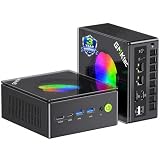
Mini PCs with OCuLink
GMKtec K11 Gaming Mini PC Desktop Computer Ryzen 9 8945HS 16GB DDR5 1TB SSD | Mini Computer With OCuLink, Dual USB…
16 GB RAM · 1000 GB SSD
CA$1,253.21Price checked 24 Oct 2026 20:19 UTCBuy on Amazon ↗If a listing sells out
GMKtec EVO-X3, 128 GB
The EVO-X3 has a physical OCuLink port and 128 GB memory. It is a premium alternative when the K8 Plus or UM890 Pro does not fit your compute needs.
See the model and configurations ↗Buying guide
What OCuLink changes
OCuLink exposes a PCIe connection to an external device, commonly an eGPU dock. It can avoid some USB4 protocol overhead, but performance still depends on PCIe generation, lane count, GPU, dock, workload and display path. The K8 Plus, UM890 Pro and EVO-T2 are named choices with documented OCuLink paths. Check the exact revision and physical connector before ordering. A Mini PC showing USB4 or a regular USB-C port has a different expansion route and should not be listed as OCuLink without evidence.
Choose the right base PC
The GMKtec K8 Plus is a sensible entry point when the external GPU is the primary reason to buy. The MINISFORUM UM890 Pro offers a Ryzen 9 8945HS base and dual 2.5GbE for other work. The EVO-T2 pairs OCuLink with 10GbE RJ45 and a 64 GB configuration for a more specialized system. Compare CPU performance, installed RAM and SSD before spending on the dock. A faster GPU cannot compensate for insufficient memory or storage in the host.
Build the entire eGPU budget
Price the Mini PC, dock or enclosure, graphics card, power supply, cable and display connection together. Confirm the dock accepts the card's length, cooling and power connectors. An external GPU needs stable power and safe placement, and the cable is usually short. An OCuLink-capable family can contain variants without a clearly exposed port or with different bundles. Check the actual listing photographs and specifications, not just a comparison table for the series.
Understand connection limits
Many OCuLink implementations are PCIe 4.0 x4 and are not designed for hot plugging. Shut the machine down before connecting or disconnecting unless the manufacturer explicitly documents another procedure. Avoid bending or repeatedly stressing the port and use a compatible cable. Depending on the model, an OCuLink connection may share lanes or physical space with internal SSD expansion. Read the board and storage documentation if you expect both high-speed internal drives and an eGPU at once.
Decide whether a desktop fits better
A compact PC plus external GPU is useful when you need a small daily machine and optional graphics for selected jobs. A conventional desktop often offers easier GPU replacement, more internal drives and simpler cabling. Compare total cost and desk space rather than only the Mini PC price. If you need a high-end GPU all day, check sustained CPU cooling, dock stability and software support. A specialized compact setup should solve a space or modularity problem you actually have.
Install and test the complete setup
On arrival, confirm the OCuLink port and the selected RAM and SSD. Update firmware only through official instructions. Assemble the dock with its PSU and GPU while powered down, connect the display to the appropriate output and install current drivers. Test several applications, restart behaviour and sleep/wake handling before the return period ends. Keep an integrated-graphics recovery path so a driver or cable problem does not leave the computer unusable. Document the exact dock and card pairing that works.
Check displays, USB and expansion
Count the monitors you own, their resolution and refresh rate, and the exact outputs on the computer. HDMI and DisplayPort versions can matter; the existence of a USB-C socket does not confirm video output, USB4 or power delivery. If an external GPU or fast expansion dock is part of the plan, verify the supported interface and lane or bandwidth details on the exact model rather than relying on the shape of the connector.
An OCuLink port can be valuable to a specific external GPU setup but adds complexity and may require an external power supply. USB4 can serve useful docks and storage, but host and peripheral support vary. A small PC with the right ordinary ports can be a better purchase than a more expensive machine with impressive expansion features you will not use.
Choose a processor tier with room for the actual tasks
Intel N-series systems can be sensible for light office use, media clients and modest home services. More demanding multitasking, several virtual machines, heavier development or graphics work may need a different class. Core and Ryzen labels span many generations and power envelopes, so the family name alone is not a reliable ranking. Check the specific CPU, memory configuration and cooling in the system you can buy.
A quoted processor base power or maximum turbo frequency is a component specification. It is not the electricity consumption of the whole computer and does not prove sustained performance inside a tiny enclosure. Compare independent testing of the exact machine when performance or acoustics matter, and leave headroom for the applications you expect to add during its useful life.
Compare Canada checkout totals
Amazon.ca listings may show multiple memory and storage variations under one product family. Select the exact configuration before comparing prices, and check whether the seller ships to your address. Review the displayed total, delivery date, return window and supplied Canadian power plug. An imported model can look cheap before shipping and taxes are considered; do not compare it to a domestic listing without the whole delivered cost.
Each card shows when its price was checked. The amount may have changed since then. Follow the retailer link to verify the selected variation, availability, seller and checkout total. Keep prices in CAD, and avoid using a converted US price as if it were a Canadian offer.
Verify the order and test the delivered machine
Before checkout, reselect the exact RAM and SSD variant and confirm the seller, condition, operating system, return window and total. Keep a copy of the listing details and your order configuration. On arrival, confirm CPU, installed memory and storage in the system settings, then test the ports your workload actually depends on. Update firmware only through the manufacturer’s documented process.
Set up recovery before moving important data. Keep a separate backup of service configurations and files, and test restoration. Try representative media, virtual machines, monitors or network paths while the return period still applies. A good buying decision includes a way to discover a wrong configuration early and return or correct it without disrupting the rest of your setup.
Questions buyers ask
How do I choose Mini PCs with OCuLink?
Recommended choice: Choose the GMKtec K8 Plus for a lower-cost OCuLink Mini PC, the MINISFORUM UM890 Pro for a stronger Ryzen base, or the GMKtec EVO-T2 if you also need 10GbE and 64 GB options. Budget for an external GPU dock, GPU and power supply; the OCuLink port alone does not include them.
Does the listed price include the complete system?
Choose the RAM, SSD and operating-system variation on the retailer page. Some model families also offer barebones or smaller configurations.
Are the prices guaranteed?
No. The date on each offer shows when the price was checked. Confirm the seller, availability and delivered total at checkout.
Compare more Mini PCs
Mini PC buying guide64GB RAM Mini PCs128GB RAM Mini PCsMini PCs with 10GbEFanless Mini PCsAs an Amazon Associate, Cloudzat earns from qualifying purchases. Prices may change; check the selected configuration and total before paying.