


Canada
DDR5 RAM Prices Canada: Which 32GB or 64GB Kit Should You Buy?
Buy Corsair Vengeance RGB RS 32 GB, 2×16 GB DDR5-6000 CL38 EXPO/XMP, CMG32GX5M2D6000Z38W. Our 32 GB choice for a compatible gaming or everyday desktop. Choose Corsair Vengeance RGB RS 64 GB, 2×32 GB DDR5-6000 CL40 EXPO/XMP, CMG64GX5M2D6000Z40. Buy 64 GB for large creative projects or several substantial virtual machines.
Choose the right option
Corsair Vengeance RGB RS 32 GB, 2×16 GB DDR5-6000 CL38 EXPO/XMP, CMG32GX5M2D6000Z38W
Our 32 GB choice for a compatible gaming or everyday desktop.
Compare exact offers ↓Corsair Vengeance RGB RS 64 GB, 2×32 GB DDR5-6000 CL40 EXPO/XMP, CMG64GX5M2D6000Z40
Buy 64 GB for large creative projects or several substantial virtual machines.
Compare exact offers ↓Amazon offers in Canada
Confirm the selected capacity, seller and delivered total.

CMG32GX5M2D6000Z38W · 2×16 GB
CORSAIR Vengeance RGB RS DDR5 32GB (2 x 16GB) Up to 6000MHz AMD Intel RAM | Desktop Gaming Memory, AMD EXPO & Intel XMP 3.0 Compatible, CL38, White, CMG32GX5M2D6000Z38W
DDR5 · 6000 MT/s · CL38 · EXPO
CA$689.99CA$21.56 / GB
Price observed 02.11.2026 14:16 UTCBuy on Amazon ↗
CMG64GX5M2D6000Z40 · 2×32 GB
Corsair Vengeance RGB RS DDR5 64GB (2 x 32GB) Up to 6000MHz AMD Intel RAM | Desktop Gaming Memory, AMD EXPO & Intel XMP 3.0 Compatible, CL40, Grey, CMG64GX5M2D6000Z40
DDR5 · 6000 MT/s · CL40 · EXPO
CA$1,522.99CA$23.80 / GB
Price observed 02.11.2026 14:16 UTCBuy on Amazon ↗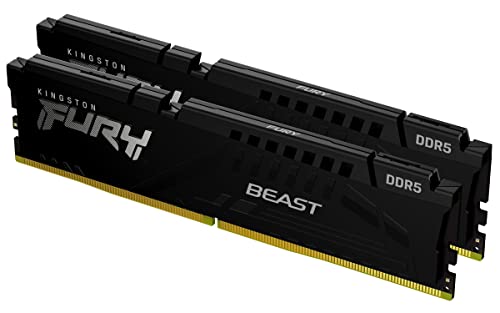
KF552C40BBK2-32 · 2×16 GB
Kingstn Fury Beast DDR5 32GB (2x16GB) 5200MHz CL40 DIMM Desktop Gaming Memory Kit of 2 - KF552C40BBK2-32
DDR5 · 5200 MT/s · CL40 · Check profile
CA$749.99CA$23.44 / GB
Price observed 02.11.2026 09:06 UTCBuy on Amazon ↗
KF560C30BWEK2-32 · 2×16 GB
Kingston Fury Beast White 32GB 6000MT/s DDR5 CL30 DIMM (Kit of 2) Desktop Gaming Memory - KF560C30BWEK2-32
DDR5 · 6000 MT/s · CL30 · EXPO
CA$795.49CA$24.86 / GB
Price observed 02.11.2026 09:06 UTCBuy on Amazon ↗
KF560C30BBEK2-32 · 2×16 GB
Kingston Fury Beast Black 32GB 6000MT/s DDR5 CL30 DIMM (Kit of 2) Desktop Gaming Memory - KF560C30BBEK2-32
DDR5 · 6000 MT/s · CL30 · EXPO
CA$969.99CA$30.31 / GB
Price observed 02.11.2026 09:06 UTCBuy on Amazon ↗
KF564C32BBEAK2-32 · 2×16 GB
Kingston Fury Beast Black RGB Expo 32GB 6400MT/s DDR5 CL32 DIMM Desktop Gaming Memory Kit of 2 - KF564C32BBEAK2-32
DDR5 · 6400 MT/s · CL32 · EXPO
CA$1,093.29CA$34.17 / GB
Price observed 02.11.2026 09:06 UTCBuy on Amazon ↗KF556C40BB2K2-64 · 2×32 GB
Kingston Fury Beast Black DDR5 64GB (2x32GB) 5600MT/s CL40 DIMM Desktop Gaming Memory Kit of 2 AMD Expo and Intel XMP - KF556C40BB2K2-64
DDR5 · 5600 MT/s · CL40 · Check profile
CA$1,549.95CA$24.22 / GB
Price observed 02.11.2026 09:06 UTCBuy on Amazon ↗As an Amazon Associate, Cloudzat earns from qualifying purchases. Prices are dated observations and can change. Check the exact variant and delivery to your address before ordering.
Buying guide
The memory kit to buy
Our first choice is Corsair Vengeance RGB RS 32 GB, 2×16 GB DDR5-6000 CL38 EXPO/XMP, CMG32GX5M2D6000Z38W. Our 32 GB choice for a compatible gaming or everyday desktop.
The alternative is Corsair Vengeance RGB RS 64 GB, 2×32 GB DDR5-6000 CL40 EXPO/XMP, CMG64GX5M2D6000Z40. Buy 64 GB for large creative projects or several substantial virtual machines.
The Corsair 32 GB CL38 kit is our lower-cost choice ahead of the Kingston 32 GB CL30 kit. Both are 32 GB purchases; the tighter timing label does not add capacity. Buy the 64 GB Corsair kit only for the heavier workload that needs it. For an ordinary gaming build, keeping the 32 GB choice is the sensible way to avoid that large capacity premium.
The part number identifies the exact matched kit. Keep that reference when selecting the store variation: the same family can contain a different capacity, profile or physical format. For a new installation, buy the one complete kit shown here rather than adding together separately sold modules with similar names.
| Choice | Exact kit | Buy it for |
|---|---|---|
| Our pick | Corsair Vengeance RGB RS 32 GB, 2×16 GB DDR5-6000 CL38 EXPO/XMP, CMG32GX5M2D6000Z38W | Our 32 GB choice for a compatible gaming or everyday desktop. |
| Alternative | Corsair Vengeance RGB RS 64 GB, 2×32 GB DDR5-6000 CL40 EXPO/XMP, CMG64GX5M2D6000Z40 | Buy 64 GB for large creative projects or several substantial virtual machines. |
Buy 32 GB for an ordinary gaming PC
Our capacity choice for a new ordinary gaming or everyday desktop is 32 GB, normally as one matched 2×16 GB kit. It gives a sensible starting amount for games, a browser and ordinary background applications without paying for a workstation-sized kit. A PC already running comfortably with 32 GB does not need 64 GB simply because that larger kit is offered.
Choose 64 GB as 2×32 GB when the computer regularly runs large creative projects, several substantial virtual machines or other work that needs more than 32 GB. The benefit is avoiding a real memory shortage. It is not a promise of twice the frame rate or twice the application speed. For a buyer mainly gaming and browsing, spend the saving on a useful graphics or storage improvement, or keep the money.
Buy memory that belongs to your platform
AM5 desktop systems use DDR5. An older AM4 desktop uses DDR4. These are different physical and electrical purchases, so a DDR5 deal is not an upgrade you can insert into an AM4 board. Some Intel generations have separate DDR4 and DDR5 motherboard models; the exact board decides which memory to buy. The processor brand alone is not a memory specification.
Our desktop kits here are full-size unbuffered DIMMs. They do not replace laptop SO-DIMMs, soldered memory or a server's registered modules. For a laptop or small PC, buy its documented format and capacity instead. A 32 GB kit means 32 GB in total: two 16 GB modules. It does not mean two 32 GB modules or 64 GB installed.
Our speed choice for AM5
For a compatible AM5 gaming build, a sensibly priced DDR5-6000 EXPO kit is our starting recommendation. Choose the named kit above rather than paying heavily for a higher frequency or RGB lighting. A lower-priced CL36 or CL38 kit can be the better value than an expensive CL30 kit when the main requirement is useful capacity. The savings are real; a large universal gaming gain from a small timing change is not.
EXPO and XMP are stored performance profiles. The advertised profile speed is not a guarantee for every processor, board, BIOS and module arrangement. Use the motherboard's memory support information for the exact part number. For a workstation where stability matters more than a small speed difference, a supported conservative configuration is a better purchase than an ambitious profile with no useful capacity advantage.
Choose one complete kit
Buy one matched two-module kit of the final capacity you want. For a new 64 GB installation, our normal choice is 2×32 GB rather than two separately purchased 32 GB kits. Two boxes with the same marketing name were not necessarily validated together. Filling four slots can also impose lower supported speeds or more demanding setup requirements than the two-module arrangement.
For an existing 16 GB or 32 GB PC, replacing the kit can be simpler than mixing old and new memory. Keep the working old kit until the replacement is stable. A single-module upgrade can be appropriate when the computer manufacturer explicitly supports it, but it should not be presented as identical to the matched kit chosen for a new build. Follow the board's recommended paired slots, often A2 and B2, rather than assuming the two nearest slots are correct.
What the timings and lighting are worth
Capacity comes first. A sufficient kit with a suitable profile is a better buy than a faster kit too small for the work. Between equally suitable kits, buy our lower-priced recommendation unless the alternative provides a specific benefit you need. RGB changes appearance, not capacity. Tall decorative heat spreaders can also reduce clearance beneath a large CPU cooler.
CL describes one part of memory timing and is read alongside the data rate. A lower CL number on a different frequency is not a complete ranking. For ordinary buyers, the useful decision is the named compatible kit and capacity, not a spreadsheet of every timing. Pay a modest premium for a preferred validated kit when it serves the system; avoid paying a large premium for the same amount of memory solely because of its styling.
Set up the kit without turning it into a tuning project
Install the kit using the motherboard instructions and allow the first boot to complete its memory training. Confirm that the system recognises the full capacity. If you want the advertised EXPO or XMP profile, use the appropriate BIOS setting on supported hardware. A profile may not be enabled by default. Buy the kit for its suitable capacity even when a conservative speed is the sensible final setting.
If the system becomes unstable, return to the documented standard settings before changing several unrelated options. Memory errors matter even when the desktop opens normally. Use an appropriate memory check and your important applications before erasing the old working setup. This is a short installation check after a clear purchase choice, not a requirement to become a memory overclocking specialist.
When to buy the 64 GB alternative
Buy the named 64 GB kit when you already have a capacity-heavy workload or know that the next project needs it. Several virtual machines, large media timelines and substantial content-creation sessions can justify more memory. A vague intention to future-proof an ordinary gaming PC is a weaker reason, especially when the 64 GB premium is large.
For a system that already has sufficient memory, keep it. If the computer is slow despite spare RAM, a new kit may not address the cause. Storage, CPU and graphics limitations need different upgrades. Our default remains 32 GB for the ordinary new desktop and 64 GB for the heavier workload described here. The alternative is a purposeful capacity purchase, not a compulsory step up.
Compare memory capacity and kit cost
Use actual checkout amounts. Add only charges not already included. The result compares cost, not compatibility or frame rate.
Check host compatibility · Estimate workload capacity
Frequently asked questions
Should I buy 32 GB or 64 GB?
Buy 32 GB for an ordinary new gaming or everyday desktop. Buy 64 GB for large creative projects, several substantial virtual machines or a known workload that exceeds 32 GB.
Is DDR5 compatible with my DDR4 board?
No. Buy the generation and physical format supported by the exact motherboard or PC. DDR4 and DDR5 are not interchangeable.
Should I buy two separate kits?
For a new installation, buy one matched kit of the final capacity. Two separately sold kits are not automatically validated together.
Is DDR5-6000 guaranteed on every AM5 PC?
No. EXPO is a performance profile that depends on the processor, board, BIOS and module arrangement. The exact kit's support information matters.
Related buying guides
- AM4 vs AM5 Upgrade Canada: Should You Keep DDR4 or Buy a New Platform?
- CPU, Motherboard and RAM Bundles Canada: Compare Complete Upgrade Costs
- Best AM5 RAM Canada: Which DDR5 EXPO Kit Should You Buy?
- RTX 5070 Ti Gaming PCs Canada: Which Configuration Should You Buy?
- RX 9060 XT Gaming PCs Canada: Which Configuration Should You Buy?
- Ddr5 Ram Price Tracker
- Ram Compatibility Checker