


Canada
Best CAD Laptops Canada: RAM, Graphics and Buying Guide
For a new CAD laptop, start with 32 GB RAM, a 1 TB SSD and graphics suited to the actual application. Choose 64 GB for larger BIM projects or assemblies, and prioritise a verified professional GPU setup when SOLIDWORKS support requires it. A gaming laptop can be useful for some Fusion work, but it is not automatically a certified CAD workstation.
Choose the right option
HP ZBook 8 G1i · 32 GB RAM · 1 TB SSD
32 GB installed RAM, RTX 500 Ada and Windows 11 Pro. For ordinary modelling at the memory tier shown. Exact certification remains unverified.
Compare exact offers ↓Lenovo ThinkPad P16 Gen 3 · 64 GB RAM · 1 TB SSD
64 GB installed RAM, RTX PRO 3000 Blackwell and Windows Pro (version not specified). For the larger-memory workload tier. Exact certification remains unverified.
Compare exact offers ↓Amazon offers in Canada
Confirm the selected capacity, seller and delivered total.
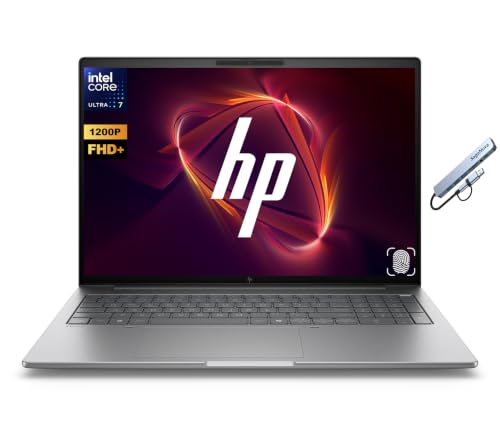
HP ZBook 8 G1i · 32 GB RAM · 1 TB SSD
HP ZBook 8 G1i 16" WUXGA AI Mobile Workstation, 16-Core Intel Core Ultra 7 255H, NVIDIA RTX 500 Ada, 32GB DDR5 RAM 1TB SSD, Windows 11 Pro, Fingerprint, Backlit KB, Thunderbolt 4, Wi-Fi 7, Silver
Core Ultra 7 255H · RTX 500 Ada · Windows 11 Pro. Certification not verified. Keyboard: confirm exact layout.
CA$7,129.03Price observed 02.11.2026 19:56 UTCBuy on Amazon ↗
Lenovo ThinkPad P16 Gen 3 · 64 GB RAM · 1 TB SSD
Lenovo ThinkPad P16 Gen 3 Intel Core Ultra 9 275HX, 24C, 16" 3.2K (3200 x 2000), 64GB RAM, 1TB SSD, NVIDIA RTX PRO 3000 Blackwell, Backlit KYB, Windows Pro
Core Ultra 9 275HX · RTX PRO 3000 Blackwell · Windows Pro (version not specified). Certification not verified. Keyboard: confirm exact layout. Confirm the supported Windows edition and release before purchase.
CA$5,999.00Price observed 02.11.2026 20:24 UTCBuy on Amazon ↗
HP ZBook Power 16 G11 A · 64 GB RAM · 2 TB SSD
HP ZBook Power 16 G11 A | 16" Mobile Workstation (AMD Ryzen 7 PRO 8845HS/64GB RAM/2TB SSD/Dual GPU NVIDIA RTX 1000 Ada 6GB & Radeon 780M) 3-Year HP Warranty
Ryzen 7 PRO 8845HS · RTX 1000 Ada 6 GB · Not specified in the offer. Certification not verified. Keyboard: confirm exact layout. Confirm the supported Windows edition and release before purchase.
CA$3,489.00Price observed 02.11.2026 19:56 UTCBuy on Amazon ↗As an Amazon Associate, Cloudzat earns from qualifying purchases. Prices are dated observations and can change. Check the exact variant and delivery to your address before ordering.
Buying guide
Which exact option fits your work?
HP ZBook 8 G1i · 32 GB RAM · 1 TB SSD: Core Ultra 7 255H, RTX 500 Ada, Windows 11 Pro. This is the installed configuration, not the maximum that the family can support. 32 GB installed RAM, RTX 500 Ada and Windows 11 Pro. For ordinary modelling at the memory tier shown. Exact certification remains unverified.
Lenovo ThinkPad P16 Gen 3 · 64 GB RAM · 1 TB SSD: Core Ultra 9 275HX, RTX PRO 3000 Blackwell, Windows Pro (version not specified). This is the installed configuration, not the maximum that the family can support. 64 GB installed RAM, RTX PRO 3000 Blackwell and Windows Pro (version not specified). For the larger-memory workload tier. Exact certification remains unverified.
The memory difference is 32 GB. Choose the larger capacity for the larger-project tier described in this guide. If ordinary work fits in the smaller capacity, the price premium needs another useful benefit. More RAM is capacity, not a measured speed ranking.
The ThinkPad P16 Gen 3 listing says Windows Pro without establishing the version. Its 64 GB RAM is useful for larger projects, but the supported Windows release and exact keyboard remain purchase conditions. The ZBook 8 offer states Windows 11 Pro and 32 GB. Neither offer is represented as an already verified certified configuration.
| Exact option | Specification | Best reason to choose |
|---|---|---|
| HP ZBook 8 G1i · 32 GB RAM · 1 TB SSD | Core Ultra 7 255H · RTX 500 Ada · Windows 11 Pro. Certification not verified. Keyboard: confirm exact layout. | 32 GB installed RAM, RTX 500 Ada and Windows 11 Pro. For ordinary modelling at the memory tier shown. Exact certification remains unverified. |
| Lenovo ThinkPad P16 Gen 3 · 64 GB RAM · 1 TB SSD | Core Ultra 9 275HX · RTX PRO 3000 Blackwell · Windows Pro (version not specified). Certification not verified. Keyboard: confirm exact layout. Confirm the supported Windows edition and release before purchase. | 64 GB installed RAM, RTX PRO 3000 Blackwell and Windows Pro (version not specified). For the larger-memory workload tier. Exact certification remains unverified. |
When paying more makes sense
Choose the laptop for the software you need to run and the weight you are willing to carry. 32 GB is a sensible starting point for regular CAD work; larger projects can justify 64 GB. Before paying more for a workstation model, check that its exact graphics, screen, memory and operating system meet your requirements.
Choose the laptop for the application
CAD covers very different work. A student making small Fusion parts, an architect coordinating Revit models and an engineer using SOLIDWORKS do not necessarily need the same graphics configuration. For a new regular-use laptop, 32 GB RAM and a 1 TB SSD are a useful baseline. They leave more working room than the lowest supported specifications without forcing every buyer into the most expensive mobile workstation.
For larger linked BIM projects or demanding assemblies, 64 GB is the more comfortable memory tier. For small learning projects, an existing supported 16 GB laptop may still be enough. The decision to spend more should come from the size and type of work. A processor or graphics badge alone does not tell you whether the installed memory is adequate.
When a mobile workstation is worth the premium
A mobile workstation can be worthwhile when you need an identifiable professional graphics configuration, application support and business service arrangements. Those are practical benefits for a machine that must earn its keep. They do not mean every workstation-labelled laptop is faster than every gaming model or automatically certified for every CAD release.
For Fusion learning or hobby work, a suitable consumer or gaming laptop may offer better value. For SOLIDWORKS with a certification requirement, the exact supported hardware and driver combination becomes a purchase condition. For Revit plus Enscape or another renderer, the GPU must also suit the renderer. Choosing the application first avoids paying for a powerful component that is poorly matched to the job.
32 GB or 64 GB, and can you upgrade later?
Choose 32 GB for ordinary modelling and moderate projects with everyday multitasking. Choose 64 GB for larger assemblies, linked building models or several heavy applications open together. More RAM provides capacity; it does not automatically accelerate a simple model that already fits. If both shortlisted laptops contain 32 GB, the higher price does not buy a larger-memory tier.
Upgrade access matters more on a laptop than on a spacious desktop. Some systems use soldered memory, others have replaceable modules, and some require replacing both installed modules to reach the next capacity. The supported maximum is not the amount delivered. Buy the actual installed configuration and include the cost of any necessary upgrade before calling the cheaper listing the better value.
Laptop graphics are not desktop graphics
A laptop GPU has its own power and cooling limits. Sharing a family name with a desktop card does not make it the same performance product. Even two laptops using the same GPU name can behave differently under sustained load because their cooling and power settings differ. That is why this guide does not infer a render time or frame rate from the GPU label alone.
Graphics memory still matters for model display and separate visualisation tools. A smaller professional GPU may suit ordinary supported modelling, while a demanding real-time renderer can require a different tier. System RAM and GPU memory are separate resources. A laptop advertised with 64 GB RAM does not thereby have 64 GB available on its dedicated graphics card.
A laptop you can actually carry and use
For frequent travel, count the charger and any dock as part of the carried setup. A powerful mobile workstation may need a large power supply, and demanding CAD work commonly changes performance and battery behaviour compared with light browsing. Do not buy on a general battery-life claim as if it described continuous modelling or rendering. If most work stays at one desk, a desktop plus a lighter travel device may be a more comfortable arrangement.
A 15- or 16-inch class screen offers more working space than a small portable display, while an external monitor is useful for drawings and tool panels at a desk. Resolution, brightness and keyboard layout should fit the actual work. A shared product photo cannot establish the exact panel or local keyboard delivered. Colour-critical visualisation may justify a separate suitable display rather than assuming every CAD laptop has the same screen quality.
Storage, ports and the dock
A 1 TB SSD is a useful starting capacity for CAD applications, active projects and temporary files. Choose 2 TB when project libraries and other software would quickly crowd 1 TB. More capacity is a straightforward benefit; a peak SSD speed figure is not a promise of a specific assembly-loading time. Keep an independent backup for projects carried on the laptop.
Check that the computer can connect to your intended monitors and network. A USB-C connector does not automatically establish every docking, display or charging feature. For a desk with two screens, Ethernet and several peripherals, the supported dock and charger can add a meaningful cost. Include them when comparing a thin portable laptop with a larger workstation that already has more useful ports.
What to choose from the shortlist
The exact comparison identifies what is actually installed, including RAM, SSD, GPU and Windows details. Choose the less expensive suitable configuration for ordinary modelling; choose the larger-memory system when your work needs it. If certification, Windows edition or keyboard layout remains unverified, keep that condition visible instead of treating a similar family name as confirmation.
A more expensive laptop is worth buying when it provides a needed memory tier, a supported graphics configuration, useful expansion or a service arrangement that matters to you. It is poor value when the premium only adds a label while leaving the required limitation unresolved. The optional selector can narrow choices, but the buying decision starts with the application, the project size and the real cost of a complete portable workstation.
Optional: refine capacity or compare your requirements
The guide above gives a starting choice without this tool. Use it only to refine your own capacity or configuration requirements. Its result is an estimate, not a performance test or certification.
SOLIDWORKS always triggers the certification check and excludes an unknown or Home edition. Prices are stored observations; add missing costs below.
Compare the complete purchase cost
Check the checkout amounts. Unknown tax and delivery charges are not added automatically.
Frequently asked questions
Can a gaming laptop be used for CAD?
For some applications and hobby workflows, yes. It is not automatically a certified professional setup. Match the actual software, GPU, operating system and support requirements before buying.
Should I buy 64 GB RAM?
For large assemblies, linked BIM projects or heavy multitasking, it can be worthwhile. For ordinary work, 32 GB is the starting tier. Check whether memory can be upgraded later.
Will CAD run at full speed on battery?
Do not assume so. Power settings and the particular laptop affect demanding work. The charger, sustained cooling and complete travel weight belong in the buying decision.
Related buying guides
- PC for Revit Canada: Workstation Specs and Prices Guide
- PC for SOLIDWORKS Canada: Workstation Specs and Prices
- Kingston FURY Renegade G5 Prices Canada: Which Capacity Should You Buy?
- Lexar NM790 Prices Canada: Which Capacity Should You Buy?
- Samsung 9100 PRO Prices Canada: Which Capacity Should You Buy?
- Samsung 990 PRO Prices Canada: Which Capacity Should You Buy?
- Best Workstation Gpu
- Gaming Laptop Price Tracker
- Laptop Ram Upgrade Checker
Sources and product references
- Autodesk Fusion: system requirements
- Autodesk Revit 2026: system requirements
- SOLIDWORKS: system requirements
- SOLIDWORKS: exact hardware and driver certification
- Autodesk: certified graphics hardware
- Lenovo PSREF: ThinkPad P16 Gen 2
- Lenovo PSREF: ThinkPad P16v Gen 2
- HP ZBook X G1i: specification options
- HP ZBook Firefly 14 G11: specification options
- HP Z2 Mini G1i: configuration reference