


Canada · CAD · Deal Watch
UPS Battery Backups Black Friday Deals 2026: What to Buy in Canada
The Canadian Black Friday UPS hunt is about buying time: time to finish a call, save a document or let a NAS shut down properly. Compare complete battery-backup systems in Canadian dollars, then judge the load they can actually support rather than chasing the biggest advertised discount.
An attractive UPS deal brings the correct regional model below its recent normal price without dropping battery capacity, communication features or battery-backed outlets. Compare delivered prices for the same suffix and battery condition. A discounted replacement battery or surge-only strip is a different purchase. A public Black Friday label identifies an event offer; the price comparison still determines its value.
Start with APC BE600M1 for a compact desk or modest network load. Compare CyberPower CP1500PFCLCD when a documented sine-wave output and a larger power budget are worth the space and cost. Neither recommendation promises a fixed runtime for your equipment: check the manufacturer’s load curve for the exact regional unit. For a router alone, APC CP12036LI is a separate low-voltage option, provided the router matches its electrical requirements. It does not replace an AC UPS for a computer.
Which UPS Battery Backups option should you choose?
Start here
APC BE600M1
Choose it for a compact AC backup, subject to the exact load and shutdown compatibility.
Buy on AmazonChoose this alternative
CyberPower CP1500PFCLCD
Choose it for a larger AC load where the documented sine-wave output is useful.
Find this configurationCurrent UPS Battery Backups Listings on Amazon
Black Friday sale dates and offer timing
Dates for 2026: Black Friday — November 27; Amazon.ca — November 19–30. Individual offer periods and eligibility vary.
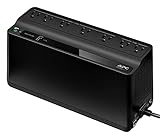
APC UPS Battery Backup & Surge Protector with USB Charger, 600VA APC Back-UPS (BE600M1)
Last verified 2026-11-13 08:41:55 UTC

APC UPS Battery Backup & Surge Protector, 600VA Backup Battery Power Supply, BE600M1 Back-UPS with USB Charging Port, Pack of 2
Last verified 2026-11-13 08:41:55 UTC

APC UPS Battery Backup & Surge Protector with USB Charger, 600VA APC Back-UPS (BE600M1), 600 VA (Pack of 2)
Last verified 2026-11-13 03:23:25 UTC

UGREEN NAS UPS US3000, 120W DC and 12000mAh Battery Backup | Uninterruptible Battery Power Supply Compatible for DH2300, DH4300 Plus, DXP2800, DXP4800 Plus, DXP4800 Pro, DXP480T Plus
Last verified 2026-11-13 08:44:56 UTC

UGREEN NAS UPS US2000, 72W DC Battery Backup and Surge Protector, | 6000mAh Uninterruptible Battery Power Supply, Only Compatible for UGREEN NAS DH2300, DH4300 Plus,DXP2800,DXP2800 GT.
Last verified 2026-11-13 08:44:56 UTC

APC Network UPS, 2000VA Smart-UPS Sine Wave UPS with Extended Run Option, SMX2000RMLV2U, 2U Rackmount/Tower Convertible, Line-Interactive, 120V
Last verified 2026-11-13 08:44:50 UTC

Vertiv Liebert 1100VA 990W 120V Advanced Avr Line-Interactive UPS with LCD Display Pure Sine Wave Output On Battery 2U Rackmount/Tower Supports Active PFC (PSI5-1100RT120)
Last verified 2026-11-13 08:44:00 UTC

Vertiv Liebert PSI5 UPS - 750VA 675W 120V Line Interactive AVR Mini Tower UPS, 0.9 Power Factor
Last verified 2026-11-13 08:43:55 UTC
As an Amazon Associate, Cloudzat earns from qualifying purchases. Prices and availability can change; Amazon shows the final price for your chosen item.
UPS Battery Backups buying guide
| Model | Best for |
|---|---|
| APC BE600M1 | a compact AC backup, subject to the exact load and shutdown compatibility |
| CyberPower CP1500PFCLCD | a larger AC load where the documented sine-wave output is useful |
Which UPS should you shortlist?
Choose between saving work and staying online
A work computer usually needs enough battery time to save and shut down, while a router may benefit from much longer operation at a small load. Those are different buying targets. Put the screen on the backed-up circuit if you need to interact with the computer during a cut. Keep a laser printer, heater and other large loads away from a small IT UPS unless its documentation expressly permits them. A cheaper unit that covers the essential devices can be a better purchase than an oversized model powering everything on the desk.
Compare the complete ownership cost
Battery access, the correct replacement cartridge and local service can matter more than another decorative display. Check whether the model allows a user battery replacement, what the replacement costs and whether the seller supplies a new complete unit. An unusually cheap clearance listing deserves a battery-age check. Also compare idle consumption, audible alarms, cabinet depth and ventilation clearance. A tower that cannot fit safely beside your desk is poor value even if its nominal output is impressive. Keep the invoice and exact model reference for future battery service.
Size the load in watts as well as VA
Use the UPS manufacturer’s watt limit and VA limit together. A 1000VA label does not mean every such unit supplies 1000W. Add the devices that must remain powered and measure their consumption during representative work, including network equipment and external storage. A power adapter’s maximum rating is not the computer’s constant consumption, but a low idle measurement is not a complete load test either.
For example, a measured 80W computer, 25W screen and 15W network load total 120W before additional reserve. This is an illustration, not a runtime claim for a recommended product. Choose output headroom and then consult the exact UPS runtime curve at the intended load. Leave space for predictable additions rather than assuming a battery that fits today’s idle setup will also handle tomorrow’s busier one.
Use a runtime curve, not a capacity shortcut
Battery runtime changes with the connected load, battery condition, temperature and the UPS electronics. A VA rating describes an output limit, not stored energy. Even a watt-hour figure cannot be divided by the load and treated as a guaranteed operating time: conversion losses, reserve limits and the battery’s discharge behaviour affect the result. Prefer the manufacturer’s curve or table for the exact model.
For shutdown protection, the available reserve must cover the waiting period, the shutdown itself and a margin for ageing. For continued networking, compare the curve at the smaller actual network load. Do not copy a runtime advertised for one light device onto a desk containing several machines. After installation, check the estimate against a controlled test carried out according to the manual, with important work saved and no storage maintenance in progress.
Verify the shutdown connection
Backup power and automatic shutdown are separate functions. A USB charging port can supply a phone without carrying any UPS status data. Look for a documented communication interface and the supported computer or NAS software. Use the correct data cable, then confirm that the operating system recognises the UPS and reports a switch to battery. A visible battery icon on the UPS is not proof that the computer has received the event.
If the alert travels over the network, every device needed for that path must remain powered long enough. Configure a shutdown delay that leaves a meaningful reserve, and check restart behaviour when the mains returns. Keep a record of the settings so a later operating-system reinstall does not silently remove the protection. For an unsupported NAS or UPS revision, obtain confirmation rather than treating another model’s compatibility report as interchangeable.
Count the right sockets and usable space
Check which outlets are battery backed and which, if any, provide surge protection only. A large total outlet count can conceal a much smaller backed-up group. Wide power bricks may block adjacent sockets, so compare the physical layout with the adapters you will connect. IEC sockets need the appropriate equipment leads; a locally compatible input plug does not guarantee that all of your existing adapters fit the outputs.
Install the UPS according to its manual, with adequate ventilation and access for service. Avoid an improvised chain of power strips or loads outside the unit’s intended use. Keep the combined load within the documented limits and use the manufacturer’s connection guidance. The correct regional voltage and outlet format matter more than a cheap imported listing. A mechanical travel adapter does not change electrical input or output voltage.
Test the protection while the return window is open
Begin by charging and setting up the UPS as its manual requires. Check the connected load, alarms and any software status before testing a power-loss response. Save important work, stop large transfers and avoid testing during a storage rebuild or other sensitive operation. Use the manufacturer’s prescribed self-test or outage-test method; do not improvise electrical work or open the battery system beyond authorised maintenance instructions.
Confirm that the intended devices remain powered, that the computer or NAS receives the alert and that shutdown completes before the battery is exhausted. Restore power and verify the restart behaviour. Record the result and repeat the appropriate checks over the product’s life, particularly after a battery change or software update. A successful first test does not make a battery permanent, but it is far more useful than assuming the setup works because the status light is green.
Compare the Canadian total in Canadian dollars
Use Canadian-dollar prices and the exact Canadian offer, including delivery, any required accessories and applicable checkout charges. A US price converted into Canadian dollars is not a verified Canadian listing. Check the seller’s local support, the supplied power equipment and the selected model or capacity. An attractive starting price may describe an incomplete package. The recommendations identify products to compare, while the dated local cards provide separately checked price observations. Reconfirm the final variant and promotion conditions before ordering; a recommendation alone is not evidence of stock or an event discount.
UPS output budget calculator
Add the measured watts of every protected device. This checks a power budget, not battery runtime. Verify the UPS watt and VA limits and its runtime curve separately.
Questions buyers ask
Is a surge protector the same as a UPS?
No. A surge-only strip has no stored energy to keep equipment running through a power cut. Some UPS units also have separate surge-only sockets; only the labelled battery-backed sockets continue supplying power during an outage.
Does a recommended model always have a Black Friday discount?
No. The model shortlist describes useful configurations. A current priced listing is a separate observation, and an event section requires fresh public Black Friday evidence. Check the exact variant, seller and final checkout terms before treating it as an event offer.
What if the recommended local configuration is unavailable?
Use the named alternative only for the different use case explained in the guide. Compare the full specifications and package again. Do not substitute a lower capacity, wrong regional voltage or incomplete unit merely to obtain a cheaper listing.