


Canada · CAD · Deal Watch
Home Assistant Mini PC Black Friday Deals Canada 2026: What to Buy
This Black Friday, look for the mini PC that gives your Home Assistant setup a useful home without overspending on unused performance.
Size RAM and storage around the add-ons you intend to run, then check the supplied operating setup and power adapter. Avoid comparing barebones prices with complete systems. Look for a Black Friday checkout total below this exact configuration’s recent normal price. Compare equivalent complete systems from reputable sellers before deciding that the offer is worth buying.
Start with a Beelink Mini S12 Pro with 16GB RAM and a 512GB SSD for a dedicated automation host with room for ordinary Home Assistant use. Compare the GMKtec NucBox G3 Plus if its complete price and connections are better for your installation. You do not need a gaming mini PC just to operate lights and sensors.
Which Home Assistant Mini PC option should you choose?
Start here
Beelink Mini S12 Pro
Choose it for a dedicated 16GB/512GB automation host.
Buy on AmazonChoose this alternative
GMKtec NucBox G3 Plus
Choose it for a compact alternative with the required storage and connections.
Find this configurationCurrent Home Assistant Mini PC Listings on Amazon
Black Friday sale dates and offer timing
Dates for 2026: Black Friday — November 27; Amazon.ca — November 19–30. Individual offer periods and eligibility vary.

Beelink MINI S12 Pro Mini Desktop PC, Intel N100, 16G DDR4 RAM+500G SSD | WiFi6+BT5.2+2.5G LAN, Dual Display HDMI 4K UHD, Mini Desktop Computer Support Auto Power On Win11 Home for Office/HTPC
Last verified 2026-11-13 07:18:04 UTC

22% below the Amazon reference price
Beelink Mini PC, Mini S12 Pro Intel 12th N100(Up to 3.4GHz), 16GB DDR4 500GB M.2 SSD, Mini Desktop Computers Support 4K@60Hz Dual HDMI Display/WiFi6/BT5.2/USB3.2/1000Mbps LAN/WOL Home/Office
16GB RAM
Last verified 2026-11-13 06:44:56 UTC

Beelink Mini S12 Pro Mini PC - 12th Gen Intel N100 (Up to 3.4GHz), 16GB DDR4, 500GB SSD, 4K Dual Display, WiFi 6, BT 5.2, 1000Mbps LAN - Low Power Mini Desktop Computer
16GB RAM · 500GB SSD
Last verified 2026-11-13 06:44:56 UTC

Beelink MINI S12 PRO Mini PC, Intel Alder Lake-N100 16GB DDR4 512GB SSD | Mini Computer 12th Gen N100 4C/4T,up to 3.4GHz,Desktop PC 4K@60Hz Dual HDMI/2.5G LAN/WiFi 6/BT5.2 for Home/Office
16GB RAM · 512GB SSD
Last verified 2026-11-13 06:44:56 UTC

Beelink Mini PC, MINI S12 Pro Intel Twin Lake N100 4C/4T Mini Computer | 12GB LPDDR5 RAM 500GB M.2 SATA SSD, Desktop PC Dual HDMI 4K UHD/2.5G Ethernet/WiFi6/BT5.2/W11 Home/HTPC
12GB RAM
Last verified 2026-11-12 08:49:09 UTC

6% below the Amazon reference price
Beelink MINI S12 PRO Mini PC, Intel Alder Lake N100, 12G LPDDR5 + 512G SSD | WIFI6+BT5.2+2.5G LAN, Intel UHD Graphics 24EUs, Small PC 4K UHD Dual HDMI Display, Mini Computer for Office/HTPC/Media Server
Last verified 2026-11-12 08:49:09 UTC
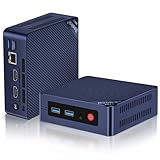
Beelink Mini S12 PRO Mini PC,12 Generation Intel N100 (Up to 3.4GHz) 4C/4T,16GB DDR4 512GB M.2 SSD,Micro PC 4K,Dual Display,WiFi6,BT5.2,2.5G LAN, Low Power Mini Computer
16GB RAM
Last verified 2026-11-12 08:49:09 UTC

MINISFORUM AI X1 Pro-470 Mini PC, AMD Ryzen AI 9 HX470 (12C/24T, up to 5.2 GHz), Radeon 890M, 32 GB DDR5 RAM, 1 TB PCIe 4.0 SSD, 4K Quad-Display, Dual 2,5G LAN, Wi-Fi 7, Bluetooth 5.4, OCuLink
32GB RAM
Last verified 2026-11-13 09:57:36 UTC
As an Amazon Associate, Cloudzat earns from qualifying purchases. Prices and availability can change; Amazon shows the final price for your chosen item.
Home Assistant Mini PC buying guide
| Choice | Best for |
|---|---|
| Beelink Mini S12 Pro | a dedicated 16GB/512GB automation host |
| GMKtec NucBox G3 Plus | a compact alternative with the required storage and connections |
Which Home Assistant Mini PC option should you choose?
For a dedicated 16GB/512GB automation host, choose Beelink Mini S12 Pro.
For a compact alternative with the required storage and connections, choose GMKtec NucBox G3 Plus.
A dedicated Home Assistant computer or a shared home server?
For a computer dedicated to lights, sensors and ordinary automations, start with the Mini S12 Pro rather than a high-end desktop. Installing Home Assistant OS directly keeps the computer focused on that job. You can still choose a mini PC with comfortable memory and storage without paying for gaming graphics or a premium workstation processor.
Choose a more capable host when it will also run demanding camera recording, local voice tools or several virtual machines. Those extra applications can need more memory, storage and compute than the automations themselves. If you only want the dedicated appliance experience, compare Home Assistant Green before buying and configuring a general-purpose computer.
Buy the installed configuration you intend to run
For a straightforward ready-to-use purchase, compare the Mini S12 Pro 16GB/512GB configuration with a complete GMKtec G3 Plus. Check what is actually included: memory, SSD and a suitable power supply. A barebone needs extra parts and is more appropriate when you already own compatible components or want to assemble it.
You do not need an enormous SSD merely to run ordinary automations. Choose enough dependable storage and keep a recoverable Home Assistant backup on another device. If the computer also records cameras, calculate that recording capacity separately instead of assuming the small boot drive should hold everything.
Use CPU headroom for defined services
For ordinary lighting and sensor automations, keep the modest N-series host on the shortlist. Spend more when a job such as camera processing, local voice or several active virtual machines needs the extra capability. A faster processor does not automatically improve a simple automation that is already responsive.
If you expect to add those services, check the host memory and storage options as well as the CPU. If the plan remains a dedicated Home Assistant installation, use the remaining budget for a well-positioned radio, backup and suitable power protection. Those purchases may improve daily reliability more than a processor upgrade.
Plan memory around virtualization boundaries
Memory becomes more important when Proxmox or another hypervisor divides the box among guests. Home Assistant may use a modest allocation, but the host, storage cache and neighboring services all need their own space. A 16GB system can be comfortable for a small lab, while more demanding consolidation may justify 32GB or beyond.
Do not buy memory solely because a listing says the platform supports a large maximum. Installed capacity, module layout and upgrade slots are what affect the current purchase. A Black Friday premium for a well-configured memory option can be worthwhile when it avoids replacing modules immediately.
Storage quality matters more than enormous capacity
Home Assistant itself does not require a multi-terabyte SSD, yet reliable local storage matters because the recorder database, backups and add-ons perform regular writes. A sensible 500GB or 512GB SSD often leaves abundant room for a dedicated installation. Larger drives become useful when the mini PC carries additional workloads.
Treat storage capacity and storage quality separately. A sale bundle with a large but unknown SSD is not automatically better than a smaller configuration using a trusted drive. Keep external backups regardless of drive size, because Black Friday pricing does not change the need for recoverable Home Assistant configuration and data.
Check Ethernet and radio attachment before buying
A Home Assistant host needs a stable network path, and many buyers also need USB for Zigbee or Z-Wave coordinators. Port placement, USB controller behavior and Ethernet speed can therefore matter more than a small processor difference. Network-attached radios reduce some USB concerns, especially with virtualization.
If the mini PC will also serve storage, cameras or several containers, 2.5GbE can be useful even though Home Assistant traffic itself is light. Buy networking for the complete host role. Paying extra for multi-gigabit Ethernet on a dedicated automation box may have no practical return.
Power efficiency is part of the purchase price
An always-on mini PC accumulates electricity cost every day, so a modest reduction in idle power can matter over several years. Low-power CPUs are attractive for Home Assistant because the base workload usually spends substantial time near idle. Higher-performance systems should earn their extra consumption by consolidating services or shortening meaningful tasks.
Black Friday analysis should include the difference between a cheap old platform and an efficient current one. A lower purchase price can be offset by higher power use, more fan noise or less useful I/O. The right value metric is total ownership for the workload, not checkout price in isolation.
Use price history at the exact configuration level
The same mini PC family may be sold with several memory and SSD combinations, and the cheapest variant can distort a broad price comparison. Compare the exact purchasable RAM and SSD configuration rather than an abstract model name.
During the event, verify that the discounted listing still includes the RAM and storage you expect. Sellers can change variations or default options. A genuine tracked low only helps when the product arriving at the door matches the configuration used in your Home Assistant plan.
Choose the mini PC that simplifies the whole stack
The best Home Assistant mini PC can reduce complexity by hosting the right services, exposing the needed network and USB ports, and fitting the backup and power plan. A system that forces docks, extra adapters or a second machine may be less attractive even at a deeper discount.
Include the cost of the mini PC, memory, SSD, radio coordinators, UPS and any networking upgrades. When the stronger host removes another box or solves a known virtualization limit, paying more can be rational. When it only adds unused specifications, the disciplined move is to buy the smaller correct system.
Choose a host and a radio plan that can stay dependable
A dedicated Home Assistant appliance keeps the installation straightforward. A mini PC can be useful when other light services will share the host, but it adds choices about virtualisation, updates and recovery. Keep the installation understandable to the people who will maintain the home. Automation that controls important household routines should have a clear backup and restore procedure.
Zigbee, Z-Wave, Matter and Thread have different roles. A radio adapter is not a replacement for the Home Assistant host. A Thread radio also needs the relevant border-router and controller arrangement; a Zigbee coordinator runs a Zigbee network. Pick the devices and integration path you intend to use before choosing the discounted adapter.
Place radios and backup power where they help
Keep USB radios away from sources of interference and inconvenient server positions. A supported extension or network-connected coordinator can make placement easier when the host is in a cabinet. Check that the chosen coordinator is supported by the integration and firmware you plan to use. Regional frequency requirements are especially important for Z-Wave devices.
For backup power, include the router, switch and any powered coordinator that must stay online alongside the automation host. A UPS keeping only the computer alive may not preserve useful control if the network shuts down. Compare real output watts, expected runtime at your load and the supported shutdown or monitoring connection.
Keep a working recovery copy of the automation system
Save the configuration and a current recoverable backup before replacing the host or radio. Understand which network and radio information must move with the installation. A discounted coordinator is less attractive if the change requires rebuilding a large collection of devices without a practical migration plan. Where possible, test the new component with a small part of the setup first.
Document the location of the host, power supply, radio and network connection. Keep simple manual controls available for important household functions when the automation platform is unavailable. A convenient smart-home installation should remain understandable when a family member needs to restart or recover it.
Buying Home Assistant Mini PC in Canada
For Home Assistant Mini PC in Canada, begin with Beelink Mini S12 Pro for a dedicated 16GB/512GB automation host. Compare GMKtec NucBox G3 Plus when a compact alternative with the required storage and connections is the more useful choice. The Amazon links and prices on this page use Amazon Canada and Canadian dollars. Add delivery and any required components to the amount you are comfortable paying. For a model family with several configurations, use the model name and the installed components together when comparing these two choices. Keep the seller’s order details so you can check that the hardware you receive is the version you chose.
Electricity cost calculator
Replace the example values with your own measurements, capacity or prices.
Questions buyers ask
Which Home Assistant Mini PC option should I choose?
Choose Beelink Mini S12 Pro for a dedicated 16GB/512GB automation host. Choose GMKtec NucBox G3 Plus for a compact alternative with the required storage and connections.
Is an Intel N100 enough for Home Assistant?
For many dedicated Home Assistant OS installations, N100-class hardware provides substantial headroom. Additional services or virtualization can change the recommendation.
Should I buy 16GB or 32GB RAM?
A dedicated Home Assistant host usually needs far less, while multiple VMs and co-hosted services can make 16GB or 32GB more useful.
How much SSD space does Home Assistant need?
Capacity depends on recorder retention and add-ons, but dedicated installations rarely need huge SSDs. Reliability and backups matter more than chasing maximum terabytes.
Is 2.5GbE useful for Home Assistant?
Home Assistant traffic is light. Multi-gigabit Ethernet is more useful when the mini PC also hosts storage, cameras or other network-heavy services.