


Canada · CAD
Best NVMe SSDs for Mini PC Upgrades Canada
For a compatible M.2 2280 NVMe slot, start with WD_BLACK SN7100; compare Samsung 990 PRO for a higher-end drive and sustained work. Choose Crucial P310 2230 for a supported 2230 slot or Corsair MP600 MICRO for a supported 2242 slot. Match length, interface and clearance before choosing capacity. Back up your files before replacing the system drive.
- Read the slot specification. Match NVMe or SATA, supported length and mounting point.
- Check clearance. Use a drive and thermal arrangement that fit the case.
- Prepare a backup. Keep the old drive until the replacement is fully working.
Choose an SSD that fits your slot
WD_BLACK SN7100, M.2 2280
First comparison for a supported full-length 2280 NVMe upgrade. Choose capacity around your applications and working files.

500 GB · M.2 2280 NVMe · CA$480.00/TB
CA$240.00Price checked 22.11.2026 02:37 UTCBuy on Amazon ↗Specifications and model details ↗Samsung 990 PRO, M.2 2280
Higher-end 2280 alternative for demanding storage work. Use a version and thermal arrangement that fit the compact chassis.
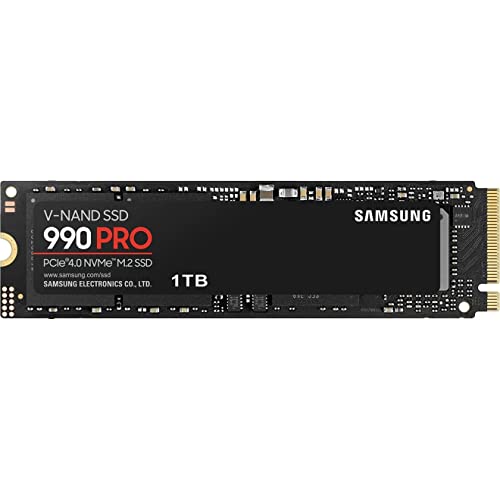
1000 GB · M.2 2280 NVMe · CA$439.98/TB
CA$439.98Price checked 22.11.2026 02:53 UTCBuy on Amazon ↗Specifications and model details ↗Crucial P310, M.2 2230
Short-drive choice for an explicitly supported 2230 NVMe position. It is not a universal substitute for any short M.2 socket.

2000 GB · M.2 2230 NVMe · CA$266.74/TB
CA$533.47Price checked 22.11.2026 03:08 UTCBuy on Amazon ↗Specifications and model details ↗Corsair MP600 MICRO, M.2 2242
2242 NVMe alternative for a matching slot. Confirm the interface and screw position as well as the length.

2000 GB · M.2 2242 NVMe · CA$279.95/TB
CA$559.90Price checked 22.11.2026 03:40 UTCBuy on Amazon ↗Specifications and model details ↗NVMe SSD prices and capacity
M.2 2280
WD_Black SN7100 500GB NVMe SSD - Gen4 PCIe, M.2 2280, Up to 6,800 MB/s Read Speed, Next Gen TLC 3D NAND, for Laptops, Handheld Gaming Devices - WDS50…
500 GB · M.2 2280 NVMe · CA$480.00/TB
CA$240.00Price checked 22.11.2026 02:37 UTCBuy on Amazon ↗M.2 2280
SAMSUNG 990 PRO SSD 1TB PCIe Gen4 NVMe M.2 Internal Solid State Hard Drive,Upto 7,450MB/s,Fast Speed for Gaming,Heat Control,Direct Storage&Memory Ex…
1000 GB · M.2 2280 NVMe · CA$439.98/TB
CA$439.98Price checked 22.11.2026 02:53 UTCBuy on Amazon ↗M.2 2230
Crucial P310 2TB M.2 2230 SSD, PCIe Gen4 NVMe, Up to 7,100MB/s, Ideal for Steam Deck, ASUS ROG Ally, MSI Claw, Mini PCs & Ultrabooks, Solid State Dri…
2000 GB · M.2 2230 NVMe · CA$266.74/TB
CA$533.47Price checked 22.11.2026 03:08 UTCBuy on Amazon ↗M.2 2242
Corsair MP600 Micro 2TB M.2 NVMe PCIe x4 Gen4 SSD – M.2 2242 – Up to 7,000MB/sec Sequential Read – High-Density 3D TLC NAND – Compatible with Lenovo …
2000 GB · M.2 2242 NVMe · CA$279.95/TB
CA$559.90Price checked 22.11.2026 03:40 UTCBuy on Amazon ↗
M.2 2280
Crucial P310 500GB 2280 PCIe Gen4 3D NAND NVMe M.2 SSD – Up to 6,600MB/s – Shift up to Gen4, with Acronis Offer, Internal Solid State Drive (PC) – CT…
500 GB · M.2 2280 NVMe · CA$391.26/TB
CA$195.63Price checked 18.11.2026 23:05 UTCBuy on Amazon ↗
M.2 2280
WD_Black SN7100 1TB NVMe SSD - Gen4 PCIe, M.2 2280, Up to 7,250 MB/s Read Speed, Up to 6,900 MB/s Write Speed, Next Gen TLC 3D NAND, for Laptops, Han…
1000 GB · M.2 2280 NVMe · CA$292.00/TB
CA$292.00Price checked 22.11.2026 02:37 UTCBuy on Amazon ↗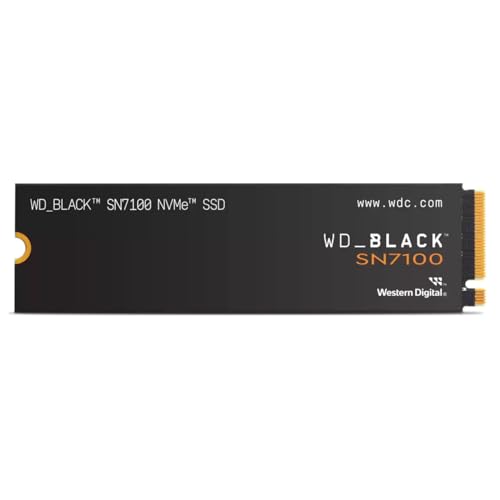
M.2 2280
WD Black SN7100 NVMe SSD 2TB
2000 GB · M.2 2280 NVMe · CA$210.00/TB
CA$419.99Price checked 21.11.2026 01:19 UTCBuy on Amazon ↗
M.2 2280
SAMSUNG 990 PRO SSD 2TB PCIe Gen4 NVMe M.2 Internal Solid State Hard Drive, Upto 7,450MB/s, Fast Speed for Gaming Heat Control, Direct Storage and Me…
2000 GB · M.2 2280 NVMe · CA$334.13/TB
CA$668.25Price checked 22.11.2026 02:53 UTCBuy on Amazon ↗SSD compatibility and migration
Choose the physical size before the brand
M.2 2280, 2242 and 2230 describe different board lengths. The final digits correspond to 80, 42 and 30 millimetres respectively, while these examples are 22 millimetres wide. Check the service manual and mounting point. A free socket is not proof that a drive can be secured correctly or that the cover will close.
An M.2 socket may also have a particular purpose or interface. Do not put an SSD into a wireless-card position or assume M.2 SATA and NVMe are interchangeable. The SN7100 and 990 PRO are full-length NVMe choices; P310 2230 and MP600 MICRO address specific shorter positions. Buy for the actual slot rather than the smallest price.
Choose useful capacity and compare price per terabyte
1TB is a useful starting comparison for applications and a moderate working library. Choose 2TB when games, photos, video or virtual machines make that space useful. Leave working room for updates and temporary files instead of filling the new drive immediately. More capacity can be a better everyday upgrade than chasing a maximum sequential transfer number.
Compare the complete drive price and cost per terabyte for the capacity you will use. A cheap smaller drive can be expensive per unit of space. Performance also depends on the host connection, workload and cooling, so a faster advertised drive may not run at its maximum in your Mini PC. Keep external backup storage separate from this capacity decision.
Clone the old drive or install a clean system?
Cloning is useful when you want to retain applications and settings, provided the tool supports the existing partition layout and destination. A clean installation is useful when you want a fresh start and can restore applications and files. In both cases, keep an independent backup and encryption recovery information before changing the boot drive.
If you use a USB enclosure during migration, match it to the SSD’s interface and size. That enclosure is a tool, not the internal replacement drive. Do not erase the original until the new installation boots independently and your documents, applications and recovery method have been checked. Keep track of which physical drive contains the only working copy.
Fit the thermal layout and verify the result
A desktop-style tall heatsink may not fit a Mini PC. Use the model’s documented thermal pad and clearance arrangement; do not stack cooling parts until the cover presses on the drive. The correct thickness matters as well as the screw position. Follow the manufacturer’s procedure for any protective film on a supplied thermal pad.
After installation, confirm capacity, interface detection and normal operation under a real file transfer. Check that sleep, restart and the boot order still work. If performance falls sharply during sustained work, investigate the host connection, free space and temperature rather than assuming the SSD is faulty. Keep the old drive intact until the migration is complete.
Identify the exact machine before changing it
Find the model code and hardware revision on the case or purchase record, then use the matching service information. Mini PCs with similar names can have different memory, storage and cooling layouts. Record the current RAM and SSD configuration before ordering parts. A supported maximum capacity is not a statement of what is installed, and an upgrade shown for another revision is not proof that it fits your machine.
Start with a problem you want to solve. More RAM helps when memory pressure is the limit; a larger SSD helps when storage capacity is the limit. Neither automatically fixes a failing fan, a bad cable or a software problem. Check system monitoring and repeat the task that causes trouble before spending money. A small, well-targeted change is often better value than replacing the whole computer without finding the cause.
Protect your work and keep a recovery route
Make an independent backup of important files before opening the case or changing the boot drive. Confirm that the backup can be read from another device. Keep any drive-encryption recovery key somewhere secure and accessible without the Mini PC. Save operating-system recovery media, application licence details and the correct network driver where needed. These preparations turn an interrupted upgrade into a recoverable task rather than a lost working day.
Shut the system down, disconnect external power and follow the manufacturer’s disassembly instructions. Use appropriate electrostatic precautions and keep track of screw locations and thermal materials. Do not force a connector, bend a module or improvise a heatsink that prevents the case from closing. A compact computer can place antennas, fan leads and ribbon cables close to the cover. Stop when the documented procedure does not match what is in front of you.
Verify the result before relying on it
After the change, confirm the detected capacity and run the workload that prompted the upgrade. Test sleep, wake and a full restart as well as a short benchmark. A system that boots is not necessarily stable under sustained memory or storage use. Keep the original parts until the replacement has passed useful checks and you have confirmed that your files and applications work. Change one thing at a time so a new problem has an identifiable cause.
If a machine is still covered by support, contact the seller or manufacturer before taking on undocumented repairs. Warranty terms and service routes depend on the supplier and country; keep the invoice and serial number. When replacement becomes sensible, choose a model with the service access, memory capacity and support you actually need. A lower sticker price is poor value if it repeats the limitation you are trying to escape.
Buying and support in Canada
Use Canadian-dollar prices when comparing these systems. Include delivery and the applicable provincial or territorial taxes in your total, and check whether the seller ships from Canada or imports the machine. A cross-border offer can have a different return process, delivery schedule or additional charges. Do not compare an American promotional price with a Canadian delivered price as though the currency and purchase conditions were identical.
Confirm the included adapter, power lead and operating-system edition, then keep the invoice and serial number. For work or study, choose a support route you can use if the computer fails during a busy week. An alternative should preserve the required memory, graphics and connections, even when the brand changes. Add any missing display, keyboard, webcam or backup drive to the budget before deciding whether the compact system is good value.
Questions buyers ask
Which SSD should I start with for a 2280 NVMe slot?
Compare WD_BLACK SN7100 for a general upgrade and Samsung 990 PRO for demanding storage work. Confirm the Mini PC’s interface and thermal clearance.
What should I buy for a shorter slot?
Compare Crucial P310 2230 for a supported 2230 position or Corsair MP600 MICRO for a supported 2242 NVMe position. Length alone does not establish compatibility.
Will a faster SSD make every task faster?
No. It helps when storage is the limit. The processor, memory, host connection and workload can determine whether a faster drive changes the experience.
Specifications and software guidance
WD_BLACK SN7100 ↗Samsung 990 PRO ↗Crucial P310 2230 ↗Corsair MP600 MICRO ↗Microsoft: BitLocker recovery key ↗Related Mini PC guides
Mini PC RAM Upgrade Guide CanadaMini PC Overheating: Causes and Fixes CanadaAre Mini PCs Reliable? Warranty and Buying Advice CanadaCompare Mini PC pricesAs an Amazon Associate, Cloudzat earns from qualifying purchases. Prices and availability can change.