


Canada · CAD
Best Mini PCs for Video Editing Canada
Choose a SER8 with 32GB for straightforward editing and a useful everyday desktop. Choose an AI X1 Pro-370 with 64GB for heavier multitasking and larger projects. Choose an AtomMan G7 Pro when NVIDIA GPU effects are important. For demanding grading, noise reduction or a required plugin, compare the specific GPU and application support before buying.
Which model to choose
Beelink SER8, 32GB
Best starting point for simpler timelines and a mixed-use desk. Choose the actual codec and project size before expecting smooth native playback of every camera format.

32 GB RAM · 1000 GB SSD
CA$908.60Price checked 01.11.2026 06:33 UTCBuy on Amazon ↗Specifications and model details ↗MINISFORUM AI X1 Pro-370, 64GB
Best flexible integrated option for larger projects and several applications. Replaceable RAM and multiple SSD positions are useful for an evolving editing desk.
See model and buying options ↗MINISFORUM AtomMan G7 Pro, 32GB or more
Best NVIDIA direction here for supported GPU-heavy effects. Its RTX 5070 Laptop GPU has an 8GB VRAM budget, which still needs to fit the project.
See model and buying options ↗Amazon prices and configurations
Ryzen 7 8745HS
Beelink SER8 Mini Pc,AMD Ryzen 7 8745HS (up to 4.9GHz),32GB DDR5 RAM & 1TB PCIe4.0 SSD,AMD Radeon 780M,Mini Computer Support 4K Triple Display(HDMI+D…
32 GB RAM · 1000 GB SSD
CA$908.60Price checked 01.11.2026 06:33 UTCBuy on Amazon ↗
Ryzen AI 9 HX 370
MINISFORUM AI X1 Pro-370 AMD Ryzen AI 9 HX370 Mini PC up to 5.1GHz 12C/24T, AMD Radeon 890M Mini Desktop Computer, 32GB DDR5 1TB PCIe 4.0 SSD, 8K Qua…
32 GB RAM · 1000 GB SSD
CA$1,719.99Price checked 01.11.2026 10:59 UTCBuy on Amazon ↗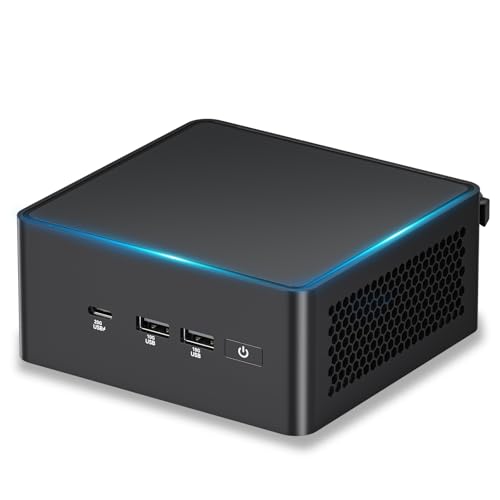
Core Ultra H
ASUS NUC 15 Pro AI Mini PC, Intel Core Ultra5 225H, 32GB DDR5 RAM, 1TB SSD | 14C/14T, Up to 4.9GHz, Intel Arc GPU Graphics/8K Quad Display/WiFi7/BT5.…
32 GB RAM · 1000 GB SSD
CA$1,759.00Price checked 01.11.2026 06:33 UTCBuy on Amazon ↗
AMD Ryzen
Reatan Gaming Mini PC, Ryzen 7 255, 48GB RAM 2TB SSD, Oculink, Radeon 780M | 5600MHz DDR5 & PCIe 4.0 SSD, 2x 8K USB4, HDMI 2.1, Wi-Fi 7, BT 5.4, Quad…
48 GB RAM · 2000 GB SSD
CA$1,989.00Price checked 01.11.2026 10:59 UTCBuy on Amazon ↗
Ryzen AI Max+ 395
GMKtec EVO-X2 AI Mini PC AMD Ryzen Al Max+ 395 Up to 5.1GHz, 16C/32T | Mini Gaming Computers 64GB LPDDR5X 8000MHz (8GB*8) 1TB PCIe 4.0 SSD, Quad Scre…
64 GB RAM · 1000 GB SSD
CA$3,180.45Price checked 01.11.2026 09:22 UTCBuy on Amazon ↗
Core Ultra
ROG NUC 2025 Mini PC with Intel Core Ultra 7 Processor, NVIDIA GeForce RTX 5060, 32GB DDR5, 1TB SSD, 4K Ready, WiFi 7, Thunderbolt 5, RGB Lighting Ef…
32 GB RAM · 1000 GB SSD
CA$3,316.61Price checked 01.11.2026 06:27 UTCBuy on Amazon ↗
Core Ultra H
Intel NUC 14 Pro,for ASUS NUC 14 Pro AI Mini Pc, Ultra 7 155H (16C/22T, Up to 4.8GHz) Mini Computer, 32GB Ram & 2TB PCIe 4.0 SSD, Intel Arc GPU/Type…
32 GB RAM · 2000 GB SSD
CA$1,839.99Price checked 01.11.2026 06:27 UTCBuy on Amazon ↗
AMD Ryzen
MINISFORUM UM890 Pro Mini PC AMD Ryzen 9 8945HS(8C/16T, up to 5.2GHz) 32GB DDR5 1TB PCIe4.0 SSD, 2xUSB4(PD 8K)|1xHDMI|1xDP Four Outputs, 2x RJ45, BT5…
32 GB RAM · 1000 GB SSD
CA$2,400.14Price checked 01.11.2026 07:56 UTCBuy on Amazon ↗Buying guide
Match the editor to the project you deliver
The SER8 with 32GB is our first comparison for simpler edits and a computer that also handles ordinary desktop tasks. Move to the AI X1 Pro-370 with more memory when projects and simultaneous applications grow. The G7 Pro is the dedicated NVIDIA option when supported effects and plugins benefit from that path. A short social video and a complex documentary do not have the same requirements, even if both are exported in 4K.
Write down your editing application, source codecs, timeline resolution, effects and delivery format. This makes the comparison specific enough to be useful. A powerful CPU name alone does not confirm hardware decoding of the particular camera footage you shoot.
Decode, edit and export are separate tasks
Source decoding affects playback, effects use different parts of the computer, and export can use another hardware path. Check support for the exact codec, bit depth and chroma format in your application and edition. A broad H.264 or H.265 claim does not establish every variation of that format. More RAM cannot add a missing codec acceleration feature.
Proxy or optimized media can make a sensible smaller computer useful for larger source files. Include the time and storage needed to create them in the workflow. If you require immediate native playback of demanding footage, compare a configuration tested with that footage rather than treating proxies as a surprise workaround after purchase.
Choose graphics for the effects you use
Basic cuts, titles, color work and complex noise reduction can load the hardware differently. The G7 Pro offers a supported NVIDIA direction, but its dedicated VRAM is finite. A larger shared-memory integrated system has different strengths and does not become a universal CUDA replacement. Check third-party plugins as well as the main editor.
For effects that need more graphics memory, compare a higher-VRAM compact configuration or a conventional workstation. A tower may provide a better graphics upgrade path. Choose the small form when the desk genuinely needs it, not because a product listing groups every creative application under one label.
Build a working media and backup layout
Keep active media and cache on storage fast enough for the project. A second internal SSD can help separate files where the exact model supports it. Check the speed and compatibility of external storage as part of the path, including the cable. A fast SSD connected through a slower port cannot deliver its internal headline speed.
Back up camera originals and project files independently before deleting the recording media. A cache can be rebuilt; the only copy of a shoot may not be replaceable. Test opening, playback, effects and a representative export during initial setup. That complete cycle is the best way to judge whether the chosen Mini PC supports your actual editing work.
Choose capacity around a real project
Use a typical project as the starting point: its resolution, source format, number of layers or tracks, effects and delivery format. Opening the application is a much smaller task than finishing that project comfortably. For a new creative Mini PC, 32GB is a practical starting tier. Compare 64GB when you work with large projects, several creative applications or memory-heavy effects. More RAM helps avoid memory pressure, but it does not turn a weak graphics processor into a strong one.
Check the application version and its supported CPU, GPU and operating system. An integrated GPU shares system memory; a dedicated GPU has its own VRAM and different software support. Some effects and plugins require a specific backend. If a required renderer or plugin needs CUDA, choose an NVIDIA system instead of assuming that an AMD or Intel AI label provides the same feature. Match the computer to the work you already need to complete.
Separate the working copy from the backup
A fast internal SSD helps with applications, cache and active projects. A second drive can separate media or sample libraries, provided the exact computer has a suitable free slot. Check physical size, PCIe connection and cooling clearance before planning that expansion. More storage makes a working environment convenient, but it is not a backup when every copy is inside one machine. Keep original material and completed work on an independent device or trusted remote backup.
Choose ports for the actual peripherals: card reader, audio interface, external storage, calibrated display and network. USB-C describes a connector, so verify the supported data and video functions of each port. Fast networking becomes useful when the rest of the storage path can sustain it. A 10GbE port does not make a slow NAS or a single hard drive behave like a high-end local SSD. Include any dock or adapter in the total price.
Judge sustained work and support
A short export or small demo may hide thermal and memory limits. During setup, open a representative project, play or edit it, apply the effects you normally use and export or render a useful section. Keep the same application version and settings when comparing alternatives. Note responsiveness, fan behavior and memory use as well as completion time. A stable, comfortable working session matters more than one unusually favorable benchmark result.
For paid work, consider the cost of downtime and recovery. Keep licence details, project dependencies and a way to restore the machine. A system with replaceable RAM and storage offers a different ownership path from one with soldered memory. Buy a larger fixed-memory configuration only when its capacity solves a real need. Choose a conventional workstation when you need a replaceable discrete GPU, several expansion cards or cooling headroom that a compact chassis cannot provide.
Buying and support in Canada
Use Canadian-dollar prices when comparing these systems. Include delivery and the applicable provincial or territorial taxes in your total, and check whether the seller ships from Canada or imports the machine. A cross-border offer can have a different return process, delivery schedule or additional charges. Do not compare an American promotional price with a Canadian delivered price as though the currency and purchase conditions were identical.
Confirm the included adapter, power lead and operating-system edition, then keep the invoice and serial number. For work or study, choose a support route you can use if the computer fails during a busy week. An alternative should preserve the required memory, graphics and connections, even when the brand changes. Add any missing display, keyboard, webcam or backup drive to the budget before deciding whether the compact system is good value.
Questions buyers ask
Which Mini PC should I compare for simple video editing?
Start with a SER8 with 32GB for modest timelines. Choose an AI X1 Pro-370 for more memory and expansion, or a G7 Pro when NVIDIA effects are important.
Does 4K output guarantee smooth 4K editing?
No. Output resolution, source decoding, effects and export are separate capabilities. Match the codec and project to the application and hardware.
When is a tower the better choice?
When you need more dedicated VRAM, a replaceable GPU or sustained performance that is poor value in a small enclosure.
Specifications and software guidance
Beelink SER8 ↗MINISFORUM AI X1 Pro-370 ↗MINISFORUM AtomMan G7 Pro ↗Adobe Premiere requirements ↗Blackmagic Design support ↗Related Mini PC guides
Best Mini PCs for DaVinci Resolve CanadaBest Mini PCs for Premiere Pro CanadaBest Mini PCs for Photo Editing CanadaBest Mini PCs for Music Production CanadaCompare Mini PC pricesAs an Amazon Associate, Cloudzat earns from qualifying purchases. Prices and availability can change.