


Canada · CAD
Best Mini PCs for Premiere Pro Canada
Choose an ASUS NUC 14 Pro with 32GB for an Intel-based Premiere desk when its supported media engine suits your footage. Choose the AtomMan G7 Pro for NVIDIA effects and a dedicated GPU. Choose an AI X1 Pro-370 with 64GB for a compatible integrated workflow with more memory and SSD expansion.
Which model to choose
ASUS NUC 14 Pro, 32GB
Best Intel-based starting point for supported codec workflows and a useful office-and-editing desk. Check the exact source format rather than assuming all footage uses hardware decoding.

32 GB RAM · 2000 GB SSD
CA$1,839.99Price checked 04.11.2026 22:05 UTCBuy on Amazon ↗Specifications and model details ↗MINISFORUM AtomMan G7 Pro, 32GB or more
Best NVIDIA direction for supported effects and plugins. Match the project to its RTX 5070 Laptop GPU and 8GB VRAM.
See model and buying options ↗MINISFORUM AI X1 Pro-370, 64GB
Best adaptable integrated choice for memory-heavy multitasking. Use it when your Premiere workflow and plugins support the platform.
See model and buying options ↗Amazon prices and configurations
Core Ultra H
Intel NUC 14 Pro,for ASUS NUC 14 Pro AI Mini Pc, Ultra 7 155H (16C/22T, Up to 4.8GHz) Mini Computer, 32GB Ram & 2TB PCIe 4.0 SSD, Intel Arc GPU/Type…
32 GB RAM · 2000 GB SSD
CA$1,839.99Price checked 04.11.2026 22:05 UTCBuy on Amazon ↗
Ryzen 7 8745HS
Beelink SER8 Mini Pc,AMD Ryzen 7 8745HS (up to 4.9GHz),32GB DDR5 RAM & 1TB PCIe4.0 SSD,AMD Radeon 780M,Mini Computer Support 4K Triple Display(HDMI+D…
32 GB RAM · 1000 GB SSD
CA$908.60Price checked 12.11.2026 18:37 UTCBuy on Amazon ↗
Ryzen 7 8845HS
Beelink SER8 Mini PC AMD Ryzen 7 8845HS(Max 5.1GHz), 32GB DDR5 1TB PCIE4.0 SSD Mini Computer, AMD Radeon 780M Graphics 12 core 2700MHz Gaming PC,Trip…
32 GB RAM · 1000 GB SSD
CA$965.70Price checked 22.11.2026 00:29 UTCBuy on Amazon ↗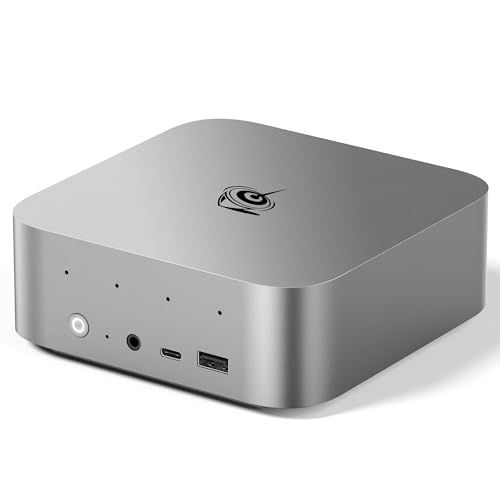
AMD Ryzen
Beelink SER9 MAX Mini PC AMD Ryzen 7 H255(UP to 4.9GHz), 32GB DDR5 1TB PCIE4.0 SSD, AMD Radeon 780M Graphics 12core 2600MHz Gaming PC, 10Gbps LAN/USB…
32 GB RAM · 1000 GB SSD
CA$1,101.70Price checked 22.11.2026 03:24 UTCBuy on Amazon ↗
Core Ultra H
GEEKOM IT15 AI Mini PC Intel Core Ultra 9 285H, 32GB DDR5 RAM, 1TB PCIe SSD | 3-Year Support, Wi-Fi 7, BT5.4, Quad 8K Display, Office, Video Editing,…
32 GB RAM · 1000 GB SSD
CA$1,671.12Price checked 23.11.2026 16:51 UTCBuy on Amazon ↗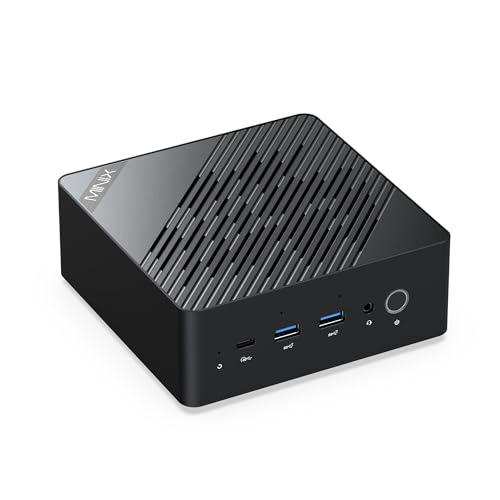
Ryzen AI 9 HX 370
MINIX ER937-AI Mini PC, AMD Ryzen AI 9 HX 370 (80TOPS), Radeon 890M, 32GB DDR5/ 1TB PCIe 4.0 SSD/Fingerpint Lock Mini Gaming PC/Wi-Fi 7/Dual 2.5G LAN…
32 GB RAM · 1000 GB SSD
CA$1,837.40Price checked 22.11.2026 08:35 UTCBuy on Amazon ↗
Ryzen AI Max+ 395
GMKtec EVO-X2 AI Mini PC AMD Ryzen Al Max+ 395 Up to 5.1GHz, 16C/32T | Mini Gaming Computers 64GB LPDDR5X 8000MHz (8GB*8) 1TB PCIe 4.0 SSD, Quad Scre…
64 GB RAM · 1000 GB SSD
CA$3,180.45Price checked 23.11.2026 16:51 UTCBuy on Amazon ↗
Core Ultra
ROG NUC 2025 Mini PC with Intel Core Ultra 7 Processor, NVIDIA GeForce RTX 5060, 32GB DDR5, 1TB SSD, 4K Ready, WiFi 7, Thunderbolt 5, RGB Lighting Ef…
32 GB RAM · 1000 GB SSD
CA$3,379.36Price checked 15.11.2026 20:25 UTCBuy on Amazon ↗Buying guide
Choose the configuration for your media
The NUC 14 Pro is our Intel-based starting comparison for a Premiere desk that also performs general work. The G7 Pro is the NVIDIA option when GPU effects or plugins drive the purchase. The AI X1 Pro-370 with more RAM suits a compatible integrated workflow with several applications and expandable storage. The correct direction depends on what the timeline contains, not just its final export resolution.
Write down camera format, bit depth, chroma sampling and the main effects before choosing. A computer can have a strong CPU and still lack a hardware decoding path for a particular format. Compare the exact application version and GPU support instead of relying on a general claim that the computer is good for video editing.
Understand the role of Intel and NVIDIA acceleration
Intel media engines and NVIDIA graphics can assist different parts of a supported Premiere workflow. Their usefulness depends on codec, application settings and hardware generation. The presence of Quick Sync does not confirm every H.264 or HEVC variation. Similarly, a CUDA-capable GPU does not make every export or effect GPU-bound.
Check Adobe’s current requirements and acceleration guidance, then test your footage. Keep drivers appropriate to the exact machine and application. If a third-party plugin specifies a GPU family or memory minimum, include that requirement. Do not assume that general application support guarantees each installed extension.
Budget RAM and storage for the full project
For a new editing desk, 32GB is a practical starting comparison, while 64GB gives more room for heavier multitasking and larger projects. More memory is especially useful when other applications remain open, but it does not add missing media-engine features. Check whether the chosen machine can accept a later memory upgrade before choosing a lower initial tier.
Keep active media, preview files and exports in a storage plan with enough free capacity. Proxy creation can help a smaller machine, but it also takes time and disk space. Include that process in your expectations. A second internal drive can be useful when the computer supports it; a separate backup remains necessary.
Use a complete editing cycle as the acceptance test
Import a representative project, play its demanding sections, apply the usual effects and export a sample delivery. Observe dropped frames, responsiveness, memory use and fan behavior. Use the same settings when comparing another computer. A quick export of a simple clip cannot validate a complex job with unsupported media or plugins.
If the preferred NUC configuration is unavailable, keep the needed codec and display support in the alternative. If the NVIDIA GPU is essential, choose another complete NVIDIA system with sufficient VRAM rather than a cheaper integrated PC. When the compact premium becomes large, compare a tower that provides the required performance and a clearer graphics upgrade path.
Choose capacity around a real project
Use a typical project as the starting point: its resolution, source format, number of layers or tracks, effects and delivery format. Opening the application is a much smaller task than finishing that project comfortably. For a new creative Mini PC, 32GB is a practical starting tier. Compare 64GB when you work with large projects, several creative applications or memory-heavy effects. More RAM helps avoid memory pressure, but it does not turn a weak graphics processor into a strong one.
Check the application version and its supported CPU, GPU and operating system. An integrated GPU shares system memory; a dedicated GPU has its own VRAM and different software support. Some effects and plugins require a specific backend. If a required renderer or plugin needs CUDA, choose an NVIDIA system instead of assuming that an AMD or Intel AI label provides the same feature. Match the computer to the work you already need to complete.
Separate the working copy from the backup
A fast internal SSD helps with applications, cache and active projects. A second drive can separate media or sample libraries, provided the exact computer has a suitable free slot. Check physical size, PCIe connection and cooling clearance before planning that expansion. More storage makes a working environment convenient, but it is not a backup when every copy is inside one machine. Keep original material and completed work on an independent device or trusted remote backup.
Choose ports for the actual peripherals: card reader, audio interface, external storage, calibrated display and network. USB-C describes a connector, so verify the supported data and video functions of each port. Fast networking becomes useful when the rest of the storage path can sustain it. A 10GbE port does not make a slow NAS or a single hard drive behave like a high-end local SSD. Include any dock or adapter in the total price.
Judge sustained work and support
A short export or small demo may hide thermal and memory limits. During setup, open a representative project, play or edit it, apply the effects you normally use and export or render a useful section. Keep the same application version and settings when comparing alternatives. Note responsiveness, fan behavior and memory use as well as completion time. A stable, comfortable working session matters more than one unusually favorable benchmark result.
For paid work, consider the cost of downtime and recovery. Keep licence details, project dependencies and a way to restore the machine. A system with replaceable RAM and storage offers a different ownership path from one with soldered memory. Buy a larger fixed-memory configuration only when its capacity solves a real need. Choose a conventional workstation when you need a replaceable discrete GPU, several expansion cards or cooling headroom that a compact chassis cannot provide.
Buying and support in Canada
Use Canadian-dollar prices when comparing these systems. Include delivery and the applicable provincial or territorial taxes in your total, and check whether the seller ships from Canada or imports the machine. A cross-border offer can have a different return process, delivery schedule or additional charges. Do not compare an American promotional price with a Canadian delivered price as though the currency and purchase conditions were identical.
Confirm the included adapter, power lead and operating-system edition, then keep the invoice and serial number. For work or study, choose a support route you can use if the computer fails during a busy week. An alternative should preserve the required memory, graphics and connections, even when the brand changes. Add any missing display, keyboard, webcam or backup drive to the budget before deciding whether the compact system is good value.
Questions buyers ask
Which Mini PC should I compare for Premiere Pro?
Start with an NUC 14 Pro for a supported Intel media workflow, a G7 Pro for NVIDIA effects, or an AI X1 Pro-370 for compatible memory-heavy integrated work.
Does Quick Sync accelerate every camera format?
No. Codec variation, hardware generation and the Premiere version matter. Check your exact source format and supported decoding path.
Is 64GB always faster than 32GB?
It helps when the project or simultaneous applications need the capacity. It does not automatically improve a workload already fitting comfortably in 32GB.
Specifications and software guidance
Adobe Premiere requirements ↗ASUS NUC 14 Pro ↗MINISFORUM AtomMan G7 Pro ↗MINISFORUM AI X1 Pro-370 ↗Related Mini PC guides
Best Mini PCs for Video Editing CanadaBest Mini PCs for DaVinci Resolve CanadaBest Mini PCs for Photo Editing CanadaBest Mini PCs for Music Production CanadaCompare Mini PC pricesAs an Amazon Associate, Cloudzat earns from qualifying purchases. Prices and availability can change.