


BLACK FRIDAY 2026
Black Friday offers and current Amazon prices
Amazon prices, discounts and promotion labels below reflect the last successful check shown on each card. The price and availability at Amazon checkout apply. As an Amazon Associate, Cloudzat earns from qualifying purchases.
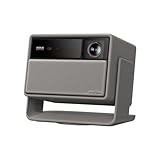
XGIMI HORIZON 20 Pro 4K RGB Triple Laser Home Projector, 4100 ISO Lumens | Google TV with Licensed Netflix, Optical Zoom & Lens Shift, IMAX Enhanced, Dolby Vision, 20,000:1 Contrast, 1ms Input Lag
$1,499.00
−25% · $1,999.00
Amazon reference price
Buy on AmazonChecked: 2026-11-25 15:12:50 UTC
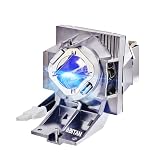
ABITAN 5J.JNL05.001 for Benq TK700 TK700ST TK700STi W1800 W1800i Replacement Projector Lamp with Housing (Original Bulb Inside).
$127.19
Buy on AmazonChecked: 2026-11-25 15:42:15 UTC
Which projector should you buy?
If you want a projector for PS5 or other consoles, the first question is not just 4K. It is how the projector handles refresh rate, latency, and your room. A model can look impressive on a spec sheet and still be the wrong fit if it only performs well in one gaming mode or needs more depth than your room allows.
Power and placement matter as much as picture quality. Some models are mains-powered only, some have built-in batteries for portable use, and some need a short-throw or ultra-short-throw setup that changes where the projector sits and what screen you need. Streaming also matters: Google TV, Netflix certification, HDMI 2.1, and built-in apps are model-specific, not automatic.
For most PS5 buyers, the strongest named alternatives are BenQ X3100i for low-lag console gaming, BenQ TH690ST for a cheaper short-throw gaming setup, and Epson Home Cinema LS11000 if you want a more cinematic projector that still supports 4K/120Hz input. If your room is shallow, Hisense PX3-PRO is the UST-style option to compare instead of a conventional throw model.
Our recommendation
Buy the BenQ X3100i if you want the most straightforward PS5 gaming choice in this group. Its 4.2 ms mode at 1080p/240Hz, 8.3 ms at 1080p/120Hz, and 16.7 ms at 4K/60Hz make the important tradeoff clear: the lowest latency comes from the highest refresh gaming modes, not from 4K/60 alone. That matters because PS5 gaming often benefits more from responsiveness than from forcing every game to run in 4K/60.
Buy the BenQ TH690ST only if you specifically need short-throw placement and want to spend less, but accept that its 4K/60 input lag is much higher than its 1080p/120Hz mode. That is a real compromise, not a minor one. It is a better fit for a room where placement is tight than for someone who expects one projector to do everything equally well at every signal mode.
Skip any model that sounds good for gaming but blurs the difference between 4K/60 responsiveness and 1080p/120Hz or 1080p/240Hz performance. For a mixed movie-and-game room, the Epson Home Cinema LS11000 is the worthwhile upgrade because it supports native 4K input up to 120Hz and stays under 20 ms input lag, while also being more cinematic than the gaming-first BenQs. If you need ultra-short-throw placement, compare Hisense PX3-PRO or XGIMI AURA 2 instead of standard-throw models.
Choose by your setup
| Use case | Pick | Why it fits | Watch out for |
|---|---|---|---|
| Competitive PS5 gaming | BenQ X3100i | 4.2 ms at 1080p/240Hz and 8.3 ms at 1080p/120Hz | 4K/60 is much slower at 16.7 ms |
| Cheaper short-throw gaming | BenQ TH690ST | 8.3 ms at 1080p/120Hz with short-throw placement | 33.4 ms at 4K/60 is a real compromise |
| Cinematic gaming plus movies | Epson Home Cinema LS11000 | Native 4K input up to 120Hz and below 20 ms lag | Dark-room performance still matters |
| Ultra-short-throw living room | Hisense PX3-PRO | UST placement, Xbox certification, HDMI 2.1, ALR-screen pairing | Needs cabinet/screen geometry to work |
| Portable streaming and travel | XGIMI MoGo 4 Laser | Built-in battery and licensed Netflix | Not a high-brightness home-theater projector |
| Bright-room conventional throw | XGIMI HORIZON 20 Pro | 4K resolution, 4100 ISO lumens, lens shift and optical zoom | Still needs proper room placement |
| UST movie-first upgrade | XGIMI AURA 2 | 0.177:1 throw and 4K laser UST design | Needs UST-compatible screen and placement |
What makes this a worthwhile Black Friday purchase?
The best deal is not always the cheapest sticker price. For gaming projectors, value comes from the signal mode you will actually use, the room depth you have, and whether you need short throw or UST placement. A discounted 4K projector with poor 4K/60 latency can still be the wrong buy for PS5 if you mostly play fast action games.
Watch for bundles that include a screen only when the screen type matches the projector. UST models such as Hisense PX3-PRO and XGIMI AURA 2 benefit from UST/ALR-style screens, while standard-throw and short-throw models need different placement assumptions. A screen bundled for the wrong geometry can erase the savings in practical use.
For lower-cost shopping, the BenQ TH690ST is the honest budget gaming option because it keeps 1080p/120Hz responsiveness at 8.3 ms, but you should not buy it expecting 4K/60 to behave the same way. For a worthwhile upgrade, Epson Home Cinema LS11000 is the more cinematic step up because it supports native 4K input up to 120Hz. If you want a flagship gaming projector with more room flexibility, BenQ X3100i is the cleaner deal than chasing a brighter but less responsive compromise.
Direct model choice for PS5 gaming
If your priority is competitive play, choose BenQ X3100i. The key reason is not simply that it supports 4K, but that it offers 4.2 ms at 1080p/240Hz and 8.3 ms at 1080p/120Hz, which are the modes that keep controller response feeling immediate. For many console buyers, that is the most tangible advantage you can buy. If you care more about cinematic gaming and movies together, Epson Home Cinema LS11000 is the smarter premium choice because it supports native 4K input up to 120Hz and stays below 20 ms input lag. Skip trying to force a movie-first projector into a fast-twitch gaming role unless the gaming specs are clearly documented.
Resolution and refresh rate
Do not confuse 4K display support with the best gaming mode. BenQ X3100i and TH690ST both show that lower-lag performance can be tied to 1080p/120Hz or 1080p/240Hz rather than 4K/60Hz. That is especially important on PS5, where the game and console mode determine what refresh rate you can actually use. Epson LS11000 supports native 4K input up to 120Hz, which makes it a strong bridge between sharpness and responsiveness. The practical takeaway is simple: if your main games are competitive, chase the lowest-lag mode; if you want a more cinematic image, make sure the projector still handles the refresh rate you need.
Room depth and projector placement
Short throw and ultra-short throw are not interchangeable. BenQ TH690ST and TK710STi are short-throw models, which means they need less room depth than a standard-throw projector, but they still do not sit right against the wall like a UST unit. Hisense PX3-PRO and XGIMI AURA 2 are ultra-short-throw projectors designed to sit close to the wall or screen. That changes everything about furniture depth, cable routing, and screen choice. If your room is shallow, a short-throw or UST projector can be the difference between a clean setup and a bad compromise. Do not buy by lumen count alone if the throw geometry does not fit.
Brightness and real viewing conditions
Brightness matters, but it does not erase ambient light. Epson Home Cinema LS11000, BenQ X3100i, XGIMI HORIZON 20 Pro, and Hisense L9Q all sit in different brightness and usage classes, but none of them turns a bright living room into a perfect projector room by itself. In a darker room, the image gains contrast and perceived punch; in a brighter room, a TV may still be the more convenient choice. If you want projection in a mixed-light room, screen choice becomes part of the purchase. UST and bright-room setups often benefit from ALR-style screens, while a plain wall or matte-white screen is not always enough.
Gaming features and HDMI reality
Check HDMI and refresh features on the exact model. BenQ X3100i’s low-lag modes are the reason it stands out, while TH690ST’s 4K/60 lag is much higher than its 1080p/120Hz result. Epson LS11000 supports native 4K input up to 120Hz, which is valuable if you want both movie and game use. Hisense PX3-PRO is especially interesting for Xbox buyers because Hisense positions it as Designed for Xbox Limited Series certified and gives it two HDMI 2.1 ports with eARC. Do not assume every projector with a gaming label handles the same refresh rate or latency. The right choice is the one that matches your console mode, not the one with the loudest marketing.
Streaming, apps, and sound
Streaming support is useful only when it is certified and built into the model you buy. XGIMI MoGo 4 Laser includes Google TV with licensed Netflix, and Nebula Cosmos 4K SE also has Google TV and official Netflix. That matters if you want a projector that works as a self-contained living-room or portable movie device. But Google TV alone does not guarantee Netflix certification. Audio is similar: a projector may have speakers, but that does not make it a full theater system. If you care about game chat, Dolby Atmos, or external sound, plan on HDMI ARC/eARC or a separate audio system rather than relying on the projector alone.
Portable, battery, and travel use
Portable does not always mean battery-powered. XGIMI MoGo 4 Laser has a built-in battery with up to 2.5 hours of video playtime in eco mode, and Nebula Capsule 3 Laser also has a built-in battery. XGIMI MoGo 4 likewise has a built-in battery, but it is LED and 1080p rather than laser and 4K. Samsung The Freestyle 2nd Gen is also portable, but its battery base is a separate accessory. These distinctions matter because a portable projector for camping or bedroom use is not the same thing as a mains-powered gaming projector. If you want one box for movement and console play, verify both battery behavior and HDMI inputs before you commit.
Screens, accessories, and alternatives
The screen can make or break the experience. For UST projectors such as Hisense PX3-PRO and XGIMI AURA 2, a UST/ALR-compatible screen is the sensible match. Elite Screens Yard Master 2 is a portable option for outdoor or flexible setups, while Aeon CLR 3 is a fixed-frame screen for cleaner permanent installations. For gaming buyers, the useful alternative path is simple: BenQ X3100i if you want the lowest-lag console projector, BenQ TH690ST if you need short throw at lower cost, Epson LS11000 if you also care deeply about movies, and Hisense PX3-PRO if you need UST placement with strong gaming credentials. Choose the geometry first, then the image class.
Questions answered
Is 4K/60 enough for PS5 gaming?
It can be fine for slower games, but it is not the same as low-latency 1080p/120Hz or 1080p/240Hz. BenQ TH690ST and X3100i make the difference obvious in their published lag figures, and that is why you should not treat 4K/60 as automatically the best gaming mode.
Should I buy a short-throw projector for a small room?
Only if the room depth really requires it. Short throw helps when distance is tight, but it is not the same as ultra-short-throw. BenQ TH690ST and TK710STi are short-throw; Hisense PX3-PRO and XGIMI AURA 2 are UST and sit much closer to the wall.
Do I need a special screen?
Not always, but it often helps a lot. UST models usually benefit from UST/ALR-compatible screens, while bright rooms also gain from the right screen material. A plain wall can work for casual viewing, but it does not replace a proper screen when contrast and image uniformity matter.
Is a battery-powered projector good for gaming?
It can be good for portable use, but battery models are usually not the same class as dedicated gaming projectors. Samsung The Freestyle 2nd Gen, Nebula Capsule 3 Laser, and XGIMI MoGo 4 Laser are portable-focused models, while BenQ X3100i and Epson LS11000 are better choices for console gaming performance.