


BLACK FRIDAY 2026
Black Friday offers and current Amazon prices
Amazon prices, discounts and promotion labels below reflect the last successful check shown on each card. The price and availability at Amazon checkout apply. As an Amazon Associate, Cloudzat earns from qualifying purchases.

NEBULA Travel Case Mars 3, Cosmos 4K SE, Cosmos Laser 4K, Waterproof and Protective Polyester with Material to Prevent Collision, Hand and Shoulder Strap Included
$69.99
−30% · $99.99
Amazon reference price
Buy on AmazonChecked: 2026-11-25 15:25:00 UTC
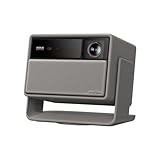
XGIMI HORIZON 20 Pro 4K RGB Triple Laser Home Projector, 4100 ISO Lumens | Google TV with Licensed Netflix, Optical Zoom & Lens Shift, IMAX Enhanced, Dolby Vision, 20,000:1 Contrast, 1ms Input Lag
$1,499.00
−25% · $1,999.00
Amazon reference price
Buy on AmazonChecked: 2026-11-25 15:12:50 UTC

XGIMI Horizon 20 4K RGB Triple Laser Home Projector&100'' Fixed Frame Projector Screen 16:9 HD&
$1,299.76
−23% · $1,688.00
Amazon reference price
Buy on AmazonChecked: 2026-11-25 14:48:19 UTC
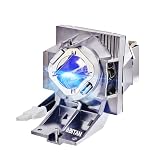
ABITAN 5J.JNL05.001 for Benq TK700 TK700ST TK700STi W1800 W1800i Replacement Projector Lamp with Housing (Original Bulb Inside).
$127.19
Buy on AmazonChecked: 2026-11-25 15:42:15 UTC
Which projector should you buy?
Buy XGIMI HORIZON 20 Pro if you want the most balanced true-4K pick here: it lists 3840 x 2160 resolution, 4100 ISO lumens, RGB triple laser, optical zoom, lens shift, and Google TV. That mix matters because it gives you real 4K detail plus enough placement flexibility for a normal room.
Skip 1080p projectors that only accept 4K input when your goal is true 4K. If you want to spend less without dropping to 1080p, XGIMI Elfin Flip 4K keeps 3840 x 2160 and Google TV, but at 1600 ISO lumens and with mains power through DC input rather than a built-in battery.
If you are building a dedicated theater, Epson Home Cinema LS11000 is the upgrade pick. Epson calls it 4K Display Technology with 8.29 million pixels on screen and a laser array light source, so treat it as pixel-shifted 4K display tech rather than a native 4K panel. BenQ is the brand to watch for short-throw gaming, Hisense for UST where cabinet depth works, and Nebula for portable streaming where resolution is a trade-off.
Our recommendation
Verdict: buy the XGIMI HORIZON 20 Pro. It is the most complete all-round 4K projector in this group because it combines true 3840 x 2160 resolution with 4100 ISO lumens, RGB triple laser, optical zoom, lens shift, and Google TV. That is the kind of spec mix that actually helps in a real room, where placement and screen size matter as much as the logo on the box.
Budget buy: XGIMI Elfin Flip 4K. It keeps the real 4K resolution and adds Google TV, but it is clearly the step-down choice at 1600 ISO lumens and with DC mains power instead of a built-in battery. That makes it a sensible smaller-room option, not a bright-room flagship.
Upgrade pick: Epson Home Cinema LS11000. Epson’s own wording is important here: this is 4K Display Technology with pixels shifted on screen, not a native 4K panel. If you want a theater-style projector with laser light source, 4K input up to 120Hz, and a more serious home-cinema setup, it is the right move. Skip any projector sold only on 4K input support if you want true 4K projection.
Choose by your setup
| Situation | Buy this | Why it fits | Watch out for |
|---|---|---|---|
| Normal living room, one-projector setup | XGIMI HORIZON 20 Pro | True 4K, 4100 ISO lumens, lens shift, optical zoom, Google TV | Still needs a sensible throw distance and a good screen |
| Smaller room or lower budget | XGIMI Elfin Flip 4K | Real 4K with Google TV in a compact package | Lower brightness than the main pick; not a battery model |
| Dedicated theater room | Epson Home Cinema LS11000 | Laser light source and 4K Display Technology with 4K input up to 120Hz | It is not a native 4K panel and is not UST |
| Short-throw gaming room | BenQ TK710STi | 4K Laser Short Throw design with 0.69-0.83 throw ratio | Short throw is not UST; room depth still matters |
| UST cabinet or near-wall setup | Hisense PX3-PRO or XGIMI AURA 2 | UST placement with screen-friendly geometry | Needs the right furniture depth and ideally an ALR screen |
What makes this a worthwhile Black Friday purchase?
Choose the projector that matches the room first, then the deal. A cheaper model is not a good value if the throw ratio, screen size, or power setup does not fit your space.
If you want real 4K on a tighter budget, Elfin Flip 4K is the lower-cost route. If you want a stronger room-filling image, HORIZON 20 Pro gives you more brightness and better placement flexibility without changing categories entirely within the XGIMI family.
The cleanest buy, the lower-cost buy, and the upgrade buy
XGIMI HORIZON 20 Pro is the direct buy for most shoppers who want one projector to handle movies, streaming, and casual gaming in a normal room. The headline specs are the ones that matter: 3840 x 2160 resolution, 4100 ISO lumens, RGB triple laser, lens shift, optical zoom, and Google TV. Those features give you image quality plus setup flexibility, which is exactly what a shopper wants from a 4K projector that is not locked to a single furniture layout.
XGIMI Elfin Flip 4K is the lower-cost choice when the room is smaller or the budget is tighter. It still lists 3840 x 2160 resolution and Google TV, but the lower 1600 ISO lumens means it is the less ambitious model. Epson Home Cinema LS11000 is the upgrade when you want a more theater-focused build and can accept Epson’s 4K Display Technology language rather than a native 4K panel claim.
True 4K, 4K display technology, and 4K input are not the same thing
Do not blur the categories. XGIMI HORIZON 20 Pro and Elfin Flip 4K both list standard resolution of 3840 x 2160 pixels, so they are true 4K projectors in the practical buying sense. That is different from older 1080p models that may accept a 4K signal but do not actually project a 3840 x 2160 image.
Epson Home Cinema LS11000 is the one model in this guide that needs careful wording. Epson lists 4K Display Technology with 8.29 million pixels on screen and a laser array light source. That is a strong home-theater technology, but it is not the same thing as a native 4K panel. If you care about the exact distinction, buy it for the theater performance and the installation class, not because it is the same type of 4K as a native 3840 x 2160 model.
Room depth, throw ratio, and lens shift decide whether the deal works at home
A projector can be a good deal and still be wrong for your room. HORIZON 20 Pro uses a 1.2-1.5:1 throw ratio with optical zoom and lens shift, which makes it easier to place in a typical living room or media room. That flexibility is worth money because it lets you correct for furniture and mounting constraints without forcing the image into a bad shape.
Elfin Flip 4K is still a conventional throw projector, so you should expect to place it with care even though it is more compact. Epson LS11000 also needs a proper installation plan; it is not a near-wall replacement and it is not a UST model. If you need ultra-short-throw placement, you should be shopping a different class entirely, such as Hisense PX3-PRO or XGIMI AURA 2.
Bright rooms, screens, and ambient light
Brightness helps, but it does not erase the room. HORIZON 20 Pro’s 4100 ISO lumens give it the strongest headroom of the main picks here, while Elfin Flip 4K’s 1600 ISO lumens fits better in a dimmer setup. Epson LS11000’s 2,500 lumens and 1,200,000:1 dynamic contrast make it a theater-style option, but it still makes the most sense in a darkened room for the best black level performance.
If the room is bright, the screen matters more than many buyers expect. For UST projectors, a UST/ALR screen is the right add-on; a plain matte-white screen is not the same thing. For standard throw projectors, a good screen still helps, but you should not assume brightness alone will beat strong daylight or lots of lamps. In a very bright living room, a TV can still be the more practical purchase.
Gaming: PS5 refresh rates, HDMI, and input lag are separate decisions
If gaming matters, look at the actual refresh modes, not just the word 4K. BenQ’s X3100i lists 4.2 ms input lag at 1080p/240Hz, 8.3 ms at 1080p/120Hz, and 16.7 ms at 4K/60Hz. That is a clear example of why PC 240Hz and PS5 up to 120Hz should be treated as different use cases. A console player and a PC gamer may want the same projector brand but not the same refresh mode.
For a short-throw gaming room, BenQ TK710STi is the more direct fit because BenQ lists it as a 4K Laser Short Throw projector with a 0.69-0.83 throw ratio and 3200 ANSI lumens. Epson LS11000 also supports native 4K input up to 120Hz and lists input lag below 20ms, which makes it a serious cinema-gaming hybrid. The right choice depends on whether your room wants short throw, standard throw, or a dedicated theater layout.
Streaming, audio, and power should match the kind of projector you want
Google TV and Netflix certification matter if you want to avoid extra boxes. HORIZON 20 Pro, Elfin Flip 4K, and several Nebula and Hisense models all lean into built-in streaming support, but the software stack is model-specific. Google TV alone does not guarantee Netflix certification, so it is worth choosing a model that states both when streaming apps are central to the purchase.
Power also changes the experience. Elfin Flip 4K is mains-powered through DC input, so it is not a battery projector. Epson LS11000 also needs AC power. That makes them different from portable models such as XGIMI MoGo 4 Laser or Nebula Capsule 3 Laser, which are convenient for travel but are not true 4K projector buys. If you need sound from the projector itself, consider the whole use case, not just the headline resolution.
Portable and battery-powered models are useful, but they are not the same as true 4K
Portable projectors are tempting because they are easy to move, but they usually trade away brightness or resolution. XGIMI MoGo 4 Laser is a portable triple-laser model with a built-in battery and up to 2.5 hours of playtime in Eco mode, but it is 1080p, not 4K. Nebula Capsule 3 Laser is also 1080p with built-in battery and officially licensed Netflix. Those models are good for casual use, but they are not substitutes for the 4K models in this guide.
That distinction matters because many shoppers search for a 4K projector and then get distracted by portability. Portable does not mean 4K, and battery-powered does not mean better image quality. If your priority is outdoor movie night or bedroom convenience, a portable 1080p model can make sense. If your priority is image detail and a larger home-cinema picture, stay with the real 4K options.
Brand-by-brand alternatives and the final value call
XGIMI is the most convenient all-rounder family here: HORIZON 20 Pro for the main buy, Elfin Flip 4K for the lower-cost route, and AURA 2 if you want a UST layout and can support the screen geometry. BenQ is the better brand when you care about gaming, short throw, or golf-simulator style placement, because its TK710STi and X3100i lines spell out throw ratio and input lag in a way that is easy to shop.
Hisense is the UST brand to compare when the cabinet and screen plan are already set, with PX3-PRO giving you 80-150 inch sizing, 3000 ANSI lumens, Dolby Vision, Dolby Atmos, Google TV, and Designed for Xbox certification. Nebula is strong for portable streaming and Google TV, but its most relevant portable models here are 1080p rather than 4K. That leaves Epson LS11000 as the theater upgrade pick for buyers who want a dedicated-room projector with laser light and 4K display technology.
Questions answered
Is Epson Home Cinema LS11000 a true native 4K projector?
No. Epson describes it as 4K Display Technology with 8.29 million pixels on screen and a laser array light source. Buy it for the theater performance and 4K input support, not as a native-panel 4K projector.
Is XGIMI Elfin Flip 4K battery powered?
No. It lists mains power through DC input, not a built-in battery. It is a compact 4K projector, not a portable battery projector.
Should I buy a 1080p portable projector instead of a 4K model?
Only if portability matters more than resolution. Portable models such as XGIMI MoGo 4 Laser or Nebula Capsule 3 Laser are convenient, but they are 1080p and are not substitutes for a true 4K purchase.
Do I need a special screen?
For UST projectors, yes, a UST/ALR screen is the right choice. For standard throw projectors, a good screen still helps, but the room’s light control and the projector’s placement matter just as much.
Related projector guides
Sources
- XGIMI HORIZON 20 Pro product
- XGIMI HORIZON 20 Pro page
- XGIMI Elfin Flip 4K product
- Epson Home Cinema LS11000
- Epson home theater specs
- BenQ TK710STi specifications
- BenQ X3100i gaming specs
- Hisense PX3-PRO
- Hisense M2 Pro
- Nebula Cosmos 4K SE specs
- Nebula Capsule 3 Laser
- XGIMI MoGo 4 Laser
- XGIMI AURA 2
- Elite Screens Yard Master 2
- Elite Screens compatibility