


the US
Best SSD for Sample Libraries: US Capacity and Prices
Choose the Samsung T7 2 TB for a portable sample-library drive that connects easily to a laptop. Choose the Samsung 990 PRO 2 TB for a studio desktop with a spare compatible M.2 slot. Both offer the same nominal capacity; buy for the connection and the room your installed libraries need, not a promised number of instruments or voices.
Choose the right option
Samsung T7 · 2 TB
Portable library choice for a laptop or a studio that uses more than one computer.
Compare exact offers ↓Samsung 990 PRO · 2 TB
Permanent internal choice for a desktop with a compatible spare M.2 slot.
Compare exact offers ↓Amazon offers in the US
Confirm the selected capacity, seller and delivered total.
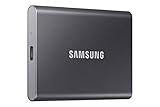
Samsung T7 · 2 TB
Samsung T7 Portable SSD 2TB Titan Gray, USB 3.2 Gen 2, Up to 1,050MB/s | Reliable External Solid State Drive Storage for Gaming, Students, Professionals (MU-PC2T0T/AM)
USB 10 Gb/s. Complete external SSD; check port and cable.
US$397.99US$199.00 / TB
Price observed 02.11.2026 20:17 UTCBuy on Amazon ↗
Samsung 990 PRO · 2 TB
Samsung SSD 990 PRO 2TB, PCIe 4.0 M.2 2280, Up to 7,450 MB/s | NVMe Internal Solid State Hard Drive for High End Computing, Gaming, and Heavy Duty Workstations, (MZ-V9P2T0B/AM)
M.2 2280 NVMe. Consumer SSD; no enterprise PLP claimed. Check slot and cooling.
US$389.99US$195.00 / TB
Price observed 02.11.2026 18:24 UTCBuy on Amazon ↗
Samsung 990 PRO · 4 TB
Samsung SSD 990 PRO 4TB, PCIe 4.0 M.2 2280, Up to 7,450 MB/s | NVMe Internal Solid State Hard Drive for High End Computing, Gaming, and Heavy Duty Workstations (MZ-V9P4T0B/AM)
M.2 2280 NVMe. Consumer SSD; no enterprise PLP claimed. Check slot and cooling.
US$799.99US$200.00 / TB
Price observed 02.11.2026 18:24 UTCBuy on Amazon ↗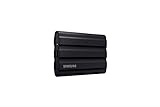
Samsung T7 Shield · 4 TB
Samsung T7 Shield Portable SSD 4TB, USB 3.2 Gen 2, Up to 1,050 MB/s | Rugged, IP65 Water Resistant, External Solid State Drive for Photographers, Content Creators and Gaming (MU-PE4T0S/AM), Black
USB 10 Gb/s. Complete external SSD; check port and cable.
US$1,099.99US$275.00 / TB
Price observed 02.11.2026 20:17 UTCBuy on Amazon ↗As an Amazon Associate, Cloudzat earns from qualifying purchases. Prices are dated observations and can change. Check the exact variant and delivery to your address before ordering.
Buying guide
Which exact option fits your work?
Samsung T7 · 2 TB. Portable library choice for a laptop or a studio that uses more than one computer. USB 10 Gb/s
Samsung 990 PRO · 2 TB. Permanent internal choice for a desktop with a compatible spare M.2 slot. M.2 2280 NVMe
| Exact option | Specification | Best reason to choose |
|---|---|---|
| Samsung T7 · 2 TB | USB 10 Gb/s. Complete external SSD; check port and cable. | Portable library choice for a laptop or a studio that uses more than one computer. |
| Samsung 990 PRO · 2 TB | M.2 2280 NVMe. Consumer SSD; no enterprise PLP claimed. Check slot and cooling. | Permanent internal choice for a desktop with a compatible spare M.2 slot. |
When paying more makes sense
Buy the Samsung T7 if you want to carry your sound libraries between computers. Buy the Samsung 990 PRO if the drive will stay inside a desktop with a free compatible SSD slot. Their 2 TB capacity holds the same amount of library data; choose the connection that suits your studio rather than paying extra for speed you may not need.
The right drive for a laptop or a studio desktop
The T7 is the straightforward option when you move between rooms, work on a laptop or cannot add an internal SSD. Your instrument content stays on one portable drive, leaving the computer's internal storage for the operating system and applications. For a fixed studio PC, the 990 PRO removes the external cable and gives the library a direct internal connection. Neither approach is universally better: portability favours the T7, while a permanent installation favours the internal drive.
Both selected models are 2 TB. If you already own a suitable SSD with enough free space, keep using it. Changing from one healthy SSD to another will not automatically fix every slow patch or audio dropout. Instrument settings, memory, CPU processing and the audio interface buffer also affect the session. A larger drive is most useful when you are running out of room or would otherwise need to remove libraries you actively use.
Buy for installed content, not the download size
Sample collections often download as compressed files and expand during installation. The advertised download size is therefore a poor way to choose the final drive. Use the publisher's installed-content requirement for the editions you plan to keep. Applications and plug-ins are usually much smaller than the actual sample content, so separating the content location can recover substantial space without moving the entire music workstation.
As a practical buying guide, 1 TB suits a focused collection of smaller instruments, 2 TB is a useful starting point for a growing mixed library, and 4 TB becomes attractive for large orchestral collections or several extensive piano and drum libraries. These are capacity choices, not performance ratings. A 4 TB SSD does not by itself play twice as many voices as a 2 TB SSD.
A worked capacity example
Suppose your installed instruments use 900 GB, you expect to add 300 GB and you want 200 GB for temporary downloads or installation work. That is 1,400 GB before free-space margin. Keeping 20% of the drive free gives a planning need of 1,750 GB, so a nominal 2 TB drive is a reasonable tier. A 1 TB drive is too small for that plan even if its advertised transfer rate is much higher.
If the same collection is already 1,600 GB before new purchases, buying another 2 TB drive leaves little growth room once updates and temporary files are included. A 4 TB model or a deliberate split across two drives is more sensible. Use one drive for the main orchestral collection and another for other instruments only if that arrangement remains easy to maintain; an overflowing folder scattered across several devices quickly becomes inconvenient.
What SSD speed changes, and what it does not
An SSD is attractive for libraries because it can retrieve many small pieces of sampled audio without the mechanical seek delay of a hard disk. Moving a large actively used library from a hard disk to an SSD is usually the meaningful category change. Between modern SSDs, the benefit depends on how the instrument loads and streams its samples, so the largest sequential-read figure is not a reliable ranking of patch-loading time.
Sample instruments can keep part of each sound in RAM and stream the rest from storage. A memory shortage, an overly demanding patch or CPU-heavy effects can still cause trouble with a fast SSD. Spend on drive capacity when content will not fit, on RAM when the loaded working set needs it, and on processing power when synthesis or effects are the restriction. Do not pay an SSD premium on a claim that it guarantees a particular polyphony count.
External storage that stays dependable in a session
For the T7, the port, cable and hub all affect the connection. USB-C describes the connector shape, not an assurance that every port runs at the same speed. Use a suitable data cable and a reliable port; a busy hub shared with other high-bandwidth devices may be less convenient than a direct connection. Position the cable so it will not be pulled out during recording or playback.
The computer needs to find the same library location when you reopen a session. Keep the drive name or path consistent and use the instrument vendor's content-location tools when moving a library. A portable SSD is useful across machines, but your licences, plug-in installation and supported file format still need to work on each one. The drive carries the samples; it does not carry every part of the software setup automatically.
Internal storage for a permanent workstation
The 990 PRO requires a compatible PCIe NVMe M.2 slot with the correct physical space. It will not fit a 2.5-inch SATA connection. In a crowded desktop, use the motherboard's suitable SSD heatsink and leave airflow around the area. If the only slot is already occupied by the system drive, an external T7 may be the simpler and less expensive expansion than replacing the system SSD and migrating Windows.
For sample playback, do not assume a PCIe generation upgrade is essential. A dependable existing SSD can remain useful for less frequently accessed libraries while a new larger drive holds the main collection. Buying more capacity at a sensible price often helps a growing studio more than buying a smaller premium drive that soon forces another migration.
Keep room for updates and your own recordings
Publisher updates can require temporary space alongside the old installation. Leave that room available instead of filling the SSD to its advertised limit on day one. The optional capacity tool below can include installed libraries, future purchases and staging space, but you can make the basic choice from the worked example without using it. Larger staging needs may justify moving download archives to a separate drive rather than permanently buying premium storage for them.
Native Access can also need temporary space on the internal system drive even when the library content is installed externally. A large empty external SSD does not by itself solve an installation failure caused by a full system drive. Keep working space on both locations and use the publisher’s content-location settings.
Commercial libraries can often be downloaded again, although doing so may take time. Your own recordings, edits, presets and project files may be irreplaceable. Back up those files independently and keep a record of the libraries a project depends on. For most mobile users the T7 2 TB is the convenient shortlist choice; for an expandable studio PC the 990 PRO 2 TB is the cleaner permanent installation. Move to a larger capacity when the actual installed collection justifies it.
Optional: refine capacity or compare your requirements
The guide above gives a starting choice without this tool. Use it only to refine your own capacity or configuration requirements. Its result is an estimate, not a performance test or certification.
Required capacity = (libraries + growth + staging) ÷ (1 − reserve). Decimal GB; formatting overhead and future installer behaviour are not guaranteed.
Compare the complete purchase cost
Check the checkout amounts. Unknown tax and delivery charges are not added automatically.
Frequently asked questions
Should sample libraries be on the system drive?
They can be, if there is enough free space. A separate SSD becomes useful when libraries crowd the system drive or you want portable content. The plug-in application and its sample content do not always have to share a drive.
Does a faster SSD prevent audio dropouts?
Only if storage is the restriction. CPU load, RAM, instrument settings, drivers and the audio buffer can also cause dropouts. No drive specification guarantees a fixed number of voices or tracks.
Is 2 TB enough for orchestral libraries?
For some collections, yes; for large collections, no. Add the installed sizes of the exact editions and leave room for growth and updates. If content already approaches 2 TB, choose more capacity rather than a faster but equally full drive.
Related buying guides
- Best SSD for Photoshop Scratch Disk: US Buying Guide
- Best CAD Laptops US: RAM, Graphics and Buying Guide
- PC for Fusion 360 US: Workstation Specs and Prices Guide
- PC for Revit US: Workstation Specs, RAM and Prices Guide
- PC for SOLIDWORKS US: Workstation Specs and Prices Guide
- Best SSD for Lenovo Legion Go: Choose by Exact Handheld Model
- Best Nvme Ssd For Video Editing
- Nvme Ssd Endurance For Workstations