


UK
Mini PCs with 10GbE in the UK
Choose the GMKtec EVO-T2 for a built-in 10GbE RJ45 connection on a compact AI PC. Choose the MINISFORUM MS-A2 for dual 10GbE SFP+ in a storage-oriented server. Choose the fanless Protectli VP2440e for a network appliance. Match RJ45 or SFP+ to your switch before buying.
Choose a model
GMKtec EVO-T2
Choose this if a built-in 10GbE RJ45 port and OCuLink are useful alongside local AI work.
Manufacturer specifications ↗MINISFORUM MS-A2
Choose this for a small server with two built-in 10GbE SFP+ ports, two 2.5GbE ports and internal storage expansion.
Manufacturer specifications ↗Protectli VP2440e
A fanless network appliance with dual 10GbE SFP+ and dual 2.5GbE. Configure RAM and SSD separately where required.
Manufacturer specifications ↗UK
Current local offers
Match the physical 10GbE connector, RJ45 or SFP+, to your switch.
8 GB RAM
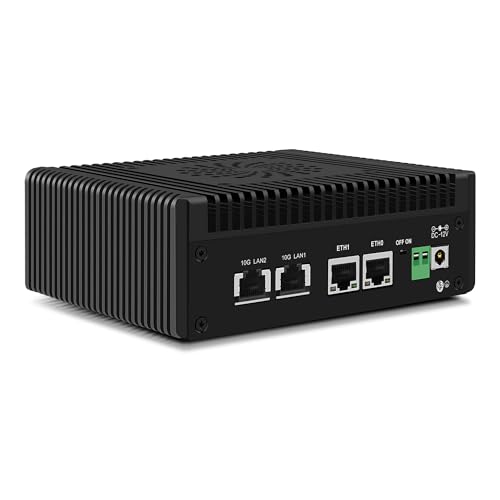
CWWK N150 Mini PC (Upgraded N100) Firewall with 4 Port 10GbE RJ45 + 2.5GbE LAN, S7 Pro OPNsense Appliance Min…
8 GB RAM · 128 GB SSD
£399.90Price checked 01 Nov 2026 14:31 UTCBuy on Amazon ↗
8 GB RAM
AIOPCWA N150 Mini PC 10Gbit Firewall Appliance (N100 upgrade), 2 Port 10GbE RJ45 Mini Computer with 2 x 2.5Gb…
8 GB RAM · 128 GB SSD
£414.00Price checked 01 Nov 2026 14:31 UTCBuy on Amazon ↗16 GB RAM
CWWK N150 Mini PC (Upgraded N100) Firewall with 4 Port 10GbE RJ45 + 2.5GbE LAN, S7 Pro OPNsense Appliance Min…
16 GB RAM · 256 GB SSD
£597.05Price checked 01 Nov 2026 14:31 UTCBuy on Amazon ↗
Mini PCs with 10GbE
Beelink Mini PC GTi14, Intel Core Ultra 9 185H (16C/22T up to 5.1GHz), 32GB DDR5 1TB M.2 PCIe4.0 SSD Mini Computer…
32 GB RAM · 1000 GB SSD
£889.00Price checked 01 Nov 2026 07:43 UTCBuy on Amazon ↗
Mini PCs with 10GbE
MINISFORUM AMD Ryzen 7 7745HX MS-A2 Mini PC (8C/16T, up to 5.1GHz), 32GB DDR5 1TB SSD, PCIe×16, HDMI/2x USB-C (8K@…
32 GB RAM · 1000 GB SSD
£889.00Price checked 01 Nov 2026 18:22 UTCBuy on Amazon ↗
Mini PCs with 10GbE
MINISFORUM AMD Ryzen 9 8945HX MS-A2 Mini PC (16C/32T, up to 5.4GHz), 32GB DDR5 1TB SSD, PCIe×16, HDMI/2x USB-C (8K…
32 GB RAM · 1000 GB SSD
£1,009.00Price checked 29 Oct 2026 05:40 UTCBuy on Amazon ↗
Mini PCs with 10GbE
Beelink Mini PC GTi15, Intel Core Ultra 9 285H(16C/16T, up to 5.4GHz), 64GB DDR5 1TB PCIe4.0 SSD AI Mini Computer …
64 GB RAM · 1000 GB SSD
£1,339.00Price checked 01 Nov 2026 07:48 UTCBuy on Amazon ↗If a listing sells out
MINISFORUM MS-S1 MAX
The MS-S1 MAX has two built-in 10GbE RJ45 ports and 128 GB memory for AI workstation work. It is a much higher-priced choice; do not pay for its compute power if you need only fast networking.
See the model and configurations ↗Buying guide
Choose the physical 10GbE connection
10GbE describes a network speed, not a single connector. The GMKtec EVO-T2 has a built-in 10G RJ45 port for copper cabling. The MINISFORUM MS-A2 and Protectli VP2440 family use SFP+ cages, which need appropriate modules or direct-attach cables. Check the switch port, cable run, transceiver compatibility and heat budget. A USB-C socket marked 10Gbps is a USB transfer rating and does not prove 10GbE networking. Nor does a 2.5GbE LAN port become 10GbE through a faster CPU.
Pick a machine for the network job
For a desk PC with fast access to a 10GbE NAS, a built-in RJ45 port can be straightforward if the switch also has copper 10G. For a server with multiple fast links and storage expansion, the MS-A2 is more relevant. A fanless Protectli appliance suits a firewall or router when its processor, NICs and software support the intended throughput. Do not choose purely by port count. VPN encryption, packet inspection, storage and the number of simultaneous clients determine the system resources required.
Check the end-to-end path
A 10GbE port on one Mini PC does not create a 10GbE transfer if the NAS, switch, cable or storage is slower. Identify every hop and whether it is full duplex, shared or oversubscribed. Copper 10G can use more power and produce more heat than an SFP+ direct-attach link; actual differences depend on the equipment. For a short rack connection, a compatible DAC can be practical. For a room-scale run, evaluate the cabling, modules and installation costs before choosing the box.
Separate built-in from adapters
A Thunderbolt or USB4 network adapter may meet a temporary desk need, but it adds cost, driver behaviour, cable clutter and another failure point. Look for a physical 10GbE port documented for the exact Mini PC model. Check the exact retailer variant and port photo. Some product titles mix multiple motherboard versions or use 10G to describe a USB port. If the vendor does not identify the controller and physical connection, treat the 10GbE claim as unresolved.
Budget for the whole setup
Include SFP+ transceivers or DACs, a 10GbE switch port, suitable cabling, power and any extra storage. A cheap Mini PC can be poor value if it requires several adapters or an immediate SSD upgrade. Compare the local delivered price and the warranty with a small server or NAS that already has the needed network. If your Internet service and local storage remain below 2.5Gb/s, a well-chosen 2.5GbE machine may solve the current task at lower total cost.
Test before relying on speed
After delivery, confirm the actual NIC in the operating system and negotiate a 10Gb/s link with the intended switch. Run a local transfer test with fast endpoints, then test the real application. Measure temperature and fan noise under sustained network activity. For firewall use, test recovery and throughput with the selected software release, VPN and inspection settings. Link speed is a capability of the port; it is not a promised application throughput or a substitute for reliable backups.
Match networking to the plan
A single Ethernet connection can be enough for a desk PC or a simple home service. Dual 2.5GbE may matter for a router, a small lab or faster transfers to a compatible switch and NAS. Count physical ports and confirm the NIC model when an operating system or firewall depends on driver support. Terms such as multi-gig, Wi-Fi 6 and dual LAN should be checked against the selected product and a detailed port photograph or specification.
Do not infer a second LAN port from an accessory, a USB Ethernet adapter shown beside the system or a comparison phrase in a seller title. For OPNsense, network segmentation and failover may require more than a nominal port count. Check throughput against VPN, IDS/IPS and packet inspection needs using the project guidance. For ordinary office work, paying for ports you will never connect is unlikely to improve the experience.
Check displays, USB and expansion
Count the monitors you own, their resolution and refresh rate, and the exact outputs on the computer. HDMI and DisplayPort versions can matter; the existence of a USB-C socket does not confirm video output, USB4 or power delivery. If an external GPU or fast expansion dock is part of the plan, verify the supported interface and lane or bandwidth details on the exact model rather than relying on the shape of the connector.
An OCuLink port can be valuable to a specific external GPU setup but adds complexity and may require an external power supply. USB4 can serve useful docks and storage, but host and peripheral support vary. A small PC with the right ordinary ports can be a better purchase than a more expensive machine with impressive expansion features you will not use.
Compare UK checkout totals
Amazon.co.uk listings may show multiple memory and storage variations under one product family. Select the exact configuration before comparing prices, and check whether the seller ships to your address. Review the displayed total, delivery date, return window and supplied UK power plug. An imported model can look cheap before shipping and taxes are considered; do not compare it to a domestic listing without the whole delivered cost.
A price can change after the date shown. Open the retailer page to check the selected configuration and final total. Follow the retailer link to verify the selected variation, availability, seller and checkout total. Keep prices in GBP, and avoid using a converted US price as if it were a UK offer.
Verify the order and test the delivered machine
Before checkout, reselect the exact RAM and SSD variant and confirm the seller, condition, operating system, return window and total. Keep a copy of the listing details and your order configuration. On arrival, confirm CPU, installed memory and storage in the system settings, then test the ports your workload actually depends on. Update firmware only through the manufacturer’s documented process.
Set up recovery before moving important data. Keep a separate backup of service configurations and files, and test restoration. Try representative media, virtual machines, monitors or network paths while the return period still applies. A good buying decision includes a way to discover a wrong configuration early and return or correct it without disrupting the rest of your setup.
Questions buyers ask
How do I choose Mini PCs with 10GbE?
Recommended choice: Choose the GMKtec EVO-T2 for a built-in 10GbE RJ45 connection on a compact AI PC. Choose the MINISFORUM MS-A2 for dual 10GbE SFP+ in a storage-oriented server. Choose the fanless Protectli VP2440e for a network appliance. Match RJ45 or SFP+ to your switch before buying.
Does the listed price include the complete system?
Choose the RAM, SSD and operating-system variation on the retailer page. Some model families also offer barebones or smaller configurations.
Are the prices guaranteed?
No. The date on each offer shows when the price was checked. Confirm the seller, availability and delivered total at checkout.
Compare more Mini PCs
Mini PC buying guide64GB RAM Mini PCs128GB RAM Mini PCsMini PCs with OCuLinkFanless Mini PCsAs an Amazon Associate, Cloudzat earns from qualifying purchases. Prices may change; check the selected configuration and total before paying.