


United Kingdom · GBP
Best Mini PCs for 1080p Gaming UK
For 1080p gaming, start with a Beelink SER8 with 32GB for lighter titles. Choose the AI X1 Pro-370 for a stronger integrated-graphics option and expansion, or the EVO-X2 with 64GB when you want more integrated GPU headroom. For demanding high-refresh games, compare a dedicated-GPU system at the same total budget.
Which model to choose
Beelink SER8, 32GB
Best lower-cost direction for lighter 1080p games and an everyday desktop. Choose settings for the specific title rather than expecting every game to behave alike.

32 GB RAM · 1000 GB SSD
£555.00Price checked 12.11.2026 08:56 UTCBuy on Amazon ↗Specifications and model details ↗MINISFORUM AI X1 Pro-370, 32GB or more
Best balanced integrated-graphics choice here. Radeon 890M graphics, replaceable RAM and OCuLink provide a more adaptable small gaming desk.

32 GB RAM · 1000 GB SSD
£1,099.00Price checked 13.11.2026 00:03 UTCBuy on Amazon ↗Specifications and model details ↗GMKtec EVO-X2, 128 GB
Best premium integrated-graphics direction when you want more headroom without a separate graphics enclosure. Its memory is fixed at purchase.

128 GB RAM · 2000 GB SSD
£3,398.96Price checked 13.11.2026 01:19 UTCBuy on Amazon ↗Specifications and model details ↗Amazon prices and configurations
Ryzen 7 8845HS
Beelink SER8 Gaming Mini PC, Ryzen7 8845HS(up to 5.1GHz),32G DDR5 1TB NVMe SSD,Mini Desktop Computer Support Triple 4K Display, powerful AI mini pc,L…
32 GB RAM · 1000 GB SSD
£555.00Price checked 12.11.2026 08:56 UTCBuy on Amazon ↗
Ryzen AI 9 HX 370
MINISFORUM Mini PC AI X1 Pro AMD Ryzen AI 9 HX370(12 Cores/24 Threads, up to 5.1GHz)&AMD Radeon 890M Mini Gaming Computer,32GB DDR5 1TB PCIe 4.0 SSD,…
32 GB RAM · 1000 GB SSD
£1,089.00Price checked 12.11.2026 08:40 UTCBuy on Amazon ↗Ryzen AI Max+ 395
GMKtec EVO-X2 AI Mini PC AMD Ryzen Al Max+ 395 (up to 5.1GHz) Mini Gaming Computers, 128GB LPDDR5X 8000MHz (8GB*8) 2TB PCIe 4.0 SSD, Quad Screen 8K D…
128 GB RAM · 2000 GB SSD
£3,398.96Price checked 13.11.2026 01:19 UTCBuy on Amazon ↗
AMD Ryzen
MINISFORUM X1 Lite-255 MINI PC 32GB RAM 512GB SSD | AMD Ryzen 7 255 (8C/16T), AMD Radeon 780M,WiFi 6E+2.5GbE LAN, OCuLink eGPU, HDMI+DP+USB4 Triple D…
32 GB RAM · 512 GB SSD
£599.99Price checked 01.11.2026 11:40 UTCBuy on Amazon ↗
Ryzen 7 8845HS
GMKtec AMD Ryzen 7 Mini Gaming PC 8845HS(8C/16T, up to 5.1GHz) K8 Plus 32GB DDR5 RAM 1TB PCIE NVME SSD, Desktop PC Oculink/Dual NIC 2.5G/WIFI 6/BT5.2…
32 GB RAM · 1000 GB SSD
£789.96Price checked 09.11.2026 08:37 UTCBuy on Amazon ↗
Core Ultra H
ASUS NUC 15 Pro AI-Ready MiniPC | Intel Core Ultra 5 225H | Home & Business | 32GB DDR5 RAM | 1TB SSD | Intel Arc Graphics | WiFi 7 | BT v5.4 | Windo…
32 GB RAM · 1000 GB SSD
£1,049.00Price checked 12.11.2026 08:40 UTCBuy on Amazon ↗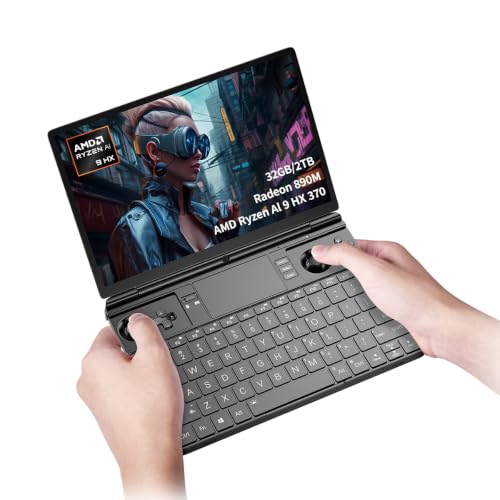
Ryzen AI 9 HX 370
Cutesliving GPD Win Max 2 2025 Handheld Gaming Mini PC with AMD Ryzen AI 9 HX 370, Radeon 890M Graphics, 10.1-inch 2.5K Display, 32GB RAM, 2TB SSD fo…
32 GB RAM · 2000 GB SSD
£1,500.99Price checked 12.11.2026 23:32 UTCBuy on Amazon ↗
Core Ultra
ROG NUC 2025 Gaming Mini PC, Intel Core Ultra 7, GeForce RTX 5060, DDR5 96GB Support, Thunderbolt 4, Triple-Fan Cooling, and ARGB Lighting (32GB DDR5…
32 GB RAM · 1000 GB SSD
£1,799.20Price checked 10.11.2026 11:52 UTCBuy on Amazon ↗Buying guide
Pick the machine for your kind of Full HD game
The SER8 is our first comparison for lighter competitive games, older releases and a general desktop with occasional gaming. The AI X1 Pro-370 is the stronger integrated option when you can use the Radeon 890M class and its expansion features. The EVO-X2 with 64GB suits a premium compact setup with more integrated-graphics capacity. The right choice depends on the title and settings, not on the fact that all three can connect to a 1080p monitor.
If your goal is demanding games at a consistently high refresh rate, compare a dedicated-GPU computer. Spending heavily on a tiny integrated machine is not automatically better value than a larger system whose graphics match the target more directly.
Separate image quality from response targets
Choose a useful settings baseline before comparing computers. Shadows, effects and render resolution can change the GPU load substantially. Competitive players may accept lower detail for clearer motion, while a slower single-player game can favor visual quality. Keep those priorities with any benchmark result so the number has meaning.
Upscaling can render internally below the display resolution. That can be a useful option, but it is different from native 1080p rendering. Frame generation also has its own support and latency considerations. Do not compare a result using those features with a native-rendering figure as though the settings were identical.
Memory configuration matters with integrated graphics
For a new machine, 32GB gives Windows, the game and shared graphics more room than a small entry configuration. On SO-DIMM systems, follow the supported module layout rather than assuming one large module performs exactly like two suitable modules. Fixed LPDDR platforms are different and should be bought with the capacity you intend to keep.
Leave room on the SSD for the installed game and updates. A small drive that is nearly full can make ordinary maintenance awkward even when the CPU and graphics are adequate. A 1TB complete configuration is a useful comparison for several large games; a smaller drive can still make sense for a short library.
Connect the monitor for the intended experience
Check which output supports the refresh rate of your 1080p monitor and use a suitable cable. Set the correct refresh rate in the operating system as well as inside the game. A monitor running at its default low refresh can hide some of the benefit of stronger hardware. Test audio, controller behavior and wake from sleep in the room where the PC will stay.
For an unavailable model, compare another computer with a similar integrated GPU tier, enough installed memory and suitable display connections. A cheaper N-series office system is not an equal replacement for a Radeon 780M or 890M gaming recommendation. If the alternative price approaches a dedicated-GPU tower, reassess the value of the compact form.
Choose the game before the graphics label
Write down the games you actually play, the monitor resolution and whether you prioritize visual detail or response time. A light esports title and a demanding recent single-player game can place very different loads on the same computer. Integrated graphics make a compact, convenient system, but they share memory bandwidth with the CPU. A discrete GPU adds dedicated graphics memory and a different performance envelope. The word gaming in an Amazon title does not establish either capability.
Compare results only when the game version, resolution, settings, power profile and memory configuration are stated. Upscaling and frame generation can improve the experience in supported games, but generated frames are different from native rendering and do not remove every latency limit. Do not buy from a universal FPS claim attached to a processor family. Choose hardware that meets the needs of your most demanding regular game, then treat easier titles as welcome headroom.
Memory, storage and cooling for a small gaming desk
For a new integrated-graphics gaming system, 32GB is a useful target because Windows, games and graphics allocations draw on the same physical capacity. Two supported memory modules can also matter on platforms designed for dual-channel operation. Soldered LPDDR memory is a different design and cannot be upgraded with a SO-DIMM kit. A faster advertised memory specification does not compensate for too little usable capacity or a restrictive power profile.
Allow enough SSD space for the games you keep installed, updates and free working room. Start at 1TB if your library includes several large modern titles. Keep cloud saves or independent backups for progress that matters. Place the PC on an open surface with room for exhaust air, rather than inside a closed TV cabinet. Fan noise, sustained clock behavior and the external power adapter are part of the living-room experience. A tiny chassis does not eliminate heat.
Complete the setup before comparing total cost
Include a controller or keyboard, a suitable display cable and any extra storage in the budget. Check the exact monitor connection you plan to use: a port that supports a high desktop resolution does not prove that a particular game will run at that resolution and refresh rate. Wired Ethernet is useful for dependable downloads and competitive play, while wireless results depend on your router, placement and interference.
Compare the final compact-system price with a conventional gaming tower before paying a premium for size. Choose the Mini PC when its small footprint solves a real problem. Choose a tower when a replaceable GPU, more cooling capacity or demanding high-resolution gaming matters more. If the first model sells out, keep the graphics class and installed memory in the replacement. A cheap office PC is not an equal alternative simply because both are described as gaming computers.
Buying and support in the UK
Compare the complete UK purchase cost in pounds, including delivery and the parts needed to finish a barebone. Check whether a marketplace seller supplies the machine from UK stock or ships it internationally. That affects delivery, possible additional charges and the practical return route. Look for the correct UK mains lead and a clear description of the included operating-system licence. A compact case does not make an overseas support arrangement more convenient.
Keep the invoice, serial number and exact RAM and SSD configuration. For a business desk, ask who handles a hardware fault and how a replacement is arranged before buying several units. When the first model is unavailable, keep the required memory, graphics and ports in the alternative. Include a monitor, keyboard and independent backup in the budget where needed. Compare the finished, usable computer rather than a low barebone headline price.
Questions buyers ask
Which Mini PC is a sensible 1080p starting point?
A SER8 with 32GB is a useful comparison for lighter games. Move to an AI X1 Pro-370 or EVO-X2 when the target games justify stronger integrated graphics.
Do I need 32GB for every 1080p game?
No. It is a practical new-system target for shared-memory graphics and multitasking, not a universal minimum for every title.
Can I expect one FPS figure for all 1080p games?
No. Game version, detail settings, memory, power and cooling change the result. Compare a stated game and configuration.
Specifications and software guidance
Beelink SER8 ↗MINISFORUM AI X1 Pro-370 ↗GMKtec EVO-X2 ↗Related Mini PC guides
Best Gaming Mini PCs UKBest Mini PCs for 1440p Gaming UKBest Mini PCs for Emulation UKCompare Mini PC pricesAs an Amazon Associate, Cloudzat earns from qualifying purchases. Prices and availability can change.