


UK BUYING GUIDE
If you are keeping BT or EE Digital Voice, the cleanest buying decision is usually not a replacement router at all. Keep the provider hub as the broadband edge and voice hub, then add a mesh system behind it in access point mode so the mesh improves coverage without taking over the phone service.
For most homes, the default pick is a TP-Link Deco X50 kit. A 3-pack suits medium homes and awkward layouts; a 2-pack is enough for smaller spaces if placement is sensible. It is a dual-band Wi‑Fi 6 system with Ethernet backhaul support and access point mode, so it fits a straightforward UK setup where you want one network name and better roaming.
The key point is that mesh choice here is mainly about Wi‑Fi coverage, not Digital Voice compatibility. BT and EE both support existing phones via the Smart Hub phone port or a Digital Voice/Home Phone adapter, but the phone service still depends on the hub and broadband. A mesh can improve coverage and placement flexibility, yet it does not replace the provider’s voice setup.
Our recommendation
Buy the TP-Link Deco X50 as the default mesh choice for BT and EE Digital Voice homes, and run it in access point mode behind the provider hub. That keeps the hub in charge of broadband routing and the voice service while the Deco system handles Wi‑Fi coverage. In practice, the best buy is a 3-pack for a typical house with more than one awkward room or floor change, or a 2-pack for a smaller home where you can place the units well.
If your existing BT or EE hub already covers the rooms you use, skip mesh entirely. A mesh is worth buying when you have dead spots, weak upstairs coverage, or a layout that makes a single router struggle. It is not worth buying simply because a product listing looks more advanced. Coverage, placement and wiring matter more than headline specification.
Avoid buying any mesh product as though it were a Digital Voice replacement. BT and EE’s own guidance makes clear that the hub must have power for Digital Voice calls, and that existing phones or adapters are separate from the Wi‑Fi layer. If you want a phone away from the hub, the right accessory is the provider’s adapter or a compatible handset, not a mesh node pretending to be a telephone solution.
TP-Link Deco X50 mesh WiFi
Amazon UK listings for this buying decision. Match the model, capacity and bundle to our recommendations below.

TP-Link Deco X50 Mesh WiFi Set (3 Pack), AX3000 Dual Band Router & Repeater (Range up to 604m², WPA3, Ideal for Large Houses, Compatible with Amazon Alexa, 9x Gigabit Ports) White
£151.79
27% off · Amazon reference price £207.99
Last verified 2026-11-29 11:09:22 UTC

TP-Link Deco XE75(2-pack) AXE5400 Tri-Band Whole Home Mesh WiFi 6E System | 3 * Gigabit Ports, AI-Roaming WiFi Router Extender Booster, IoT WiFi, HomeShield, VPN, Easy Setup, Alexa & Google
£209.99
25% off · Amazon reference price £280.50
Last verified 2026-11-29 11:09:17 UTC
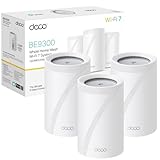
TP-Link Deco BE65 Pro(3-pack) BE9300Mbps Tri-Band Whole Home Mesh WiFi 7 System, 2x 5 Gbps & 1x 2.5 Gbps Gigabit Ports, Seamless AI-Driven WiFi Extender Booster, HomeShield
£489.99
8% off · Amazon reference price £529.99
Last verified 2026-11-29 11:09:17 UTC

TP-Link Deco XE75 Pro(3-pack) AXE5400 Tri-Band Mesh WiFi 6E System | 2.5Gbps Ports, AI-Roaming WiFi Router Extender Booster, IoT WiFi, HomeShield, VPN, Gaming & 4K, Easy Setup, Alexa&Google
£299.99
27% off · Amazon reference price £412.99
Last verified 2026-11-29 11:09:11 UTC
As an Amazon Associate, Cloudzat earns from qualifying purchases. Price and availability may change; Amazon checkout controls the purchase price.
What to buy for your needs
Keep the provider hub as the core device
BT says that if you are a Digital Voice customer, you can continue to use your existing handset by plugging it into the phone port on the Smart Hub, and EE states that its Digital Home Phone service works with both EE and BT Smart Hubs. That means the safest home-network design is simple: the provider hub stays connected and remains the core device for the phone service, while the mesh only extends Wi‑Fi.
That arrangement matters because Digital Voice is not a separate phone network that a mesh system can take over on its own. The hub and broadband connection are part of the service. If the goal is to improve wireless coverage, the mesh should sit behind the hub rather than replacing it. For a reader making a buying decision, that means you should budget for coverage, not for a router swap.
If you want a phone somewhere other than next to the hub, BT and EE both provide an adapter for that purpose. BT says the Digital Voice Adapter lets you use existing home phones away from the hub, and EE says its adapter works with EE and BT Smart Hubs and allows a phone to be placed in any room with a power socket.
Put the mesh in access point mode, not router mode
TP-Link’s own guidance for Deco access point mode is the decisive setup rule here. In AP mode, the existing router keeps its DHCP server, and the Deco system extends the network rather than creating a separate routed subnet. That is exactly what you want behind a BT or EE hub, because it avoids double routing and lets the provider hub remain the device that manages the internet edge and voice service.
TP-Link also states that Ethernet backhaul is supported in access point mode, and that multiple Deco units can be wired directly to an existing router without causing a network loop. If you can wire any nodes together with Ethernet, do it. Wired backhaul usually gives you more predictable performance and more stable roaming than a purely wireless chain, especially in homes with thick walls or floors.
One practical implication of AP mode is that some Deco app features are not available, including antivirus, parental controls, port forwarding, address reservation and TP-Link DDNS. That is not a flaw in the mesh; it is the trade-off for letting the BT or EE hub stay in charge. If you need those features from the router layer, keep the hub as the primary router and buy the mesh for coverage only.
Choose the right size kit, not the fanciest one
The right kit size depends on the layout of the home, not on how high the package’s speed number looks. TP-Link’s UK X50 page describes the Deco X50 as suitable for 1- to 3-bedroom homes in 1-pack form, and the product family is sold as 1-pack, 2-pack and 3-pack variants. In buying terms, the 2-pack is the sensible budget option for a smaller home or flat, while the 3-pack is the better default where you need coverage across multiple rooms or floors.
The same logic applies to the X60 and XE75. The X60 is a higher-capacity AX5400 mesh, and TP-Link presents it as a current UK product page. It is a good step-up if you have many active devices, regular video streaming, or a household that places more load on the network. The XE75 is a tri-band Wi‑Fi 6E model for users who specifically want the extra 6 GHz band, but TP-Link’s own page flags at least one pack size as being replaced by X50. That is a warning not to assume every pack option is equally sensible or equally current.
For most BT and EE Digital Voice homes, buying a bigger kit than you need is the wrong move. A badly placed premium mesh is still badly placed. It is usually better to buy the smallest kit that gives you the right physical placement options, then add Ethernet backhaul where possible.
Match the mesh to the home, not to the listing
If your home is compact and the hub already sits in a reasonably central place, the X50 2-pack is usually the most restrained and sensible purchase. It keeps the system simple, costs less than stepping up to a higher-spec family, and still gives you access point mode with optional Ethernet backhaul. Choose it when you mainly need to smooth out one or two weak areas, not rebuild the entire network.
If you have a larger semi-detached house, a house with a loft conversion, or a layout where the router is forced to one end of the property, the X50 3-pack is the better default. It gives you more placement freedom, which often matters more than raw speed. In a real shopping decision, the third node is frequently what turns a mesh from “helpful” into “actually fixes the house”.
Choose the X60 when the home is busier and you want more capacity headroom than X50 provides. Choose the XE75 only when you have a specific reason to want tri-band 6E and the devices to benefit from it. Neither of those choices changes the Digital Voice rule: the BT or EE hub remains the service core.
Capacity, compatibility and ownership
What BT and EE Digital Voice mean for the phone side of the purchase
BT says most cordless digital phones can continue to work with Digital Voice when the base unit is plugged into the Smart Hub, and BT and EE both support their own Digital Voice / Home Phone adapters. EE says the adapter works with both BT and EE Smart Hubs, and that one adapter can cover a DECT cordless phone setup. That matters because a mesh node is not the thing that carries your phone service; the hub or adapter does.
BT also notes that phones bought before 2015 may not ring correctly when used with the Digital Voice Adapter. That is the sort of detail that can save a buyer from assuming an old handset will behave exactly as it did on the old PSTN line. If you are keeping an older handset, check the service notes before you rely on it. For most homes, a modern cordless DECT phone or the provider’s own phone accessory is the cleaner choice.
If you use a corded handset rather than a cordless base, the adapter requirement is different. EE says corded phones need one adapter per phone, while a DECT cordless base with additional handsets needs only one adapter for the whole set. That is a compatibility detail worth checking before you buy mesh, because the right phone accessory and the right Wi‑Fi mesh solve different problems.
The X50 in particular: why it is the default
TP-Link’s UK X50 page identifies it as an AX3000 whole-home mesh Wi‑Fi 6 system with dual-band Wi‑Fi, Router mode, Access Point mode and optional Ethernet backhaul. That is the exact feature mix most BT and EE Digital Voice homes need: modern Wi‑Fi, simple roaming and the ability to sit behind an existing hub without becoming the main router.
It is also a sensible default because dual-band mesh is usually enough for ordinary household devices. You do not need to buy tri-band simply because it sounds more advanced. In a home where the main goals are better coverage for phones, laptops, tablets and streaming devices, the X50 is the point where capability and simplicity meet.
TP-Link also shows the X50 with multiple hardware versions on the UK page. That is another reason not to infer anything from product naming alone. If you do buy one, check the exact hardware version, bundle size and included power plugs on the seller page and on the official support documentation for that version.
What the X60 and XE75 are for, and what they are not for
The X60 is the higher-capacity answer among the mainstream Deco options. TP-Link lists it as AX5400 and highlights stronger whole-home coverage and more device capacity than the X50. That makes it the better choice for larger households, homes with heavier evening usage, and buyers who want more performance margin. It is not a requirement for Digital Voice; it is just the stronger mesh when more Wi‑Fi capacity matters.
The XE75 is the specialist pick for users who want Wi‑Fi 6E and tri-band design. That extra 6 GHz band can be useful if you have compatible devices and a home environment where spectrum congestion is a problem. But TP-Link’s page also flags phasing guidance for at least one pack option, so buyers should be careful not to assume every bundle variant is an equally current or equally sensible purchase.
For a BT or EE Digital Voice household, the specialist choice should still be justified by the network, not by the phone service. If you need better Wi‑Fi distribution around the house, X50 usually remains the cleanest answer. Step up to X60 or XE75 only when there is a concrete capacity or band-selection reason to do so.
Power cuts, emergency calling and what not to assume
BT states plainly that Digital Voice needs power at the hub to work, and that in a power cut you will not be able to make calls using the service unless you have a separate backup arrangement. BT also says cordless handsets will not work in a power cut, and EE says the same basic point for its Digital Home Phone service: during a power cut or broadband issue, you cannot make emergency calls from phones connected to the hub or adapter unless you have battery backup or another approved solution.
That means no mesh purchase should be sold as an emergency-calling fix. A mesh can improve room coverage, but it does not create power during an outage. If resilience matters, the relevant product is a battery back-up unit, not a mesh kit. EE explicitly offers battery back-up support for keeping the hub and broadband services working for at least an hour, and BT similarly points to emergency alternatives and battery-backed options for vulnerable users.
This is also why the buying advice should avoid overpromising. The correct promise is better Wi‑Fi coverage and better room placement for your devices. The incorrect promise is uninterrupted phone service through a power cut.
Which option should you choose?
Default choice: TP-Link Deco X50 3-pack
This is the best all-round answer for most BT and EE Digital Voice homes. It is current, mainstream Wi‑Fi 6, dual-band, supports Ethernet backhaul and can run in access point mode behind the provider hub. The 3-pack gives you the best chance of placing nodes where they are actually useful rather than where the cable happens to reach.
Choose the 3-pack if you need to cover upstairs and downstairs, or if the hub is stuck at one end of the house. That extra node often matters more than a higher specification. For most homes, this is the most reliable balance of coverage, simplicity and future-proofing without overspending.
Budget choice: TP-Link Deco X50 2-pack
This is the sensible lower-cost option when your home is smaller or when the hub already does a decent job and you just need to remove one weak area. It keeps the same operating model as the 3-pack, which means the setup remains simple and compatible with the BT or EE hub arrangement.
Pick this only if you are confident you will not need another node soon. Buying too small can leave you with one improved part of the house and one stubborn dead zone. The budget choice should still solve the problem you actually have, not merely reduce the number of boxes you buy.
Specialist choice: TP-Link Deco X60, or XE75 if you truly need 6E
If your household is busier, the X60 is the better specialist choice because TP-Link positions it as a higher-capacity AX5400 system. It is the more straightforward step-up when you want stronger performance headroom but do not specifically need 6 GHz. For many large homes, that is the better specialist answer than jumping straight to 6E.
If you want tri-band Wi‑Fi 6E and have compatible devices, the XE75 is the niche option. It is the specialist pick for spectrum and capacity, not for Digital Voice. Because TP-Link flags at least one pack variant as being replaced, check the exact bundle carefully before buying and do not assume all sizes are equally current or equally sensible.
NAS options on Amazon
Compare the NAS model, drive bays, included disks and supported applications before buying. Keep using your existing NAS if it already meets the guide’s requirements.
Checking current Amazon listings…
As an Amazon Associate, we earn from qualifying purchases. Prices and availability can change; Amazon’s checkout price applies.
Questions answered
Can a mesh replace my BT or EE hub if I have Digital Voice?
No. BT and EE both make clear that Digital Voice depends on the hub being powered and connected. The mesh should sit behind it, usually in access point mode, so it improves Wi‑Fi coverage without taking over the phone service.
Do I need a special phone for Digital Voice?
Not always. BT says existing handsets can work with the Smart Hub, and BT and EE both support adapters for moving a phone away from the hub. For older phones, check the compatibility notes; BT warns that phones bought before 2015 may not ring correctly with the adapter.
Will Ethernet backhaul work with Deco behind my provider router?
Yes. TP-Link states that Ethernet backhaul works in Deco access point mode, and that multiple Deco units can be wired directly to an existing router without creating a network loop.
Is the Deco X50 enough for a normal UK house?
For many homes, yes. TP-Link lists it as AX3000 Wi‑Fi 6 with access point mode and optional Ethernet backhaul, which is why it is the default recommendation here. If your home is larger or busier, X60 or XE75 may be a better fit.
What should I buy if I want the phone away from the hub?
Buy the BT or EE Digital Voice/Home Phone adapter, not a mesh node. The adapter is the product that lets you place a home phone in another room while keeping the provider hub as the core device.
Will Digital Voice still work in a power cut?
Not by default. BT and EE both say the service needs power at the hub, so you need a battery back-up or another approved solution if uninterrupted calling matters. A mesh does not solve that problem.
Sources and further detail
- TP-Link UK: Deco X50 product page — Current UK X50 model name, AX3000 Wi‑Fi 6 specification, dual-band design, Router mode, Access Point mode and optional Ethernet backhaul.
- TP-Link UK: Deco X60 product page — Current UK X60 model page, AX5400 specification, Wi‑Fi 6 capacity positioning and pack variants.
- TP-Link UK: Deco XE75 product page — Current UK XE75 model page, AXE5400 tri-band Wi‑Fi 6E specification and pack-phasing notice.
- TP-Link UK support: Deco Access Point Mode Setup — AP mode behaviour, DHCP requirement, feature limitations and Ethernet backhaul support.
- BT Help: Will my existing handset and fax machine still work? — Existing handset compatibility, Smart Hub phone-port use and Digital Voice adapter guidance.
- EE Help: Set up your Digital Home Phone service — EE and BT Smart Hub compatibility, adapter use away from the hub and battery back-up guidance.