


CYBER MONDAY 2026
Cyber Monday offers and current Amazon prices
Black Friday Big Deal
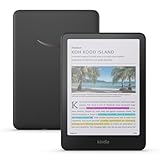
Amazon Kindle Colorsoft 16 GB (2024 model) – With colour display that brings covers and content to life, now highlight in colour – Black
−44% · Amazon reference price: £259.99
Verified 2026-11-29 15:56:11 UTC

Amazon Kindle Colorsoft Signature Edition 32 GB (Newest Gen), Thinner, new aluminium design, 7" colour display, Auto-adjusting front light - Graphite
Verified 2026-11-29 15:56:08 UTC

Amazon Kindle Colorsoft Signature Edition 32 GB (Newest Gen), Thinner, new aluminium design, 7" colour display, Auto-adjusting front light - Fig
Verified 2026-11-29 15:56:08 UTC
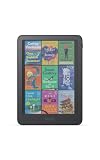
Amazon Kindle Colorsoft 16 GB (Newest Gen), Now thinner and lighter, 7" colour display, warm light - Graphite
Verified 2026-11-29 15:56:08 UTC
Compare current prices, available savings and Amazon promotion labels above. Each listing shows its latest successful price check. Prices and availability can change; the price at checkout applies. As an Amazon Associate, Cloudzat earns from qualifying purchases.
Our recommendation
Buy the standard Kindle Colorsoft if you regularly read illustrated books or want colour highlights. For mostly novels, buy a discounted Kindle Paperwhite instead. Pay extra for a Signature Edition only when its specific conveniences will be used, not simply because its discount percentage looks larger.
Cyber Monday is a useful moment to make your next Kindle a colour reader, but the best purchase depends on what fills your library. Our default Colorsoft recommendation is the standard version for readers who enjoy illustrations, colour-coded notes and browsing covers. Those benefits are visible in everyday use. They matter much less when almost every page you read is black text, where a Paperwhite usually makes the more sensible purchase.
The live Amazon UK listings above separate the actual device, generation and storage option from its price. Compare a discounted older Colorsoft with the newer model as two different purchases. A lower price can make the older generation the better buy for reading, while a newer design is worth paying for only if its changes solve something you care about. Do not let a bundle of accessories decide the purchase before you have chosen the reader itself.
For a straightforward upgrade, buy the reader first and add a cover made for that exact generation. Keep an existing working USB-C charging arrangement if it meets the device requirements. Choose Paperwhite for a largely text-based library, Colorsoft for meaningful colour content, or a larger writing-focused device only when handwriting is a central requirement. This guide explains those decisions so you can choose from the available offers without assembling a separate shopping checklist.
Choose the right option
| Your main use | Our choice | Reason |
|---|---|---|
| Illustrated books and colour highlights | Standard Kindle Colorsoft | Colour adds something to the books you actually read. |
| Mostly novels and bedtime reading | Kindle Paperwhite | Spend on the reading experience rather than unused colour. |
| Already happy with a recent Paperwhite | Keep your current Kindle | A sale alone is not a useful reason to replace it. |
| Handwritten notes and large documents | A writing-focused reader such as Kindle Scribe | Choose a different device class for a different job. |
Which Colorsoft offer should you buy?
Start with a standard Colorsoft offer for the generation you want. Treat the displayed total as the price of the exact item in that card, not as a starting price for every colour or capacity. A newer Signature listing and an older standard listing are not interchangeable even when both say Colorsoft. Our value choice is the less expensive complete reader that delivers the colour-reading experience you need.
If the older generation costs meaningfully less and you are buying primarily to read, choose it rather than stretching your budget for a newer casing or an accessory package. If the prices are close, favour the newer generation provided its delivery timing and condition suit the purchase. A used or refurbished listing needs a separate comparison; it should not be treated as the same deal as a new device. The product cards here are intended to show matching new-device offers.
Colorsoft or Paperwhite: make the decision from your books
Choose Colorsoft when colour is part of the content, not just the shop window. Illustrated titles, coloured diagrams and highlights give it a clear purpose. For a novel reader who would see colour mainly on the library screen, our recommendation is Paperwhite. Put the difference towards books or keep it rather than buying a feature you will seldom notice once reading begins.
Do not choose Colorsoft as a small entertainment tablet. A colour e-reader is designed around reading and should not be bought for the video, games or rapid animation experience of a tablet. Conversely, if you want long reading sessions without being pulled into a general-purpose device, a dedicated reader is the appropriate category. For large magazines, detailed diagrams or documents requiring frequent zooming, prioritise a more suitable screen size before colour alone. A discounted compact reader is still compact.
Is the Signature Edition worth the extra money?
The Signature Edition is a convenience upgrade, not the automatic best deal. Decide using the features attached to the exact generation in the listing. Do not transfer a charging, lighting or storage specification from a newer Signature device to an older offer with a similar name. Our default remains the standard Colorsoft because that buys the central reason for choosing this range: reading in colour.
Buy Signature when you already know you will use its extra features frequently and the total price remains comfortable. Skip it when the appeal is mainly a larger percentage discount against a higher reference price. An expensive model reduced substantially may still cost more than the simpler model that meets your needs. If Signature and standard versions are close in price, the better-equipped version can be sensible; it does not follow that the Signature badge makes a much larger premium worthwhile.
Choose storage and accessories without overbuying
For a predominantly text-based reading library, choose the standard storage option before paying for more capacity. Illustrated books and downloaded audio place different demands on space, so readers who deliberately keep large collections offline have a stronger reason to step up. Capacity should follow the material you carry, not the assumption that the largest number is always the safest purchase. There is no need to buy storage for a collection you do not expect to use offline.
A fitted cover is the accessory most likely to improve a portable reading setup. Buy one explicitly made for the reader’s generation; a familiar product name does not establish that the dimensions and attachment points match. Avoid building a basket around charging stands, page-turning accessories and premium cases before deciding which reader to keep. A bundle is worthwhile when you want its included items and its combined price beats buying those same items separately.
What makes the displayed discount useful?
Use the current price to compare your shortlist, and use the reference-price saving as additional context. The saving shown beside a card comes from the available Amazon offer information. It does not establish that this is the lowest price ever, or that a different storage option receives the same reduction. A Black Friday badge may remain on a valid offer during the Cyber Monday shopping period; the badge should retain the event wording supplied for that offer.
Our buying decision is straightforward: buy now if a suitable Colorsoft costs less than the other appropriate options available to you and you are ready to use it. Do not pay more for an unwanted configuration to capture a bigger percentage. If no matching device offer is present, the named Paperwhite alternative is useful for prose readers, but it is not a colour substitute for someone whose main requirement is illustrated reading.
Who should keep their current Kindle?
Keep a recent Paperwhite if it is comfortable to read, holds the books you need and does not leave you wishing for colour content. The improvement from replacing a working reader is smaller when the existing device already performs its main job well. Cyber Monday creates a buying opportunity, not an obligation to replace a device that suits your routine.
Upgrade when you can name a recurring limitation that Colorsoft resolves: colour illustrations lose meaning on your current screen, coloured annotations would help your reading, or your older device needs replacing anyway. For a gift, choose the standard reader suited to the recipient’s books and a compatible cover rather than guessing that the most expensive version is safest. If handwriting is the actual goal, move to the writing-device shortlist instead of buying Colorsoft and hoping an accessory will turn it into a different type of reader.
Suitable alternatives — different models

Black Friday Big Deal
Amazon Kindle Paperwhite (2024 model) – 7" glare-free display and weeks of battery life – 16 GB – With Ads - Raspberry
−35% · Amazon reference price: £184.99
Verified 2026-11-29 15:56:08 UTC

Black Friday Big Deal
Amazon Kindle Paperwhite (2024 model) – 7" glare-free display and weeks of battery life – 16GB – Without Ads - Black
−33% · Amazon reference price: £199.99
Verified 2026-11-29 15:56:08 UTC

Amazon Kindle Paperwhite Signature Edition 32 GB (Newest Gen), Thinner, new aluminium design, 7" display, Auto-adjusting front light, without ads - Seaglass Green
Verified 2026-11-29 15:56:08 UTC

Amazon Kindle Paperwhite 16 GB (Newest Gen), Now thinner and lighter, 7" display, warm light, without Ads - Graphite
Verified 2026-11-29 15:56:08 UTC

Amazon Kindle Paperwhite Signature Edition 32 GB (Newest Gen), Thinner, new aluminium design, 7" display, Auto-adjusting front light, without Ads - Graphite
Verified 2026-11-29 15:56:08 UTC
Your questions answered
Is Colorsoft the best Kindle for reading novels?
Paperwhite is our default for mostly novels. Colorsoft becomes the better fit when illustrations and colour highlights are important parts of your reading. If you would only notice colour on book covers before opening a black-and-white novel, choose the less expensive suitable Paperwhite offer and spend the difference on reading material.
Should I buy an older Colorsoft in the sale?
Yes, if the older generation meets your reading needs and its price is clearly better than the newer alternative. Compare the actual generation and condition, not only the Colorsoft name. Our recommendation favours the cheaper complete reader for value; the newer version deserves a premium only when its changes matter to you.
Does every Colorsoft accessory fit every generation?
No. Choose a cover, charging accessory or other fitted item for the exact device generation. Do not infer compatibility from the Colorsoft name alone. For a simple purchase, buy the reader and one correctly matched cover; leave optional accessories out until you have a clear use for them.
Should I buy Colorsoft for UK library borrowing?
Do not buy it on the assumption that it supports the UK public-library borrowing service you use. Our recommendation here is for the Kindle reading ecosystem. If public-library borrowing is your main requirement, choose a reader whose documented local library-service support fits that workflow rather than treating colour as the deciding feature.
Does a Cyber Monday page mean every card has that badge?
No. The page gathers relevant current offers for the Cyber Monday shopping period, while each card keeps the verified promotion label supplied for that individual listing. The useful comparison is the exact reader, its current price and any visible reference-price saving. An unlabelled offer can still be the better purchase for your needs.
Our final choice
Buy standard Colorsoft for colour reading, Paperwhite for mostly novels, and keep a recent working Kindle when neither solves a real problem. Choose the generation first, then the best-priced matching offer. Signature extras and accessory bundles should earn their place in your basket through use, not through a bigger discount badge.