


CYBER MONDAY 2026
Cyber Monday offers and current Amazon prices

Cohix Sense Gaming PC • RTX 5080 16GB • Ryzen 7 9800X3D 8-Core • 32GB RAM • 2TB M.2 SSD • RGB Lighting • WiFi • Windows 11 Pro (Ryzen 7 7800X3D, RTX 5070 TI 16GB)
Verified 2026-11-28 16:32:22 UTC

Alienware Aurora Gaming Desktop ACT1250 - Intel Core Ultra 9 285 Processor, Liquid Cooled, NVIDIA GeForce RTX 5080, 32GB DDR5 RAM, 1TB SSD, 1000W Platinum Rated PSU, Win 11 Home - Clear Panel
Verified 2026-11-28 16:31:15 UTC
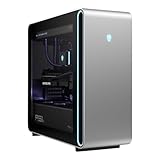
Dell Alienware Area-51 AAT2250 Gaming PC - Intel Core Ultra 9 285K (24-Core), NVIDIA GeForce RTX 5080 16GB GDDR7, 32GB DDR5 6400 RAM, 2TB NVMe SSD, WiFi 7, 360mm Liquid Cooling, Windows 11
Verified 2026-11-28 16:31:15 UTC

Alienware Area-51 Gaming Desktop - Intel Core Ultra 9 285K, RTX 5080 | 32GB RAM, 2TB SSD, Windows 11 Home, Intel Killer Wi-Fi 7, Bluetooth 5.4, Integrated HD Audio, AlienFX RGB Lighting
Verified 2026-11-28 16:31:15 UTC

ionz Gaming Desktop PC, Ryzen 7 9800X3D, Nvidia RTX 5080, 32GB DDR5 RAM, 1 TB NVMe SSD, 240mm AIO, Windows 11, 850W 80+ PSU - Apex Black
Verified 2026-11-28 16:24:08 UTC

ionz Gaming PC - Desktop Computer, Ryzen 7 5700X, NVIDIA RTX 5060,16GB RAM 1TB NVMe SSD, Windows 11, 650W 80+ PSU, WiFi (Dynamic Compact, White)
Verified 2026-11-28 16:21:08 UTC
Compare current prices, available savings and Amazon promotion labels above. Each listing shows its latest successful price check. Prices and availability can change; the price at checkout applies. As an Amazon Associate, Cloudzat earns from qualifying purchases.
Our recommendation
Choose a balanced Aurora, Legion Tower 5/5i or Predator Orion 5000 with 32GB RAM and a useful SSD. Start the GPU comparison with RTX 5060 Ti 16GB for a moderate budget, and move to RTX 5070 Ti or a higher tier for a demanding monitor and workload. Choose Area-51 or another RTX 5090 tower only when flagship graphics and the complete system cost are justified.
For Cyber Monday 2026, start with a complete Alienware Aurora or Lenovo Legion Tower 5/5i configuration with 32GB RAM and at least a 1TB SSD, then choose the GPU for the monitor. An RTX 5060 Ti 16GB system is the useful lower-tier comparison for a moderate gaming and creative workload; RTX 5070 Ti is the step up when graphics demand justifies it. Acer Predator Orion 5000 is another mainstream tower worth comparing. Area-51 belongs in the flagship discussion rather than being the default answer for every gamer.
The configuration matters more than the brand photograph. A tower with a premium CPU and entry-level GPU can be less suitable for high-resolution gaming than a more balanced build. For a first full setup, leave room in the budget for a useful monitor, keyboard and reliable network connection. A basic office mini PC, a USB Wi-Fi adapter or a KVM switch is not an equivalent gaming desktop simply because it appears in the same search results.
For UK buyers, a locally supplied Aurora, Legion Tower or Predator Orion configuration is the practical starting point. Choose the GPU for the display, with 32GB memory and a useful SSD, and keep the proper UK mains lead and local repair handling in the comparison. A KVM switch, SSD or integrated-graphics office mini PC is a separate purchase, not a lower-priced version of the same gaming tower.
Which option should you buy?
| Choose | Best use | Reason to pass |
|---|---|---|
| Alienware Aurora | Mainstream complete gaming tower | Exact GPU and cooling vary by build |
| Lenovo Legion Tower 5/5i | Balanced configurable gaming desktop | Keep 8GB and 16GB GPU versions separate |
| Acer Predator Orion 5000 | Alternative mainstream tower | Compare the selected GPU and SSD |
| Alienware Area-51 | Flagship graphics and larger chassis | Excessive for many ordinary displays |
| Acer Predator Orion 7000 | Higher-tier Orion comparison | More system than a modest workload needs |
Choose a balanced mainstream build first
For many buyers, a tower with a sensible midrange CPU, 32GB memory and the right GPU is more useful than a flagship processor paired with a weak graphics configuration. RTX 5060 Ti has separate 8GB and 16GB versions; we prefer the 16GB version when its complete-system cost remains reasonable because it gives textures and creative workloads more room. That extra capacity does not give it the compute capability of an RTX 5070 Ti. The higher tier is the more relevant step when rendering demand, rather than capacity alone, is the limitation.
Aurora, Legion Tower 5/5i and Orion 5000 are useful complete-system families for this comparison. None deserves a blanket recommendation without its selected parts. A 32GB/1TB configuration is a practical baseline, with 2TB attractive for a larger library. A buyer with a modest monitor should avoid paying for unused flagship graphics while accepting inadequate storage or support. The useful desktop is the whole working setup, including the display that determines how much of the graphics capability will be visible.
A premium tower needs a premium workload
Alienware Area-51 and Predator Orion 7000 are the higher-tier alternatives when the plan includes a demanding GPU, substantial cooling and a larger chassis. They can be appropriate for a mixed gaming and creator desk, but their extra size and cost should have a purpose. A large enclosure may provide useful airflow and expansion room, yet it also needs floor or desk space and a suitable place for heat to escape. A premium system is not automatically a quieter system.
For high-resolution gaming, a stronger GPU can be the sensible place to spend, while competitive high-refresh games can also make CPU performance important. No family name guarantees a particular frame rate across every title and setting. If the real requirement is GPU rendering or local AI, treat software compatibility and graphics memory as part of the decision rather than borrowing a gaming ranking. An expensive gaming tower can be a useful workstation for some tasks, but it is not automatically a substitute for professional certification or a much larger GPU-memory pool.
Complete-PC comparisons should stay complete
The useful retail comparison contains the assembled tower, intended graphics card, CPU, memory, storage, PSU and advertised operating system. A low-cost listing for an internal SSD or Wi-Fi adapter cannot be compared with that complete machine. Likewise, an office mini PC with integrated graphics is a different class even when it can play lighter games. A desktop title that mentions several GPU tiers needs the selected option to be clear before its value can be assessed.
A custom builder can be attractive when the owner wants ordinary retail parts and a particular case or cooling arrangement. A major-brand tower can be attractive when an integrated service package matters more than replacing the motherboard years later. Both routes can make sense. The comparison should reward the configuration and support that suit the buyer rather than assume one assembly method wins in every case. Where two builds are close, a useful SSD, adequate memory and clear local repair handling can decide the better purchase.
Balance CPU and graphics with the monitor
For a gaming desktop, the graphics tier should match the monitor resolution and the kind of games played. A competitive title at reduced settings can be limited by CPU performance, while a demanding high-resolution scene can place more pressure on the GPU and its memory. A premium processor does not compensate for an undersized graphics configuration in every game. Similarly, the largest GPU can be wasted behind a modest display or a workload that already reaches the desired experience on a lower tier.
Keep native rendering, upscaling and generated frames separate when comparing performance claims. They describe different experiences and processing paths, so a large advertised frame-rate figure is not a universal result. For a mixed gaming and creative desktop, application support matters too: a renderer, editor or local-model tool may favour a particular GPU backend. Choose the system for the software that will actually run. The best-balanced tower is the one whose processor, graphics and display serve the same target rather than competing for the largest individual specification.
Buy enough RAM and useful SSD capacity
Thirty-two gigabytes of system memory is a sensible target for a modern gaming desktop that also runs a browser, communications software and ordinary background applications. A 16GB system can still suit a narrower budget and workload, but the upgrade path and module layout matter. Sixty-four gigabytes is more relevant to large creative projects, development or a broader workstation role than to gaming alone. System RAM is separate from the GPU’s dedicated video memory; adding one does not increase the other.
A 1TB SSD is a workable starting point, while 2TB is a more comfortable choice for a sizeable game library and creative applications. A faster-generation SSD with too little capacity can be less useful than a well-sized drive that avoids constant uninstalling. A second supported internal slot gives a practical expansion route. Keep a separate backup for saves and documents that are not reliably synchronised elsewhere, and remember that the operating system, recovery files and applications reduce the space available for the game library.
The power supply and cooling are part of the system
A complete prebuilt should be designed around its installed CPU and GPU, with the appropriate power supply and cooling. That does not make every tower in the same family equally upgradeable. A lower-power configuration may ship with a different PSU, cooler or cable arrangement from a flagship option. The PSU’s wattage is a capacity rating rather than the power the computer draws constantly. Its connectors, quality and supported configuration matter as much as the headline number when the machine is expected to handle sustained gaming or rendering.
For a later graphics upgrade, the actual case clearance, power cabling and cooling arrangement need to support the replacement. Modular PSU cables are not universally interchangeable. A compact chassis can make an otherwise attractive upgrade awkward if a larger card or radiator does not fit. Liquid CPU cooling also does not remove all fan noise: radiator fans, the pump and the GPU cooler remain part of the acoustic result. Choose a complete thermal design suitable for the room and sustained workload, rather than assuming a large cooler name guarantees silence.
Upgradeability depends on the exact chassis
A tower gives more expansion room than many mini PCs, but standard-looking dimensions do not establish that every motherboard, PSU or front-panel connection is interchangeable. Some system designs use manufacturer-specific parts or power arrangements. That is not automatically a reason to reject a prebuilt, especially when the buyer values an integrated service package, but it changes the long-term comparison with a system assembled from ordinary retail components. The relevant question is which upgrades the particular machine supports, not whether it is described generically as a desktop.
For most buyers, a supported memory upgrade and another SSD are more likely than a complete motherboard replacement. Prioritise those practical additions, the monitor connections and enough USB ports for the desk. A GPU’s display outputs should serve the intended monitor directly when gaming; motherboard video connections may depend on the CPU and configuration. Wired Ethernet is useful for a fixed desk, while Wi-Fi is a convenience when cabling is difficult. A separate Wi-Fi adapter, KVM switch or SSD is an accessory rather than a complete gaming PC.
Compare the service you will actually receive
A complete-system warranty can be valuable because one seller is responsible for the assembled computer. Parts coverage, labour, remote diagnosis, return-to-base repair and on-site service are different arrangements. A long labour promise does not necessarily mean every replacement part is free for the same period. For an expensive tower, a local service route can be worth more than an apparently similar imported configuration. The seller named on the actual order matters even when the case and brand are familiar.
Compare like-for-like configurations: CPU, GPU and its memory, installed RAM, SSD, power arrangement, operating system and condition. Refurbished, open-box and new towers are separate choices. A family page advertising an upper-end GPU does not establish that its least expensive configuration includes that card. Keep the selected build specification and invoice together. A sensible premium pays for a useful assembled system, support and suitable components; decorative lighting or a larger model number should not conceal a weaker configuration in the areas that matter to the owner.
Questions answered
Does a desktop family name define the graphics card?
No. Aurora, Area-51, Legion and Orion families can contain very different CPU, GPU, RAM and storage combinations. The selected configuration must explicitly include the intended graphics card and memory capacity. An up-to claim elsewhere on a family page is not the specification of the entry build.
Is 64GB RAM necessary for gaming?
Usually it is a workload-specific addition rather than the first gaming priority. A balanced 32GB configuration is a sensible starting point for many modern gaming desktops. Large creative projects or other professional tasks can justify more memory, but extra RAM does not replace a stronger GPU.
Does a 1500W PSU always use 1500W?
No. The rating describes the supply’s capacity. Actual power draw depends on the components and workload, with additional losses in conversion. The supply still needs the correct connectors and a configuration supported by the system builder.
Can I upgrade any prebuilt with any graphics card?
No. Case dimensions, power capacity, connectors, cooling and platform support all matter. Some towers also use manufacturer-specific components. A supported storage or memory upgrade can be straightforward even when a major graphics or motherboard change is more constrained.
Is liquid cooling automatically quieter?
No. Fans and the pump remain sources of noise, and the GPU has its own cooling system. The complete design and sustained workload matter. A large liquid cooler can be appropriate for a demanding CPU without guaranteeing that the whole tower will be silent.
Is a standalone GPU listing a prebuilt PC?
No. A complete desktop includes the assembled computer with its CPU, memory, storage, power supply and the advertised operating system. A graphics card, case, cooler or networking adapter is a component or accessory, even when gaming-PC keywords appear in the title.