


CYBER MONDAY 2026
Cyber Monday offers and current Amazon prices

Black Friday Big Deal
Amazon Fire TV Stick 4K Select, start streaming in 4K, hundreds of thousands of films and TV episodes, free & live TV, find TV programmes faster with Alexa+
−66% · Amazon reference price: £64.99
Verified 2026-11-28 19:10:15 UTC

Black Friday Big Deal
Amazon Fire TV Stick 4K Plus streaming device, supports Wi-Fi 6, Dolby Vision/Atmos, HDR10+, find TV programmes faster with Alexa+
−56% · Amazon reference price: £79.99
Verified 2026-11-28 19:10:15 UTC

Black Friday Big Deal
Amazon Fire TV Stick 4K (newest gen), simple 4K streaming, new Fire TV Remote, all your apps in one place, free & live TV, find shows faster with Alexa+
−54% · Amazon reference price: £69.99
Verified 2026-11-28 19:10:15 UTC

Amazon Fire TV Stick 4K Max (Newest gen), supports Wi-Fi 6E, Ambient Experience, find TV programmes faster with Alexa+
−53% · Amazon reference price: £99.99
Verified 2026-11-28 19:10:15 UTC
Compare current prices, available savings and Amazon promotion labels above. Each listing shows its latest successful price check. Prices and availability can change; the price at checkout applies. As an Amazon Associate, Cloudzat earns from qualifying purchases.
Our recommendation
Buy Fire TV Stick 4K for a straightforward streaming upgrade. Choose 4K Max when you want more app storage or can use its Wi-Fi 6E support. Keep a working recent stick if it already runs the services you watch reliably. Neither model makes paid streaming subscriptions free.
A discounted Fire TV Stick can rescue a television whose built-in apps have become frustrating without the cost of replacing the screen. For that job, our first choice is the standard Fire TV Stick 4K. Step up to 4K Max for a deliberate benefit, such as more room for installed apps or a suitable Wi-Fi 6E network, rather than treating the longest product name as the default purchase.
The Cyber Monday offers above show the actual Amazon UK model and its current price. Match the generation as well as the 4K or Max label: similar names can sit beside different remotes, bundles and hardware versions. We would buy the simplest complete streaming package that solves your television’s problem. A remote accessory, protective case or adapter is not a replacement for the streaming device itself.
Your television, subscriptions and network still determine what you can watch and how reliably it plays. A 4K stick cannot turn an ordinary source into genuine 4K material, and a faster wireless specification cannot repair every coverage problem. Use the recommendations below to choose the appropriate stick, power it properly and avoid paying for a premium that will be invisible in your normal viewing.
Choose the right option
| Situation | Buy | Reason |
|---|---|---|
| Old television apps are slow | Fire TV Stick 4K | Our default streaming upgrade. |
| More installed apps and compatible Wi-Fi 6E | Fire TV Stick 4K Max | The extra storage and wireless support have a clear purpose. |
| Recent stick already works well | Keep it | A sale does not create a viewing problem. |
| Weak signal behind the television | Improve the network first | Changing the stick alone may not fix the bottleneck. |
4K or 4K Max: our buying decision
Choose standard 4K when your priority is opening a few streaming services on a television with outdated or inconvenient built-in apps. It is the sensible starting point for a bedroom screen or straightforward living-room setup. Do not pay extra for Max merely because you own a 4K television; the standard 4K model is already in that resolution category.
Choose Max when you expect to install more apps or have a network that can use its additional wireless capability. The observed Max model lists 16GB of storage, compared with the 8GB comparison for the standard 4K model. That is room for device software and applications, not a promise that every streaming film can be downloaded and stored locally. If the price difference is small and you expect to keep the stick for several years, the added flexibility can be worthwhile. A large premium is harder to justify for two or three familiar services.
When Wi-Fi 6E is worth paying for
The 4K Max’s Wi-Fi 6E support matters most when the rest of your network can use it. It does not turn an older router into a newer one or guarantee stronger coverage through walls. Buy Max for that feature when you have a compatible router and a practical reason to use the supported connection. For an ordinary television near a reliable router, standard 4K remains a reasonable choice.
If viewing pauses because the television sits in a weak-signal corner, solve that coverage problem before assuming a new streaming stick will fix it. Moving the router, improving access-point placement or choosing an appropriate network arrangement can have more value than a model-name upgrade. This is a diagnosis, not a reason to buy an expensive mesh system automatically: where other devices also struggle in the same position, the network is the more likely limitation. Do not spend the streaming-device budget on an unused headline wireless standard.
What 4K does and does not change
A 4K label describes a capability in the viewing chain. You still need suitable content and a television able to display it, with any required service plan. Buying a 4K stick does not make every programme a higher-resolution production, remove subscription limits or change the quality of a poor source. Choose the stick to provide a convenient supported playback route, rather than expecting it to transform all material.
For an older television whose panel still looks good, a streaming device can be a much smaller purchase than a new screen. That is our preferred route when the main complaint is the built-in app experience. If the panel itself is damaged, too small or otherwise unsuitable, the stick does not solve those issues. Avoid treating HDR terminology as a reason to buy without considering the rest of the chain. The useful result is reliable playback of the services and material you actually watch.
Buy a complete UK package and avoid misleading comparisons
Compare complete devices from the UK marketplace. A listing for a remote control, cable, protective sleeve or replacement power accessory can mention the same Fire TV model but is a different purchase. The relevant comparison is between the streaming stick packages you would actually install. For a gift, a complete local package also reduces the chance of needing another purchase before the device can be used.
Take the displayed bundle title seriously. A stick bundled with another device is only good value when you want both products. A large reference-price discount can be less useful than a smaller discount on the stick alone. Our recommendation is to start with the device package, then add accessories only to solve a known setup need. Do not choose an imported configuration solely because its price is lower; the plug, included components and local service expectations should suit the UK installation.
Subscriptions, apps and the real cost of ownership
A Fire TV purchase buys hardware. It does not generally replace the subscriptions needed for paid services or guarantee that every programme you want is included. Build the decision around the services you already use. If the same subscriptions will continue on a different screen, the device cost is the main extra expense. Do not count a temporary promotion as permanent access when comparing the total purchase.
For a shared television, consider who will use the account and which purchases or subscriptions should be controlled. A simple, familiar arrangement is often more useful than a long list of apps installed because the device has spare space. Max provides more headroom for applications, but that does not make more paid subscriptions a requirement. We would keep the service list focused and avoid adding recurring costs just to make the new hardware feel more fully used.
Should you replace an existing Fire TV Stick?
Keep a recent stick that starts your usual apps promptly and plays reliably. The discounted replacement must solve a problem to be worthwhile. Upgrade when the old device’s performance or storage has become a genuine limitation, or when moving to a television and viewing setup that makes use of the newer model’s capabilities. A seasonal badge alone is not a practical upgrade requirement.
For a second room, the standard 4K is our starting recommendation unless you already know why Max would be useful there. Spend more on the main screen only when its use justifies it. If an older stick has become unstable, distinguish a device limitation from inadequate power or a weak network before buying the same sort of replacement. The goal is a working viewing setup. When the original problem lies elsewhere, replacing the stick can leave you with two devices and the same frustration.
Suitable alternatives — different models
Black Friday Big Deal
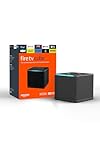
Amazon Fire TV Cube (Newest gen), Hands-free streaming media player with Alexa, Wi-Fi 6E, 4K Ultra HD, find TV programmes faster with Alexa+
−45% · Amazon reference price: £199.99
Verified 2026-11-28 19:10:15 UTC
Your questions answered
Is 4K Max necessary for a 4K television?
No. Standard Fire TV Stick 4K is already the relevant resolution category. We recommend Max for its additional app storage or suitable Wi-Fi 6E use, not simply because the television is 4K. Choose using the complete setup and current price difference, rather than assuming the more expensive name is required.
Does a Fire TV Stick include all streaming services?
No. The hardware purchase does not make paid subscriptions free. Your service accounts and plan restrictions still apply. Buy the stick as a playback device for the services you want, and treat any temporary subscription promotion as a separate offer with its own duration and conditions.
Will Max fix buffering on a weak home network?
Not automatically. Wi-Fi 6E support helps only in a compatible arrangement and does not remove physical coverage problems. If several devices struggle near the television, improve the network connection first. Choose Max when its capabilities address a real part of your setup, rather than buying it as a universal buffering cure.
Should I buy a remote-only offer because it mentions 4K Max?
No, if you need the streaming device. A replacement remote, case or adapter is an accessory, even when its title includes the exact Fire TV name. Choose a complete device package for a new installation. Accessories belong in the basket only when they solve a specific need for hardware you already own.
Should I wait for a Cyber Monday badge?
Judge the current matching offer rather than the event wording alone. A valid Black Friday-labelled deal may remain available during the Cyber Monday shopping period. The card should keep its verified label, price and reference-price saving. Waiting for a renamed badge does not guarantee a different price for the same device.
Our final choice
Buy Fire TV Stick 4K for a simple streaming upgrade and 4K Max for a clear storage or network benefit. Keep a recent working stick, avoid accessory-only comparisons and include subscription costs in the decision. The best purchase improves your actual television setup without adding features or recurring costs you do not need.