


UK BUYING GUIDE
For most UK home offices, Synology is easiest to buy when you separate the chassis from the storage plan. The current range that matters here is the DS223, DS225+, DS925+ and DS1525+, with the higher-bay models aimed at people who need growth rather than anyone chasing the newest badge. The right answer is usually less about model age and more about whether you want a simple two-bay private cloud, a faster 2.5GbE desktop NAS, or a larger platform that can absorb more drives later.
Do not treat the NAS and the drives as the same purchase. Synology’s current desktop models are sold as bare enclosures with drive bays, memory and network ports specified separately, while the packaging contents are just the main unit, accessory pack, power adapter, power cord and LAN cables; the drives are sold separately. That means a bundle is only worth considering if the seller clearly states the exact chassis and drive models, because the enclosure itself does not come with usable storage.
The most important compatibility change for current buyers is that Synology no longer has the old blanket message people remember from earlier years. Its 2026 compatibility policy says that, from 2025 models onward, 2025 DiskStation Plus series products offer more flexibility for third-party HDDs and 2.5-inch SATA SSDs when creating storage pools, while compatibility-list drives remain the safest route for full support and predictable behaviour. That is a meaningful shift, but it does not make every drive acceptable, and it does not apply retroactively to older models.
Our recommendation
Buy the Synology DS225+ if you want the cleanest default choice for a UK home office. It is a current 2-bay Plus model with 2 GB DDR4 non-ECC memory, one 1GbE port, one 2.5GbE port, two USB ports and support for two 3.5-inch SATA HDDs or 2.5-inch SATA SSDs. For most households and small offices, that is the best balance of simplicity, speed and price-to-capability without paying for bays you may never use.
Choose the DS925+ if the NAS is going to become a shared file hub rather than a personal store. It has four bays, 4 GB ECC memory, two 2.5GbE ports, support for two M.2 2280 NVMe SSDs, and expansion to nine bays with a DX525 unit; it also keeps the same 100V to 240V AC input range as the smaller models, so UK mains compatibility is not the issue. The real reason to pay more is headroom, not novelty.
Skip the DS1525+ unless you know you need five internal bays and a bigger ceiling from day one. It is a serious platform with 8 GB ECC memory, five bays, two M.2 NVMe slots, dual 2.5GbE and 100V to 240V AC input, but that scale is overkill if your real job is backing up a few PCs and sharing documents. In other words: DS225+ for most people, DS925+ for growth, DS1525+ for larger storage needs.
Synology NAS DiskStation
Amazon UK listings for this buying decision. Match the model, capacity and bundle to our recommendations below.

SYNOLOGY Diskstation DS1825+
£1,489.97
Last verified 2026-11-28 10:16:19 UTC

Synology 8-Bay Expandable NAS Kit, DS1825+ AMD RyzenCPU with 8GB Memory, 2.5GbE Standard Users, Domestic Authorized Reseller, Field Lake, Phone Support, DiskStation
£1,496.92
Last verified 2026-11-28 10:16:19 UTC
Synology DS223j 2-Bay Diskstation NAS (Realtek RTD1619B 4-Core 1.7 GHz 1GB DDR4 RAM 1xRJ-45 1GbE LAN Port) 16TB Bundle with 2 x 8TB Seagate IronWolf NAS HDDs (ST8000VN004)
£955.77
Last verified 2026-11-28 08:02:51 UTC
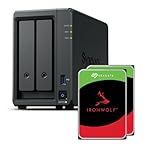
Synology DS725+ Bundle 12TB (Seagate Ironwolf 2X 6TB) Series 2 Bay Plus with Ryzen R1600, 4GB RAM (32GB Max), 1x 2.5GbE, 1x 1GbE, 2x M.2 NVMe slots. DX525 expansion available via
£1,252.44
Last verified 2026-11-28 08:02:51 UTC
As an Amazon Associate, Cloudzat earns from qualifying purchases. Price and availability may change; Amazon checkout controls the purchase price.
What to buy for your needs
Start with the bay count that matches the next three years, not the next three weeks
A two-bay NAS is still the best fit for many home offices because it keeps the purchase simple while still allowing a mirrored pair of disks. The DS225+ sits squarely in that role: current, compact, and easy to size for personal documents, backups, and light collaboration. If you are replacing a USB drive, a desktop shared folder or a small cloud subscription pile, the DS225+ is usually enough.
Move up to the DS925+ when you expect multiple users, larger media libraries, or a retention-heavy workflow such as design archives, client files or camera recording. Four bays let you build a better storage layout without replacing the whole unit too soon, and the model’s 2.5GbE networking gives it more usable headroom for sustained transfers than the 1GbE-only budget class.
The DS1525+ is the choice when you want a five-bay base with future expansion in mind. It has five internal drive bays and support for up to 15 bays with two DX525 expansion units, which is a different proposition from the smaller desktop models. That does not make it the best buy for everyone; it simply means you should only pay for it when you know the storage plan needs that extra runway.
Buy the enclosure and the drives as separate decisions
Synology’s product pages are clear that these NAS units are shipped as enclosures, not pre-populated storage servers. For the DS225+, DS925+ and DS1525+, the packaging contents list the main unit, accessory pack, AC adapter, AC power cord and two LAN cables, but not hard drives or SSDs. That matters because many listings blur “NAS” and “bundle” together, yet the bundle decision is the part that changes capacity, noise and long-term value.
For a home office, mirrored HDDs remain the cleanest default. On the DS225+, two matched NAS-grade 3.5-inch SATA HDDs are the sensible starting point if your priority is safe file storage and straightforward backup. If you prefer SSDs for a quieter system or specific workload reasons, the same chassis can accept 2.5-inch SATA SSDs, but you should choose them deliberately rather than because a product title happens to mention “SSD”.
Avoid overfocusing on M.2 just because higher-end Synology models mention it. The DS925+ and DS1525+ both have built-in M.2 2280 NVMe slots, but Synology also states that creating M.2 storage pools on the DS925+ requires Synology-verified SSDs. That means M.2 is a model feature, not a universal promise, and it is best treated as an advanced option rather than the foundation of a sane first purchase.
Understand the new drive policy before you buy disks
Synology’s 2026 knowledge-base page is the key correction to older advice. It says the updated compatibility policy applies only to models released from 2025 onwards, and that 2025 DiskStation Plus models offer more flexibility for installing third-party HDDs and 2.5-inch SATA SSDs when creating storage pools. That is a real change from the old blanket perception, but it is still wiser to stay within the compatibility list if you want the smoothest experience and the least chance of support friction.
The practical buying rule is therefore narrower than “Synology blocks third-party drives” and narrower than “anything goes”. For 2025 models, Synology still recommends compatible drives for optimal performance and reliability, and its own product pages warn that full functionality, reliability and performance are only guaranteed for compatible drives. So the safest approach is not to speculate about a drive being fine; it is to check the exact model on the compatibility list before you purchase it.
That matters most if you are building storage pools from scratch rather than migrating an existing array. Synology’s policy table distinguishes between supported new installations, migrations and drives that are not listed, so the same disk can behave differently depending on whether you are creating a new pool or moving existing storage. In plain English: do not buy disks first and hope the NAS will forgive the mismatch later.
Check power, plugs and the small regional details
UK buyers do not need to worry about a special mains-voltage variant. The DS225+, DS925+ and DS1525+ all list 100V to 240V AC input with 50/60 Hz single-phase power, which covers UK mains supply. In buying terms, that means the important UK question is not voltage but whether the seller includes the correct mains lead and whether you have enough network ports and switch capacity for the speeds you want.
The power figures also explain why a NAS is not a dramatic electricity hog, but the exact idle or access draw should not be the buying trigger. The sensible point is simply that all three current desktop models are regular mains-powered appliances, not region-specific gadgets. If you are comparing them for a home office, the more relevant difference is network capability: 1GbE on DS223, 1GbE plus 2.5GbE on DS225+, dual 2.5GbE on DS925+ and DS1525+.
Synology also marks UKCA on the current UK product pages, which is what a British buyer should look for on a local purchase page. That does not make the NAS better by itself, but it does confirm that you are looking at the UK-facing product presentation rather than a random import listing.
Buy for the software features you will actually use
The main reason to buy Synology is DSM, not the chassis alone. The current home-office models support the usual mix of file sharing, snapshots, backup and remote access, and the DS223 product page explicitly positions it as a private-cloud and backup device for home and small office use. If your main need is shared folders, Synology Drive and backup tasks, the entry and mid-range models already do the job.
If you plan to use Synology Photos or Surveillance Station, remember that the hardware choice affects how gracefully the box handles growth. The DS223 includes two free Surveillance Station licences and is aimed at small environments, but higher-bay models are better when cameras, clients or team members multiply. Do not buy the smallest chassis if you already know you are adding cameras, because extra licences and extra storage can quietly turn a bargain into a cramped system.
Also note that Synology’s product pages mention subscription-gated services around C2 Storage, C2 Backup for Surveillance, Active Insight and Extended Warranty Plus. Those are not required to use a NAS as local storage, but they are relevant if you were planning to rely on Synology for off-site services or extra coverage. For most home offices, the practical reading is simple: the core NAS software is included, but some cloud and extended-support services are paid extras.
If video transcoding is a priority, be honest about the alternative
If your main requirement is hardware video transcoding, Synology is not the first place I would point you for a desktop NAS shortlist. QNAP’s TS-464 hardware specifications explicitly list hardware-accelerated transcoding, and the package is sold without HDDs, so it is a direct example of a media-first four-bay NAS rather than a drive-included bundle. That is useful if your home office doubles as a media server and transcoding matters more than Synology’s DSM ecosystem.
By contrast, the Synology models covered here are better buys when the priorities are private cloud storage, predictable file sharing, backup and a cleaner ownership experience. So the correct comparison is not “which box has the most codec marketing”, but whether you value Synology’s software stack more than a model that explicitly advertises transcoding as a hardware feature. For most office buyers, Synology still wins; for media-heavy buyers, QNAP deserves a look.
Capacity, compatibility and ownership
Default choice: Synology DS225+
The DS225+ is the best default recommendation because it is current, compact and easy to understand. It has a 64-bit Intel Celeron J4125, 2 GB DDR4 non-ECC memory, one 1GbE port, one 2.5GbE port and support for two 3.5-inch SATA HDDs or 2.5-inch SATA SSDs. That combination is enough for most solo users and small offices without pushing you into a larger platform before you need it.
It also carries the current UK-facing certification and warranty presentation, with UKCA listed and a 3-year hardware warranty that can be extended to 5 years with Extended Warranty Plus. If you are buying for a business or a serious home office, that is a better starting point than an older or discontinued 2-bay model that may still appear in marketplace listings.
Use the DS225+ when you want a tidy local cloud for documents, photos, backups and light team use, but do not need four bays, expansion or heavier multitasking. It is the least fussy current Synology answer to the question “what should I buy first?”
Budget choice: Synology DS223
The DS223 is the better budget choice than chasing a discontinued bargain because it is a current, generally available model with full DSM support. Synology’s product status page lists it as generally available with full technical support and a 2-year warranty, which makes it a more defensible low-cost recommendation than older 2-bay units that may still be floating around in search results.
Its hardware is modest by design: a Realtek RTD1619B, 1 GB of memory, two bays and one 1GbE port. That makes it slower and less expandable than the DS225+, but it is still a sensible buy if your priority is basic shared storage, backups and simple private-cloud use rather than a faster network or a more ambitious storage roadmap.
This is the model to pick when budget matters more than speed, and when you are happy to keep the NAS role narrow. If you know you will move lots of large files or want headroom for future users, pay for the DS225+ instead.
Specialist choice: Synology DS925+
The DS925+ is the specialist pick for a growing office because it gives you four bays, 4 GB ECC memory, two 2.5GbE ports and support for two M.2 2280 NVMe SSDs. It also scales to nine bays with one DX525 expansion unit, which is the kind of growth path you only pay for when you really need it.
Its best case is a shared office storage hub where you expect more users, more files or more retention over time. In that scenario, the DS925+ is the more future-proof platform because it lets you grow inside the same ecosystem instead of replacing the NAS too early. If you are choosing only one higher-end model, this is the one to shortlist first.
It is still not the automatic answer for every buyer. Because 2025 Plus models now have more flexibility on third-party HDDs and 2.5-inch SATA SSDs, the DS925+ is no longer a closed ecosystem story; the real buying question is whether you need four bays, NVMe options and dual 2.5GbE more than you need a smaller, cheaper desktop box.
Step-up choice: Synology DS1525+
The DS1525+ is the model to buy only when five bays and larger-scale expansion are part of the plan. It comes with 8 GB ECC memory, five 3.5-inch SATA bays or 2.5-inch SATA SSD bays, two M.2 2280 NVMe slots and dual 2.5GbE networking, plus support for a 10GbE upgrade module sold separately. That is a serious platform, not a casual home-office toy.
It also shares the same important UK-compatible traits as the smaller models: 100V to 240V AC input, 50/60 Hz single-phase power, UKCA on the UK page and a 3-year hardware warranty extendable with Extended Warranty Plus. So the reason to buy it is capacity and growth, not because it is somehow more UK-friendly than the DS225+ or DS925+.
For a typical home office, it is easy to overspecify this model. The DS1525+ makes sense when you need multiple shared data sets, a larger camera archive, or a structured storage plan that will keep growing. If you do not have that problem now, buy smaller and spend the saved money on better drives and a proper backup plan.
What to avoid
Do not buy a model simply because it appears in an old comparison chart or marketplace bundle. The DS224+ is still visible in Synology’s support status pages, but it is marked discontinued there, so it is not the best current UK recommendation for a fresh purchase. Likewise, do not assume that a seller’s bundle solves compatibility or capacity planning for you; the bundle may be convenient, but the NAS itself still needs the right drives and the right storage layout.
Do not overvalue M.2 unless you know why you need it. On the DS925+ and DS1525+, M.2 support is useful, but it is not a substitute for buying enough HDD capacity in the first place. For most home offices, a well-chosen pair of HDDs in a 2-bay or 4-bay chassis will be more useful than an overcomplicated SSD-first design.
Finally, do not treat warranty and memory policies as trivial footnotes. Synology says it will not provide complete product warranty or technical support if non-Synology memory modules are used for memory expansion, and the current UK pages still frame the base warranty as three years with Extended Warranty Plus as a separate purchase. If you are paying for the larger models, those rules belong in the decision, not in the small print.
Which option should you choose?
Default choice: Synology DS225+ diskless, plus two matched NAS HDDs
This is the recommendation I would give most UK home-office buyers. You get a current 2-bay Synology NAS with 2 GB of memory, 1GbE plus 2.5GbE networking and support for two SATA drives, which is enough for a private cloud, backups and sensible growth without overbuying. Keep it diskless unless a seller clearly states the exact drive models and they match your storage plan.
Budget choice: Synology DS223
Choose the DS223 if you want to keep the entry cost down and you are happy with a basic 1GbE, 1 GB-memory system. It is current, generally available and fully supported, so it is a safer low-budget recommendation than shopping an older discontinued unit just because it looks cheaper in a listing.
Specialist choice: Synology DS925+
Choose the DS925+ if the NAS is part of a growing office or a more demanding home workflow. Its four bays, dual 2.5GbE, M.2 slots and expansion path make it the best specialist Synology desktop choice in this guide when you want more than a compact two-bay box but do not yet need the DS1525+ scale.
Synology NAS options on Amazon
Use a Synology DiskStation for the Synology steps in this guide. Check support for the exact DSM package and model; another brand does not run Hyper Backup or Synology Drive. Manufacturer compatibility information.
Checking current Amazon listings…
As an Amazon Associate, we earn from qualifying purchases. Prices and availability can change; Amazon’s checkout price applies.
Questions answered
Should I buy a Synology NAS diskless or with drives included?
Diskless is usually the better choice because it lets you pick the correct capacity, drive class and mirror layout yourself. Bundles only make sense if the seller clearly identifies the exact NAS model and the included drives, and the bundle still fits your capacity plan.
Can I use third-party drives in current Synology Plus models?
Yes, but the answer depends on the 2025 model-generation policy and the exact drive type. Synology says 2025 DiskStation Plus series models offer more flexibility for third-party HDDs and 2.5-inch SATA SSDs when creating storage pools, while compatibility-list drives remain the safest recommendation.
Do I need M.2 NVMe SSDs for a home-office NAS?
No. They are optional and useful only if you have a specific caching or storage-pool reason to use them. For most buyers, it is smarter to spend first on enough hard-drive capacity and only add M.2 if the workload truly needs it.
Are these Synology models suitable for UK mains power?
Yes. The DS225+, DS925+ and DS1525+ all accept 100V to 240V AC at 50/60 Hz, so they are compatible with UK mains supply. You still need the correct lead and network setup, but there is no UK-specific voltage barrier.
How long is the warranty on the current UK Synology desktop models?
The current UK product pages list a three-year hardware warranty for the DS225+, DS925+ and DS1525+, with Extended Warranty Plus available as a paid add-on in Europe and North America. The warranty period starts from the purchase date on your receipt.
If I need hardware video transcoding, should I still buy Synology?
Only if Synology’s software strengths matter more to you than transcoding. QNAP’s TS-464 hardware specifications explicitly list hardware-accelerated transcoding, so it is the clearer media-focused alternative if transcoding is a must-have.
Sources and further detail
- Synology DiskStation DS225+ product page — Current UK model, 2-bay capacity, memory, ports, warranty, packaging contents, UKCA and power-input specification.
- Synology DiskStation DS925+ product page — Current UK model, 4-bay capacity, ECC memory, dual 2.5GbE, M.2 slots, expansion path, warranty and packaging contents.
- Synology DiskStation DS1525+ product page — Current UK model, 5-bay capacity, ECC memory, M.2 slots, 10GbE upgrade option, warranty and packaging contents.
- Synology Product Support Status — Current availability and support status, including DS225+ generally available, DS223 generally available and DS224+ discontinued.
- Drive compatibility policies FAQs for Synology storage systems starting from 2025 (DSM 7.3 and above) — DSM 7.3 policy change, 2025-model scope, third-party HDD and 2.5-inch SATA SSD flexibility, and non-retroactive application.
- QNAP TS-464 hardware specifications — Hardware-accelerated transcoding, shipped-without-HDD wording, memory, drive bays and networking for the comparison note.