


UK BUYING GUIDE
The Bambu Lab A1 is the larger open-frame printer in Bambu’s A-series, while the A1 mini is the smaller sibling with a 180 × 180 × 180 mm build volume. The A1 gives you 256 × 256 × 256 mm, so this guide is about the full-size model and the A1 Combo bundle rather than the mini.
For UK buyers, the important point is not whether the A1 is powerful enough. It is whether an open printer with Bambu’s AMS Lite bundle matches the materials you want, the space you have, and the level of automation you expect. Bambu’s official quick-start material guidance places PLA, PETG, TPU and PVA in the ideal category, while ABS, ASA, PC, PA, PET and carbon/glass-fibre reinforced polymers are not recommended.
If you want an easy, well-featured machine for everyday household parts, prototypes, toy parts, organisers and display items, the A1 is a sensible shortlist contender. If you want multi-colour printing, the A1 Combo is the default configuration because it adds AMS Lite; if you need an enclosed printer for hotter engineering materials, the A1 is the wrong class of machine.
Our recommendation
Buy the Bambu Lab A1 Combo if you want the least-compromise version of the printer for a first purchase in the UK. The printer and Combo share the same core hardware, but the bundle adds AMS Lite, which is the practical difference between a standard single-filament setup and an ownership experience that can handle multi-colour and multi-material workflows more easily. Bambu’s own documentation also confirms that the A1 uses Bambu Studio, can work with third-party slicers that export standard G-code, and supports Wi‑Fi, microSD and app/PC control.
Buy the plain A1 if you are confident you will print mostly single-colour, single-material jobs and do not want the extra complexity or desk footprint of AMS Lite. The printer itself is the same platform, so the decision is about workflow rather than print quality. For many practical users, the base A1 is the better value choice because it avoids paying for a feature they may not use.
Do not buy the A1 as your main machine if your regular filaments are ABS, ASA, PC or other higher-temperature engineering materials that usually benefit from an enclosure. Bambu’s own guidance does not position the A1 as the right platform for that job, and the open-frame design is part of the reason it feels easy to use with PLA and PETG.
Bambu Lab A1 printers
Choose the exact model and configuration recommended below. These listings are from Amazon UK; bundles and capacities are identified on each card.
A priced matching listing is not currently confirmed in our Amazon UK catalogue.
Find these products on Amazon UK
Optional PLA filament for your A1
These are consumables for a printer you already own or buy separately. They are not printer listings or substitutes for the Bambu Lab A1.
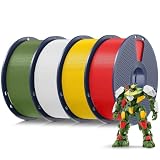
SUNLU 4KG PLA Filament 1.75mm, White+Red+Yellow+Olive Green | Dimensional Accuracy +/- 0.02mm, Neatly Wound 3D Printer Filament 1KG Spool (2.2lbs) Fits for Most FDM 3D Printers
£30.68
19% off · Amazon reference price £37.99
Last verified 2026-11-28 09:42:17 UTC

ELEGOO PLA 3D Printer Filament 1.75mm Grey 2KG, Easy to Use, Durable | Dimensional Accuracy +/- 0.02mm, 2pcs 1kg Spools(2.2lbs), Fit Most FDM 3D Printers, Vacuum-Sealed, No Clogging, Tangle‑Free
£21.23
15% off · Amazon reference price £24.98
Last verified 2026-11-28 09:42:17 UTC

ELEGOO PLA Basic Refill 3D Printer Filament 1.75mm Bundle 4KG, Easy Storage | Black/ White/ Red/ Cobalt Blue, Multicolours 3D Printer Filament No Spool, Dimensional Accuracy +/- 0.02mm, Vacuum-Sealed
£31.44
21% off · Amazon reference price £39.96
Last verified 2026-11-28 09:42:17 UTC
As an Amazon Associate, Cloudzat earns from qualifying purchases. Price and availability may change; Amazon checkout controls the purchase price.
What to buy for your needs
Choose the A1 Combo unless you know you will stay single-colour
The Combo is the safer default because AMS Lite is the feature that changes day-to-day ownership most. It makes colour changes and filament management easier, and it gives you a more flexible setup if your first projects start simple and become more ambitious later. Bambu’s own materials for the A1 Combo show that the bundle is intended to pair the printer with AMS Lite from the outset.
The plain A1 still makes sense if your printing is mostly functional and you want the lower-friction route into the platform. If you print brackets, clips, repair parts, organisers, jigs or plant labels, the printer itself is usually the part that matters most. In that case, the extra bundle hardware is optional, not essential.
Match the printer to the materials you actually intend to use
Bambu’s official quick-start guidance is clear about the A1’s sweet spot: PLA, PETG, TPU and PVA are listed as ideal. ABS, ASA, PC, PA, PET and carbon/glass-fibre reinforced polymers are listed as not recommended. That is the key material decision point for UK buyers, because it tells you the A1 is built for convenience and common desktop materials rather than enclosed high-temperature work.
If you are mostly printing homeware, desk accessories, cosplay parts, toys, storage and prototypes, the A1’s supported material set is a good fit. If you routinely need a tougher engineering filament, look at a different printer class instead of expecting the A1 to behave like an enclosed machine.
Check the electrical basics before you assume it is a UK-specific model
Bambu lists the A1 at 100–240 VAC, 50/60 Hz input, with maximum power of 1300 W at 220 V. That means it is electrically compatible with UK mains voltage, so you do not need a special regional voltage variant. You still need a normal UK mains lead and a sensible socket arrangement, because the printer is a powered appliance rather than a low-draw accessory.
The A1’s headline speed figures are not the main buying reason. Bambu lists a 500 mm/s maximum toolhead speed and 10 m/s² acceleration in the A1 mini documentation, and the full-size A1 family is aimed at convenience and consistent results rather than ultra-specialist high-temperature work. For most buyers, that matters less than whether the printer fits the material and workflow.
Understand the AMS Lite limitations before you pay for the bundle
AMS Lite is the A1-compatible multi-material system, and it is the main reason to buy the Combo. It is not the same product family as the enclosed AMS used on other Bambu printers, and Bambu’s A1-family documentation makes clear that third-party slicers may work but some advanced features are limited. In practice, that means the bundle is useful if you want the ecosystem, but you should not expect every Bambu accessory to be interchangeable across series.
Bambu’s AMS Lite guidance also warns against using flexible materials such as TPU, TPE or absorbent PVA through AMS Lite, and says harder or brittle fibre-reinforced materials should be fed externally rather than through the system. The practical takeaway is simple: AMS Lite is helpful for standard multi-filament ownership, but it is not a universal feeder for every material type.
Treat the 2024 recall as a product-history issue, not a reason to rule out the current A1 outright
Bambu’s official recall update confirms that the A1 heatbed cable callback was real and that replacement and refund options were provided. That is relevant buying context, but it is not the same as saying current A1 stock is automatically suspect. The sensible approach is to buy only current production stock from an authorised channel and avoid old, unclear marketplace listings.
For a reader in 2026, the material correction is straightforward: the original recall was about the heatbed cable issue, and the relevant current question is whether the unit you are buying is from the revised product path. Do not treat the recall as a reason to ignore the model, but do treat it as a reason to be careful about stale inventory.
Capacity, compatibility and ownership
Why the A1 is the right size for many homes
The A1’s 256 × 256 × 256 mm build volume is the main reason it sits above the A1 mini for many buyers. The extra space is useful for larger boxes, household storage items, cosplay pieces, prototype housings and prints that would feel cramped on the mini’s 180 × 180 × 180 mm bed. If you want one printer to cover a wider range of everyday jobs, the full-size A1 is the more forgiving choice.
The open-frame design is part of that appeal. It keeps the printer easy to access and easy to live with for common materials, but it also means you should not expect the same environmental control as you would from an enclosed machine. That is a fair trade for PLA and PETG, and a poor trade for demanding engineering materials.
Why the A1 is not a universal recommendation
The A1 is a good general-purpose consumer printer, not a catch-all solution. Bambu’s own material guidance excludes the kinds of filaments that usually push buyers toward enclosed printers, so anyone planning to print ABS, ASA, PC or similar materials regularly should redirect the budget to a more suitable model.
It is also less appropriate if you want a highly manual, fully open tinkering platform. The A1 is designed around Bambu’s software and connectivity model, and while third-party slicers can be used, the smoothest path is still to stay close to the manufacturer ecosystem. That is a strength for convenience, and a drawback for users who want complete independence from vendor tooling.
What the A1 actually includes and what it does not
The official quick-start documents confirm the A1’s core hardware details: 300 °C hot end, 0.4 mm included nozzle, optional 0.2/0.6/0.8 mm nozzles, a 100 °C bed, Wi‑Fi connectivity, microSD storage and touchscreen/app/PC control. Those are the concrete capabilities that matter more than marketing language. They also show that the A1 is a self-contained printer rather than a kit-like machine that needs extensive extra parts before it can be used.
The Combo adds AMS Lite, but it does not turn the A1 into a different printer class. It remains an open, consumer-focused machine with the same build volume and the same material limits. That means the bundle changes convenience and colour capability, not the underlying thermal profile of the printer.
Warranty and purchase-channel caution for UK buyers
Bambu’s publicly surfaced warranty wording states that only purchase receipts issued by Bambu Lab or authorised distributors are valid for warranty. That makes the sales channel part of the buying decision: if the listing cannot clearly show an authorised route, do not assume the manufacturer will treat it as a normal warranty purchase.
That is why you should not infer UK support or stock status from product naming alone. The same model name can appear through different regional shops and reseller channels, and the warranty position may depend on where and how the printer was sold. A UK buyer should therefore verify the seller channel and the regional terms, not just the badge on the box.
A1 versus A1 mini: the distinction that prevents the wrong purchase
The A1 mini is not just a smaller A1 with the same job changed only by size. It has a 180 × 180 × 180 mm build volume and is aimed at buyers who want a more compact footprint. The A1 is the larger option at 256 × 256 × 256 mm, so if you need more workspace or broader print room, the full-size model is the one to look at.
The A1 mini Combo documentation also shows the AMS Lite spool and material caveats, including limits on flexible materials and on certain fibre-reinforced filaments. That matters because the smaller model is often marketed as a beginner printer, but beginners still need to know whether their intended filaments fit the system.
Which option should you choose?
Default pick: Bambu Lab A1 Combo
Choose the A1 Combo if you want the best all-round A1 ownership experience. It gives you the printer plus AMS Lite, which is the practical feature that makes colour changes and multi-filament use easier. For most UK households, that is the configuration least likely to feel limiting six months later.
This is also the better default if you are new to 3D printing and do not yet know how quickly your projects will expand. The Combo lets you start with simple prints and move into more ambitious multi-colour or multi-material work without changing printer class.
Budget pick: Bambu Lab A1
Choose the plain A1 if you are sure that most of your work will stay single-colour and single-material. You keep the same build volume, the same 300 °C hot end, the same supported software route and the same common-material focus, but you avoid paying for AMS Lite up front.
This is the cleaner choice for buyers who mainly want practical household parts, prototype pieces and simple utility prints. It is also the more sensible option if you already know you will handle spools manually and do not need the extra multi-material hardware.
Specialist alternative: buy an enclosed printer instead
If your real target is regular ABS, ASA, PC or similar engineering materials, skip the A1 and buy a printer that is designed around an enclosure. That is not a criticism of the A1; it is simply the manufacturer’s own material guidance applied sensibly.
This alternative also makes sense if the printer will live in a draughty room, a busy family area or somewhere that benefits from more physical separation. The A1’s open format is excellent for convenience, but it is not the right answer for every workspace.
NAS options on Amazon
Compare the NAS model, drive bays, included disks and supported applications before buying. Keep using your existing NAS if it already meets the guide’s requirements.
Checking current Amazon listings…
As an Amazon Associate, we earn from qualifying purchases. Prices and availability can change; Amazon’s checkout price applies.
Questions answered
Is the Bambu Lab A1 the same as the A1 mini?
No. The A1 is the larger printer at 256 × 256 × 256 mm, while the A1 mini is 180 × 180 × 180 mm. The names are similar, but the size, use case and buying decision are different.
Can the A1 run on UK mains power?
Yes. Bambu lists the A1 at 100–240 VAC, 50/60 Hz input, which covers UK mains.
What filaments should I use in the A1?
Bambu’s official guidance lists PLA, PETG, TPU and PVA as ideal. ABS, ASA, PC, PA, PET and carbon/glass-fibre reinforced polymers are listed as not recommended.
Do I need AMS Lite to make the A1 worthwhile?
No. The base A1 is still the same printer and is perfectly sensible for single-colour work. AMS Lite is worthwhile if you want easier multi-colour or multi-filament printing, but it is not mandatory for the printer to be a good buy.
Can I use any filament in AMS Lite?
No. Bambu’s AMS Lite guidance warns against flexible materials such as TPU, TPE and absorbent PVA, and advises external spool feeding for harder or brittle fibre-reinforced materials.
Is the old A1 recall still relevant?
Yes, as buying context. Bambu did issue an A1 heatbed cable callback and later published a recall update, so current buyers should stick to clear, current stock from authorised channels rather than vague marketplace listings.
Sources and further detail
- Bambu Lab A1 Combo Quick Start Guide — Official A1 Combo specifications: 100–240 VAC input, 1300 W max power at 220 V, 256 × 256 × 256 mm build volume, 300 °C hot end, software compatibility, Wi‑Fi and microSD.
- Bambu Lab A1 quick-start specifications — Official A1/A1 Combo control and connectivity details, including touchscreen, app/PC control, Bambu Studio and third-party slicer support notes.
- Bambu Lab A1 mini Quick Start Guide — A1 mini build volume and AMS Lite material/spool restrictions used to distinguish A1 from A1 mini and to confirm AMS Lite limitations.
- Bambu Lab A1 Recall Update — Official recall-resolution context for the A1 heatbed cable issue and revised product path.
- Bambu Lab A1 Heatbed Cable Callback — Official callback notice confirming the original A1 recall issue and warranty note.