


The StationPC DA400 is a four-bay launch-stage AI NAS built around local file intelligence, photo organization, private search and small-model inference rather than a large add-in GPU. This guide separates confirmed StationPC specifications from early independent testing, tracks launch status, and shows where the DA400 fits against older StationPC storage products and established AI NAS alternatives.
Official StationPC materials confirm four SATA bays, one M.2 2280 slot, up to 136TB total raw storage, dual 2.5GbE, RAID support, local AI up to 8B models and a Kickstarter launch scheduled for September 15, 2026. Component-level CPU/RAM details discussed from early testing are labeled as such.
The DA400 is most compelling for home users, photographers, creators and small teams that want one appliance for backup, semantic file search, AI photo organization and smaller local models. It is less compelling if you require 10GbE, heavy virtual machines, a discrete GPU, or a mature Synology/QNAP-class software ecosystem on day one.
DA400 launch and marketplace status
Crowdfunding/direct status and Amazon availability are intentionally independent. A marketplace listing does not automatically mean StationPC’s campaign or direct retail status changed.
StationPC is taking $1 reservations and says the DA400 Kickstarter launches September 15, 2026. Retail availability is not assumed until the status is updated.
View StationPC DA400 launch pageA DA400 Amazon card appears only when an exact supported listing is available. Earlier StationPC storage products and competing AI NAS options are shown separately so buyers can compare them without confusing them with the DA400.
Is the StationPC DA400 the right AI NAS for your workload?
Choose your main workload, storage target, network requirement and tolerance for a launch-stage platform. The result distinguishes where the DA400’s four-bay/2.5GbE design is a good fit from situations that deserve a larger or more mature NAS.
The result focuses on the hardware and deployment trade-offs covered on this page.
Previous StationPC products and DA400 alternatives
The DA400 is StationPC’s new four-bay AI NAS rather than a direct revision of PocketCloud. Compare the earlier StationPC storage family for software lineage, then compare current AI NAS systems for the hardware capabilities the DA400 does not target.
| Option | Role | Why it matters |
|---|---|---|
| StationPC PocketCloud | Earlier StationPC NAS/storage product | Useful for understanding StationPC’s prior storage software direction, but it is portable and not a four-bay DA400 substitute. |
| StationPC PA100 Pro | Earlier StationPC creator-storage product | An adjacent StationPC storage product useful for understanding the brand’s creator/backup lineage, but not a four-bay AI NAS replacement. |
| UGREEN iDX6011 family | Integrated AI NAS alternative | A stronger comparison when mature appliance software, more ambitious integrated AI and higher-end networking matter more than low entry cost. |
| Zettlab D6 Ultra | Six-bay AI NAS alternative | Adds more bays, dual 10GbE and an Intel Core Ultra platform, making it relevant for larger creator libraries and faster networks. |
| MINISFORUM N5 / N5 MAX | Performance-focused AI NAS alternative | Targets buyers who want more compute expansion, 10GbE-class networking and a larger storage/AI platform. |
| NIMO Nexus Pro | GPU-expandable AI NAS/workstation | A different architecture for buyers who want a full discrete GPU rather than the DA400’s integrated local-AI approach. |
DA400 listings, previous StationPC storage and current AI NAS alternatives
The exact DA400 class is strict so reservation credits, accessories or unrelated StationPC devices cannot masquerade as the NAS. When DA400 inventory is thin, separate alternative classes keep the buying section useful without pretending those products are DA400 variants.
Showing previous StationPC hardware and current AI NAS alternatives that are available now. They are clearly separated from the DA400 and are not presented as DA400 variants.
StationPC PocketCloud
2 options
STATIONPC PocketCloud Portable NAS with M.2 NVMe & SD Slots, up to 8TB Capacity (Diskless) & Dock with M.2 NVMe Slot, 2.5GbE Ethernet, PD Charging & USB-A Ports, Modular SSD Storage

STATIONPC PocketCloud Portable NAS, M.2 NVMe & SD Card Slots, Up to 8TB Capacity (Diskless), One-Click Backup, Wi-Fi 6 Support, LCD Display & App Control, Dual 3200mAh Batteries for Outdoor Backup
UGREEN iDX6011 family
3 options
UGREEN AI NAS iDX6011 Pro 64GB 6-Bay for SMBs, IT Teams & Growing Business | AI Global Search, Backup & Media Management, Intel Core Ultra7 255H 16-Core, 64GB LPDDR5/x, 2x 10GbE, 2x TBT4, Diskless

UGREEN AI NAS iDX6011 32GB 6-Bay for NAS Upgraders, Creators & Small Teams | AI Global Search, Backup & Media Management, Intel Core Ultra5 125H 14-Core, 32GB LPDDR5/x, 2x 10GbE, 2x TBT4, Diskless
UGREEN AI NAS iDX6011 64GB 6-Bay for NAS Upgraders, Creators & Small Teams | AI Global Search, Backup & Media Management, Intel Core Ultra5 125H 14-Core, 64GB LPDDR5/x, 2x 10GbE, 2x TBT4, Diskless
MINISFORUM N5 AI NAS family
3 options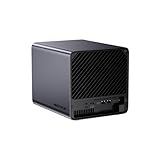
MINISFORUM AI NAS N5 Pro-P370 (0+128GB), AMD Ryzen AI 9 HX Pro 370 12C/24T Up to 5.1GHz, 10GbE+5GbE, 3× M.2/U.2, OCuLink, HDMI/2 x USB4 4K 144Hz, PCIe ×16, MinisCloud OS 5-Bay Desktop NAS

MINISFORUM N5 Air 5-Bay Desktop NAS with up to 174 GB Storage, AMD Ryzen 7 255 (8C/16T) CPU, Dual DDR5 RAM Slots (up to 96 GB), 1x 10GbE, 1x 5GbE, 2X USB4 (8K), HDMI 8K, OCuLink, 3X M.2 Slots

MINISFORUM NAS N5 MAX 5 Bay AMD Ryzen AI Max+ 395 64GB LPDDR5 128GB SSD | Desktop NAS AMD Radeon 8060S Graphics,2*10G Lan,2*USB4 v2,1*USB 4, 8K HDMI,5xM.2 Slot up to 200TB, Network Attached Storage
Amazon prices, sellers and stock can change. Confirm the exact model, configuration, condition and final price at checkout.
StationPC DA400 strengths, limits and who should care
Use this as a first filter before comparing campaign pricing.
| Area | DA400 position | Buying implication |
|---|---|---|
| Local AI | Up to 8B models; private AI/search/photo features | Strong for appliance-style local intelligence, not positioned as a large-model GPU workstation. |
| Storage | 4 SATA bays + 1 M.2; up to 136TB raw | Enough for many home/creator libraries, but fewer bays than six/eight-bay rivals. |
| Network | Dual 2.5GbE | Good home/SMB speed; 10GbE-first workflows should compare alternatives. |
| RAID | RAID 0/1/5/6/10 listed | Useful flexibility, but recovery behavior and final software maturity matter. |
| Platform maturity | Launch-stage/crowdfunding | Value depends on final software, support, shipping and campaign configuration. |
Checks that matter for this decision
Final campaign configuration
Confirm the actual memory, storage bundle, included accessories and delivery terms of the reward or retail SKU you choose.
2.5GbE is enough for you
Dual 2.5GbE can be very useful, but it does not replace a native 10GbE path for workstation-scale transfers.
AI workload stays realistic
StationPC targets up to 8B-class local models. Larger-model ambitions may be better served by separate AI compute using the NAS as storage.
Backups remain separate
RAID is not a backup. Keep an independent copy of irreplaceable photos, documents and project files.
What the StationPC DA400 is trying to be
The DA400 enters a NAS market where “AI” can mean anything from face recognition to a full local inference server. StationPC’s positioning is relatively specific: the box is intended to combine ordinary storage and backup with semantic file search, photo understanding, document assistance and smaller local language models. That matters because the correct comparison is not an RTX workstation with four disks. It is a compact private-cloud appliance that tries to make the files already on the NAS easier to search, summarize and organize without sending the underlying library to a public cloud.
The four-bay chassis also marks a significant step beyond StationPC’s earlier portable-storage direction. PocketCloud remains relevant as product-line history, but the DA400 is designed around permanent multi-drive storage, RAID and home/office network access. Buyers should therefore treat it as a new platform generation rather than assuming every feature or limitation of PocketCloud carries forward.
AI is attached to the data layer
The most interesting part of the DA400 concept is that the AI features are tied to the files stored on the device. Semantic search can reduce dependence on filenames and folder discipline, while OCR and photo categorization can make a large personal archive easier to navigate. That is a useful everyday problem even for people who never run a general-purpose chatbot. The value depends on indexing quality, language support, privacy controls and how well StationOS handles permissions across users.
It is not positioned as a GPU workstation
StationPC’s public page talks about models up to 8B and does not advertise a desktop discrete-GPU slot. That should shape expectations. The DA400 may be an efficient always-on assistant for file search, document questions and modest local chat, while a separate workstation remains the better place for larger models, rapid model experimentation or GPU-heavy image generation. A NAS does not become a better NAS merely because it can run every AI workload.
Confirmed DA400 storage design
StationPC confirms four 3.5/2.5-inch SATA drive bays and one M.2 2280 SSD slot. The company says each hard drive can be as large as 32TB and the SSD can be as large as 8TB, producing a stated 136TB maximum raw total when all slots are populated at those limits. Raw capacity is not the same as protected usable capacity, so a realistic plan must subtract parity or mirror overhead and preserve room for snapshots, application data and growth.
The single M.2 slot should be treated as a fast tier, not as a substitute for a second independent copy of the array. Depending on StationOS behavior, buyers may use it for cache, application data, databases, AI indexes or frequently accessed content. The best use will depend on the final software options and whether the application can recover cleanly if the SSD fails.
RAID support is broad on paper
StationPC lists RAID 0, RAID 1, RAID 5, RAID 6 and RAID 10. On a four-bay appliance, RAID 5 maximizes usable capacity with one-drive fault tolerance, RAID 6 sacrifices more capacity for two-drive fault tolerance, and RAID 10 trades half the raw capacity for mirrored stripes. The right choice depends on rebuild time, drive size, workload and how quickly you can restore from backup, not simply on which mode produces the largest number.
Large drives change the risk calculation
A four-bay 32TB-per-drive system can hold a very large amount of data. Rebuilds and restores at that scale are operational events, not background details. Buyers using the DA400 for family photos, client footage or a large media library should plan off-device backups and test restore procedures. If a project only has one copy because “the NAS uses RAID,” it is still one operational domain away from loss.
Local AI, semantic search and photo intelligence
StationPC says the DA400 can run models up to 8B locally and advertises generation speeds up to 50 tokens per second. Those are useful headline figures, but actual responsiveness will depend on the model, quantization, context length, indexing workload and how the software schedules AI work alongside normal NAS services. The safer buying question is whether the built-in features solve your specific workflow, not whether a maximum tokens-per-second number beats another vendor in isolation.
For many buyers, the photo and file features may be more valuable than general chat. StationPC advertises natural-language file finding, document summarization and translation, OCR-based image search, duplicate/similar-photo detection and automatic categorization of people, pets, travel and scenes. If those functions are accurate and permissions-aware, they can turn a large archive into something closer to a searchable knowledge base.
An 8B ceiling is a design boundary
Up to 8B-class models covers a useful range of compact assistants but it is not the same workload class as 70B models or large multimodal systems that rely on huge unified-memory pools or discrete GPUs. Buyers who want to experiment with bigger models should consider a split architecture: keep the DA400 as storage and expose selected data to a stronger local AI server over the network. That preserves the NAS role while avoiding the pressure to make one low-power appliance do everything.
Indexing quality matters more than AI branding
Search quality depends on metadata extraction, OCR accuracy, embeddings, language support and how quickly the index updates when files change. A brilliant hardware block can still feel disappointing if the software does not recognize the file types or folder permissions that matter to you. The early-stage nature of the platform means software testing deserves as much attention as drive capacity or processor identity.
Networking and creator workflow
The DA400 has dual 2.5GbE Ethernet ports according to StationPC, with the company quoting a maximum transfer speed around 312MB/s. For home backup, photo libraries and many small-office workloads, 2.5GbE is a meaningful step above gigabit Ethernet. It can move large media files without requiring the cost and heat of a full 10GbE network, especially when several devices are still connected through Wi-Fi or 1GbE.
The limitation appears when the NAS becomes part of a high-end editing or AI pipeline. A fast SSD cache cannot make a single 2.5GbE client link behave like 10GbE. If multiple creators need to edit from the NAS or an external AI server must scan huge datasets repeatedly, network throughput can become the bottleneck before the drives or CPU do.
SD and USB matter for photographers
StationPC includes a dedicated SD slot and says it can reach up to 156MB/s. USB-A and USB-C ports can attach other card readers for CFexpress or XQD workflows. This is a practical creator feature because a photographer can offload media directly to the NAS without staging everything on a laptop first. The usefulness depends on how clearly StationOS exposes import progress, duplicate handling and destination controls.
Cloud sync should complement local storage
StationPC says the mobile app can connect to OneDrive, Google Drive, Dropbox, Baidu Cloud and Aliyun Drive with automatic or scheduled synchronization. That can make the DA400 part of a layered backup plan, but synchronization is not always the same as versioned backup. Buyers should understand whether deletions replicate, how conflicts are handled and how many historical versions can be recovered after accidental changes or ransomware.
Software maturity and launch-stage risk
The DA400 is arriving through Kickstarter rather than as a long-established retail appliance. That changes how it should be evaluated. Campaign pricing can be attractive, but buyers are also accepting uncertainty around final firmware, shipping schedules, region support and the pace at which software limitations are fixed. StationPC’s two-year product warranty is a positive signal, yet warranty terms do not eliminate the inconvenience of downtime or immature features.
Independent early testing has described an RK3588-class ARM platform, Debian-based StationOS Pro and several areas where the software still needs refinement. Treat those as pre-release observations rather than finalized manufacturer specifications unless StationPC publishes them in the campaign or retail documentation. Hardware seen in an early unit can change, and software behavior can change even faster.
ARM compatibility is an application question
If the final DA400 remains ARM-based, many common containers and services will work well, while some x86-only binaries or proprietary packages may not. That does not automatically make ARM a weakness. It means a buyer with a specific Docker stack should verify architecture support before committing. A family photo NAS needs different application compatibility from a homelab running dozens of community images.
Crowdfunding price is not total ownership cost
The real budget includes drives, an M.2 SSD, a 2.5GbE switch if your network is still gigabit, backup storage and possibly a UPS. Shipping, taxes and campaign add-ons can also change the effective price. Compare complete configurations, not the DA400 shell price against a rival already bundled with memory and storage.
Who should buy the DA400 and who should compare alternatives
The DA400 makes the most sense for buyers who value a compact four-bay footprint, private photo/file intelligence and direct creator-friendly ingestion more than maximum expansion. It is especially interesting when the NAS will sit close to the people using it: a home office, photography studio, family media setup or small team that wants local search without maintaining a separate AI server. The combination of four bays, an SSD tier and dual 2.5GbE is balanced for that class of deployment.
Compare UGREEN or Zettlab when integrated NAS software and higher-end platform features are more important. Compare MINISFORUM N5-class systems when you need 10GbE, more storage expansion or stronger compute. Compare NIMO Nexus Pro when discrete-GPU flexibility matters. And compare a traditional non-AI NAS if your real requirement is reliable backup and file serving rather than local inference or semantic search.
The previous StationPC option is PocketCloud, not a DA400 predecessor in the conventional sense
PocketCloud shows StationPC’s earlier NAS/storage direction and can still suit portable backup, but it is not a lower-spec four-bay DA400. The form factor, storage topology and intended deployment are different. Treat it as a previous family product and a portability alternative, not as “DA400 Gen 1.”
The best alternative may be a split system
A mature NAS plus a separate mini PC or GPU workstation can be more resilient over time. Storage hardware changes slowly, while AI compute changes quickly. If you expect to upgrade models or accelerators every year or two, splitting the roles can keep the NAS stable and let the compute side evolve without risking the storage platform.
A sensible DA400 buying process
Start with data rather than specifications. Estimate how much protected capacity you need today, how fast the library is growing, how many users will connect at once and which AI features you will actually use. Then decide whether dual 2.5GbE is sufficient and whether up-to-8B local models are enough. Only after those requirements are clear should campaign pricing become the deciding factor.
For launch-stage hardware, document the final configuration you are buying. Save the campaign SKU, memory amount, included power adapter, warranty wording, drive support limits and expected shipping region. After delivery, update StationOS before importing irreplaceable data, test the storage pool with noncritical files, verify backup restore, and then enable AI indexing in stages. That reduces the chance that a new software feature becomes the only path to valuable data.
Buy the storage for the RAID layout, not the raw-capacity headline
Four 32TB drives sound like 128TB, but protected capacity can be much lower depending on RAID. A RAID 6 layout, for example, uses the equivalent of two drives for parity. If 60TB of protected space is the real goal, a four-drive plan should be sized from that usable target rather than from the chassis maximum.
Keep the AI index reproducible
Treat embeddings, thumbnails and search indexes as rebuildable application data where possible. Back up the original files and configuration first. If the DA400’s AI database becomes corrupted or a future update changes the indexing engine, you want the ability to rebuild intelligence from protected source data rather than discovering that the derived index was the only usable copy.
StationPC DA400 AI NAS questions
When does the StationPC DA400 launch?
StationPC currently says the DA400 Kickstarter launches September 15, 2026. Check the availability section on this page and the official StationPC launch page for the latest campaign or retail status.
How many drives does the DA400 support?
StationPC lists four 3.5/2.5-inch SATA drive bays plus one M.2 2280 SSD slot.
What is the maximum DA400 storage capacity?
StationPC states up to 32TB per HDD across four bays plus an 8TB M.2 SSD, for up to 136TB raw total storage.
Does the DA400 support RAID 5 and RAID 6?
Yes. StationPC lists RAID 0, RAID 1, RAID 5, RAID 6 and RAID 10.
Can the DA400 run a local LLM?
StationPC advertises local models up to 8B. Larger or more demanding models may be better on separate compute using the DA400 as network storage.
Is PocketCloud the previous DA400 version?
No. PocketCloud is an earlier StationPC NAS/storage product with a different portable design. It is useful as product-line context, not a direct DA400 generation.
Does the DA400 have 10GbE?
No. StationPC lists dual 2.5GbE Ethernet.
Should I trust early RK3588 hardware reports?
Treat them as independent pre-release findings until StationPC publishes final campaign or retail component specifications.
Specifications and source notes
Official StationPC specifications are separated from early independent testing where the launch documentation does not yet publish a component-level detail. Re-check the final campaign and retail specification before buying because launch-stage hardware and software can change.
- StationPC DA400 official launch page
- StationPC DA400 reservation and campaign FAQ
- StationPC NAS product collection
- StationPC company and product history
- NASCompares DA400 early hands-on testing
As an Amazon Associate, Cloudzat may earn from qualifying purchases. The purchase price is the price shown by Amazon at checkout.