


Use the GPU Finder to identify graphics cards that satisfy performance, VRAM, physical fit and power requirements. Partner-card dimensions can vary enough for two cards using the same GPU to have different case compatibility.
Before you filter
Choose the workload and display target first. 4K gaming, esports and local AI prioritize different GPU traits.
After performance, verify card dimensions and the power path for the exact partner model.
Choose the workload
Gaming, creation and local AI do not value the same GPU characteristics.
Treat VRAM as capacity
VRAM can be a hard ceiling for local models and creator projects.
Measure the case
Partner-card length and thickness vary inside one GPU family.
Plan power delivery
PSU capacity and native connectors matter at the top end.
Find a graphics card
Filter current GeForce RTX 50-series and Radeon RX 9000-series cards by family, VRAM, gaming target, local-AI fit and price.

Gaming RTX 5060 8G Shadow 2X OC Graphics Card (8GB GDDR7,128-bit, Extreme Performance: 2535 MHz, DisplayPort x3 2.1a, HDMI 2.1b, NVIDIA Blackwell Architecture) 5060

XFX Swift AMD Radeon RX 9060 XT OC Gaming Edition with 8GB GDDR6 HDMI 2xDP, AMD RDNA 4 RX 9060XT RX-96TSW8GBQ

Yeston GAMEACE Radeon RX 9060 XT 8GB GDDR6 PCI Express 5.0 x16 Graphics Card RX9060XT

GIGABYTE GeForce RTX 5060 WINDFORCE OC 8G Graphics Card, Cooling System, 8GB 128-bit GDDR7, PCIe 5.0, Manufactured by NVIDIA, DisplayPort & HDMI - Video Output Interface, GV-N5060WF2OC-8GD Video Card

GIGABYTE GeForce RTX 5060 Ti WINDFORCE OC 8G Graphics Card, 8GB 128-bit GDDR7, PCIe 5.0, WINDFORCE Cooling System, GV-N506TWF2OC-8GD Video Card

ASRock Radeon RX 9060 XT Challenger 16GB OC, RDNA 4, 3290MHz Boost, 16GB GDDR6 128-bit, PCIe 5.0, Dual Fans, 0dB Silent, LED Indicator, DisplayPort 2.1a, HDMI 2.1b
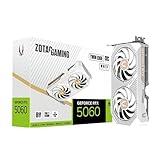
ZOTAC GeForce RTX 5060 Twin Edge OC White Edition Graphics Card, NVIDIA, 8GB GDDR7, DLSS 4, 3× DisplayPort 2.1b & HDMI 2.1b, PCIE 5.0 (ZT-B50600Q-10M)

ASUS Prime Radeon RX 9060 XT 8GB GDDR6 OC Edition Gaming Graphics Card

ASRock Radeon RX 9060 XT Challenger Pro 16GB OC Graphics Card, RDNA 4, 3290MHz Boost, 16GB GDDR6 128-bit, PCIe 5.0, Triple Fan, 0dB Silent, LED Switch
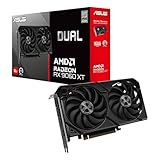
ASUS Dual Radeon RX 9060 XT 16GB GDDR6 Gaming Graphics Card

ZOTAC Gaming GeForce RTX 5060 Ti 8GB Twin Edge OC DLSS 4 8GB GDDR7 128-bit 28 Gbps PCIE 5.0 Gaming Graphics Card, IceStorm 2.0 Cooling, SFF-Ready, ZT-B50610H-10A

ASRock Radeon RX 9060 XT Steel Legend 16GB GDDR6 OC Graphics Card | 3275 MHz Boost | Triple Fan | 0dB Cooling | Metal Backplate | PCIe 5.0 | DisplayPort 2.1a, HDMI 2.1b

ASUS Dual Radeon RX 9060 XT 16GB GDDR6 White Edition Gaming Graphics Card

MSI GeForce RTX 5060 8G Ventus 2X OC White Graphics Card - RTX 5060 GPU, 8GB GDDR7 (28Gbps/128-bit), PCIe 5.0 - Dual-Fan Thermal Design (2 x TORX Fan 5.0) - HDMI 2.1b, DisplayPort 2.1b

ASUS Dual GeForce RTX 5060 Ti 8GB GDDR7 OC Edition Gaming Graphics Card
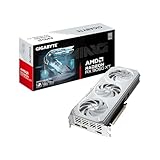
GIGABYTE Radeon™ RX 9060 XT Gaming OC ICE 16G Graphics Card (16GB GDDR6, 128-bit, PCIe 5.0, HDMI/DP 2.1, 2 Slot, Hawk Fan, Server-Grade Thermal Gel, Reinforced Structure)

Yeston ACE Radeon RX 9060 XT 16GB GDDR6 PCI Express 5.0 Graphics Card RX9060XT

GIGABYTE Gaming Radeon RX 9070 GRE 12GB GDDR6 PCI Express 5.0 ATX Graphics Card GV-R907GREGAMING OC-12GD
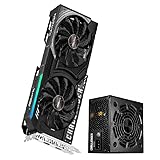
ASRock Radeon RX 9060 XT Challenger 16GB OC + CL-750B 750W PSU Gaming Power Bundle
ASRock Radeon RX 9060 XT Challenger 16GB OC + CL-750G 750W Gold PSU Ultimate Gaming Bundle

XFX Swift AMD Radeon RX 9060 XT OC White Gaming Edition with 16GB GDDR6 HDMI 2xDP, AMD RDNA™ 4 (RX-96TSW16WQ)

XFX Swift AMD Radeon RX 9060 XT OC Triple Fan Gaming Edition with 16GB GDDR6 HDMI 2xDP, RDNA 4 RX-96TS316BA, Graphics Card, Compatible with Desktop PCs

XFX Swift AMD Radeon RX 9060 XT OC Triple Fan Gaming Edition with 16GB GDDR6 HDMI 2xDP, RDNA 4 RX-96TS316B7, Graphics Card, Compatible with Desktop PCs
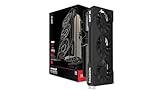
XFX Swift AMD Radeon RX 9070 GRE Triple Fan Gaming Edition with 12GB GDDR6 HDMI 3xDP, AMD RDNA 4 RX-97GRE29BA
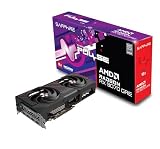
Sapphire 11354-01-20G Pulse AMD Radeon™ RX 9070 GRE Gaming OC Graphics Card with 12GB GDDR6, AMD RDNA 4

ASUS Prime Radeon RX 9060 XT 16GB GDDR6 OC Edition Gaming Graphics Card

ASUS Prime Radeon™ RX 9070 GRE EVO OC Edition Graphics Card (PCIe 5.0, HDMI/DP 2.1, 2.5-Slot Design, axial-tech Fans, Dual Ball Fan Bearings, Dual BIOS, GPU Guard)

ASUS ATS Radeon RX 9070 GRE 12GB GDDR6 OC Edition Gaming Graphics Card

Yeston Sakura Radeon RX 9060 XT 16G GDDR6 Computer Graphics Card

ASUS Prime GeForce RTX 5060 Ti 8GB GDDR7 OC Edition Gaming Graphics Card

ASRock Radeon RX 9070 Challenger 16GB OC Graphics Card, RDNA 4, 2520MHz Boost, 16GB GDDR6 256-bit, PCIe 5.0, Triple Fans, 0dB Silent, LED Indicator

XFX Swift AMD Radeon RX 9070 OC Triple 90mm Fan Gaming Edition with 16GB GDDR6 HDMI 3xDP, RDNA 4 RX-97SWFT3B7, Graphics Card, Compatible with Desktop PCs

XFX Swift AMD Radeon RX 9070 OC Triple Fan Gaming Edition with 16GB GDDR6 HDMI 3xDP, AMD RDNA 4 RX-97SWFB3B9

GIGABYTE Radeon RX 9070 Gaming OC 16G Graphics Card, PCIe 5.0, 16GB GDDR6, GV-R9070GAMING OC-16GD Video Card

GIGABYTE Radeon™ RX 9070 XT Gaming OC ICE 16G Graphics Card (16GB GDDR6, 256-bit, PCIe 5.0, HDMI/DP 2.1, 2.7 Slot, Hawk Fan, Server-Grade Thermal Gel, Reinforced Structure)

ASRock Radeon RX 9070 XT Challenger 16GB OC Graphics Card - AMD RDNA 4 Architecture, 2970 MHz Boost Clock, GDDR6, PCIe 5.0, DisplayPort 2.1a, HDMI 2.1b, Triple Fan Cooling 800W

ASUS Prime GeForce RTX 5060 Ti 16GB GDDR7 Gaming Graphics Card

XFX Swift AMD Radeon RX 9070XT Triple Fan Gaming Edition with 16GB GDDR6 HDMI 3xDP, AMD RDNA 4 RX-97TSWF3BA

GIGABYTE Radeon RX 9070 XT Gaming OC 16G Graphics Card, PCIe 5.0, 16GB GDDR6, GV-R9070XTGAMING OC-16GD Video Card
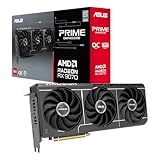
ASUS Prime Radeon RX 9070 EVO 16GB GDDR6 OC Edition Gaming Graphics Card

ASUS Dual GeForce RTX 5060 Ti 16GB GDDR7 OC Edition Gaming Graphics Card

ASUS Dual GeForce RTX 5060 Ti 16GB GDDR7 White OC Edition Graphics Card

Sapphire 11348-03-20G Pulse AMD Radeon™ RX 9070 XT Gaming Graphics Card with 16GB GDDR6, AMD RDNA 4

ASRock Radeon RX 9070 XT Steel Legend 16GB Graphics Card, AMD RDNA 4 Architecture, 2970 MHz, GDDR6, PCIe 5.0, Triple Fans, Polychrome SYNC, Reinforced Metal Frame, DisplayPort 2.1a, HDMI 2.1b

ASUS Prime Radeon RX 9070 XT 16GB GDDR6 OC Edition Gaming Graphics Card

XFX Mercury AMD Radeon RX 9070 XT OC Gaming Edition with RGB 16GB GDDR6 HDMI 3xDP, AMD RDNA 4 RX-97TRGBBB9

ASUS Prime GeForce RTX 5060 Ti 16GB GDDR7 OC Edition Gaming Graphics Card

ZOTAC Gaming GeForce RTX 5070 AMP White Edition DLSS 4 12GB GDDR7 192-bit 28 Gbps PCIE 5.0 Gaming Graphics Card, IceStorm 2.0 Cooling, Spectra RGB Lighting, ZT-B50700FQ-10A
Choose the technically valid shortlist first
Use the filters to remove products that fail a hard requirement. Then compare the remaining models on current price, quality, upgrade headroom and the features that matter to your workload.
Verify these before checkout
Use these final checks on the exact retail model before you place the order.
Verify the partner card, not only the GPU chip.
Check length, thickness and cable room.
Confirm PSU capacity and native connector support.
Check the ports required by the monitor or KVM chain.
How to choose the right graphics card
Pick the performance target before the brand
Start with resolution, refresh rate and the applications you use.
Then compare board partners on cooling, acoustics, size, warranty and price.
VRAM can be a hard constraint
Local AI and some creator workloads may not fit at all below a required VRAM capacity.
In ordinary gaming, more memory is useful but still must be paired with a fast enough GPU.
Partner cards complicate physical fit
The same GPU can appear in cards with very different lengths and slot thicknesses.
Use exact board dimensions when case clearance is tight.
Power planning goes beyond wattage
Quality, native GPU cables and CPU load all matter in addition to the PSU wattage number.
Modern ATX 3.1 units can simplify premium GPU builds.
Local AI changes value
For local models, memory capacity and software support can matter more than gaming frame rates.
Cloudzat keeps local-AI fit separate from gaming suitability.
The display chain can become the limit
A powerful GPU cannot deliver a mode that the monitor, KVM, dock or cable cannot carry.
High-bandwidth 4K modes require checking the whole signal path.
Do not overpay for unusable cooler size
A huge premium card can be quiet, but the benefit disappears if the case cannot fit it.
Balance cooler quality against dimensions, airflow and price.
Verify the exact product at checkout
Family names cover many partner cards and factory-overclocked variants.
Confirm seller, condition, dimensions and included power accessories on the final listing.
Board dimensions matter as much as the GPU name
For a GPU purchase, card length, slot thickness and power-cable bend room should be treated as an early gate rather than a detail to check after checkout. The common failure is a partner card fitting on paper but colliding with a radiator, drive cage or side panel. Use the exact board-part dimensions for the listing you intend to buy to eliminate unsuitable options before price sorting. This keeps the shortlist focused on hardware that can actually work in the intended system.
Once that gate is satisfied, verify manufacturer length and thickness plus the case clearance after fans, radiators and front-mounted hardware are installed. Product families often contain several revisions or partner designs, so a family name alone may not prove the required feature. When the exact specification is unclear, compare another documented model instead of assuming that nearby products share the same behavior.
Treat VRAM as workload capacity
A reliable GPU shortlist starts by examining VRAM size, model footprint and creator working-set requirements. Buyers often run into trouble by buying a fast GPU whose memory ceiling prevents the local model or project from loading. Make the largest workload that must fit without spilling into slower system memory part of the first filter pass, especially when the build already contains expensive parts that would be difficult to replace or rearrange later.
The final check should cover the model size, context target, texture workload or creator project that will use the card in practice. Read the exact model information rather than relying on a broad category label. That approach reduces returns, avoids paying for features the rest of the system cannot use, and makes later comparison on price or secondary features much more meaningful.
Power delivery needs connector-level checking
Do not treat PSU wattage, transient headroom and native GPU connectors as a marketing footnote when choosing GPU hardware. A frequent mismatch comes from meeting the headline wattage while relying on an awkward adapter path or insufficient cable routing. Instead, define both total power and the correct native connection for the exact graphics card before comparing brands. Hard requirements are most useful when they remove impossible candidates immediately rather than becoming a warning after the purchase.
For the remaining products, confirm PSU specification, cable set, connector seating space and the combined CPU/GPU demand of the intended build. Similar names can hide different ports, dimensions, firmware requirements or included accessories. The exact retail model is therefore the right level for the last compatibility check, while price should rank only the choices that have already passed those technical checks.
Display bandwidth can cap an expensive GPU
With GPU products, resolution, refresh rate, HDR, DSC and display connector versions can change the value of two otherwise similar choices. The expensive mistake is expecting the target mode through a monitor, KVM, dock or cable that cannot carry it. Base the first decision on the complete signal chain from GPU output to the display input, then look at brand, appearance or small feature differences only after the essential requirement is satisfied.
Before ordering, check HDMI or DisplayPort version, DSC requirements, monitor input limits and every intermediate switching device in the path. This is particularly important when a manufacturer sells several revisions under one family name. A clear specification on the exact model is stronger evidence than an assumption based on another variant, and it gives the comparison tool a cleaner set of candidates.
Partner design changes noise and fit
The practical way to compare GPU options is to make cooler size, fan design, power limit and factory tuning measurable. Problems usually appear when someone is choosing solely by chip family when two partner boards behave differently in thermals, acoustics and dimensions. Define the board implementation after the GPU family has met your performance requirement as the boundary for the build, and discard results that cannot demonstrate the needed capability instead of trying to compensate elsewhere in the system.
After that, validate independent thermal data when available, exact physical measurements, warranty terms and whether the premium over a simpler board produces a benefit you will notice. The goal is not to maximize every specification at once; it is to avoid a hidden bottleneck or fit problem while keeping the budget concentrated on features that improve the actual workload. Exact-model verification is the last step before checkout.
Finish the GPU decision with the exact partner card
Once the GPU family and VRAM tier are chosen, the remaining decision moves from chip-level performance to board-level engineering. Record the exact partner model, not just “RTX 5090” or “RX 9070 XT,” and check its measured length, thickness, power connector position and display outputs. A compact three-fan model and a large premium cooler can behave very differently inside the same chassis. The quieter card may be worth more in an open-air workstation, while the shorter card may be the only sensible choice in a case where a front radiator reduces clearance.
For gaming, compare the card against the monitor modes you will genuinely use instead of the highest benchmark result available. For local AI or creator work, treat VRAM capacity and software support as separate hard checks before frame-rate value. Then inspect the complete power path from wall to PSU to native GPU cable, including bend space at the connector. These last checks convert a broad GPU recommendation into a specific purchasable board that fits, powers correctly and exposes the ports needed by the real display or KVM chain.
Related Cloudzat tools
Frequently asked questions
What should I filter first when choosing gpu finder?
Start with the specifications that can make the product unusable, then use price and secondary features to rank the technically valid shortlist.
Why do some products have blank specifications?
Cloudzat leaves a field blank when saved product evidence does not support a reliable value instead of inventing one.
Does a finder result guarantee compatibility?
No. The finder narrows the product set. Use the linked compatibility or build tools to validate the full system.
Are Amazon prices guaranteed?
No. The page shows the latest verified marketplace observation available to Cloudzat and links to Amazon for the current checkout price and availability.
Can I compare results?
Yes. The Compare action uses Cloudzat comparison destinations and is ready for the universal comparison engine when it is installed.
Can I add a result to a build?
Yes. Add to Build opens the High-End PC Builder with the product identity attached.
Are accessories mixed into the results?
Product checks reject obvious accessories, complete systems and wrong-category listings before they can appear in a finder.
Do filters create indexable parameter pages?
No. Filtering happens inside the tool, so temporary combinations do not create a large faceted index.
How this finder works
The finder uses Cloudzat's verified component data, shows only specifications supported by available product information, and keeps filtering inside the page rather than creating crawlable filter combinations. Marketplace availability can change independently of the buying guidance. Unknown specifications remain blank rather than being guessed.
Marketplace availability can change. Confirm the exact model, specifications, seller, condition and final checkout price on Amazon before ordering.