


Quick answer: TeraBox is the capacity outlier with 1 TB of free cloud storage, but the headline number comes with trade-offs that make it better suited to low-priority archives than everyday working files. Among mainstream services, MEGA offers 20 GB, Google gives 15 GB shared across Drive, Gmail and Photos, pCloud and Icedrive offer up to 10 GB, OneDrive, iCloud, Proton Drive and Sync offer 5 GB, and Dropbox Basic includes 2 GB.
The right choice is not simply the provider with the largest number. The better question is what you are storing, how often you need it, whether you share it, how private it needs to be, and what happens when the free tier is full.
TeraBox
MEGA
Proton Drive / Sync
Free cloud storage compared
Capacity matters, but the limit beside the capacity often matters more.
| Provider | Free storage | Best for | Important limit |
|---|---|---|---|
| TeraBox | 1 TB | Cold or low-priority archives | Ads and a more restricted free experience |
| MEGA | 20 GB | Private archives and encrypted storage | Transfer quotas can interrupt heavy sharing |
| 15 GB | Documents, collaboration and Android users | Shared with Gmail and Google Photos | |
| pCloud | Up to 10 GB | General file storage and media access | Part of the allowance is unlocked through account steps/referrals |
| Icedrive | 10 GB | A clean separate cloud drive | Some desktop sync and client-side encrypted-drive features are paid-only |
| OneDrive | 5 GB | Windows and Microsoft 365 users | Backups and synced folders can consume it quickly |
| iCloud | 5 GB | Apple device sync and backups | Photos, backups and app data share the same small pool |
| Proton Drive | 5 GB | Private files and documents | Capacity is small if you store photos or video |
| Sync | 5 GB | Private syncing and sharing | Free sharing and collaboration controls are limited |
| Dropbox | 2 GB | Simple link sharing and light sync | Smallest major free allocation and a three-device limit |
Free storage capacity by provider
TeraBox is such a large outlier that the bars use a logarithmic visual scale. The printed GB/TB values are the actual headline allocations.
The chart emphasizes relative scale while keeping small tiers visible. It is not a speed, security or quality score.
Why the biggest free tier is not automatically the best
A storage allowance only tells you how much data can sit in the account. It does not tell you how fast files move, how much link traffic is allowed, whether desktop sync is included, whether encrypted folders are available on the free plan, how many devices can connect, or what happens to an account after long inactivity.
That is why a 5 GB privacy-focused account can be more useful than a much larger free account for tax files, legal documents and identity records, while a 15 GB Google account can be more useful for collaborative work even though the nominal capacity is smaller than MEGA. Capacity is one part of the decision, not the decision itself.
TeraBox: the 1 TB headline and its fine print
No other service in this comparison comes close to TeraBox on headline free capacity. That makes it attractive for large collections of files that you do not need to retrieve constantly. The trade-off is that the free experience is monetized more aggressively and is not as frictionless as the smaller mainstream tiers.
The practical way to think about TeraBox is as a large free archive, not as the only copy of your most important files. If something matters enough that losing it would hurt, keep another independent copy. If you need to move large files every day, test the real upload and download experience on your connection before moving a full archive.
MEGA: the strongest mainstream capacity-to-privacy combination
MEGA gives 20 GB of free storage and uses end-to-end encryption for user data. That makes it one of the most attractive free tiers for personal archives, private files and a secondary backup that you still want to reach from multiple devices.
The restriction most likely to matter is transfer quota rather than storage capacity. A 20 GB account can hold a useful archive, but heavy download or link-sharing activity can run into transfer limits before the account runs out of space. For files you access occasionally, that is often acceptable. For public distribution or repeated large downloads, it is less convenient.
Google: 15 GB that is easier to use than it is to keep empty
Google’s 15 GB free allowance remains one of the most useful because Drive is connected to Docs, Sheets, Gmail, Google Photos and an enormous collaboration ecosystem. The catch is that the storage is shared. Gmail attachments, Photos and Drive files all compete for the same pool.
This is why a long-running Google account can feel “full” even when Drive itself contains very little. Before choosing Google as a backup destination, check the storage breakdown. If most of the space is already being consumed by Photos or Gmail, the usable Drive allocation may be much smaller than 15 GB.
pCloud and Icedrive
pCloud offers up to 10 GB on its free plan, with some of that capacity unlocked through account-completion and referral steps. It is a useful separate drive for general files and media. Icedrive also advertises 10 GB free and has a clean web/mobile experience, but some of its stronger desktop sync and encrypted-drive features sit on paid plans.
Both work well when you want a cloud account that is separate from your primary email ecosystem. For many people, that separation is useful: work documents can stay in Google or Microsoft while personal archives live somewhere else.
OneDrive, iCloud, Proton Drive and Sync
OneDrive and iCloud are convenient because the operating system keeps pushing files into them automatically. That is also why 5 GB disappears quickly. Windows folders, iPhone backups, photos and app data can consume the free allocation before you deliberately use it as storage.
Proton Drive and Sync approach 5 GB differently. Their selling point is privacy rather than raw capacity. If the job is protecting a small set of important documents, 5 GB can be plenty. For video, phone-photo libraries or large creative files, it is not.
Dropbox Basic: only 2 GB, but still easy to share
Dropbox’s free plan is tiny by current standards, but its strength is familiarity. Links are easy to create, recipients understand the workflow and the sync model remains simple. The bigger constraint is not just the 2 GB quota: Dropbox Basic also limits the number of linked devices. That makes it better for light sharing than for building a serious free-storage strategy.
The best free cloud storage for each use case
Google is the easiest fit if you already live in Gmail, Android and Google Photos. Apple users get the same ecosystem convenience from iCloud, but 5 GB fills much faster.
Proton Drive or Sync are better choices when privacy is more important than capacity. MEGA is also strong when you need more space.
MEGA is the cleaner mainstream option. TeraBox is the capacity-first choice if you accept its trade-offs.
Google Drive and Dropbox remain easy because recipients already understand their links and collaboration flows.
When owning the storage makes more sense
Free cloud storage solves access and syncing. It does not always solve capacity cheaply.
| If you need… | Better fit | Why |
|---|---|---|
| Files everywhere on every device | Cloud storage | No hardware to carry and simple remote access |
| 2 TB to 20 TB for backups | External HDD | Large one-time capacity at a low cost per TB |
| Fast portable working storage | Portable SSD | Fast local transfers and no internet dependency |
| Your own private multi-device cloud | NAS system | Central storage you control, with remote-access options |
| Protection from device loss | Cloud + local copy | Two independent copies protect against different failures |
A good backup plan is often hybrid. Keep active files in a cloud service for access, then keep a separate local copy on an SSD, external hard drive or NAS. That removes the pressure to force everything into a free tier and gives you a second copy you control.
Prefer to own the storage? Current hardware options
If your problem is capacity rather than remote access, local storage can replace another subscription. Cloudzat checks Amazon for portable SSDs, desktop hard drives, NAS drives and personal NAS systems.
Portable SSD

Crucial X9 1TB Portable SSD, Up to 1050MB/s, USB 3.2 USB-C, External Solid State Drive, Compatible with Windows, Mac, & Android, Reliable Storage for Games, Files, & Backups, Black - CT1000X9SSD902

Sandisk 1TB Portable SSD, Dragon Edition, Up to 800MB/s Read Speeds

Crucial X10 Pro 1TB Portable SSD, Up to 2100MB/s Read, 2000MB/s Write, 3.2 USB-C, External Solid State Drive, Durable Storage for PC & Mac, for Professional Creators, Black - CT1000X10PROSSD902
Desktop external HDD

WD 1TB Elements Portable External Hard Drive - USB 3.0 - WDBUZG0010BBK-WESN

WD 1TB My Passport, Portable External Hard Drive, Black, backup software with defense against ransomware, and password protection, USB 3.1/USB 3.0 compatible - WDBYVG0010BBK-WESN
WD 2TB My Passport, Portable External Hard Drive, Black, backup software with defense against ransomware, and password protection, USB 3.1/USB 3.0 compatible - WDBYVG0020BBK-WESN
NAS hard drive

Western Digital 4TB WD Red Plus NAS Internal Hard Drive HDD - 5400 RPM, SATA 6 Gb/s, CMR, 128 MB Cache, 3.5" - WD40EFZZ

Western Digital 2TB WD Red Plus NAS Internal Hard Drive HDD - 5400 RPM, SATA 6 Gb/s, CMR, 64 MB Cache, 3.5" - WD20EFRX

Western Digital 8TB WD Red Plus NAS Internal Hard Drive HDD - 5640 RPM, SATA 6 Gb/s, CMR, 256 MB Cache, 3.5" - WD80EFPX
Personal NAS system

BUFFALO LinkStation 210 2TB 1-Bay NAS Network Attached Storage with HDD Hard Drives Included NAS Storage that Works as Home Cloud or Network Storage Device for Home

Synology DS124 Personal Backup & File Hub - Protect Photos, Secure Home Surveillance (1-Bay Diskless NAS)
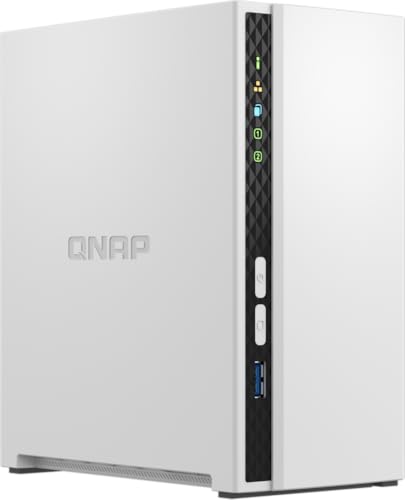
QNAP TS-233-US 2 Bay Desktop NAS
As an Amazon Associate, Cloudzat may earn from qualifying purchases. Prices, seller, selected variation and availability can change after the last verification. Prices and images remain available from the last successful verification if a later check is delayed; known product links remain usable.
How much do the mainstream free tiers add up to?
Excluding the 1 TB TeraBox outlier, the other nine providers in this comparison total only 77 GB of headline free storage.
That is the hidden weakness of account stacking. You can create many accounts and keep adding small amounts of storage, but the administrative cost grows faster than the capacity. You have more passwords, recovery addresses, sync clients, terms, inactivity rules and sharing limits to manage.
If you include TeraBox, the ten headline allocations total about 1,101 GB. But 1,024 GB of that total comes from one provider. The apparent diversification is therefore much smaller than the raw total suggests.
When should you stop stacking free accounts?
Stop when the location of a file becomes harder to remember than the value of the free storage you are gaining. That point arrives earlier than most people expect. Once you have dozens of gigabytes of active files, automatic photos, working documents and backups, a paid plan or local-storage purchase usually saves more time than another free login.
A simple middle ground is two or three services with clear roles. For example: Google for collaboration, Proton or MEGA for private archives, and a local SSD or hard drive for a second copy. If you need significantly more space, compare the annual cost of a paid tier on our cloud storage pricing index with the one-time cost of owning storage.
Why free cloud storage tiers exist
Free storage is an acquisition model. A provider gives you enough space to become part of your workflow, then earns money when you outgrow the tier, buy related services or accept advertising. Ecosystem companies also benefit when storage keeps you using their email, photos, productivity apps and devices.
That does not make free plans bad. It simply explains why the restrictions differ. One provider limits capacity, another limits transfers, another makes advanced encryption paid, and another uses advertising. Once you understand what the provider is optimizing for, it becomes easier to decide whether the free plan matches your own use.
Free tiers work best as trial runs
The smartest use of a free tier is to test the product before paying for it. Upload a few gigabytes, install the app on your real devices, restore files, create a shared link and check how quickly everything syncs on your own connection. Test the largest file you normally work with, not a tiny document.
That short audition tells you more than a feature list. You learn whether the desktop client behaves well, whether phone uploads are reliable, whether sharing is understandable to other people, and whether the provider fits your routine. If the free plan works well, upgrading later is a much safer decision.
Keep free accounts alive
Free accounts can have inactivity rules, and policies change. Sign in periodically, keep recovery details current and record which email address owns each account. Do not put the only copy of an important archive in an account you may forget for years.
The more services you stack, the more maintenance you create. That maintenance cost is real even when the storage price is zero.
Capacity is not the only limit
Large individual files, link traffic, device counts, upload methods, offline access, version history and advanced sharing controls can matter before the headline quota does. Dropbox’s device limit is a good example. Icedrive’s free plan also withholds some desktop and encrypted-drive features that appear on paid tiers.
Before committing to any provider, test your largest real file and your most common sharing workflow.
Free cloud storage questions
What service gives the most free cloud storage?
TeraBox is the capacity outlier in this comparison with 1 TB. If you want a mainstream encrypted service with fewer compromises around everyday use, MEGA’s 20 GB is the stronger benchmark.
What is the best free cloud storage for most people?
Google is the easiest general-purpose choice because its 15 GB works with Drive, Gmail, Photos and Google Docs, but the storage is shared across those services. If privacy matters more, look at Proton Drive, Sync or MEGA.
Is free cloud storage safe?
Major providers use serious security controls, but no cloud account should be the only copy of an irreplaceable file. Use strong authentication and keep a second independent copy of anything important.
Should I buy an external drive instead of paying for cloud storage?
If your main problem is capacity and you do not need every file available remotely, an external hard drive or SSD can be cheaper over time. For access plus resilience, use both: cloud for active files and local storage for a second copy.
Can I build my own cloud storage at home?
Yes. A NAS can centralize storage on your own network and many NAS systems support secure remote access. It costs more up front and requires maintenance, but it gives you much more control over capacity and hardware.
How much free storage do all these services provide together?
The ten headline allocations in this comparison total about 1,101 GB, but TeraBox alone contributes 1,024 GB. Excluding TeraBox, the other nine services total 77 GB.
Cloudzat compares the storage included at no charge, then looks at the restrictions most likely to change real-world usefulness: shared quotas, transfer limits, device limits, desktop features, encryption, backup behavior and account maintenance. Storage plans change, so always confirm the provider’s current terms before moving a large archive.