


Canada
WD_BLACK SN850X Prices Canada: Which Capacity Should You Buy?
Buy WD Black SN850X 2 TB. Our 2 TB choice for a well-equipped Gen4 gaming or everyday PC. Choose WD Black SN850X 4 TB for the larger game, media or project collection.
Choose the right option
WD Black SN850X 2 TB
Our 2 TB choice for a well-equipped Gen4 gaming or everyday PC.
Compare exact offers ↓WD Black SN850X 4 TB
Choose this larger capacity for more installed games, media and projects.
Compare exact offers ↓Amazon offers in Canada
Confirm the selected capacity, seller and delivered total.

WD_BLACK SN850X · 2 TB
WD_Black SN850X 2TB NVMe SSD with Heatsink - M.2 2280, Up to 7,300 MB/s Read speeds, Up to 6,300 MB/s Write speeds, Gaming Expansion, High Performance Internal Solid State Drive - WDS200T2XHE
PCIe 4.0 · Heatsink listed
CA$629.99CA$315.00 / TB
Price observed 02.11.2026 08:52 UTCBuy on Amazon ↗
WD_BLACK SN850X · 4 TB
WD Black 4TB SN850X NVMe Internal Gaming SSD Solid State Drive - Gen4 PCIe, M.2 2280, Up to 7,300 MB/s - WDS400T2X0E
PCIe 4.0 · Check heatsink variant
CA$1,086.13CA$271.53 / TB
Price observed 02.11.2026 08:52 UTCBuy on Amazon ↗
WD_BLACK SN850X · 1 TB
Western Digital WD Black M.2 SSD Internal Heatsink 1TB PS5 Operation Verified NVMe PCIe Gen4 x4 WDS100T2XHE-EC SN850X
PCIe 4.0 · Heatsink listed
CA$439.99CA$439.99 / TB
Price observed 24.10.2026 19:17 UTCBuy on Amazon ↗As an Amazon Associate, Cloudzat earns from qualifying purchases. Prices are dated observations and can change. Check the exact variant and delivery to your address before ordering.
Current SSD Deals on Amazon
Adjacent alternatives: compare capacity and compatibility before substituting.

Lexar NM790 · 1 TB
Lexar 1TB NM790 SSD with Heatsink PCIe Gen4 NVMe M.2 2280 Internal Solid State Drive, Up to 7400/6500 MB/s Read/Write, Compatible with PS5, for Gamers and Creators, Black (LNM790X001T-RN9NU)
PCIe 4.0 · Heatsink listed
CA$305.83CA$305.83 / TB
Price observed 24.10.2026 19:17 UTCBuy on Amazon ↗
Samsung 9100 PRO · 1 TB
Samsung 9100 PRO with Heatsink - 1TB PCIe 5.0 x4, NVMe 2.0, M.2 Internal SSD, Up to 14,700MB/s, Fast Speed, Thermal Contorl, MZ-VAP1T0CW [Canada Version]
PCIe 5.0 · Heatsink listed
CA$349.99CA$349.99 / TB
Price observed 24.10.2026 19:14 UTCBuy on Amazon ↗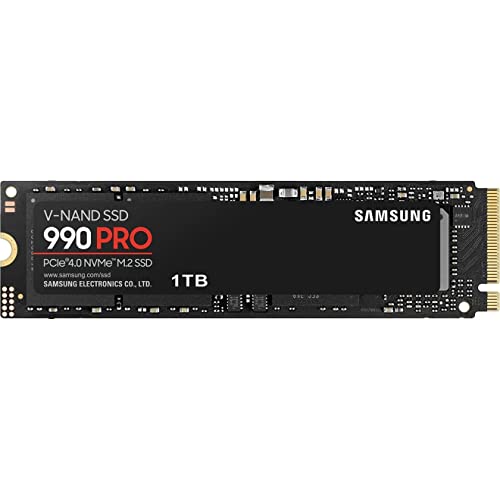
Samsung 990 PRO · 1 TB
SAMSUNG 990 PRO SSD 1TB PCIe Gen4 NVMe M.2 Internal Solid State Hard Drive,Upto 7,450MB/s,Fast Speed for Gaming,Heat Control,Direct Storage&Memory Expansion,MZ-V9P1T0B/AM[Canada Version]
PCIe 4.0 · Check heatsink variant
CA$439.99CA$439.99 / TB
Price observed 02.11.2026 08:45 UTCBuy on Amazon ↗
Kingston FURY Renegade G5 · 1 TB
Kingston FURY Renegade G5 1024GB NVMe SSD | PCIe 5.0 M.2 2280 | Up to 14,8000MB/s | SFYR2S/1T0
PCIe 5.0 · Check heatsink variant
CA$512.90CA$512.90 / TB
Price observed 02.11.2026 08:45 UTCBuy on Amazon ↗Buying guide
The SSD to buy
Our pick is WD Black SN850X 2 TB. Our 2 TB choice for a well-equipped Gen4 gaming or everyday PC.
The alternative is WD Black SN850X 4 TB. Choose this larger capacity for more installed games, media and projects.
WD Black SN850X 2 TB: PCIe 4.0 NVMe, M.2 2280; heatsink included. Use the included cooler only where it fits. If no cooler is included, plan suitable motherboard cooling for the installation.
WD Black SN850X 4 TB: PCIe 4.0 NVMe, M.2 2280; no heatsink stated. Use the included cooler only where it fits. If no cooler is included, plan suitable motherboard cooling for the installation.
| Choice | Exact option | Buy it for |
|---|---|---|
| Our pick | WD Black SN850X 2 TB | Our 2 TB choice for a well-equipped Gen4 gaming or everyday PC. |
| Alternative | WD Black SN850X 4 TB | Choose this larger capacity for more installed games, media and projects. |
Our choice for a well-equipped Gen4 gaming PC
The SN850X is a strong Gen4 direction for Windows, games and active everyday files. A 2 TB version is our starting capacity for a new gaming drive. It gives room for several large games, the operating system and applications without immediately buying the largest model. A 4 TB version suits a collection that will otherwise need regular uninstalling.
For a PC limited to PCIe 4.0, a sensible SN850X purchase avoids paying a large premium for unused Gen5 capability. The important everyday gain is enough room and a suitable installation. Do not replace a healthy existing SN850X just because a newer model name appears; choose extra capacity when the current drive is full.
When the SN8100 is the better new purchase
The SN8100 is a PCIe 5.0 alternative. Choose it for large-file work on a suitable Gen5 system, or for a new build when the equivalent-capacity price is close and cooling is already covered. That can be a straightforward better-value purchase without implying that every game needs Gen5.
If the newer drive is much more expensive, our gaming choice remains a suitable Gen4 model. The maximum sequential transfer number is not a matching increase in game frame rate. In a system without Gen5 support, the newer drive is constrained by the connection anyway. Compare the same capacity and the complete cooling cost rather than a 1 TB versus 2 TB price.
Choose capacity for the installed collection
Choose 2 TB for a normal new gaming library and 4 TB when you keep many large titles installed or store substantial local media. A larger capacity is useful because it holds more files. It does not automatically make the same game render faster. Leave room for updates and the working files applications create.
If the machine has one easy upgrade slot, a larger first purchase can avoid a later replacement and data migration. If it has a spare slot, keeping the present drive and adding another may be simpler. Neither choice creates a backup on its own. Your irreplaceable files still need a separate copy on another device or service.
Buy the correct heatsink variant
A desktop with a suitable motherboard SSD heatsink can use the appropriate bare version. A compatible console installation needs cooling that meets the console's requirements. A laptop may have no room for the large factory-heatsink version. Choose the physical version for the device rather than treating every SN850X listing as interchangeable.
The family includes different capacities and variants with their own specifications. The name SN850X does not establish that the offer includes a heatsink or has the capacity you want. Our recommended product card states the selected capacity; buy that variant rather than the lowest headline price attached to some other option in the family.
Buy the internal drive your computer accepts
These are M.2 2280 NVMe drives: small internal modules about 80 mm long. Buy one for a computer that accepts that size and type. A 2.5-inch SATA bay or a SATA-only M.2 socket is a different connection. For a machine without a suitable free internal slot, choose an appropriate external SSD or a supported replacement of its existing drive.
For a desktop with an existing SSD heatsink, the fitting bare-drive variant is usually the simple choice. For a laptop, choose the physical version the laptop accepts rather than a bulky desktop heatsink. The right model name, capacity and physical version need to describe the same product. Do not buy an accessory-only heatsink thinking it contains an SSD.
More game space or a replacement system drive?
If the current Windows drive is healthy and there is a suitable free slot, our simple choice is to add storage and keep the original drive. Install large games or active project files on the new SSD. This gives more space without making a Windows migration a compulsory part of the purchase.
If only one slot is available, a larger replacement may be necessary. Allow for a suitable temporary connection or a fresh installation when planning that replacement. Keep the original data until the new setup and independent backup are working. The purpose of buying more capacity is useful room for your files, rather than creating a migration project without need.
A useful capacity example
Fifteen games averaging 100 GB already use about 1.5 TB before Windows, applications and updates. A 2 TB drive can therefore become tight for a buyer who wants all of them available together. That buyer should choose 4 TB if the budget and device support it. Someone keeping only a few active titles may be comfortable with 2 TB.
Use the same reasoning for media. Working video, exported versions and project cache can occupy space together. The biggest file alone does not describe the whole collection. Choose enough room for the files that stay on this SSD, including growth. More expensive peak performance is a poor substitute for capacity that prevents the drive becoming full.
What else belongs in the storage budget
A working SSD and a backup perform different jobs. Keep an independent copy of photographs, projects and other files you cannot replace. Two partitions on one SSD are still one physical device. Buying a premium brand or a longer warranty does not recover the only copy of a lost project.
For an ordinary personal PC, buy this consumer drive for its intended desktop or laptop use. A server requiring documented hardware protection during power loss is a different purchase and can call for enterprise storage. Do not assume a gaming SSD provides that feature. Put the necessary backup or protection into the budget before paying for a speed premium you may not use.
Compare SSD cost and price per TB
Enter actual prices. Add only charges not already included, including your applicable tax, delivery and required extras.
Frequently asked questions
Should I choose 2 TB or 4 TB?
Choose 2 TB for a normal new gaming or mixed-use collection. Choose 4 TB for many large installed games, active media or a machine where another upgrade would be awkward.
Does Gen5 make games twice as fast as Gen4?
No. The maximum storage transfer figure is not the game's frame rate. Buy Gen5 for a suitable storage workload or a close total price; prioritise useful capacity for normal gaming.
Which heatsink version should I buy?
Use an appropriate bare version with suitable motherboard cooling or a compatible laptop. Choose a fitted-heatsink version only when the device needs it and has room.
Can I keep the existing SSD?
Yes, if it is healthy and a suitable second slot is available. Adding storage can be simpler than replacing a working system drive.
Related buying guides
- Kingston FURY Renegade G5 Prices Canada: Which Capacity Should You Buy?
- Lexar NM790 Prices Canada: Which Capacity Should You Buy?
- Samsung 9100 PRO Prices Canada: Which Capacity Should You Buy?
- Samsung 990 PRO Prices Canada: Which Capacity Should You Buy?
- Samsung 990 PRO vs 9100 PRO: Which SSD Should You Buy in Canada?
- WD_BLACK SN8100 Prices Canada: Which Capacity Should You Buy?
- Wd Black Sn850x Prices