


Canada · CAD · Deal Watch
WAVLINK Networking Black Friday Deals 2026: What to Buy in Canada
Look past the broad WAVLINK discount banner: the worthwhile Black Friday find is the exact outdoor access point or adapter your setup can use.
Use the full WL model number. Similar-looking WAVLINK adapters can use USB4, USB 3.2 Gen 2x2 or a slower USB interface; outdoor access points also differ in radio, power and installation requirements. Compare Canadian offers in Canadian dollars, with delivery, the supplied power equipment and the exact regional model included.
Compare WL-WN573HX3 for outdoor Wi-Fi coverage and WL-NWU342G for adding wired 10GbE to a compatible USB4 or Thunderbolt computer. These are two separate routes through the brand’s networking range, not interchangeable alternatives. The dedicated guides below explain each installation in more detail.
Which WAVLINK Networking option should you choose?
Start here
WAVLINK WL-WN573HX3
Choose it for an outdoor Wi-Fi 6 access point installation.
Find this configurationChoose this alternative
WAVLINK WL-NWU342G
Choose it for a USB4 or Thunderbolt 10GbE adapter setup.
Find this configurationCurrent WAVLINK Networking Listings on Amazon
Black Friday sale dates and offer timing
Dates for 2026: Black Friday — November 27; Amazon.ca — November 19–30. Individual offer periods and eligibility vary.

WAVLINK USB4 to 10Gbps Ethernet Adapter Supports Thunderbolt 3/4/5 & USB4 | USB-C to 10G Ethernet Network Adapter with AQC113 Chip for Mac, Windows & Linux (Driver Required on Windows & Linux)
Last verified 2026-11-13 08:35:59 UTC
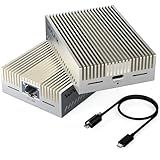
WAVLINK USB4 to 10Gbps Ethernet Adapter Supports Thunderbolt 3/4/5 & USB4 | USB-C to 10G Ethernet Network Adapter with AQC113 Chip for Mac, Windows & Linux (Driver Required on Windows & Linux)
Last verified 2026-11-13 08:35:59 UTC
As an Amazon Associate, Cloudzat earns from qualifying purchases. Prices and availability can change; Amazon shows the final price for your chosen item.
WAVLINK Networking buying guide
| Model | Best for |
|---|---|
| WAVLINK WL-WN573HX3 | an outdoor Wi-Fi 6 access point installation |
| WAVLINK WL-NWU342G | a USB4 or Thunderbolt 10GbE adapter setup |
Which WAVLINK products belong in different shortlists?
A brand page is useful for discovering these overlooked categories, but it must not mix their value judgements. An outdoor access point needs a suitable network and power route. A high-speed Ethernet adapter needs a compatible host and switch. Neither becomes a better deal because another product from the brand is expensive.
Why are the model suffix and host interface so important?
WAVLINK lists NWU342G as its USB4 and Thunderbolt 10G adapter family and NWU343G as a USB 3.2 Gen 2x2 family. The USB-C connector shape does not make those host requirements identical. Check the computer’s documented ports before choosing between visually similar enclosures.
The same caution applies to a PCIe card versus an external USB adapter. A PCIe product needs an internal expansion slot; a USB product needs the appropriate external link. Retailer titles often mention many compatible systems, so the model’s own specification is the stronger starting point.
What should an outdoor WAVLINK bundle include?
For WN573HX3, verify the actual regional package and power arrangement against WAVLINK’s documentation. An outdoor-rated access point does not mean its injector or power converter can be exposed to rain. The manufacturer explicitly distinguishes the device from the power equipment in its installation guidance.
Plan the cable entry, mounting position and access for maintenance before comparing bundles. A wireless repeater mode still needs power at the device. If a wired path is available, access-point mode avoids depending on a weak wireless uplink to the building.
Budget for the outdoor installation, not just the radio
Check the manufacturer’s weather, temperature and mounting requirements for the exact model. An outdoor-rated enclosure does not automatically cover its power supply, cable joints or injector. Route and protect the connections as specified, and keep indoor-only equipment in a suitable dry location. A device mounted under a roof still needs the correct cable entry and power arrangement; shelter alone does not establish suitability.
Plan where the Ethernet cable returns to the network and how the device will be reached for maintenance. An exposed or elevated installation may need professional work and the site-appropriate grounding or surge provisions. Keep those costs in the comparison between a bundle and a bare access point. For a detached building, an outdoor access point is not automatically a substitute for a designed building-to-building link. Check the intended distance, obstructions and two-way client connection before accepting a retailer’s broad coverage claim as evidence that it fits the site.
Check the computer’s port, not only the connector shape
USB-C is a physical connector used by several different data interfaces. Read the computer’s specification for the actual port you intend to use. A neighbouring port can have different capabilities, and a dock can share bandwidth among Ethernet, storage and displays. For a USB4 or Thunderbolt adapter, confirm the supported host mode and any requirement for PCIe tunnelling rather than assuming all USB-C sockets are equivalent.
Use the cable supplied or specified by the manufacturer, with the required data capability and length. A cable suitable for charging may not provide the expected data link. Connect directly to the computer for the first test so a dock or hub is not an extra unknown. For an internal card, check the electrical slot bandwidth, bracket height and physical clearance. The card fitting the connector is only one part of compatibility; the operating system and driver still need to support the actual controller.
Confirm support for the exact operating system and revision
Read the manufacturer’s current download page for the exact model and hardware revision. Windows, macOS and Linux are broad labels, and support can differ by release or processor architecture. An ARM computer may need a different driver from an x86 machine. For Linux, the relevant kernel and driver support are more useful than a vague claim that the adapter works with Linux. A third-party driver project is a different support arrangement from a manufacturer-supported installation.
Download any required driver through the manufacturer’s normal support route while you still have a working connection. Check whether administrator access is needed on a managed work computer before purchasing. Keep the model and revision recorded with the installer so a later operating-system update is easier to troubleshoot. Do not treat a retailer review from a different revision as proof of compatibility. The saving is useful only if the adapter works reliably on the machine that will actually use it.
Test coverage where you need it, not beside the box
Use the same client in several normal locations and repeat the test at a busy time. A strong result next to the router says little about the room at the far end of the building. Try a video call, a sustained download and access to local storage if those are the jobs the upgrade should improve. If the problem occurs only on one client, check that device’s driver and settings before replacing the whole network.
For a mesh or multi-access-point setup, walk through the usual route and check that the device reconnects sensibly. Roaming also depends on the client, so a marketing claim cannot guarantee identical behaviour on every phone. Keep notes of node placement and Ethernet connections so you can compare a change fairly. Moving a node a short distance or giving it a wired path can be more useful than adding another radio. Make these adjustments before concluding that a higher-priced kit is necessary.
Judge the complete offer against a recent price baseline
Use the recent selling price of the same model and configuration as the comparison where price history is available. A large percentage reduction against a manufacturer’s reference price can coexist with a much smaller saving against the normal market price. Check the selected variation, seller, delivery charge and any membership or coupon condition before comparing two offers. A discount requiring a paid membership is worth a different amount to somebody who does not already have it.
There is no universal percentage that makes networking hardware a good buy. A modest reduction on the exact device that fits can be more useful than a large reduction on the wrong interface or an oversized bundle. Compare the complete working installation with a suitable alternative, including required cables, power supplies and controllers. We do not describe an offer as an all-time low without supporting history, and a product recommendation does not mean that the model currently carries a Black Friday promotion.
Electricity cost calculator
Replace the example values with your own measurements, capacity or prices.
Questions buyers ask
Are WAVLINK NWU342G and NWU343G interchangeable?
Their host interfaces differ. NWU342G targets USB4 and Thunderbolt; NWU343G is a USB 3.2 Gen 2x2 family. Verify the computer’s port before choosing.
How should I compare a WAVLINK Networking Black Friday price?
Use the full WL model number. Similar-looking WAVLINK adapters can use USB4, USB 3.2 Gen 2x2 or a slower USB interface; outdoor access points also differ in radio, power and installation requirements.
What if WAVLINK WL-WN573HX3 has no matching local offer?
Use the model search to check the local market, then compare WAVLINK WL-NWU342G only for the use case described above. A recommendation is not confirmation of current stock or an event discount.