


Canada · CAD · Deal Watch
Mac mini Docks Black Friday Deals 2026: What to Buy in Canada
Canadian Black Friday Mac mini dock offers can stretch an upgrade budget beyond the computer itself. Compare a compact stand-and-hub with a powered Thunderbolt dock, then price any SSD and display adapters separately. A bargain enclosure is less compelling when the parts needed to finish it double the bill.
Compare a complete dock package for your exact Mac mini generation, including its host cable, power supply and any SSD you intend to add. A 10Gbps USB storage hub is not a 40Gbps Thunderbolt dock. Check recent prices for the same model and included accessories. A genuine saving should preserve the port capabilities you need, rather than trading them for a larger advertised port count.
Choose Satechi’s ST-GNMMES Stand & Hub for a compatible compact Mac mini when front USB-A, an SD reader and an NVMe enclosure are the priorities. Compare CalDigit TS4 for a powered Thunderbolt desktop setup with a different connection and expansion role. These are alternatives for different budgets and needs, not equal-speed products. Satechi’s older, wider Mac mini/Studio stand is a separate model. Check the manufacturer’s generation list rather than assuming all stands fit every Mac mini.
Which Mac mini Docks option should you choose?
Start here
Satechi ST-GNMMES Mac mini Stand Hub
Choose it for a supported compact Mac mini needing front ports and a 10Gbps NVMe enclosure.
Find this configurationChoose this alternative
CalDigit TS4
Choose it for a supported powered Thunderbolt desk with broader peripheral connections.
Buy on AmazonCurrent Mac mini Docks Listings on Amazon
Black Friday sale dates and offer timing
Dates for 2026: Black Friday — November 27; Amazon.ca — November 19–30. Individual offer periods and eligibility vary.

11% below the Amazon reference price
CalDigit TS4 Thunderbolt 4 Dock - 18 Ports, 98W Charging, 40Gb/s Thunderbolt 4, USB-A/C, 2.5GbE, 8K/6K Displays, Mac/PC/Chrome Compatible
Last verified 2026-11-14 11:58:00 UTC

UGREEN Mac mini M6/M5 Pro/M4 Dock with 10Gbps M.2 NVMe SSD Slot | Docking Station with 3*USB A 3.2, 5V Charging Port, USB 5A2C, SD/TF 170MB/s, Compatible with Mac mini M4/ M4 Pro
Last verified 2026-11-14 11:56:04 UTC

Stouchi Mac mini M6, M5 Pro, M4 Dock Stand with NVMe SATA SSD Enclosure | 10Gbps | Easy Power Button | Stable Wi-Fi | 2* USB A 10Gbps, 4K@60Hz HDMI, SD/TF Slot, 2* USB A, Audio 3.5mm | for M4/M5/M6
Last verified 2026-11-14 11:56:04 UTC

Stouchi Mac mini M6, M5 Pro, M4 Dock Stand with NVMe SATA SSD Enclosure | 10Gbps | Easy Power Button | Stable Wi-Fi | 2* USB A 10Gbps, 4K@60Hz HDMI, SD/TF Slot, 2* USB A, Audio 3.5mm | for M4/M5/M6
Last verified 2026-11-14 11:56:04 UTC

Satechi Mac mini M6, M5 Pro, M4 Hub & Stand with NVMe SSD Enclosure, Silver | 2 USB-A ports up to 10 Gbps, USB-A data port, SD card reader, optimized self-cooling
Last verified 2026-11-14 11:51:05 UTC

OWC miniStack STX 0TB Thunderbolt Storage Enclosure - Black | Add SATA HDD/SSD and NVMe M.2 2280 SSD - Stackable design sized to Mac Studio/Mac mini - Integrated hub - Up to 96W PD
Last verified 2026-11-14 10:05:30 UTC
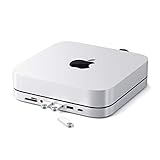
Satechi Aluminum Stand & Hub for Mac mini, USB 3.0 & Headphone Jack, Silver | USB-C data port, micro/SD card readers, for Mac Mini M2/M1 (not compatible with M4)
Last verified 2026-11-13 08:46:09 UTC

UGREEN Mac mini Dock & Stand with NVMe SSD Enclosure for M6/M5 Pro/M4 | 3 USB A 10Gbps, USB C Data Port, SD Card Reader for Mac mini M6/M4/ M4 Pro/M5 Pro
Last verified 2026-11-13 08:46:09 UTC
As an Amazon Associate, Cloudzat earns from qualifying purchases. Prices and availability can change; Amazon shows the final price for your chosen item.
Mac mini Docks buying guide
| Model | Best for |
|---|---|
| Satechi ST-GNMMES Mac mini Stand Hub | a supported compact Mac mini needing front ports and a 10Gbps NVMe enclosure |
| CalDigit TS4 | a supported powered Thunderbolt desk with broader peripheral connections |
Which dock should a Mac mini owner shortlist?
Buy the enclosure and SSD as separate decisions
The Satechi stand’s storage bay does not mean an SSD is included. Its 10Gbps enclosure limits the host connection even when a faster NVMe drive is installed. Follow the supported drive size, thickness and thermal-pad instructions; the compact stand is not a generic enclosure for every heatsink-equipped SSD. For frequent large transfers, compare a separate faster enclosure on a suitable Mac port. For backups and convenient storage, a sensibly priced compatible drive may offer better value than paying for performance the hub cannot expose.
Keep display and power expectations realistic
A Mac mini uses its own mains supply; laptop charging wattage is not a reason to pay more for its dock. Count the video outputs the exact Mac chip supports, and check the dock’s monitor arrangement. A USB-A storage hub does not create additional native display engines. Leave ventilation and power-button access clear when stacking a stand beneath the computer. Also check the host cable’s reach: a neat product photograph may not reflect a desk with a monitor arm, rear cable tray and external drives.
Check the host port before choosing the dock
USB-C describes a connector shape used for several capabilities. The computer’s manual must confirm the data protocol, any display support and the charging role required by the dock. A port can transfer files without providing DisplayPort Alt Mode, while a Thunderbolt or USB4 connection can have additional capabilities that depend on the host implementation. The dock cannot create a missing native video signal simply because its cable plugs in.
Use the supplied host cable for the initial setup and connect it to the marked host port. A charging-only cable, an older extension or the wrong socket can prevent the intended connection. Check whether the manufacturer supports the computer’s operating system and exact model. If the dock falls back to ordinary USB, read what functions remain available rather than assuming the full monitor and storage specifications still apply.
Compare one complete monitor arrangement
Write down the intended resolution, refresh rate and number of independent screens, then check that combination in the dock maker’s table. A maximum stated for one screen may not apply to two or three at once. Some HDMI and DisplayPort sockets are alternatives for one channel. Other products use MST, DisplayLink or a mix of native and USB graphics, each with different operating-system requirements.
For a Mac, the exact chip and the dock’s display path both matter. For a Windows laptop, the host port and graphics implementation still set limits. High-refresh gaming, protected video and colour-sensitive work deserve checks beyond ordinary office compatibility. Keep the monitor cables within the supported specification and test the intended arrangement directly. Do not assume that an adapter advertised for an extreme resolution supports every lower resolution at every refresh rate.
Remember that the host connection is shared
The dock’s upstream connection carries traffic for several devices. A fast external SSD, network transfer, camera and display can compete for resources, so adding every port’s maximum speed does not produce a realistic simultaneous total. The exact allocation depends on the dock and host. Compare the intended workload rather than treating a 40Gbps label as a dedicated 40Gbps link for each connected peripheral.
For a desk used mainly for documents and ordinary networking, a less expensive compatible dock may be enough. For frequent large file transfers, check storage performance with the displays and other devices attached. Connect a particularly demanding SSD directly to another suitable host port if that provides a better arrangement. Also distinguish gigabit Ethernet from 2.5GbE or faster networking: a USB4 host connection does not make the dock’s Ethernet controller faster than its own rating.
Compare the dock, power supply and cables together
Confirm whether the listing includes the manufacturer’s power adapter, a suitable host cable and any required regional mains lead. A lower box price can be misleading when essential parts are missing. The adapter’s total wattage is not necessarily the power delivered to the laptop; the dock and connected devices use some of that budget. Read the documented host charging output for the exact revision.
A desktop Mac mini uses its own power supply, whereas a laptop may need the dock to charge while working. Check that the available charging rate suits the laptop’s workload, and keep its original charger where necessary. Compare local warranty and return arrangements as well as delivery. Cable reach, adapter size and ventilation can affect the final desk layout, so include them in the purchase before paying extra for a clean-looking product photograph.
Check the whole desk after installation
Test the dock with its supplied cable and power adapter before adding extensions or third-party replacements. Confirm each screen’s independent desktop, resolution and refresh rate, then try Ethernet, storage, audio and charging as applicable. Sleep and wake behaviour matters for a daily office setup, so test it with the devices you normally leave connected. Save work before changing display or storage connections.
Install firmware or drivers only through the manufacturer’s supported route and follow its instructions. A managed work computer may require the organisation’s permission for DisplayLink or other software. If a function fails, isolate one connection at a time and compare the result with the compatibility table. Keep packaging until the intended arrangement is verified. A bargain is useful when the complete desk works consistently, not merely when the dock appears in the operating system’s device list.
Compare the Canadian total in Canadian dollars
Use Canadian-dollar prices and the exact Canadian offer, including delivery, any required accessories and applicable checkout charges. A US price converted into Canadian dollars is not a verified Canadian listing. Check the seller’s local support, the supplied power equipment and the selected model or capacity. An attractive starting price may describe an incomplete package. The recommendations identify products to compare, while the dated local cards provide separately checked price observations. Reconfirm the final variant and promotion conditions before ordering; a recommendation alone is not evidence of stock or an event discount.
Electricity cost calculator
Replace the example values with your own measurements, capacity or prices.
Questions buyers ask
Does a Mac mini dock upgrade internal memory?
No. A dock adds supported external connections or storage. It does not increase the Mac mini’s unified memory, and an SSD enclosure adds storage capacity rather than RAM. Choose the required memory configuration when buying the computer.
Does a recommended model always have a Black Friday discount?
No. The model shortlist describes useful configurations. A current priced listing is a separate observation, and an event section requires fresh public Black Friday evidence. Check the exact variant, seller and final checkout terms before treating it as an event offer.
What if the recommended local configuration is unavailable?
Use the named alternative only for the different use case explained in the guide. Compare the full specifications and package again. Do not substitute a lower capacity, wrong regional voltage or incomplete unit merely to obtain a cheaper listing.