


Canada · CAD · Deal Watch
Frigate Mini PC Black Friday Deals Canada 2026: What to Buy
Put a dedicated Frigate mini PC on your Black Friday shortlist and turn the savings hunt into a complete camera-server plan.
Check the supplied RAM and SSD, then compare the total delivered cost. A stronger mini PC is worth considering when your planned streams exceed a lighter machine’s capabilities. Look for a Black Friday checkout total below this exact configuration’s recent normal price. Compare equivalent complete systems from reputable sellers before deciding that the offer is worth buying.
Start with the Beelink Mini S12 Pro for a small dedicated Frigate recorder. Choose a MINISFORUM UM870 Slim when the same computer will also run more services and needs more CPU and memory. Neither model comes with a guaranteed camera count: video settings and enabled features change the load.
Which Frigate Mini PC option should you choose?
Start here
Beelink Mini S12 Pro
Choose it for a small, carefully sized NVR.
Buy on AmazonChoose this alternative
MINISFORUM UM870 Slim
Choose it for more host CPU and memory for a busier installation.
Buy on AmazonCurrent Frigate Mini PC Listings on Amazon
Black Friday sale dates and offer timing
Dates for 2026: Black Friday — November 27; Amazon.ca — November 19–30. Individual offer periods and eligibility vary.

6% below the Amazon reference price
Beelink Mini PC, Mini S12 Pro Intel 12th N100(Up to 3.4GHz), 16GB DDR4 500GB M.2 SSD, Mini Desktop Computers Support 4K@60Hz Dual HDMI Display/WiFi6/BT5.2/USB3.2/1000Mbps LAN/WOL Home/Office
16GB RAM
Last verified 2026-11-15 01:27:58 UTC

Beelink MINI S12 Pro Mini Desktop PC, Intel N100, 16G DDR4 RAM+500G SSD | WiFi6+BT5.2+2.5G LAN, Dual Display HDMI 4K UHD, Mini Desktop Computer Support Auto Power On Win11 Home for Office/HTPC
Last verified 2026-11-13 07:18:04 UTC

Beelink Mini S12 Pro Mini PC - 12th Gen Intel N100 (Up to 3.4GHz), 16GB DDR4, 500GB SSD, 4K Dual Display, WiFi 6, BT 5.2, 1000Mbps LAN - Low Power Mini Desktop Computer
16GB RAM · 500GB SSD
Last verified 2026-11-13 06:44:56 UTC

Beelink MINI S12 PRO Mini PC, Intel Alder Lake-N100 16GB DDR4 512GB SSD | Mini Computer 12th Gen N100 4C/4T,up to 3.4GHz,Desktop PC 4K@60Hz Dual HDMI/2.5G LAN/WiFi 6/BT5.2 for Home/Office
16GB RAM · 512GB SSD
Last verified 2026-11-13 06:44:56 UTC

Beelink Mini PC, MINI S12 Pro Intel Twin Lake N100 4C/4T Mini Computer | 12GB LPDDR5 RAM 500GB M.2 SATA SSD, Desktop PC Dual HDMI 4K UHD/2.5G Ethernet/WiFi6/BT5.2/W11 Home/HTPC
12GB RAM
Last verified 2026-11-12 08:49:09 UTC

6% below the Amazon reference price
Beelink MINI S12 PRO Mini PC, Intel Alder Lake N100, 12G LPDDR5 + 512G SSD | WIFI6+BT5.2+2.5G LAN, Intel UHD Graphics 24EUs, Small PC 4K UHD Dual HDMI Display, Mini Computer for Office/HTPC/Media Server
Last verified 2026-11-12 08:49:09 UTC
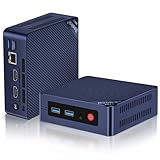
Beelink Mini S12 PRO Mini PC,12 Generation Intel N100 (Up to 3.4GHz) 4C/4T,16GB DDR4 512GB M.2 SSD,Micro PC 4K,Dual Display,WiFi6,BT5.2,2.5G LAN, Low Power Mini Computer
16GB RAM
Last verified 2026-11-12 08:49:09 UTC

MINISFORUM UM870 Slim Mini PC AMD Ryzen 7 8745H 8C/16T Desktop Computer 16GB RAM 1TB SSD, HDMI/DP/USB4 8K@60Hz Output, 1X 2.5G RJ45 Port, 4X USB Port, Dual Band WiFi, AMD Radeon 780M Graphics
16GB RAM · 1TB SSD
Last verified 2026-11-15 01:28:39 UTC
As an Amazon Associate, Cloudzat earns from qualifying purchases. Prices and availability can change; Amazon shows the final price for your chosen item.
Frigate Mini PC buying guide
| Choice | Best for |
|---|---|
| Beelink Mini S12 Pro | a small, carefully sized NVR |
| MINISFORUM UM870 Slim | more host CPU and memory for a busier installation |
Which Frigate Mini PC option should you choose?
For a small, carefully sized NVR, choose Beelink Mini S12 Pro.
For more host CPU and memory for a busier installation, choose MINISFORUM UM870 Slim.
Decode capability matters more than a synthetic CPU headline
Frigate receives compressed video continuously, so decoding can dominate host work when hardware acceleration is not configured effectively. A processor that looks modest on a general benchmark can be a strong NVR choice when its supported media engine handles the codecs and resolutions used by your cameras. Conversely, a faster CPU can waste power if every stream falls back to software decoding.
Verify the exact processor and the Frigate hardware-acceleration path that applies to it. Amazon titles sometimes emphasize generation or core count while omitting details that matter to the video pipeline. Treat vague listings cautiously and favor models whose CPU identity is clear enough to verify before purchase.
Camera count is only the first sizing input
Four 4K cameras, sixteen 1080p cameras and eight mixed-resolution cameras are not equivalent workloads. Detect FPS, substream resolution and recording strategy change how much data moves through the system. Use camera count as a starting point, then layer in resolution and detection intensity before deciding whether an N100-class host, a higher N-series processor or a stronger Core/Ryzen system is justified.
When the cameras expose efficient low-resolution detect streams, a modest host can cover more endpoints than a naive main-stream calculation suggests. That is why Cloudzat's tool asks about workload rather than returning a universal camera-per-CPU number. Real results depend on the exact streams and configuration.
Buy enough memory for the whole host, not only Frigate
Frigate itself may fit comfortably in a relatively small memory footprint, but many buyers run it beside Home Assistant, MQTT, databases, dashboards or other containers. Virtualization adds its own overhead. A Black Friday listing with very little installed RAM can therefore be a worse purchase than a slightly more expensive configuration that avoids an immediate upgrade.
Prefer listings that clearly state installed memory rather than only maximum supported memory. If memory is replaceable, compare the complete cost of the host plus the upgrade. If it is soldered, the initial configuration becomes a long-term constraint and deserves more weight than a temporary sale price.
Storage on the mini PC is not your recording plan
A 256GB or 512GB SSD can be adequate for the operating system, containers and local application data while recordings live on separate storage. It can also be woefully inadequate if you expect the same device to hold weeks of high-bitrate footage. Separate boot/application storage from retention storage in your planning.
Do not infer that a large advertised SSD makes a mini PC a better NVR. Capacity, endurance, replacement options and the external or network storage path all matter. Use the dedicated Frigate storage calculator for retention, then judge the mini-PC SSD on the role it will actually perform.
Ethernet reliability usually beats a wireless shortcut
The host is the convergence point for all camera streams, so a stable wired connection is strongly preferable in most fixed NVR deployments. A 1GbE link can serve many ordinary camera systems because compressed surveillance streams are much lower bandwidth than storage benchmarks, but larger systems or hosts sharing other heavy services may benefit from 2.5GbE.
Do not buy 10GbE simply because the mini PC includes it. Estimate the actual aggregate camera traffic and storage topology. If the recordings are written across the same link to a NAS, that path deserves more attention. A well-sized wired link is more valuable than the highest number printed on the chassis.
Accelerator compatibility can decide the chassis
If your build will use a Coral M.2 or Hailo module, the available slot, keying, PCIe wiring and physical clearance can determine which mini PC is viable. A USB Coral follows a different path. Buyers often discover after purchase that the internal slot they expected to use is occupied, unsupported or intended only for storage or wireless hardware.
Choose the detector architecture before assuming a compact host will accept it. If an external USB path satisfies the design, that can simplify the build. If an internal accelerator is essential, verify the exact host board layout and current Frigate support rather than relying on a generic 'M.2 slot' statement.
Thermals and power matter in an always-on NVR
Frigate hosts operate continuously, often in network closets or shelves where airflow is limited. A bursty desktop benchmark does not tell you how a mini PC behaves under steady decode, recording and inference support. Fan noise, dust exposure and sustained thermal limits can influence reliability as much as peak performance.
Low-power processors can be attractive for 24/7 use, but efficiency is useful only when the host still has enough headroom. The right Black Friday choice balances idle/sustained power, cooling and workload. Avoid buying an ultra-small system solely because it is cheap if the intended camera load will keep it permanently at its thermal limit.
Compare complete configurations, not model names
Amazon often lists the same mini PC with multiple RAM and SSD combinations. A sale page can make one variation look like a model-wide discount even when another configuration is the better value. Confirm the exact variation in the cart and compare it with the tracked configuration that Cloudzat recorded.
Treat a mini PC as a complete Frigate option only when the installed RAM and storage are clear. Do not assume a listing's maximum-capacity specification is the configuration you will receive, and price barebones systems only after adding the memory and storage you need.
Know when to buy now and when to wait
If the current regular price is already near a tracked low and the host exactly matches your build, buying before Black Friday can be rational, especially when inventory is limited. Waiting makes more sense when pricing is ordinary, you have no deployment deadline, or the current configuration would require compromises.
During the event, compare the verified Black Friday price with both the regular listings and historical baseline. A genuine low on the correct configuration is meaningful. A large discount on the wrong CPU, too little RAM or a barebones variant is not a win, regardless of the percentage shown.
Budget for decoding, detection and recording separately
The host decodes video, the detector performs object inference, and storage keeps the recordings. These are separate workloads. An accelerator can improve detection without fixing a slow recording drive or an unsuitable video-decoding path. Choose the camera streams, recording plan and detector together so that one part does not remain the bottleneck.
A lower-resolution detection stream can reduce processing work while a higher-quality stream is recorded. Confirm that the camera provides the streams and local access your setup requires. Battery cameras, vendor-cloud features and a high advertised resolution do not by themselves establish suitability for continuous local recording.
Choose the detector for the software and connector you have
Coral USB, Coral M.2 and Hailo devices are different hardware paths. Match the exact connector, host support, driver and model format to the Frigate version you plan to use. An M.2-shaped accelerator does not automatically fit or operate in an SSD slot. A Raspberry Pi HAT is not a complete general-purpose computer.
Before adding cameras, leave capacity for the busiest scene and concurrent recording activity. Check inference and video-processing behaviour with the intended streams. A fixed number of cameras is not a universal hardware rating because resolution, frame rate, scene activity, recording settings and software choices change the work.
Keep recording storage and recovery separate from the camera price
Estimate storage from the camera bitrate, recording duration and retention period, then leave room for overhead and growth. A resolution label alone does not determine the storage needed. Continuous recording and event-based retention can produce very different capacity requirements. Use the settings you intend to keep rather than the smallest file size demonstrated by a seller.
Place important event exports or required evidence on another recoverable device when losing the recorder would also lose the recordings. A camera purchase is only part of a complete local recording setup. Include the switch or PoE supply, host, storage and a sensible recovery procedure in the budget.
Buying Frigate Mini PC in Canada
For Frigate Mini PC in Canada, begin with Beelink Mini S12 Pro for a small, carefully sized NVR. Compare MINISFORUM UM870 Slim when more host CPU and memory for a busier installation is the more useful choice. The Amazon links and prices on this page use Amazon Canada and Canadian dollars. Add delivery and any required components to the amount you are comfortable paying. For a model family with several configurations, use the model name and the installed components together when comparing these two choices. Keep the seller’s order details so you can check that the hardware you receive is the version you chose.
Electricity cost calculator
Replace the example values with your own measurements, capacity or prices.
Questions buyers ask
Which Frigate Mini PC option should I choose?
Choose Beelink Mini S12 Pro for a small, carefully sized NVR. Choose MINISFORUM UM870 Slim for more host CPU and memory for a busier installation.
What mini PC is best for Frigate?
There is no universal model. Match the host to camera count, stream design, decode support, detector path and other services running on the machine.
Is an Intel N100 enough for Frigate?
It can be appropriate for many efficient small deployments, but camera resolution, substreams, decode configuration and detector workload determine the real requirement.
How much RAM should a Frigate mini PC have?
Size memory for Frigate plus the operating environment and any other containers or VMs. A complete 16GB-class configuration is a practical starting point for many buyers, not a universal rule.
Do I need 2.5GbE for a Frigate mini PC?
Not always. Aggregate camera and storage traffic should determine the network requirement; many camera streams fit easily inside 1GbE.