


Canada · CAD
Best Mini PCs for Office Work Canada
Choose a GMKtec G3 Plus with 16GB for documents, email and a straightforward home office. Choose a Beelink SER8 with 32GB when you keep more applications open or mix office work with creative tasks. Choose an ASUS NUC 14 Pro for a more connectivity-focused desk and a documented commercial configuration.
Which model to choose
Beelink Mini S13 Mini PC, Intel Twin Lake-N150 (4C/4T, up to 3.6GHz), 16GB DDR4 RAM 500GB…
Alternative for light everyday work: Intel N150 · 16 GB RAM
Best budget starting point for light office work. Choose a complete 16GB system and spend the remaining budget on a comfortable display and backup.

16 GB RAM · 500 GB SSD
CA$418.93Price checked 01.11.2026 09:55 UTCBuy on Amazon ↗Beelink SER8, 32GB
Best balanced choice for heavier multitasking and a mixed work-and-home desk. More memory and stronger compute give useful room beyond basic documents.

32 GB RAM · 1000 GB SSD
CA$908.60Price checked 01.11.2026 06:33 UTCBuy on Amazon ↗Specifications and model details ↗ASUS NUC 14 Pro, 32GB
Best when display connections and a specific supported commercial configuration matter. Compare the complete system rather than the barebone kit.

32 GB RAM · 2000 GB SSD
CA$1,839.99Price checked 01.11.2026 06:27 UTCBuy on Amazon ↗Specifications and model details ↗Amazon prices and configurations
Ryzen 7 8745HS
Beelink SER8 Mini Pc,AMD Ryzen 7 8745HS (up to 4.9GHz),32GB DDR5 RAM & 1TB PCIe4.0 SSD,AMD Radeon 780M,Mini Computer Support 4K Triple Display(HDMI+D…
32 GB RAM · 1000 GB SSD
CA$908.60Price checked 01.11.2026 06:33 UTCBuy on Amazon ↗Core Ultra H
Intel NUC 14 Pro,for ASUS NUC 14 Pro AI Mini Pc, Ultra 7 155H (16C/22T, Up to 4.8GHz) Mini Computer, 32GB Ram & 2TB PCIe 4.0 SSD, Intel Arc GPU/Type…
32 GB RAM · 2000 GB SSD
CA$1,839.99Price checked 01.11.2026 06:27 UTCBuy on Amazon ↗Intel N150
Beelink Mini S13 Mini PC, Intel Twin Lake-N150 (4C/4T, up to 3.6GHz), 16GB DDR4 RAM 500GB M.2 SSD, Mini Computer Support 4K@60Hz Dual Screen Display/…
16 GB RAM · 500 GB SSD
CA$418.93Price checked 01.11.2026 09:55 UTCBuy on Amazon ↗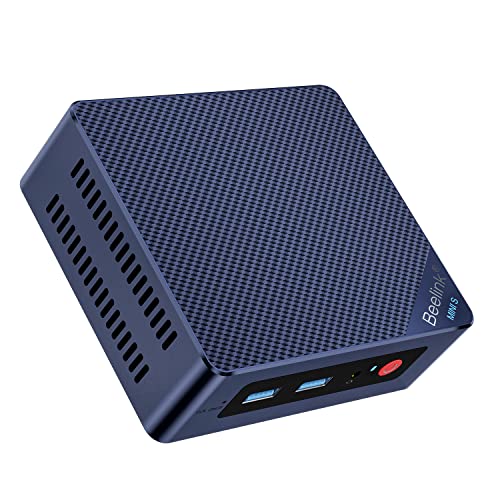
Intel N100
Beelink Mini S12 Pro Mini PC - 12th Gen Intel N100 (Up to 3.4GHz), 16GB DDR4, 500GB SSD, 4K Dual Display, WiFi 6, BT 5.2, 1000Mbps LAN - Low Power Mi…
16 GB RAM · 500 GB SSD
CA$421.04Price checked 01.11.2026 09:55 UTCBuy on Amazon ↗
AMD Ryzen
GMKtec G10 Mini PC, AMD Ryzen 5 3500U, 16GB DDR4 512GB SSD W11 Pro Silver | (Beats 3200U) 2.5GbE LAN Desktop Computer, Triple 4K Display, USB-C PD, D…
16 GB RAM · 512 GB SSD
CA$439.00Price checked 01.11.2026 06:27 UTCBuy on Amazon ↗
Ryzen 7 7735
GMKtec K16 Gaming Mini PC, AMD Ryzen 7 7735HS 32GB LPDDR5 512GB NVMe SSD | OCuLink eGPU Port, Dual 2.5GbE LAN, USB4 40Gbps, WiFi 6E, Triple Display, …
32 GB RAM · 512 GB SSD
CA$829.00Price checked 01.11.2026 10:59 UTCBuy on Amazon ↗
Ryzen 7 8745HS
Beelink SER8 Mini PC, AMD Ryzen 7 8745HS (8C/16T up to 4.9GHz), 16GB DDR5 512GB SSD, AMD Radeon 780M Graphics/Triple 4K Display (HDMI 2.1+DP+USB4)/2.…
16 GB RAM · 512 GB SSD
CA$896.04Price checked 01.11.2026 06:33 UTCBuy on Amazon ↗
Intel Core
MINISFORUM NAB9S Mini PC, Intel Core i9-13900HK (14C/20T, Up to 5.4GHz), 16GB DDR4, 500GB PCIe 4.0 SSD, Quad 4K Display, Dual 2.5GbE LAN, Wi-Fi 6, BT…
16 GB RAM · 500 GB SSD
CA$1,019.99Price checked 01.11.2026 06:27 UTCBuy on Amazon ↗Buying guide
Which office Mini PC is the right starting point?
The G3 Plus with 16GB is the sensible first comparison for email, documents, browser work and a modest video-meeting setup. It keeps the computer small and leaves money for the parts of the desk you touch all day. Choose the SER8 with 32GB when you keep more applications active, work with larger spreadsheets or also use creative software. The NUC 14 Pro is the connectivity-led alternative when its exact ports and support package fit the workplace.
Do not buy a premium AI processor only to run a few cloud applications. The faster computer becomes useful when the actual workload needs its capacity. For a simple desk, enough memory, the correct display outputs and a comfortable monitor can be the better investment.
Plan the video-call setup as a complete desk
A Mini PC does not normally include the camera, microphone, speakers and screen built into a laptop. List those separately before comparing the total. Check where the USB ports sit if you connect a headset, webcam, keyboard receiver and storage at the same time. A front-accessible port can be more convenient than adding a hub behind the monitor.
Test a meeting while the usual documents and browser tabs remain open. That exposes a more useful workload than a call with nothing else running. Check microphone pickup near the computer’s fan and place the machine accordingly. A wired network connection can also remove one source of unpredictable call quality.
Choose memory and local storage sensibly
For a new Windows desk, 16GB is the starting tier we would compare. Choose 32GB when real multitasking justifies it, rather than buying 8GB and hoping every future application stays small. Some computers use soldered memory and others use replaceable modules. That difference matters when the budget requires a staged upgrade.
A 500GB or 512GB SSD can suit a cloud-centered office. Choose 1TB for larger local files, applications and offline copies. A synchronized folder is useful, but understand whether deletions or unwanted changes also synchronize. Keep a recoverable independent copy of work that would be expensive to lose.
Make ownership convenient for the person using it
Choose the operating-system edition required for remote access, organizational management and business applications. Do not assume every Windows-labelled listing includes the same licence or management features. Keep recovery information and the seller’s contact details accessible to the person responsible for support. If the computer replaces a working laptop, preserve a way to access important files during the changeover.
For an alternative to the G3 Plus, keep a complete 16GB office configuration and the required monitor ports. For an alternative to the SER8, preserve the higher multitasking capacity rather than replacing it with a basic N-series device. Match the real desk needs first, then compare brand, size and price.
Buy for the working day you actually have
Count the applications that stay open together: browser tabs, documents, a video meeting, accounting software and remote desktop sessions. A simple reception desk needs less compute than a developer compiling projects during calls. Start with 16GB for a new general-purpose Windows desk and compare 32GB for heavier multitasking. A low-cost computer can be good value when it fits that work; a more expensive processor does not make a poorly equipped desk comfortable.
Check the complete setup rather than the processor alone. You need the right monitor connections, enough accessible USB ports and a dependable network. Include a webcam, headset and keyboard if the Mini PC replaces a laptop. A 500GB or 512GB SSD can be sufficient for cloud-based office work. Choose 1TB when applications and local files justify it, and keep an independent backup for important documents.
Make the desk easy to support
Choose a complete computer when you want to unpack it and start work. A barebone may need RAM, storage and an operating-system licence, which changes both the cost and who supports the finished system. For several desks, consistent hardware and a documented recovery image often matter more than a small difference in benchmark scores. Record the exact model and hardware revision before buying additional units, because a familiar brand name can cover different network, storage and wireless components.
Keep airflow clear when using a VESA mount. Behind-monitor mounting can save desk space, but check cable access and whether the display already occupies the mounting points. Test wake from sleep, the network connection, a video call and the actual display arrangement during initial setup. These everyday behaviors determine whether a small computer is convenient. They are more useful acceptance checks than watching a promotional video or opening one empty document.
Spend on the parts that improve daily use
A good screen, comfortable input devices and reliable backup can improve the working day more than moving from a sensible midrange CPU to a premium model. Do not pay for a large NPU score unless your chosen application actually uses it. For a quiet office, compare measured noise when available and choose placement that keeps the fan away from a microphone. A fanless system suits some light tasks, but its cooling and sustained workload still need to match.
If you are buying for someone else, write a short acceptance list: open the required applications together, run a meeting, connect every display, print a document and recover a sample file from backup. Keep the purchase record and recovery information somewhere accessible. When choosing an alternative model, preserve the installed RAM, required ports and service arrangements. A cheaper unit with fewer display outputs or an unsupported Windows edition can create more work than it saves.
Buying and support in Canada
Use Canadian-dollar prices when comparing these systems. Include delivery and the applicable provincial or territorial taxes in your total, and check whether the seller ships from Canada or imports the machine. A cross-border offer can have a different return process, delivery schedule or additional charges. Do not compare an American promotional price with a Canadian delivered price as though the currency and purchase conditions were identical.
Confirm the included adapter, power lead and operating-system edition, then keep the invoice and serial number. For work or study, choose a support route you can use if the computer fails during a busy week. An alternative should preserve the required memory, graphics and connections, even when the brand changes. Add any missing display, keyboard, webcam or backup drive to the budget before deciding whether the compact system is good value.
Questions buyers ask
Which Mini PC is enough for a simple home office?
A complete G3 Plus with 16GB is a sensible starting point for documents, email and light browser work. Include a suitable webcam, display and backup.
When should I choose the SER8 instead?
Choose it with 32GB when multitasking, larger spreadsheets or mixed creative work justify more CPU, memory and graphics capability.
Does a Mini PC include a webcam and screen?
Usually not. Budget for the display, camera, audio and input devices needed to replace the complete laptop or desktop setup.
Specifications and software guidance
GMKtec NucBox G3 Plus ↗Beelink SER8 ↗ASUS NUC 14 Pro ↗Related Mini PC guides
Best Mini PCs for Students CanadaBest Mini PCs for Multiple Monitors CanadaBest Mini PCs for Business CanadaMini PCs for Digital Signage and Kiosks CanadaCompare Mini PC pricesAs an Amazon Associate, Cloudzat earns from qualifying purchases. Prices and availability can change.