


United States · USD · Deal Watch
Smart blind controllers: Black Friday 2026 deals in the US
A Black Friday blind-control purchase should make mornings easier without turning the window into a compatibility project. Start with the movement you need: tilting slats, moving curtains or raising a motorised shutter. Those are separate jobs, and the strongest offer is the one that completes the right job with the fewest unnecessary parts.
Before choosing an offer, compare the exact configuration with its recent selling price and the complete setup cost. Use the model checks below to decide what belongs in your basket; a discount is worthwhile when the required equipment and support fit the job.
Compare retrofit blind motors and wired cover controllers as different solutions. SwitchBot Blind Tilt works on suitable wand-operated blinds; a Shelly cover-control module is for an installer-approved powered motor arrangement. Check physical fit, power, hub requirements and manual operation before comparing the final price.
Which Smart blind controllers option should you choose?
Start here
SwitchBot Blind Tilt
Retrofit device for suitable wand-operated blinds. It tilts slats rather than lifting the whole blind. Confirm physical fit, charging and the compatible bridge needed for your preferred third-party control system.
3-pack · $209.95 total
Buy on AmazonChoose this alternative
Shelly 2PM Gen4
Wired switching and supported cover-control module. Have the motor, electrical arrangement and installation space checked professionally. Include fitting and calibration; it is not a retrofit wand motor or a complete powered shutter.
4-pack · $151.96 total
Buy on AmazonCurrent Smart blind controllers Listings on Amazon
Black Friday sale dates and offer timing
Dates for 2026: Black Friday — November 27; Amazon.com — November 19–30. Individual offer periods and eligibility vary.

SwitchBot Blind Tilt Motorized Blinds - Smart Electric Blinds, Automatic Blind Opener and Closer, Solar Powered, Light Sensing Control, Add Hub Mini to Make it Compatible with Alexa & Google Home
Last verified 2026-11-16 09:33:13 UTC
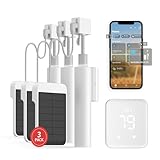
SwitchBot Blind Tilt Automatic Blind Opener 3-Pack & Hub 2- Smart Motorized Blinds with Bluetooth/IR Remote Control, WiFi Thermometer Hygrometer, Light Sensor, Work with Alexa, Google Home, HomeKit
3 devices in this pack · $69.98 each
Last verified 2026-11-16 09:33:13 UTC
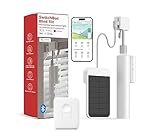
21% below the Amazon reference price
SwitchBot Blind Tilt Motorized Blinds with Remote, Automatic Blind Opener and Closer, Solar Powered, Light Sensing Control, Add Hub Mini to Make it Compatible with Alexa & Google Home
Last verified 2026-11-16 09:33:13 UTC

18% below the Amazon reference price
SwitchBot Blind Tilt & Hub 3 Kit: Solar-Powered Smart Blinds with Matter Support, Light Automation & Voice Control for Complete Home Management
Last verified 2026-11-16 09:33:13 UTC
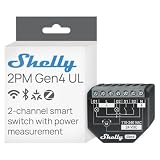
Shelly 2PM Gen4 UL Smart Relay, Power Metering, Wi-Fi, Matter, 2-Channel | Power Metering, Compatible with Alexa, SmartThings, Google Home, Apple HomeKit, Home Assistant, Roller Shutters Control
Last verified 2026-11-16 09:35:00 UTC

Shelly 2PM Gen4 UL Smart Relay Switch, Power Metering, Wi-Fi, Matter 4-Pack | 2-Channel, Compatible with Alexa, SmartThings, Google Home, Apple HomeKit, Home Assistant, Roller Shutters Control
4 devices in this pack · $37.99 each
Last verified 2026-11-16 09:35:00 UTC

Shelly 2PM Gen4, Smart Relay Switch, WiFi, Matter & Zigbee, 2-Channel | Power Metering, Compatible with Alexa, SmartThings, Google Home, Apple HomeKit, Home Assistant, Roller Shutters Control
Last verified 2026-11-16 09:35:00 UTC

Shelly 2PM Gen4 UL Smart Relay Switch, Power Metering, Wi-Fi, Matter 2-Pack | 2-Channel, Compatible with Alexa, SmartThings, Google Home, Apple HomeKit, Home Assistant, Roller Shutters Control
2 devices in this pack · $39.19 each
Last verified 2026-11-16 09:35:00 UTC
As an Amazon Associate, Cloudzat earns from qualifying purchases. Prices and availability can change; Amazon shows the final price for your chosen item.
Smart blind controllers buying guide
| Model or family | What to check |
|---|---|
| SwitchBot Blind Tilt | Retrofit device for suitable wand-operated blinds. It tilts slats rather than lifting the whole blind. Confirm physical fit, charging and the compatible bridge needed for your preferred third-party control system. |
| Shelly 2PM Gen4 | Wired switching and supported cover-control module. Have the motor, electrical arrangement and installation space checked professionally. Include fitting and calibration; it is not a retrofit wand motor or a complete powered shutter. |
The compatibility decision that matters
A device that rotates a blind wand does not necessarily lift the blind. A curtain motor travels along a compatible track or rod, while a shutter relay controls an existing motor using the permitted electrical arrangement. Read the exact compatibility guide for the fitting you own. Check whether position control requires calibration and how the device behaves when movement is interrupted. For wired systems, have a qualified installer verify the motor type, switching arrangement, load and available enclosure space; a generic two-channel relay is not automatically suitable.
Build a useful buying shortlist
Measure each window and count the moving panels or motors. Add the required bridge, charging method and installation to the basket. If solar charging is optional, assess actual daylight at that window instead of treating the accessory as essential. Test noise, end positions, manual override and your preferred schedule during the return period. Where several blinds form a group, verify how that group appears in the destination app before ordering enough devices for the entire room.
Plan the complete automation, not only the device
Write the intended chain in plain terms: something is detected or requested, the controller decides what to do, and another device performs the action. Identify which parts are already present and which must be purchased. A sensor, bridge and actuator have separate roles. If a product combines several roles, confirm the supported combination in its current documentation rather than assuming that every feature can run together.
Check each connection in that chain. Wi-Fi, Zigbee, Thread and Matter are not interchangeable labels for one network. A Matter controller, a Thread border router and a Zigbee coordinator can be different devices or functions. Confirm the exact integration and the events it exposes. A device appearing in an app is only the starting point; the measurement, gesture or control you need must also be available.
Check everyday operation and ownership costs
Decide which routines need to keep working when the internet is unavailable and which depend on a remote service. Local operation can still require a powered hub, working router or other equipment. Check the physical control and the recovery state after a power interruption. Give other household members a straightforward way to use the system without relying on one person’s phone.
Count batteries, power adapters, mounting parts and optional subscription features over the period you expect to keep the equipment. Check current product-support information and the process for moving devices to another controller. For mains, heating or motor installations, include qualified assessment and fitting where required. This is a buying guide, so use the manufacturer’s exact installation instructions and the appropriate professional rather than treating a product recommendation as a wiring plan.
Test one useful routine before expanding
Use the first purchase at the intended location and observe it during a normal day. Check missed events, unwanted triggers, delay and how clearly the app reports low battery or disconnection. If the routine is important, decide what you will do when a device is unavailable. Notifications need a person or a defined next action to be useful.
Once the first setup behaves consistently, compare the cost of expansion with the original plan. Buying several units can save money, but only if their locations, radio coverage and supported actions are known. Record model names and the configuration so later maintenance does not depend on remembering how the first device was set up.
How to judge the Black Friday price
A useful discount lowers the complete price of the exact product you need, compared with its recent normal selling price and credible alternatives. Keep the model, generation, condition and pack quantity fixed while comparing. A reduction against an old reference price can look dramatic without being the best available purchase. Where price history is available, inspect the matching variant rather than borrowing the history of a different size or bundle.
Set a target basket before browsing: required hardware, missing accessories, delivery and any recurring service you actually intend to use. Treat a coupon as a saving only when it applies to your account and selected item at checkout. Do not count an optional extra as essential merely because a bundle includes it. The calculator below helps compare the complete amounts you enter; it does not determine compatibility or establish a historic low.
Read the listing and the offer conditions
Check the written model and package contents, then confirm the seller, condition and local return arrangements. Product photographs can show accessories or another configuration. A multipack price should be divided by the number of units you will use, not automatically by every item in the box. Keep new, used and refurbished offers separate when their support and condition differ.
Current Amazon cards are local price observations for matching products. A normal listing is not automatically an Early Black Friday or main-event promotion. Promotional sections require separate current evidence, while individual offers can end, change or become unavailable. Recheck the final basket before paying. If no qualified listing appears, use the buying guidance and named comparisons without interpreting an unavailable card as a guaranteed forthcoming discount.
A practical buy-or-wait decision
Buy when the required configuration fits, the delivered price meets your target and the seller gives you a workable opportunity to test it. Wait when the uncertainty concerns a core requirement, such as an unsupported connection, missing controller, unsuitable installation or unclear warranty. A deadline banner does not resolve those questions.
After ordering, keep the exact model and invoice details and plan the acceptance checks before the return window ends. Test the intended everyday task, not just power-on. If the setup needs a second purchase to work properly, update the complete cost and compare again. That approach makes a smaller, well-matched discount more useful than a large reduction on equipment that does not solve the original problem.
US buying and compatibility checks
Compare Amazon.com listings in USD and include the taxes, delivery and extras shown for your order. Keep the exact model, seller, new condition and package quantity fixed through checkout. A US listing with clear local support is a different proposition from an imported version with uncertain service. Check the written contents and the return route before paying. If several devices are required, compare one complete usable basket rather than mixing attractive prices from different configurations that cannot form the intended setup.
Complete purchase cost calculator
Enter the actual prices for the selected configuration. Include only costs not already included in the item price. This estimate does not check compatibility or confirm a discount.
Questions buyers ask
Will a blind-tilt motor also raise the blind?
Not necessarily. Tilting slats and lifting the blind are different mechanisms. Buy against the precise movement and fitting supported by the product, rather than a broad smart-blinds label.
Does a listed price prove a Black Friday deal?
No. A current listing establishes an observed local offer, not an exceptional saving. Compare the exact variant’s recent selling price, complete cost and credible alternatives. Early and main-event labels require separate public promotional evidence. Recheck seller, quantity, coupon eligibility and the basket total before buying.
What should I do if the recommended model is unavailable?
Keep the requirements fixed and compare an alternative on its own specification. Do not accept a different connection, missing controller or unsuitable physical fit just because it appears in search results. Check the manufacturer’s local availability and support, or wait if no complete suitable option meets your budget.
Related buying guides
- Home Assistant
- Aqara smart home
- Shelly smart home
- SONOFF smart home
- SwitchBot smart home
- Smart plugs with energy monitoring
- Water-leak sensors
- Temperature and humidity sensors
- Door and window sensors
- mmWave presence sensors
- Smart relay modules
- Home energy monitors
- Smart thermostats
- Smart garage-door controllers
- Home Assistant Green
- Home Assistant Voice
- SMLIGHT SLZB-06
- Zigbee smart buttons