


United States · USD · Deal Watch
Lorex Camera Systems Black Friday Deals 2026: Buying Guide for the US
Build a clearer Lorex Fusion shopping list before choosing a Black Friday recorder or kit. US buyers should separate wired camera support from wireless expansion and decide which part of the system the purchase will supply.
Compare the exact recorder family, camera package and HDD contents at recent US prices. Count wired channels and PoE ports separately and include compatible cameras if the listing is recorder-only. A larger combined channel number does not establish the same wired installation capacity.
Compare the Lorex Fusion N847 family for its eight wired-camera positions with the N864 family’s sixteen-channel wired role. Confirm the precise model and supported camera combination before choosing a package.
Which Lorex Camera Systems option should you choose?
Start here
Lorex Fusion N847 NVR
A Fusion recorder family with eight wired camera positions; do not read a combined camera count as sixteen PoE ports.
Find this configurationChoose this alternative
Lorex Fusion N864 NVR
A sixteen-channel wired NVR family; check compatible cameras and whether the chosen listing includes any.
Find this configurationCurrent Lorex Camera Systems Listings on Amazon
Black Friday sale dates and offer timing
Dates for 2026: Black Friday — November 27; Amazon.com — November 19–30. Individual offer periods and eligibility vary.
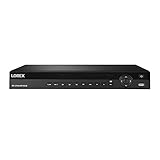
Lorex N882A63B Series 16 Channel 4K HD 3TB IP Ultra HD Security System Network Video Recorder (NVR) with Lorex Cloud Connectivity, Real Time 30FPS, Audio Recording, Multiple Recording Modes, Black
Last verified 2026-11-14 10:18:42 UTC

Lorex 4K Smart Security Lighting Deterrence Bullet AI PoE IP Wired Camera with Smart Motion Detection Plus and IP67 Weatherproof Rating
Last verified 2026-11-14 10:18:42 UTC
As an Amazon Associate, Cloudzat earns from qualifying purchases. Prices and availability can change; Amazon shows the final price for your chosen item.
Lorex Camera Systems buying guide
| Model or family | What to compare |
|---|---|
| Lorex Fusion N847 NVR | A Fusion recorder family with eight wired camera positions; do not read a combined camera count as sixteen PoE ports. |
| Lorex Fusion N864 NVR | A sixteen-channel wired NVR family; check compatible cameras and whether the chosen listing includes any. |
Choose the right configuration for this purchase
If a listing advertises sixteen-camera capability, establish whether those are all wired recording positions or a combined Fusion arrangement. Then check which cameras are included and what must be bought separately. Availability and package contents can differ by market, so use the dated local product data and selected seller details. Price the actual completed layout, including cables and storage, rather than importing a capacity claim from another regional bundle.
Distinguish cameras, channels and physical PoE ports
Write down three separate numbers: cameras supplied, recording channels supported and powered Ethernet ports present. They are not interchangeable. A recorder described as sixteen-camera capable may combine wired and wireless connections, while an eight-channel kit can contain only four cameras. Some systems count additional streams or supported camera types differently by hardware revision.
Check the exact recorder’s documentation for simultaneous recording, supported resolution, incoming bandwidth and playback limits. Extra switch ports do not remove the recorder’s own limits. If future expansion matters, identify the cameras and recording mode that will actually be supported. Compare two bundles at the same supplied camera count and storage capacity, then value spare channels separately. This avoids paying for a larger headline number that does not expand the part of the system you need.
Verify the exact camera and recorder pairing
Start with the manufacturer’s compatibility list for the exact hardware revisions. A matching brand name helps identify a product family but does not prove that every feature works across all generations. Likewise, a general interoperability claim may cover video while leaving detection events, audio, tracking or configuration controls unavailable through a different recorder.
If you are expanding an existing installation, record its model and firmware version before shopping. Check which functions matter and confirm each one. If you are starting fresh, compare the complete ecosystem, including local playback, remote viewing, updates and the route for adding cameras later. Do not count a battery camera, coaxial analogue camera and PoE IP camera as interchangeable replacements. A discounted add-on is useful only if it performs the required job in the system that will receive it.
Read the bundle contents line by line
A system name can cover several combinations of recorder, camera housings, lenses and hard drives. Confirm the camera quantity and exact models in the selected option, not just in the first photograph. Check whether a disk, cables, power supplies, mounting parts and any required switch are included. A recorder-only listing can share search terms with a complete kit.
Compare a bundle against the cost of the same components bought separately. Spare cameras add value only if you have useful positions for them, and a larger recorder is worthwhile only if the supported expansion fits your plan. Keep a record of the selected variant before checkout. A Black Friday offer becomes easier to judge when both baskets contain the same number of cameras, the same recording storage and the parts needed to make them work.
Budget for recording time and exporting useful clips
Storage needs depend on camera count, bitrate, recording schedule and the number of days you want to keep. Resolution alone is not enough to calculate retention. Continuous recording and event-only recording can require very different capacities, and variable bitrate changes the amount used as the scene becomes busier. Treat a calculator as a planning estimate rather than a promise.
Check whether the selected recorder includes a hard drive, which models and capacities it supports, and how important clips are exported. A no-HDD package needs additional storage before it can provide the intended local archive. Plan a separate copy of clips you need to retain rather than relying on a rolling overwrite cycle. Test playback, time stamps and export soon after installation, while the exact purchase and configuration are still easy to review.
Plan PoE ports, total power and the cable route
PoE carries power and data over Ethernet, but the camera and power source must support compatible standards and sufficient power. Count the ports available on the recorder or switch, then check its total power budget as well as the per-port limit. Extra features such as heaters, lights or moving cameras can change the requirement.
Measure the cable routes and identify any additional switch, injector, junction box or weatherproof connection needed. A wireless label may describe data connectivity while the camera still needs a power cable. Conversely, a battery camera is not automatically suitable for continuous recording. Compare the complete installation bill rather than only the camera price. Use the manufacturer’s documented power and cabling requirements, and include appropriate installation help if the route or mounting location calls for it.
Check local access, remote viewing and ongoing charges
Decide which functions you need without an internet connection and which depend on an account or remote service. Local recording, mobile alerts, off-site viewing and cloud backup are separate features. Check the current terms for the exact product and region instead of assuming that a local-storage label removes every optional subscription or account requirement.
Compare the cost over the years you expect to keep the system. Include any paid features you intend to use and the supported route for updates. Set up access with individual accounts where available, strong credentials and the manufacturer’s recommended protections. Test local playback as well as the phone app. A cheap kit is less attractive if the feature that motivated the purchase is unavailable in your region or requires an ongoing payment omitted from the comparison.
Judge the full security purchase, not just the discount
Add up the cameras, recorder, recording drive, power equipment, cables, installation and any intended service charges. Compare that completed system with an equivalent local offer. Use the recent selling price of the exact kit where reliable history is available, keeping camera count and HDD capacity consistent. A reference-price reduction can look large while the actual package differs from the one you need.
Recheck seller, condition, delivery, regional support and the final selected variant. Public Black Friday labels identify a promotion; they do not prove the lowest-ever price or guarantee that every recommendation is reduced. An inexpensive system that cannot retain enough footage or accept the required cameras can cost more to replace later. Prefer a clear specification and complete purchase total over a headline saving that leaves essential components unpriced.
Compare the full US installation
Compare the selected Amazon.com model and package in US dollars, including the tax shown for your address, shipping and required accessories. Keep camera count, supplied recording storage and model revisions consistent. Check the approved power adapter and the seller’s regional support route. A low camera or recorder price can omit the equipment needed to put it into service.
Write down the complete installation budget before comparing promotions: cameras, recorder, drives, PoE power, cabling and mounting where required. Use recent prices for the exact selected configuration instead of relying only on a reference-price reduction. The shortlist is buying guidance; dated listings are separate observations. Search links support comparison without confirming stock or a current Black Friday discount. Recheck the final variant, seller and offer requirements at checkout.
Recording storage calculator
Replace the example values with your own measurements, capacity or prices.
Questions buyers ask
Does a sixteen-camera Fusion label always mean sixteen PoE ports?
No. Some Fusion configurations combine wired and wireless capacity. Inspect the exact recorder’s physical ports and supported camera mix. The N847 and N864 families should not be treated as the same wired layout.
Does every recommendation have a Black Friday discount?
No. The shortlist is buying guidance. Dated local cards show observed listings; Early and main Black Friday sections require fresh public event evidence. We do not call a price a historic low without supporting history. Check the final seller, selected variant and basket total.