


United States · USD · Deal Watch
GL.iNet Router Black Friday Deals 2026: What to Buy in the US
GL.iNet’s Black Friday appeal is practical: a capable travel companion or a more flexible home router without buying features you will never use.
Compare the exact GL model code and power bundle. A Beryl travel router, a Flint home router, a Brume wired gateway and a cellular Spitz are different products, even when their listings all emphasise VPN support. Compare US offers in dollars, including delivery and the exact seller’s terms before checkout.
Choose Beryl AX GL-MT3000 for portable Wi-Fi 6 routing and Flint 2 GL-MT6000 for a more permanent home installation. Beryl AX has a faster WAN socket than its gigabit LAN socket, so it is not a pair of 2.5GbE wired ports. Flint 2 offers a different wired layout intended for the home; compare that layout against the devices you will connect.
Which GL.iNet Router option should you choose?
Start here
GL.iNet Beryl AX GL-MT3000
Choose it for a compact Wi-Fi 6 travel router.
Buy on AmazonChoose this alternative
GL.iNet Flint 2 GL-MT6000
Choose it for a home router with wired expansion and VPN functions.
Buy on AmazonCurrent GL.iNet Router Listings on Amazon
Black Friday sale dates and offer timing
Dates for 2026: Black Friday — November 27; Amazon.com — November 19–30. Individual offer periods and eligibility vary.
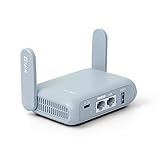
GL.iNet GL-MT3000 Beryl AX Wi-Fi 6 Travel Router, 2.5G WAN, VPN, OpenWrt | Wi-Fi 6 dual band 574Mbps 2.4GHz plus 2402Mbps 5GHz, 2.5G WAN, gigabit LAN, USB 3.0
Last verified 2026-11-14 19:00:09 UTC

15% below the Amazon reference price
GL.iNet GL-BE9300(Flint 3) Tri-Band WiFi 7 Router & GL.iNet GL-MT3000 (Beryl AX) Portable Travel Router
Last verified 2026-11-14 18:25:33 UTC

GL.iNet GL-MT6000 Flint 2 Wi-Fi 6 Gaming Router Dual 2.5G Ports | 8-stream Wi-Fi6 at 6 Gbps, dual 2.5G multi-gig ports, Up to 1148 Mbps and 4804 Mbps, pre-installed OpenWrt, OpenVPN WireGuard
Last verified 2026-11-14 19:00:15 UTC

15% below the Amazon reference price
GL.iNet GL-BE9300(Flint 3) Tri-Band WiFi 7 Router & GL.iNet GL-MT6000(Flint 2) WiFi 6 Router
Last verified 2026-11-14 18:25:33 UTC
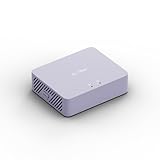
GL.iNet GL-MT5000 Brume 3 Wired VPN Security Gateway NO Wi-Fi | Up to 1100 Mbps hardware-accelerated VPN, three 2.5GbE ports with multi-WAN failover, VPN obfuscation, OpenWrt with 1GB DDR4
Last verified 2026-11-14 19:00:09 UTC
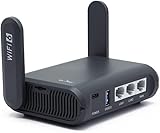
GL.iNet GL-AXT1800 Slate AX Pocket-Sized Wi-Fi 6 Travel Router with VPN | Dual-band Wi-Fi 6 speeds up to 1800 Mbps, MU-MIMO and OFDMA, connects up to 120 devices simultaneously
Last verified 2026-11-14 18:58:30 UTC

7% below the Amazon reference price
GL.iNet GL-X3000 (Spitz AX) Cellular Gateway 5G Router & Travel eSIM with Global 4G / 5G Networks
Last verified 2026-11-14 18:58:30 UTC

5% below the Amazon reference price
GL.iNet GL-BE9300(Flint 3) Tri-Band WiFi 7 Router & GL.iNet GL-X3000 (Spitz AX) Cellular 5g Router
Last verified 2026-11-14 18:58:30 UTC
As an Amazon Associate, Cloudzat earns from qualifying purchases. Prices and availability can change; Amazon shows the final price for your chosen item.
GL.iNet Router buying guide
| Model | Best for |
|---|---|
| GL.iNet Beryl AX GL-MT3000 | a compact Wi-Fi 6 travel router |
| GL.iNet Flint 2 GL-MT6000 | a home router with wired expansion and VPN functions |
Which GL.iNet family belongs on your shortlist?
Newer Beryl, Slate and Flint generations also deserve a price check, but do not pay more simply for a new number. Match the radio bands, Ethernet ports and supported VPN functions to the connection. Model codes are safer identifiers than a retailer’s expanded marketing title.
Does the router include mobile internet?
Beryl AX and Flint 2 are not cellular modems. A supported tethering or external modem arrangement is different from a router with an integrated SIM modem. If mobile service is the requirement, inspect the exact cellular model, supported bands and carrier compatibility instead of assuming a USB socket provides a complete mobile subscription.
Likewise, a Brume wired gateway should not be bought as though it includes a Wi-Fi access point. Separating these roles prevents a common Black Friday mistake: choosing a heavily discounted product from the right brand but the wrong family.
How should VPN features affect the buying decision?
A router’s wireless rating is not its encrypted VPN throughput. Compare the protocol you intend to use and the vendor’s conditions behind any performance claim. Server location, the internet connection and firmware configuration can all change the result. A headline laboratory maximum is not a promise for your own tunnel.
Check whether your VPN provider supplies a compatible router configuration and whether the required feature is supported by the exact firmware. A supported client mode, a VPN server and remote-access tools solve related but different tasks. Include any paid VPN subscription separately when comparing the hardware offer.
Check the upstream connection before relying on the travel kit
A travel router shares an existing connection; it does not make the hotel or mobile service faster. Ethernet access, a wireless repeater connection and phone tethering are different upstream choices. Verify that the selected model supports the method you expect to use and that the venue or provider permits the arrangement. Captive portals may require a browser sign-in and can impose their own session or device limits.
Set up the familiar local Wi-Fi network before travelling, then practise changing the upstream connection. Keep the manufacturer’s instructions available offline and retain a simple way to connect directly if the venue’s portal behaves differently. A portable router can reduce repeated setup across several devices, but it is not a guarantee of uninterrupted work. If an important call depends on the connection, test it at the destination with enough time to use another available connection rather than discovering a portal problem at the start of the meeting.
Compare VPN functions separately from advertised Wi-Fi speed
A VPN client sends traffic through a remote service, while a VPN server accepts incoming connections. Pass-through support simply lets another device establish a tunnel. Check the exact function, supported protocol and provider configuration for the router being considered. A commercial service subscription is generally a separate cost. The router’s combined wireless rating does not describe its encrypted throughput, and laboratory VPN figures depend on the test conditions.
Consider which devices should use the tunnel and which need direct or local access. Policy routing, DNS behaviour and tunnel-failure settings vary by firmware. Test the intended configuration with the actual applications, including local storage or printers that must remain reachable. A VPN changes where traffic travels and who must be trusted; it is not a promise of anonymity or protection from every threat. Buy the router for a supported, useful connection arrangement and assess performance on the real service rather than relying only on the highest vendor headline.
Preserve the working internet connection during replacement
Confirm the ISP connection requirements before replacing its equipment. A new Ethernet router may still need the existing modem or fibre terminal, and phone or television services may rely on the supplied gateway. Check supported connection modes and any required credentials through the provider’s normal guidance. A router with faster ports is not automatically a replacement for every part of the internet installation.
Record the existing local network, Wi-Fi and forwarding settings that you need, then test the new device before putting the old one away. Verify internet access, local storage, printers and work applications from both wired and wireless devices. If a second router remains upstream, decide deliberately which device performs routing. Keep a recovery path to the administration interface and avoid making several unrelated configuration changes at once. The practical value of the sale hardware is the improvement it delivers after these ordinary services continue to work.
Include the power arrangement and everyday placement
Check the specified supply voltage, current and connector rather than assuming any USB-C charger or spare power brick is suitable. A travel router may require a particular USB power arrangement, while a home router may include a regional mains adapter. A power bank’s capacity does not by itself establish that it supports the required output. Include the right supply and cable when comparing an apparently cheaper bundle.
Choose a position where the router can ventilate and the cables are not under strain. A small box hidden behind a monitor or inside luggage may have very different thermal conditions from an open desk. Test the normal connection arrangement, including any attached USB device that changes power demand. For home use, compare the likely electricity cost as well as the purchase price using a measured or appropriate manufacturer figure. The calculator is an estimate, and the supply’s maximum rating is not a measurement of constant power consumption.
Judge the complete offer against a recent price baseline
Use the recent selling price of the same model and configuration as the comparison where price history is available. A large percentage reduction against a manufacturer’s reference price can coexist with a much smaller saving against the normal market price. Check the selected variation, seller, delivery charge and any membership or coupon condition before comparing two offers. A discount requiring a paid membership is worth a different amount to somebody who does not already have it.
There is no universal percentage that makes networking hardware a good buy. A modest reduction on the exact device that fits can be more useful than a large reduction on the wrong interface or an oversized bundle. Compare the complete working installation with a suitable alternative, including required cables, power supplies and controllers. We do not describe an offer as an all-time low without supporting history, and a product recommendation does not mean that the model currently carries a Black Friday promotion.
Electricity cost calculator
Replace the example values with your own measurements, capacity or prices.
Questions buyers ask
Does every GL.iNet router include a SIM modem?
No. Beryl and Flint models should not be treated as integrated cellular routers. Check the exact mobile model and supported service if a SIM connection is needed.
How should I compare a GL.iNet Router Black Friday price?
Compare the exact GL model code and power bundle. A Beryl travel router, a Flint home router, a Brume wired gateway and a cellular Spitz are different products, even when their listings all emphasise VPN support.
What if GL.iNet Beryl AX GL-MT3000 has no matching local offer?
Use the model search to check the local market, then compare GL.iNet Flint 2 GL-MT6000 only for the use case described above. A recommendation is not confirmation of current stock or an event discount.