


United States · USD · Deal Watch
Encrypted USB drives: Black Friday 2026 deals in the US
Black Friday encrypted-USB offers are worth comparing by the protection and recovery workflow you will actually use.
Decide who needs access before buying. An organisation may require documented management or validation that a personal backup does not. Compare the complete working process, including spare copies and recovery planning, rather than choosing solely on capacity per unit of money.
Compare named hardware-encrypted USB products and their exact connector and capacity. Distinguish keypad unlocking from software-managed access, and check supported operating systems, retry limits, administrator options and the precise certification claimed for that model.
Which Encrypted USB drives option should you choose?
Start here
Kingston IronKey Keypad 200
Keypad-unlocked hardware encryption: confirm KP200 versus KP200C connector choice, capacity and the documented unlock and reset process.
Buy on AmazonChoose this alternative
Kingston IronKey Vault Privacy 50
Software-unlocked IronKey family: check supported systems, administrator options and the exact capacity and connector before purchase.
Find this configurationChoose this alternative
iStorage datAshur PRO2
Keypad-encrypted alternative: review the precise security specification, PIN policies and recovery implications for your intended users.
Find this configurationCurrent Encrypted USB drives Listings on Amazon
Black Friday sale dates and offer timing
Dates for 2026: Black Friday — November 27; Amazon.com — November 19–30. Individual offer periods and eligibility vary.

Kingston Ironkey Keypad 200 32GB Encrypted USB | Alphanumeric Keypad | Multi-Pin Access | XTS-AES 256-bit | FIPS 140-3 Level 3 Certified | Brute Force & BadUSB Protection | IKKP200/32GB,Blue
Last verified 2026-11-16 07:10:19 UTC

Kingston Ironkey Keypad 200 16GB Encrypted USB | Alphanumeric Keypad | Multi-Pin Access | XTS-AES 256-bit | FIPS 140-3 Level 3 Certified | Brute Force & BadUSB Protection | IKKP200/16GB,Blue
Last verified 2026-11-16 07:10:10 UTC
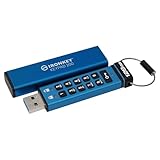
Kingston Ironkey Keypad 200 128GB Encrypted USB | Alphanumeric Keypad | Multi-Pin Access | XTS-AES 256-bit | FIPS 140-3 Level 3 Certified | Brute Force & BadUSB Protection | IKKP200/128GB,Blue
Last verified 2026-11-16 07:10:10 UTC

Kingston Ironkey Keypad 200 64GB Encrypted USB | Alphanumeric Keypad | Multi-Pin Access | XTS-AES 256-bit | FIPS 140-3 Level 3 Certified | Brute Force & BadUSB Protection | IKKP200/64GB
Last verified 2026-11-16 07:10:10 UTC

Kingston Ironkey Keypad 200 USB-C 256GB Encrypted Flash Drive | OS Independent | FIPS 140-3 Level 3 | XTS-AES 256-bit | BadUSB and Brute Force Protection | Multi-Pin Option | IKKP200C/256GB
Last verified 2026-11-16 07:10:10 UTC

Kingston Ironkey Keypad 200 USB-A 256GB Encrypted Flash Drive | OS Independent | FIPS 140-3 Level 3 | XTS-AES 256-bit | BadUSB and Brute Force Protection | Multi-Pin Option | IKKP200/256GB
Last verified 2026-11-16 07:10:10 UTC

7% below the Amazon reference price
Kingston Ironkey Keypad 200 USB-C 64GB Encrypted Flash Drive | OS Independent | FIPS 140-3 Level 3 | XTS-AES 256-bit | BadUSB and Brute Force Protection | Multi-Pin Option | IKKP200C/64GB
Last verified 2026-11-16 07:10:10 UTC

Kingston Ironkey Keypad 200 USB-C 16GB Encrypted Flash Drive | OS Independent | FIPS 140-3 Level 3 | XTS-AES 256-bit | BadUSB and Brute Force Protection | Multi-Pin Option | IKKP200C/16GB
Last verified 2026-11-16 07:10:10 UTC
As an Amazon Associate, Cloudzat earns from qualifying purchases. Prices and availability can change; Amazon shows the final price for your chosen item.
Encrypted USB drives buying guide
| Model or family | Check before buying |
|---|---|
| Kingston IronKey Keypad 200 | Keypad-unlocked hardware encryption: confirm KP200 versus KP200C connector choice, capacity and the documented unlock and reset process. |
| Kingston IronKey Vault Privacy 50 | Software-unlocked IronKey family: check supported systems, administrator options and the exact capacity and connector before purchase. |
| iStorage datAshur PRO2 | Keypad-encrypted alternative: review the precise security specification, PIN policies and recovery implications for your intended users. |
The distinction that changes this purchase
Encryption does not replace a backup and cannot promise recovery after lost credentials or destructive reset. A generic stick with a password-protected folder is not automatically equivalent to hardware encryption.
Choose the connector for the machines that exchange files
Write down the ports on both ends of the workflow. USB-A and USB-C describe physical connectors, not a guaranteed transfer rate. A dual-connector drive can be useful between different computers, but check its width, swivel mechanism and clearance beside neighbouring ports. A phone may require a supported file system and a compatible file-management workflow. Do not assume an included adapter improves the underlying speed. If every transfer needs a separate dongle, compare that inconvenience with a drive using the correct connector directly. Keep the intended capacity and performance consistent when comparing USB-A and USB-C variants of the same named family.
Check writing performance and the type of files
Large advertised read numbers can hide a much slower experience when copying a folder onto the drive. Look for evidence that distinguishes reading from writing and short bursts from sustained transfers. Many tiny files can behave differently from one large video. If the drive is used for repeated large project copies, compare a portable SSD as a separate alternative, including size and cable requirements. For a few documents, higher peak speed may offer little practical benefit. Check whether the body becomes uncomfortable during the intended workload and use the device within its published operating guidance. Capacity alone does not establish a good daily transfer experience.
Decide how files will be protected and recovered
Choose a file system supported by every intended device and check large-file requirements before copying the only version of anything important. Formatting changes can erase existing contents. For encrypted drives, read the exact unlock procedure, administrator options and failed-attempt behaviour. A lost password or deliberate reset may make the data unrecoverable, so keep independent backups and recovery information through an appropriate separate process. A hardware-encrypted drive can protect data at rest but is not a guarantee against every risk after unlocking. Ordinary USB sticks also need a safe-removal habit and a clear backup plan. The right deal supports the workflow you can reliably maintain.
Match the entire transfer or recording chain
List the device that creates the files, the removable medium, the reader or USB connection, and the drive that receives the copy. Each has its own format and speed limits. A faster label on one part does not upgrade the rest of the chain. For recording, follow the camera or recorder requirements for the exact mode rather than choosing by peak read speed. For copying, consider sustained writing, many small files and the connection actually available on the computer. A benchmark made with a special reader may not describe your equipment. Buy the capability that removes an identified limitation; if the present workflow is already fast enough, capacity and dependable sourcing may deserve more of the budget.
Check the new purchase before trusting it with important files
Keep the original files elsewhere while checking the new medium or reader. Confirm the reported capacity, copy a representative set of files, read them back and verify that they open correctly. A capacity test that writes across the device must be run only on a new or deliberately emptied medium because it can overwrite data. Follow device instructions for formatting and safe removal. For a camera, make a trial recording at the intended mode and review the result on the computer. For a reader, test each required slot and cable. Keep the receipt and packaging while assessing the purchase. A removable device can be lost or fail, so an important file should never exist only on that device.
What qualifies as a worthwhile Black Friday price?
Start with the exact model, capacity and package you intend to buy. Compare its current total with its recent normal selling price where reliable history exists, then compare credible alternatives that meet the same requirements. A crossed-out reference price alone cannot establish a saving. Record whether a coupon, membership or minimum order is required. If an offer changes the capacity, generation, included parts or condition, begin a new comparison rather than carrying the old discount across. Set a maximum basket cost before browsing. That gives a time-limited offer a useful test: it should improve the purchase you already planned, not force a different and less suitable configuration.
Check the seller and the complete delivery cost
Look at the selected seller, dispatch arrangement, delivery estimate and return information on the final listing. A familiar product photograph does not establish who supplies the item. Compare new products with new products; used, renewed and open-box units require a separate assessment of condition and support. Include delivery and any taxes or import charges shown for your address. Check regional warranty eligibility for the exact package rather than borrowing a promise from another country. Keep the invoice and selected product reference together. When two offers are close, a clear source, dependable delivery and an understandable support route can be more useful than a small headline saving.
Use the live listings as a shortlist, then verify the basket
The Amazon listings on this page provide the current local product choices returned for this guide when a matching offer is available. Their prices, images and availability can change. Open the chosen product and confirm the model, variant, condition, seller and final total before paying. A normal listing is not automatically a Black Friday promotion; a public event badge identifies the promotion without proving exceptional value. We do not describe a price as a historic low without supporting history. If no matching priced listing is available, use the compatibility guidance to compare alternatives and return later. There is no need to substitute a different product simply to fill the page.
Complete purchase cost calculator
Enter the actual prices for the selected configuration. Include only costs not already included in the item price. This estimate does not check compatibility or confirm a discount.
Questions buyers ask
Does every listed product have a Black Friday discount?
No. The guide explains what to compare, while current product cards show available local price observations. An ordinary listing does not establish an event discount. Early and main Black Friday sections require their own fresh public promotional evidence. Recheck the chosen variant, seller, any coupon conditions and the final basket before ordering.
What if the exact model or configuration is unavailable?
Keep the compatibility requirements fixed and compare a named alternative on its own merits. Do not silently substitute a different socket, memory capacity, physical format or missing component. Compare the full delivered price and support package again. Waiting can be preferable to buying an unsuitable item merely because a search result is available today.
How should I compare a bundle with a single item?
List everything that is actually supplied and price only the parts you need. A reader, adapter, cable, cooler or motherboard can change the basket calculation, but a photograph does not prove it is included. Check model numbers and quantities in the written contents. Keep multipack totals separate from the capacity or specification of one individual item.