


United States · USD · Deal Watch
Dual monitor arms: Black Friday 2026 deals in the US
A dual-monitor arm can be the Black Friday upgrade that gives a compact desk its working space back. The bargain depends on supporting the screens you already own and fitting the desk securely. Compare the complete mount, not just a low headline price for one arm or an accessory bar.
Before choosing an offer, compare the exact configuration with its recent selling price and the complete setup cost. Use the model checks below to decide what belongs in your basket; a discount is worthwhile when the required equipment and support fit the job.
Choose dual arms by each monitor's weight without its stand, VESA attachment, dimensions and the desktop's permitted mounting method. A combined weight claim can hide a per-arm limit. Check both the minimum and maximum supported load where a spring mechanism requires them, as well as reach and rear clearance.
Which Dual monitor arms option should you choose?
Start here
Ergotron LX Dual Monitor Arm
Dual-arm family with version-specific screen and weight limits. Confirm each display’s weight without its stand, VESA attachment and desk-clamp fit. A single LX arm or an add-on crossbar is not the complete dual-monitor kit.
Buy on AmazonChoose this alternative
ARCTIC Z2 Pro Gen 3
Dual-monitor desk mount: confirm the current specification for your exact version, display widths, per-arm load and desktop thickness. Check rear clearance and USB-hub connections separately; the mount does not provide video docking by itself.
Find this configurationCurrent Dual monitor arms Listings on Amazon
Black Friday sale dates and offer timing
Dates for 2026: Black Friday — November 27; Amazon.com — November 19–30. Individual offer periods and eligibility vary.
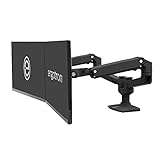
Ergotron – LX Dual Monitor Arm, VESA Desk Mount – for 2 Monitors Up to 27 Inches, 7 to 20 lbs Each – Matte Black
Last verified 2026-11-16 09:38:35 UTC

Ergotron – LX Dual Monitor Arm, VESA Desk Mount – for 2 Monitors Up to 27 Inches, 7 to 20 lbs Each – Polished Aluminum
Last verified 2026-11-16 09:38:35 UTC

23% below the Amazon reference price
Ergotron – LX Dual Monitor Arm, VESA Desk Mount – for 2 Monitors Up to 27 Inches, 7 to 20 lbs Each – White
Last verified 2026-11-16 09:38:35 UTC
As an Amazon Associate, Cloudzat earns from qualifying purchases. Prices and availability can change; Amazon shows the final price for your chosen item.
Dual monitor arms buying guide
| Model or family | What to check |
|---|---|
| Ergotron LX Dual Monitor Arm | Dual-arm family with version-specific screen and weight limits. Confirm each display’s weight without its stand, VESA attachment and desk-clamp fit. A single LX arm or an add-on crossbar is not the complete dual-monitor kit. |
| ARCTIC Z2 Pro Gen 3 | Dual-monitor desk mount: confirm the current specification for your exact version, display widths, per-arm load and desktop thickness. Check rear clearance and USB-hub connections separately; the mount does not provide video docking by itself. |
The compatibility decision that matters
Ergotron LX dual configurations and ARCTIC Z2 Pro Gen 3 offer different adjustment and mounting arrangements. Match the exact version rather than borrowing specifications from another arm in the family. Curved or deep displays can affect leverage and positioning, while two wide screens may exceed the intended side-by-side arrangement even when their weights are acceptable. The desk must also suit the clamp or grommet method. Glass, hollow or weak surfaces should not be assumed suitable without explicit support from the relevant manufacturers.
Build a useful buying shortlist
Measure desktop thickness, usable edge depth and the space behind the desk before ordering. Include the weight of attached accessories when checking the permitted configuration. Plan cable slack for the full movement range and check whether the screens can align at the desired height. Compare the arm against keeping the supplied stands if movement is rarely needed. During setup, follow the mount instructions and use the correct fasteners; avoid improvising with unsuitable spacers. The useful discount creates a stable, comfortable layout rather than simply removing two stands.
Build a fit checklist for both screens
Find the manufacturer’s weight without the supplied stand for each monitor. Check the VESA hole pattern and whether a recessed attachment needs a specific adapter. The two displays do not have to weigh the same, but each must fall within the permitted range of its own arm. Where the mechanism has a minimum load, an unusually light screen can be unsuitable even though it is below the maximum.
Compare screen width and depth as well as diagonal size. A deep curved monitor changes leverage, and two wide panels can collide before reaching the angle you want. Decide between side-by-side and stacked arrangements before purchase. A mount advertised for two screens may support only one of those layouts at the chosen dimensions.
Check the desktop and adjustment space
Measure the mounting edge, underside clearance and any cable tray or frame that could obstruct a clamp. For a grommet installation, confirm the permitted hole and hardware against both the desk and mount instructions. Do not assume a reinforcement plate makes every weak or hollow desktop suitable. If the desktop manufacturer does not support the arrangement, choose a different approved mounting solution.
Allow room behind the desk for joints and cable movement. An arm that folds backwards may be awkward against a wall, while a fixed-height pole may limit adjustment after installation. Think about whether you will move the screens frequently or simply set them once. A simpler suitable mount can be better value than a heavily articulated one whose movement you cannot use.
Compare the complete mounted arrangement
List the kit contents: two complete arms or mounting positions, the correct base, attachment plates and the approved desk-fixing hardware. An extension, handle, crossbar or replacement clamp is not a full dual-screen mount. Check whether any model-specific monitor adapter is separate. USB ports on a base may add convenience but do not automatically carry video or provide laptop docking.
After installation, follow the manufacturer’s adjustment procedure and confirm that each screen stays where intended through its permitted movement. Leave safe cable slack without trapping leads in joints. Check stability at normal desk height and, if relevant, while a sit-stand desk moves. Keep the documentation and supplied tools accessible for later adjustment rather than treating the first assembled position as the end of the setup.
How to judge the Black Friday price
A useful discount lowers the complete price of the exact product you need, compared with its recent normal selling price and credible alternatives. Keep the model, generation, condition and pack quantity fixed while comparing. A reduction against an old reference price can look dramatic without being the best available purchase. Where price history is available, inspect the matching variant rather than borrowing the history of a different size or bundle.
Set a target basket before browsing: required hardware, missing accessories, delivery and any recurring service you actually intend to use. Treat a coupon as a saving only when it applies to your account and selected item at checkout. Do not count an optional extra as essential merely because a bundle includes it. The calculator below helps compare the complete amounts you enter; it does not determine compatibility or establish a historic low.
Read the listing and the offer conditions
Check the written model and package contents, then confirm the seller, condition and local return arrangements. Product photographs can show accessories or another configuration. A multipack price should be divided by the number of units you will use, not automatically by every item in the box. Keep new, used and refurbished offers separate when their support and condition differ.
Current Amazon cards are local price observations for matching products. A normal listing is not automatically an Early Black Friday or main-event promotion. Promotional sections require separate current evidence, while individual offers can end, change or become unavailable. Recheck the final basket before paying. If no qualified listing appears, use the buying guidance and named comparisons without interpreting an unavailable card as a guaranteed forthcoming discount.
A practical buy-or-wait decision
Buy when the required configuration fits, the delivered price meets your target and the seller gives you a workable opportunity to test it. Wait when the uncertainty concerns a core requirement, such as an unsupported connection, missing controller, unsuitable installation or unclear warranty. A deadline banner does not resolve those questions.
After ordering, keep the exact model and invoice details and plan the acceptance checks before the return window ends. Test the intended everyday task, not just power-on. If the setup needs a second purchase to work properly, update the complete cost and compare again. That approach makes a smaller, well-matched discount more useful than a large reduction on equipment that does not solve the original problem.
US buying and compatibility checks
Compare Amazon.com listings in USD and include the taxes, delivery and extras shown for your order. Keep the exact model, seller, new condition and package quantity fixed through checkout. A US listing with clear local support is a different proposition from an imported version with uncertain service. Check the written contents and the return route before paying. If several devices are required, compare one complete usable basket rather than mixing attractive prices from different configurations that cannot form the intended setup.
Complete purchase cost calculator
Enter the actual prices for the selected configuration. Include only costs not already included in the item price. This estimate does not check compatibility or confirm a discount.
Questions buyers ask
Is the advertised maximum screen size enough to choose an arm?
No. Weight, VESA pattern, screen width and depth, mounting method and desktop suitability all matter. Check the exact configuration and per-arm limits, not just the diagonal-size headline.
Does a listed price prove a Black Friday deal?
No. A current listing establishes an observed local offer, not an exceptional saving. Compare the exact variant’s recent selling price, complete cost and credible alternatives. Early and main-event labels require separate public promotional evidence. Recheck seller, quantity, coupon eligibility and the basket total before buying.
What should I do if the recommended model is unavailable?
Keep the requirements fixed and compare an alternative on its own specification. Do not accept a different connection, missing controller or unsuitable physical fit just because it appears in search results. Check the manufacturer’s local availability and support, or wait if no complete suitable option meets your budget.