


United States · USD · Deal Watch
DIY NAS Kits & Cases Black Friday Deals 2026: Buying Guide for the US
Build the NAS around your own storage plan this Black Friday. DIY offers can stretch the US budget when the parts fit together, but a discounted case is only the beginning. Compare a complete parts list before choosing between a compact chassis and a ready-made NAS.
DIY NAS Black Friday savings work best as a parts-list comparison. A reduced case is a starting point: add the motherboard, processor, memory, power supply, cooling and storage your build needs. Compare each exact component’s recent price and check fit before adding the discounts together.
Use Jonsbo N3, Jonsbo N4 and Fractal Node 304 as case-only starting points, then complete a compatible parts list. This guide covers DIY kits and components; none of those three chassis alone is a functioning NAS.
Which DIY NAS Kits & Cases option should you choose?
Start here
Jonsbo N3 NAS Case
Case only: a compact eight-HDD DIY starting point, requiring motherboard, CPU, RAM, PSU, storage and software.
Buy on AmazonChoose this alternative
Jonsbo N4 NAS Case
Case only: compare a six-HDD layout and motherboard fit; two extra 2.5-inch positions are not extra large HDD bays.
Buy on AmazonChoose this alternative
Fractal Design Node 304 Case
Case only: an alternative DIY layout with six shared drive mounts; check clearance with the chosen components.
Buy on AmazonCurrent DIY NAS Kits & Cases Listings on Amazon
Black Friday sale dates and offer timing
Dates for 2026: Black Friday — November 27; Amazon.com — November 19–30. Individual offer periods and eligibility vary.

11% below the Amazon reference price
JONSBO N3 Mini-ITX NAS PC Chassis, ITX Computer Case, 8HHD+1-SSDD isk Bays NAS Mini Aluminum with Steel Plate Case, Built-in 2x10cm Fan, Power Support: SFX105mm, Support 130mm CPU Cooler
Last verified 2026-11-13 14:49:57 UTC
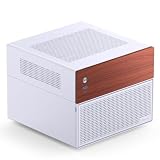
14% below the Amazon reference price
JONSBO N4 White NAS Pc Case, Walnut Wood, 8-Drive Bay/6 * 3.5 "HDD (4 hot-swap,2 Non hot-swap), 2 * 2.5SSD,Micro ATX Chassis USB3.2Gen2Type-C, 1x120mm Fan Built-in, White
Last verified 2026-11-13 14:49:57 UTC

Jonsbo N4 NAS Case Black and Wood Pc case 8 bays
Last verified 2026-11-13 14:49:57 UTC

Fractal Design Node 304 - Black - Mini Cube Compact Computer Case - Small Form Factor - Mini ITX – mITX - High Airflow - Modular Interior - 3X Fractal Design Silent R2 120mm Fans Included - USB 3.0
Last verified 2026-11-13 14:50:16 UTC

Rosewill Helium NAS Max | ATX Mid Tower Computer Case | Mesh Panel | 4 x 140mm PWM Fan | Support 11 x 3.5 HDD | BTF Motherboard Compatible | USB 3.2 Type-C | Ideal for DIY NAS, AI
Last verified 2026-11-13 14:49:57 UTC

8 Bay NAS Case, Support MATX ITX Motherboard & ATX PSU, SATA & SAS HDD Compatible, 8x3.5 Hot-Swap + 2x2.5 SSD, Dual-Chamber NAS PC Case Support 4 Fans Mounting, Black
Last verified 2026-11-13 14:49:57 UTC

JONSBO N5 NAS Pc Case, E-ATX,12HDD+4SSD Drive Bay GPU HP Host, Supports Max. 4 GPU,E-A.TX(330mm) MB/ATX PSU Supports, with 3 Fans Built-in, 8 Slots PCI, Solid Wood Veneer Computer Case,Home Server
Last verified 2026-11-13 14:49:41 UTC
As an Amazon Associate, Cloudzat earns from qualifying purchases. Prices and availability can change; Amazon shows the final price for your chosen item.
DIY NAS Kits & Cases buying guide
| Model | Best for |
|---|---|
| Jonsbo N3 NAS Case | Case only: a compact eight-HDD DIY starting point, requiring motherboard, CPU, RAM, PSU, storage and software. |
| Jonsbo N4 NAS Case | Case only: compare a six-HDD layout and motherboard fit; two extra 2.5-inch positions are not extra large HDD bays. |
| Fractal Design Node 304 Case | Case only: an alternative DIY layout with six shared drive mounts; check clearance with the chosen components. |
Start with the right storage plan
A sensible DIY deal begins with the constraints: motherboard dimensions, CPU cooling height, power-supply format, controller connections and the number of actual HDD mounts. Jonsbo N3 and N4 are not the same internal layout, and the Node 304 uses a different mounting approach. Price the cables and any storage controller as well as the headline components. Decide who will install updates, monitor drive health and restore the system if it fails. Building can be rewarding, but the value depends on your willingness to maintain the finished server as well as assemble it.
Build a complete compatible parts list first
An empty NAS case is a legitimate starting component, but it needs a compatible motherboard, processor, memory, power supply, storage connections and operating system. Confirm motherboard size, cooler height, power-supply dimensions and expansion-card clearance from the case documentation. Check the number and type of drive connections as well as the number of mounting positions.
Add fans, power leads and data cables where the selected package does not include them. If a controller card is needed, confirm the intended operating system supports it and that the cabling matches the drive backplane. Compare the total with a ready-made diskless NAS that performs the same job. DIY can provide useful flexibility, but it also makes you responsible for assembly, updates and troubleshooting. A Black Friday component saving is worthwhile only when the complete build remains compatible, maintainable and within budget.
Count physical HDD bays separately from SSD slots
A product described as six-bay or eight-bay may count different kinds of storage positions. Check the number of 3.5-inch SATA bays separately from 2.5-inch positions and M.2 slots. A system designed for small SSDs cannot accept a set of desktop HDDs merely because the total slot count matches.
Also distinguish a complete diskless NAS, an expansion shelf, a USB DAS and an empty computer case. A NAS includes the computing platform and networked storage functions; a USB-attached enclosure depends on another host, and a DIY case needs additional parts. Read the selected package rather than relying on a photograph with every bay populated. Maximum advertised capacity usually describes what could be installed with particular drives, not the storage included in the price. This distinction is central to a useful Black Friday comparison.
Price the complete NAS system
Start with the enclosure, then add the drives needed for your chosen layout, any required memory or network upgrade, cables and a separate backup destination. Compare that total with the usable capacity and applications you intend to run. A large percentage reduction on the empty unit may be less useful than a modest saving on the complete storage plan.
If you intend to start partly populated, confirm the supported expansion path and budget for the later drives. Do not assume that all pool layouts can grow without copying data elsewhere. Include the time needed to install, migrate and maintain the system. For always-on use, consider measured power consumption at your actual electricity tariff rather than a generic running-cost claim. A NAS can be a useful long-term purchase when the total cost and ongoing responsibilities are understood before the checkout timer starts influencing the decision.
Check the network from storage to computer
The NAS port is only one part of the transfer path. The client adapter, switch or direct connection, cable and destination storage all affect what you can achieve. Confirm whether a fast interface is built in, supplied as an installed card or merely supported as an optional upgrade. USB speed figures and Ethernet speed figures describe different connections.
Consider the workload before paying for faster networking. Large sequential transfers, many small files and multiple simultaneous users have different bottlenecks. Link aggregation does not automatically double one file copy’s speed; supported multichannel or aggregation behaviour depends on the full setup. Plan a simple test with the computers and data you actually use. Compare the price of that complete working path with the slower configuration, then decide whether the expected time saving justifies the extra equipment.
Choose the software and maintenance plan alongside the hardware
List the jobs the system must perform: shared folders, computer backups, photo access, media playback or particular applications. Check the current supported software and any hardware dependencies before selecting a NAS just from its processor or port count. A feature mentioned for the operating-system family may not be available on every model or configuration.
For a supplied licence, confirm the edition, device limits, update terms and whether the selected retailer package includes it. Decide how updates, user accounts and backup alerts will be managed. For a DIY system, include installation and recovery work in the plan; an empty case does not come with a configured operating system. Prefer a configuration you can maintain consistently over unused capability. Keep recovery instructions and access information available separately so the NAS itself is not the only place they are stored.
Keep the backup separate from the storage upgrade
A larger drive or a redundant NAS pool can improve capacity and availability, but it does not create an independent backup by itself. Accidental deletion, a compromised account or damage to the whole enclosure can affect multiple members together. Decide what must be recoverable and where another copy will live before spending the entire budget on the primary system.
Use a second device or a suitable off-site service for important data, then test restoration of a small representative selection. Check that the restored files open and that the recovery process is understandable to whoever will need it. Snapshots can be useful for version recovery, but their location and retention still matter. A Black Friday saving is more useful when it leaves enough budget for this recovery plan. Hardware recommendations here are comparison guidance, not a promise that a particular setup cannot lose data.
What makes this a worthwhile Black Friday purchase?
A useful deal lowers the complete cost of the exact storage configuration you need below its recent normal price while staying competitive with comparable offers. Check price history for the same model and capacity where available. A discount against a suggested retail price is a different comparison and may exaggerate the practical saving. Avoid declaring a historic low without a history that supports it.
Use the dated local product cards to inspect current observations, then verify the final seller, quantity and basket price. Early Black Friday and main-event sections use separate public promotion evidence; inclusion in the buying shortlist is not proof that a model is discounted. If the price does not meet your target or requires a compromise that adds cost elsewhere, waiting can be the better decision. Compare the whole job the product will do, not only the percentage displayed beside it.
Use the delivery window to validate the upgrade
Before installation, compare the delivered model number, capacity and accessories with the order. Inspect packaging and connectors for obvious damage, then follow the manufacturer’s installation instructions. Keep the old working storage available until the new system has passed its initial checks and important data exists in more than one place. Do not rush a migration simply because the purchase happened during a short promotion.
Plan a maintenance window for copying data, initialising an array or rebuilding redundancy. These tasks can take much longer than a quick connection test, particularly with large drives. Record the starting configuration and keep recovery information somewhere accessible if the new system is unavailable. The practical measure of a good storage purchase is a working, maintainable setup at a sensible total cost. The checkout saving is only one part of that result.
Compare the complete US order
Use dollar prices for the exact model, capacity and quantity. Compare the final order total, including applicable tax, delivery and any required accessories. For a NAS or desktop external drive, confirm the supplied mains lead and power adapter. An overseas price converted to dollars is not a verified US offer. Check the seller and the regional support route before ordering. Keep capacity selectors and condition choices consistent when comparing the recent normal price. If you need several drives, calculate the cost of the whole set and any independent backup storage. The model shortlist supplies buying guidance; the dated local product cards supply separate price observations. Neither a product recommendation nor an event calendar promises that every listed model is discounted.
NAS capacity calculator
Replace the example values with your own measurements, capacity or prices.
Questions buyers ask
Why does this DIY NAS guide include empty cases?
A case is a legitimate DIY component when it is clearly labelled. Compare it with other case-only offers and add all required parts; never compare its price directly with a complete diskless NAS.
Does every recommended product have a Black Friday discount?
No. The shortlist is buying guidance, not proof of a promotion. Dated local cards show price observations. Early and main Black Friday sections require separate fresh public event evidence. Always recheck the final seller, variant and basket price.