


The best general BMAX Mini PC should be a strong complete purchase across several common jobs, so this ranking rewards balance rather than one extreme specification.
For BMAX, this URL is built around the best balance of processor capability, installed memory, included storage, useful ports and total value. MaxMini B11 Power and MaxMini B11 Pro are compared as separate purchasable configurations whenever their saved specifications differ.
Four things to verify for this BMAX purchase
BMAX: Do not let one flagship specification hide weak RAM, storage or connectivity.
BMAX: Read the full CPU name on the selected variation before comparing value.
BMAX: Separate barebones from complete systems and compare installed RAM and SSD.
BMAX: Use current price for current value; treat Last verified price as older evidence.
Best BMAX Mini PCs right now
These rankings compare qualifying BMAX configurations using the hardware and price observations shown on this page. The order can change when a configuration or valid Amazon price changes.


How this page chooses BMAX Mini PCs
Compare the ranked BMAX options
Every product below is the exact configuration that meets this page's buying criteria. Price, image and specifications stay attached to that Amazon variation.
| Model | Processor | RAM | SSD | Network | Main strength | Current price | Value | Buy |
|---|---|---|---|---|---|---|---|---|
| B6Bmax 2026 Mini PC Micro Desktop Computer, Intel Core i5-8257U (Beats N100/N97/N150/4300U/10110U) 16GB DDR4 RAM 512GB SATA SSD, Support 64GB/4TB Expansion, WiFi 6, Dual 4K HDMI/DP, Win 11 Pro,B6 Turbo | Intel I5-8257U | 16GB | 512GB | 1GbE | Everyday value | $299.99Last verified price | 91Exceptional value | Buy on Amazon |
| B4Bmax Mini PC, Intel N150(4C/4T, Up to 3.6GHz), 16GB RAM 512GB SSD, Triple 4K Display Mini Computers, Gigabit Ethernet, WiFi & Bluetooth 5.0, Small Computer Work Study & Home Office, B4 Turbo | Intel N150 | 16GB | 512GB | 1GbE | Everyday value | $284.99Last verified price | 91Exceptional value | Buy on Amazon |
| 2026Bmax 2026 Mini PC 12GB DDR4 RAM 512GB NVMe SSD,Intel i3 1000NG4 Up to 3.2GHz(Beat N150/N95),4TB Expansion,Mini Micro Desktop Computer Windows 11 Pro Dual 4K HDMI for Home Office HTPC, WiFi5/BT B6Plus | 12GB | 512GB | 1GbE | Everyday value | $249.99Last verified price | 91Exceptional value | Buy on Amazon | |
| B6BMAX Mini PC, Intel Core i3 8109U Up to 3.6GHz (Beats N95/N100/N5030/N5095), Compact PCs 12GB RAM 256GB/4TB SSD Small Desktop Computer 4K HDMI DP WiFi & BT5 Windows 11 Pro for Office Business Home, B6 | Intel I3-8109U | 12GB | 256GB | Check listing | Everyday value | $239.99Last verified price | 91Exceptional value | Buy on Amazon |
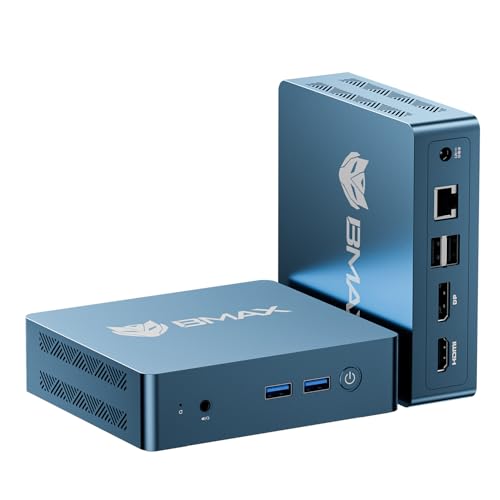 B2 PowerBmax Mini PC 2026 Intel 5205U 12GB RAM 256GB SSD Support Expansion (64GB&2TB) Small Desktop Computer Windows 11 Pro,HDMI/DP 4K Dual Display WiFi5 & BT5 Micro Compact PC for Home/Office/Design B2 Power B2 PowerBmax Mini PC 2026 Intel 5205U 12GB RAM 256GB SSD Support Expansion (64GB&2TB) Small Desktop Computer Windows 11 Pro,HDMI/DP 4K Dual Display WiFi5 & BT5 Micro Compact PC for Home/Office/Design B2 Power | 12GB | 256GB | 2 x 5GbE | Fast networking | $209.99Last verified price | 91Exceptional value | Buy on Amazon | |
 B11 ProBmax AI Gaming Mini PC, Intel Core Ultra 5 115U (8C/10T, Up to 4.2GHz), 16GB LPDDR5X 512GB SSD, Triple 8K Display, Mini Computers AI Boost NPU, 2.5" Storage Expansion, WiFi6, BT5.2, 2.5G LAN, B11 Pro B11 ProBmax AI Gaming Mini PC, Intel Core Ultra 5 115U (8C/10T, Up to 4.2GHz), 16GB LPDDR5X 512GB SSD, Triple 8K Display, Mini Computers AI Boost NPU, 2.5" Storage Expansion, WiFi6, BT5.2, 2.5G LAN, B11 Pro | Core Ultra 5 115U | 16GB | 512GB | 2.5GbE | Everyday value | $436.99Last verified price | 84Excellent value | Buy on Amazon |
 B3 ProBmax Mini PC, Intel N4500 Processor Up to 2.8GHz, 8GB RAM 256GB M.2 SSD, Windows 11 Pro Mini Desktop Computer, Dual 4K Display, WiFi 5, VESA Mount, for Office, Home Business & HTPC, B3 Pro B3 ProBmax Mini PC, Intel N4500 Processor Up to 2.8GHz, 8GB RAM 256GB M.2 SSD, Windows 11 Pro Mini Desktop Computer, Dual 4K Display, WiFi 5, VESA Mount, for Office, Home Business & HTPC, B3 Pro | 8GB | 256GB | 5GbE | Everyday value | $199.99Last verified price | 91Exceptional value | Buy on Amazon | |
 B9 PowerBmax Mini PC B9 Power Intel Core i9-12900H(up to 5.0GHz,14C/20T) 32GB DDR4/1TB NVMe SSD Mini Desktop Computer WiFi6 BT5.2 Gaming Mini Computer DP/Type-C/HDMI Triple Display 4K/8K, Win 11 Pro B9 PowerBmax Mini PC B9 Power Intel Core i9-12900H(up to 5.0GHz,14C/20T) 32GB DDR4/1TB NVMe SSD Mini Desktop Computer WiFi6 BT5.2 Gaming Mini Computer DP/Type-C/HDMI Triple Display 4K/8K, Win 11 Pro | Intel I9-12900H | 32GB | 1TB | Check listing | Everyday value | $599.99Last verified price | 72Good value | Buy on Amazon |
The date beside each price shows when it was checked. Older prices provide a comparison point; Amazon confirms the price and availability when you order.
What matters for this BMAX decision
How to choose the best BMAX Mini PC overall
The best overall BMAX Mini PC is not simply the fastest BMAX machine or the cheapest MaxMini B6 listing. A useful all-round choice needs a processor with enough headroom, a sensible RAM and SSD bundle, ports that fit everyday work, and a price that reflects the parts actually included. For BMAX, this page compares those pieces together so one flashy specification cannot hide a weak configuration.
BMAX buyers should think about the jobs the computer will perform most often. If MaxMini B11 Power is mainly for browser work and office software, premium graphics may add little value. If MaxMini B11 Pro will also host media, containers or development tools, more memory, stronger networking and a newer CPU can matter much more. The overall ranking favors the BMAX configuration that stays balanced across several realistic roles.
Processor balance matters more than a BMAX family name
BMAX uses several processor tiers across its Mini PC range, so a family label alone is not enough. Before comparing MaxMini B6 with MaxMini B11 Power, read the full CPU name on the exact configuration. A processor change can affect graphics, media capability, efficiency and sustained speed even when two BMAX systems look nearly identical from the outside.
For an overall BMAX recommendation, processor performance is weighed against what the rest of the machine can support. A high-end CPU paired with too little RAM or a small SSD may be less useful than a slightly slower BMAX option with a complete 32GB/1TB-style bundle. The goal is a machine that feels coherent, not a collection of one or two expensive specifications.
RAM and SSD bundles can reorder the BMAX shortlist
Installed RAM and storage deserve separate attention on every BMAX model. Amazon can group multiple capacities under one product family, so MaxMini B11 Pro with one memory bundle should not inherit the price or value of another BMAX variation. The Cloudzat row keeps the installed RAM and included SSD tied to the exact configuration that produced the price and image evidence.
An overall BMAX buyer should pay for capacity that will be used. More RAM helps heavier multitasking, virtual machines and server workloads, while a larger SSD reduces immediate upgrade pressure. However, oversized memory on MaxMini B10 Pro can be poor value if the processor is entry-level and the workload is light. The best overall BMAX option keeps CPU, RAM and SSD in proportion.
Connectivity can separate two otherwise similar BMAX systems
Network ports, USB4, OCuLink and internal expansion are easy to overlook when BMAX models are compared mostly by processor. Yet those ports determine how MaxMini B6 fits external storage, a faster home network or future peripherals. Cloudzat only credits a connection when it belongs to the exact BMAX configuration being ranked, rather than assuming every member of the family carries it.
For a general-purpose BMAX Mini PC, extra connectivity is valuable when it prevents adapters or replacements later. Dual 2.5GbE may matter for a home lab but not for a basic office desk. OCuLink can be useful for a planned external-GPU setup but irrelevant to a family computer. The overall BMAX score therefore treats connectivity as practical utility, not as a checklist where more ports always wins.
Complete-system value is the key BMAX price test
The cheapest visible BMAX price can belong to barebones hardware, less RAM, a smaller SSD or a different processor. That is why the overall page compares the price of the exact BMAX configuration instead of using the lowest number attached to a family listing. A complete system that costs more than a barebones MaxMini B11 Power can still be the better purchase once missing memory, storage and software are added.
Current Amazon prices can move, so the BMAX ranking can move with them. When a new valid price is observed, the value relationship is recalculated. If a later Amazon response is incomplete, Cloudzat keeps the last valid BMAX price and image rather than blanking the product. Older evidence is labelled Last verified price and is not presented as a guaranteed checkout price today.
How the BMAX lineup maps to overall value
MaxMini B series for compact Windows systems across several Intel performance tiers shape one side of the BMAX choice for overall value, while Power / Pro variants for higher memory, storage or processor configurations cover a different part of the range. That distinction matters because balanced capability should come from the exact machine rather than from the brand name. MaxMini B6 can be a sensible candidate for one buyer, while MaxMini B11 Power may fit a heavier version of the same job. The dedicated BMAX page keeps those tiers visible without assuming the most expensive family is automatically best.
entry systems add another level to the BMAX catalogue, but for overall value the extra capability has to earn its cost. A shopper comparing MaxMini B11 Pro with MaxMini B10 Pro should ask whether the premium improves a coherent CPU, RAM and SSD bundle or simply adds hardware that will sit unused. This is where a brand-specific page is more useful than a generic Mini PC list: the BMAX families can be evaluated inside one consistent buying question while every Amazon variation remains separate.
Where MaxMini B6 and MaxMini B11 Power fit in this BMAX decision
BMAX is positioned primarily around low-cost compact Windows desktops. That makes the brand most useful when the buying question is whether a complete inexpensive Mini PC can replace a larger office desktop, family computer or media box. For overall value, that means MaxMini B6 should be judged by balanced capability and ports that match several likely jobs, not by how familiar its name is. MaxMini B11 Power deserves the same treatment. When the two BMAX models use different processors or memory bundles, the comparison should explain the hardware difference before letting price influence the order.
The same rule applies to MaxMini B11 Pro and MaxMini B10 Pro. A stronger BMAX processor can justify a higher price when it improves a coherent CPU, RAM and SSD bundle, but a larger specification sheet is not automatically a better overall value purchase. The useful question is whether the exact configuration removes a bottleneck the buyer is likely to encounter. If it does not, the less expensive BMAX option may remain the more rational choice.
The BMAX advantage when overall value is the priority
The value proposition is straightforward: enough processor, memory and SSD capacity for the workload at a low total system price. A complete Windows configuration can be attractive when compared with a barebones system that still needs memory, storage and an operating system. That brand characteristic becomes relevant to overall value only when the exact product evidence confirms the feature or capability being discussed. Cloudzat does not promote a BMAX model for balanced capability merely because another member of the same series has that strength. The recommendation has to belong to the configuration shown in the table.
For a BMAX shopper focused on overall value, the advantage is choice across several configurations without abandoning the brand. That makes it possible to trade a coherent CPU, RAM and SSD bundle against value across the whole configuration rather than jumping immediately to another manufacturer. The page is designed to show those trade-offs directly, including when a midrange BMAX model becomes more attractive than a flagship because the current price relationship changes.
The BMAX caution that matters most for overall value
Budget systems have less room for specification mistakes. Verify RAM, SSD, processor and network ports carefully, and avoid paying a premium for a configuration that remains limited by an entry-level CPU. On a overall value page, that warning is enforced by keeping the price, processor, RAM, SSD and port evidence attached to the exact BMAX variation. If an Amazon selector moves from one bundle to another, the buyer should recheck the details instead of assuming the recommendation transfers unchanged.
This is especially important when MaxMini B6 and MaxMini B11 Power share similar naming. For overall value, a small change in ports that match several likely jobs can be more important than a modest price difference. The page therefore prefers a smaller number of clearly qualified BMAX options over a longer table containing uncertain near-matches. A product can stay in the main BMAX catalogue without qualifying for this focused decision.
Choosing between BMAX tiers for overall value
Start with the lowest BMAX tier that clearly satisfies balanced capability. Then move upward only when a coherent CPU, RAM and SSD bundle or ports that match several likely jobs provides a benefit you can describe before buying. This approach keeps overall value purchases disciplined: MaxMini B6 is not dismissed because it is cheaper, and MaxMini B10 Pro is not preferred merely because it belongs to a higher part of the BMAX range.
Finish by checking value across the whole configuration against the current Amazon offer. If two BMAX configurations solve the same overall value problem, the one with the cleaner complete-system value is usually easier to justify. If the higher-priced model adds a verified feature you will use for years, paying more can make sense. The key is that the final BMAX decision remains tied to the exact variation and the actual job, not to a generic brand ranking.
BMAX Mini PC FAQ
How does Cloudzat choose the best BMAX Mini PC for overall?
The page first narrows the BMAX catalogue to configurations that meet the overall requirement, then ranks the qualifying machines using processor, RAM, SSD, networking, workload fit and price observations appropriate to that buying question.
Why can MaxMini B6 and MaxMini B11 Power rank differently?
They can be different BMAX platforms or different Amazon variations with different processors, RAM, SSD, networking or operating-system bundles. The page keeps those configurations separate instead of borrowing specifications across a family.
Does the cheapest BMAX model automatically win?
No. Price only helps after the BMAX configuration meets the page requirement. A cheaper machine can rank lower when its CPU, memory, storage, connectivity or bundle is a worse match.
What does Last verified price mean?
It is the most recent valid positive Amazon price Cloudzat successfully observed for that exact configuration when the price is older than the current-price window. It remains visible as evidence instead of disappearing.
Can the top BMAX recommendation change?
Yes. A new qualified BMAX configuration, a fresh valid price or better specification evidence can change the order. The page is designed to reflect the strongest current match rather than freeze one model permanently.
Why is a valid BMAX Mini PC sometimes missing from this page?
The brand hub is broader than this overall page. A genuine BMAX product can remain in the full catalogue while failing this narrower requirement because its price, network, workload score or configuration evidence does not qualify.
Are barebones BMAX Mini PCs included?
Barebones models can appear in the full BMAX catalogue. A dedicated buying page only ranks them when the page rules allow barebones; complete-system comparisons do not treat missing RAM and SSD as equivalent to an included bundle.
What should I verify on Amazon before buying a BMAX Mini PC?
Confirm the selected BMAX processor, installed RAM, SSD, operating system, network ports, condition, seller and final checkout price. Make sure the Amazon variation still matches the configuration shown on Cloudzat.
Manufacturer reference
As an Amazon Associate, Cloudzat may earn from qualifying purchases. Prices and availability can change. Confirm the exact processor, memory, storage, operating system, condition, seller and checkout price before buying.