


Scan-to-print buying guide
Our picks
Best choices for this job
Revopoint POP 4
General maker and scan-to-print use
- Accuracy
- Fine consumer/prosumer capture
- Best for
- Portable hybrid 3D scanner
Creality Pika
Small to large everyday objects
- Accuracy
- Up to 0.03 mm
- Best for
- Portable hybrid 3D scanner
3DMakerpro Fox
First-time scanning and general home objects
- Accuracy
- Entry-level consumer class
- Best for
- Entry-level medium-format scanner
Before you buy
Four checks that matter more than one headline accuracy number
Object size
Choose for the smallest and largest objects you regularly scan. Small-detail and large-object scanners solve different problems.
Surface type
Black, glossy, metallic and transparent surfaces are harder. Check the scanner mode, markers and surface-preparation options you can use.
Workflow
Confirm the scanner works with your computer or phone and exports files that fit your mesh-editing, CAD or 3D-printing process.
Real project fit
Buy for the objects you scan every week, not the rare edge case. The right field of view and tracking behavior save more time than unused features.
Decision tool
Which 3D scanner should I choose?
Select the kind of object and what matters most. The result favors scanners from this guide that are suited to the job rather than simply choosing the most expensive model.
Amazon options
Compare prices for the recommended 3D scanners
We show the scanner itself rather than turntables, sprays, markers or other accessories. When one model is unavailable, we show another scanner suited to a similar job.
Revopoint POP 4
Portable hybrid 3D scanner · General maker and scan-to-print use

Revopoint POP 4 3D Scanner, AI Segmentation, for 3D Printing, Standard | Up to 105 FPS, 0.03mm Blue Laser, Small-Medium, 5 Modes, Anti-Shaking, Outdoor Scan, 3DGS, for iOS/Android/Win/MacOS
General maker and scan-to-print use
Seller: Revopoint Official Store

Revopoint POP 4 3D Scanner, AI Segmentation, for 3D Printing, Premium | Up to 105 FPS, 0.03mm Blue Laser, 5 Modes, Small-Medium, 5,500mAH Outdoor Scan, 3DGS Modeling, for Win/MacOS/iOS/Android
General maker and scan-to-print use
Seller: Revopoint Official Store
Creality Pika
Portable hybrid 3D scanner · Small to large everyday objects

Creality Pika 3D Scanner, Dual 7-Line Blue Laser & NIR Light, 110 FPS
Small to large everyday objects
Seller: Creality Global Direct Store

Creality Pika Portable 3D Scanner, 0.03mm High Accuracy, Dual-Mode 7 Blue Laser & NIR Structured Light, AI-Powered Body Completion & Retexturing, Marker-Free, 110 FPS, Wi-Fi 6, 3" Touchscreen
Small to large everyday objects
Seller: Creality US Official Store
3DMakerpro Fox
Entry-level medium-format scanner · First-time scanning and general home objects

3DMakerpro Fox Entry-Level Medium-Format 3D Scanners for 3D Printing | Handheld 3D Scanner with Markerless AI visual tracking, 10FPS Fast Scan, 0.07mm Accuracy for 3D Printer
First-time scanning and general home objects
Seller: 3DMakerpro Official Store

3DMakerpro Fox 3D Scanner, 0.07mm Accuracy 3D Scanner for 3D Printing, Entry-Level Easy Scanning for Small to Large Objects
First-time scanning and general home objects
Seller: 3DMakerpro Authorized Store
3DMakerpro Moose Lite
Budget medium-format scanner · Beginner and home medium-object scanning

3DMakerpro 3D Scanner Moose Lite, Medium-Format 3D Scanners for Printing, NIR Light Source, Up to 0.05mm Accuracy, Mono Texture Scanning
Beginner and home medium-object scanning
Seller: 3DMakerpro Authorized Store

3DMakerpro 3D Scanner Moose Lite, Medium-Format 3D Scanners for Printing, NIR Light Source, Up to 0.05mm Accuracy, Mono Texture Scanning
Beginner and home medium-object scanning
Seller: 3DMakerpro Authorized Store
Revopoint MINI 2
Fine-detail blue-light scanner · Miniatures, jewelry and small parts
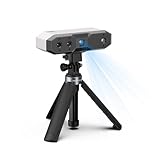
Revopoint MINI 2 3D Scanner, Full Color Scan, for 3D Printing, Standard | 0.02mm, Industrial Blue Light, Model Scanning for Small Objects, Wi-Fi 6, Portable Lightweight, for Win/Android/iOS/macOS
Miniatures, jewelry and small parts
Seller: Revopoint Official Store

Revopoint MINI 2 3D Scanner, Full Color Scan, for 3D Printing, Advanced | 0.02mm, Industrial Blue Light, Model Scanning for Small Objects, Wi-Fi 6, Portable Lightweight, for Win/Android/iOS/macOS
Miniatures, jewelry and small parts
Seller: Revopoint Official Store
EINSTAR 2
Laser + IR workshop handheld scanner · Reverse engineering, dark surfaces and larger parts

EINSTAR 2 Wireless 3D Scanner, 17 Parallel Lines Blue Laser and VCSEL Infared Light Support 3D Scanning Small to Large Objects, Up to 90 FPS High Speed Scanning, Support 3mm, 6mm, 12mm Markers.
Reverse engineering, dark surfaces and larger parts
Seller: SHINING 3D TECHNOLOGY INC
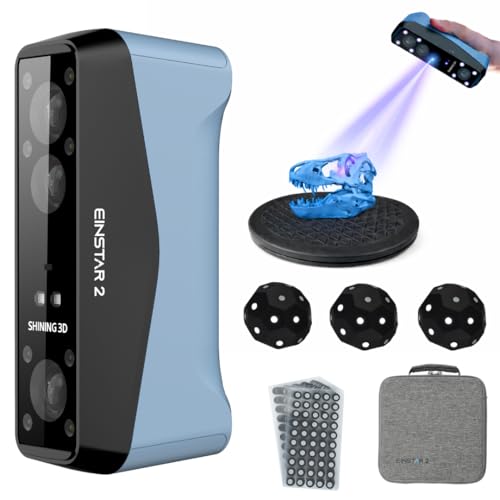
EINSTAR 2 Wireless Handheld 3D Scanner with Blue Laser Hybrid
Reverse engineering, dark surfaces and larger parts
Seller: 3D UMAX - Authorized Shining3D Einscan Distributor
3DMakerpro Seal
Small-format fine-detail scanner · Miniatures, jewelry and small parts

3DMakerpro Seal 3D Scanner for 3D Printing - 3D Printer Accessories Vivid Textures Handheld Scan 0.01mm Accuracy 0.05mm Resolution 10FPS, Blue Light & Anti-Shake Lenses, Free 3D Scanning Software
Miniatures, jewelry and small parts
Seller: BUDDYFU 3DMakerpro Authorized Store

3DMakerpro Seal 3D Scanner, Handheld 3D Scanners for Printing | Standard Version, Small-Format, Up to 0.01mm Accuracy, 24-Bit Full-Color Scanning, Blue Structured Light, Powered by JMStudio
Miniatures, jewelry and small parts
Seller: 3DMakerpro Authorized Store
Buying decision
Which type of 3D scanner should you buy?
If your goal is to scan an object and print a copy, prioritize reliable tracking, workable mesh cleanup and export to common formats such as STL or OBJ. For functional parts, treat the scan as a reference and rebuild critical dimensions in CAD instead of assuming the raw mesh is dimensionally perfect.
At a glance
Compare the top 3D scanners at a glance
Use this quick comparison to see which scanner best matches your object size, workflow and level of detail before you read the full buying guide below.
| Scanner | Best for | Accuracy | Object range | Light source | Workflow |
|---|---|---|---|---|---|
| Revopoint POP 4Portable hybrid 3D scanner | Maker & scan-to-print | Fine consumer/prosumer capture | Small through medium/large objects | Blue laser + infrared | Portable workflow |
| Creality PikaPortable hybrid 3D scanner | Everyday objects | Up to 0.03 mm | 10 mm to 2000 mm | Blue laser + NIR | Phone/PC, Wi-Fi 6 or USB |
| 3DMakerpro FoxEntry-level medium-format scanner | First-time scanning & home objects | Entry-level consumer class | Medium objects | Structured-light scanning | JMStudio desktop workflow |
| 3DMakerpro Moose LiteBudget medium-format scanner | Beginners & home medium objects | 0.05 mm single-frame | Medium everyday objects | NIR | JMStudio on Windows/macOS |
| Revopoint MINI 2Fine-detail blue-light scanner | Miniatures, jewelry & small parts | Fine-detail small-object class | Small objects | Blue-light structured scan | Turntable or handheld small-object workflow |
| EINSTAR 2Laser + IR workshop handheld scanner | Reverse engineering & dark objects | Laser HD high-detail class | 10 mm+ laser; large objects in IR | 17 blue laser lines + IR VCSEL | PC handheld; battery supported |
| 3DMakerpro SealSmall-format fine-detail scanner | Miniatures, jewelry & small parts | Fine small-object class | Small objects | Blue-light small-format scanning | JMStudio turntable or handheld |
Detailed guide
What to know before choosing a 3D scanner
Start with the size of the object
The first buying decision for scan-to-print projects is not brand. It is scale. A scanner that is excellent on a 30 mm part can become slow and frustrating on a bumper, while a scanner designed for a large field of view can miss the fine features of a miniature. For objects you want to copy, repair or reproduce on an FDM or resin printer, write down the smallest and largest objects you expect to scan before comparing models.
If most projects sit in one size band, buy a scanner optimized for that band. Choose an all-round model only when your work genuinely moves between small and large subjects. This avoids paying for flexibility you do not use and reduces the amount of rescanning, stitching and cleanup required later.
Accuracy and resolution are not the same thing
Manufacturers often place one very small accuracy number at the top of the specification sheet, but that number does not describe the entire scanning experience. Accuracy is about dimensional closeness to the real object. Resolution or point spacing is about how densely surface detail is captured. Both can change by scanning mode, distance and surface condition.
For decorative scan-to-print projects, fine surface detail may matter more than metrology-level dimensional claims. For mating parts, brackets and reverse engineering, repeatability and dimensional validation matter more. Always treat headline specifications as best-case laboratory figures and allow for real-world setup, movement, calibration and surface preparation.
Surface material can change the result dramatically
Matte objects with visible texture are usually the easiest to scan. Glossy plastic, polished metal, deep black material, transparent parts and hair can be much harder. The scanner may lose tracking or return noisy geometry because the projected light is absorbed, reflected or refracted in ways the cameras cannot interpret cleanly.
If difficult materials are common in your scan-to-print projects work, favor scanning modes designed for dark or reflective surfaces and budget for markers or removable scanning spray. No scanner completely removes the physics of a difficult surface, so a realistic preparation workflow is part of choosing the right hardware.
Tracking quality matters more than many buyers expect
A scan can look good frame by frame and still fail if tracking drifts while you move around the object. Repetitive patterns, large flat areas and symmetrical parts are common trouble spots. Feature tracking works best when the scanner can see distinctive geometry or texture; marker tracking provides artificial reference points when the object itself does not offer enough information.
For objects you want to copy, repair or reproduce on an FDM or resin printer, think about how you will physically move around the subject. A stable turntable can help with small objects. Handheld large-object work benefits from a comfortable working distance and a field of view that does not force hundreds of tiny passes. Good tracking saves more time than a theoretical specification you cannot reproduce.
Plan the full scan-to-print or scan-to-CAD workflow
Scanning is capture, not the finished product. After capture you may need to remove the table or background, align passes, fill holes, smooth noise, reduce polygons and repair non-manifold geometry. A printable mesh must be watertight enough for slicing, while an engineering part often needs its important dimensions rebuilt as CAD features.
For scan-to-print projects, check the software before you buy the scanner. Export formats, automatic alignment, mesh repair, decimation and compatibility with your preferred CAD or modeling package can have a larger effect on productivity than a small hardware difference. A good workflow gets you from the physical object to a usable model with fewer manual steps.
Check computer, phone and connection requirements
Portable scanners are not all equally independent. Some need a powerful Windows workstation, some can use a phone, and others include their own screen and processing hardware. Wireless connectivity can reduce cable clutter, but processing may still happen on a separate device. Confirm the exact operating-system and hardware requirements for the model you plan to buy.
This is especially important for scan-to-print projects if you expect to scan away from a desk. A scanner that technically fits the job may be a poor choice if your laptop cannot process the point cloud smoothly or if the mobile workflow disables a scanning mode you intended to use.
Know when spray and markers are worth using
Scanning spray is not a sign that the scanner failed. It is a practical way to give a difficult surface a uniform matte finish that optical systems can read more reliably. Markers solve a different problem: they provide stable reference points for tracking on smooth or repetitive geometry. Many demanding projects use one or both even with expensive scanners.
Before spraying a valuable, porous or delicate object, confirm that the coating is safe and removable. For objects you want to copy, repair or reproduce on an FDM or resin printer, test on a non-critical area first. When markers are used, distribute them irregularly so the scanner can distinguish one region from another rather than seeing a repeated pattern.
Portability includes power, cables and processing
A light scanner is easier to hold, but true portability also depends on battery life, cable length, wireless options, how the scanner connects to the processing device and whether you can review the scan before leaving the job site. Standalone models can be especially useful around vehicles, machinery and large objects because they reduce the number of devices you must manage.
For desk-based scan-to-print projects, a tethered scanner may be perfectly fine and can even be preferable if it gives you access to the full scanning mode and a powerful GPU. Do not pay for standalone hardware unless mobility solves a real problem in your workflow.
Spend for the problem you actually have
Budget for mesh cleanup and simple accessories as well as the scanner itself. Price bands often reflect wider fields of view, additional light sources, better tracking, standalone processing or stronger performance on difficult surfaces. Those features are valuable only when they solve a recurring problem.
Compare the total cost, including a turntable, markers, spray, a capable computer and any CAD software you need. A scanner that costs less but doubles cleanup time may be poor value for frequent work, while an expensive workshop scanner is unnecessary for occasional hobby scans of easy matte objects.
How the recommended models divide the work
The models on this page are not interchangeable. The best pick is intended to cover the broadest share of the target use case, the alternative emphasizes a different strength, and the value pick protects the budget. Small-object specialists remain better for tiny subjects even when an all-round scanner costs more, while workshop models make more sense when surface difficulty and object size increase.
Use the Amazon section to compare the exact model name, condition and current buying options. If the preferred model is unavailable, choose an alternative that belongs to the same use-case class rather than accepting an unrelated accessory or a scanner designed for a completely different object size.
Common buying mistakes to avoid
Do not assume the smallest accuracy number means the best scanner for every job. Do not confuse a large scan range with fine small-object detail. Do not buy from a listing that is actually a turntable, grip, spray kit, marker pack or calibration accessory. And do not assume a scanner creates perfect CAD automatically.
For scan-to-print projects, read the full product title and included-items list before checkout. Confirm that the listing contains the scanner itself, not only an accessory bundle. When two models are close in price, choose the one whose scanning modes and software fit your objects rather than the one with the most aggressive marketing number.
Final buying checklist
Before buying, confirm five things: your normal object-size range, the surfaces you need to scan, the level of detail or dimensional reliability required, the computer or mobile workflow you can support, and the software path from scan to a usable file. If any one of those is unclear, resolve it before comparing price.
Then choose the scanner that fits most of your real projects, not the rare edge case. For objects you want to copy, repair or reproduce on an FDM or resin printer, that usually produces a better result than buying the most expensive model available. Keep calipers or another measurement reference for critical dimensions, and expect a short learning period before judging scan quality.
Questions buyers ask
Questions buyers ask before choosing a 3D scanner
What is the best scanner for scan-to-print projects?
A 3D scanner does not need to match your printer brand. It needs to match the size and detail of the objects you want to reproduce. Revopoint POP 4 is a strong general scan-to-print choice, Creality Pika adds a flexible hybrid workflow, and Revopoint MINI 2 is the better fit for tiny resin-printing subjects.
Can I use a 3D scanner with any 3D printer?
Yes. The scanner and printer do not need to be the same brand. What matters is whether your scanning software can export a mesh format your editing or slicing workflow accepts, such as STL or OBJ. You still need to prepare the mesh before printing when holes, noise or alignment errors are present.
Can I scan an object and print it immediately?
Sometimes, but a clean one-click result is not guaranteed. Most real scans need cropping, alignment, hole filling, simplification or surface repair. Functional parts often need CAD reconstruction because a printable mesh is not the same thing as an exact engineering model.
Do I need scanning spray?
Not for every object. Matte, textured objects are usually easier. Glossy black, transparent or highly reflective surfaces are harder because optical scanners may lose or distort the projected light. A removable scanning spray can make difficult surfaces much easier when the material allows it.
Are markers always required?
No. Many scanners can track textured or geometrically rich objects without markers. Markers become more useful on smooth, repetitive, reflective or featureless surfaces, and in laser modes that are designed around marker tracking.
What is more important: accuracy or resolution?
They describe different things. Accuracy is about how close the captured geometry is to the real object, while resolution or point spacing affects how much fine detail is represented. A small-object project may need fine resolution even when absolute dimensional accuracy is not the main goal.
Can an iPhone replace a dedicated 3D scanner?
Phone LiDAR and photogrammetry are useful for rooms, furniture and rough references, but a dedicated scanner is usually better for small parts, repeatable close-range detail and workflows that need more controlled geometry. The gap is largest on small mechanical components and miniature subjects.
What computer do I need for 3D scanning?
It depends on the scanner and software. Point-cloud processing can be demanding, so check the manufacturer requirements before buying. Standalone scanners reduce dependence on a nearby computer, while some portable scanners still rely heavily on the phone or PC for processing.
How should I scan shiny or black objects?
Start by reducing reflections, improving exposure and using the scanner mode recommended for difficult surfaces. Markers can improve tracking. If the object can safely accept it, removable scanning spray often produces a cleaner and more consistent surface for optical capture.
How much should I spend on my first 3D scanner?
Spend enough to cover your normal object size and surface type. A lower-cost specialist can outperform a more expensive all-rounder on tiny objects, while large automotive parts may justify spending more for field of view and tracking. The wrong scanner is expensive at any price.
Sources and buying notes
Manufacturer specifications describe best-case capabilities and can change by scanning mode or software version. Confirm the exact model, included accessories, system requirements and return policy before buying.
- Creality Pika official product information
- Creality CR-Scan Raptor official product information
- EINSTAR 2 official product information
- EINSTAR VEGA official product information
- Revopoint MINI 2 official product information
- 3DMakerpro Moose official product information
- 3DMakerpro scanner range
- Autodesk guidance on scan-to-CAD reverse engineering